Establishing secure connection…Loading editor…Preparing document…

Agreement Maintenance Form

This template is fully customizable. Edit the text, fill out the fields, and send it for signature. Give it a try!
Agreement Maintenance Form

What the Agreement Maintenance Form Is and When It’s Used

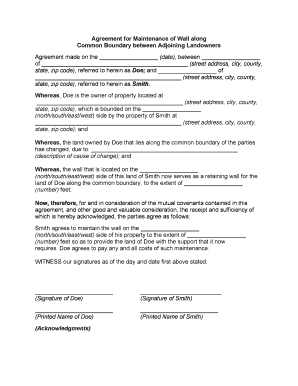
An Agreement Maintenance Form is a standardized document used to record updates, amendments, or administrative changes to an existing contract or agreement. It captures the parties involved, the effective date of the change, a clear description of the amendment or maintenance action, and any signatures needed to validate the modification. Organizations use this form to ensure a consistent audit trail, to reduce disputes about contract terms over time, and to meet recordkeeping obligations. The form can be used for fee changes, contact updates, schedule revisions, or scope clarifications.

Why a Formal Maintenance Form Matters

Using an Agreement Maintenance Form creates a clear, auditable record of contract changes and reduces ambiguity about responsibilities and timing. It supports compliance with retention rules, simplifies internal approvals, and provides evidence of mutual consent when rights or obligations are modified.

Why a Formal Maintenance Form Matters

Who Typically Prepares and Signs This Form

Typical users include contract managers, procurement teams, legal counsel, and operations staff who manage lifecycle changes and administrative updates.

  • Contract managers — document amendments, track approval history, and maintain version control.
  • Procurement teams — update vendor terms, pricing adjustments, and renewal dates.
  • Legal counsel — review amendments for compliance, risk, and enforceability across jurisdictions.

Step-by-Step: Completing the Agreement Maintenance Form

Follow these steps to complete and record an Agreement Maintenance Form, from preparation through approval and final retention for compliance purposes.

  • 01
    Prepare document: Identify original agreement reference and describe required change.
  • 02
    Confirm authority: Verify signer has delegated authority or attach resolution.
  • 03
    Obtain approvals: Collect internal approvals in required order and document timestamps.
  • 04
    Sign and record: Execute signatures, date form, and store final version securely.

Configuring an Online Workflow for Amendments

Configure an online workflow to route the Agreement Maintenance Form for review, signature, and archival with enforced field validation and audit capture.

Field Configuration
Routing order Sequential or parallel signer routing
Authentication method Email link, SMS code, or KBA
Conditional fields Show fields only when relevant
Retention settings Export PDF and save audit trail
Notifications Auto email on assignment and completion

Typical eSubmission and Routing Flow

Typical routing for electronic Agreement Maintenance Forms includes upload, field placement, recipient delivery, signer authentication, and final archival with an audit record.

  • Upload: Add base agreement and amendment details to the form
  • Place fields: Insert signature, date, and reference fields
  • Send to signer: Choose email or secure link with authentication
  • Archive: Save final PDF and retain audit log

Distribution Channels and Platform Considerations

Distribute the Agreement Maintenance Form using chosen platforms while ensuring compatibility and security requirements are met.

  • Email: Broad reach; include signed PDF attachment
  • Secure portal: Centralized access with user authentication
  • eSignature platform: Supports audit trail and file formats

Core Elements to Include on the Form

Essential parts of an Agreement Maintenance Form ensure clarity, authorization, dates, scope of change, and an audit trail for each amendment to the base contract.

Parties

List each contracting party with full legal name, role, and contact details; mismatches with original agreement names can create enforcement issues and trigger verification requests.
Effective date

State the exact effective date using MM/DD/YYYY format; this determines when amended obligations begin and affects applicable limitation periods and reporting deadlines and should match any referenced schedules or exhibits.

Description

Provide a concise but specific description of the change, citing affected sections or exhibit numbers; avoid vague language like 'as agreed' to prevent future disputes.

Authorization

Include a clear signature block for authorized signers and describe authority limits; attach proof of delegation when signing authority differs from primary agreement signatories or corporate resolutions.

Attachments

Reference and attach any supporting documents such as revised schedules, invoices, or technical specifications; ensure attachment names and versions match the references in the amendment.

Audit trail

Record timestamps, signer identity, IP addresses, and version history; maintaining these records supports enforceability and meets many corporate and regulatory retention requirements such as SEC, IRS, or HIPAA obligations.

Security and Compliance Considerations

Encryption: TLS 1.2/1.3 in transit; AES-256 at rest
Audit Trail: Timestamps, IP, signer actions recorded
HIPAA: BAA available for protected health data
Certifications: SOC 2 Type II, ISO 27001, PCI DSS
Access Controls: Role-based access, SSO, MFA options
Retention: Immutable logs and exportable records

Timing and Deadlines to Watch

Key deadlines and timing for Agreement Maintenance Forms depend on contract terms, notice periods, and regulatory reporting schedules.

Effective date entry:

Enter effective date as MM/DD/YYYY to avoid ambiguity.

Internal approval SLAs:

Follow internal SLA for approvals; typical 3–7 business days.

Notarization timelines:

Complete any required notary actions before filing or recording.

Tax reporting windows:

Submit changes affecting tax reporting before applicable IRS deadlines.

Retention start date:

Retention clock begins on the agreement's effective or execution date.

Common Risks and Consequences of Errors

Invalid Amendment: Vague changes may be unenforceable.
Tax Exposure: Unreported modifications can trigger IRS penalties.
Contract Breach: Unauthorized changes risk breach claims.
Notarization Failure: Missing notary or witness can invalidate filing.
Data Loss: Poor storage may compromise evidence for disputes.
Signature Mismatch: Names that differ from records can cause delays.

Pricing and Feature Snapshot for eSignature Providers

Compare common vendor pricing and feature criteria relevant to Agreement Maintenance Form eSignature workflows; signNow is listed first per platform data.

signNow DocuSign Adobe Sign PandaDoc HelloSign
Starting Price $8/user/mo $15/user/mo $14/user/mo $19/user/mo $15/user/mo
Free Trial Yes, 7-day trial No No Yes, limited Yes, limited
Bulk Send Yes Yes Yes Yes No
Audit Trail Yes Yes Yes Yes Yes
HIPAA Compliant Yes Yes Yes No No

Frequently Asked Questions About Agreement Maintenance Forms

Answers to common questions about electronic execution, notarization, storage, and corrections for Agreement Maintenance Forms.


Need help? Contact support

be ready to get more
Join over 28 million airSlate SignNow users