Establishing secure connection…Loading editor…Preparing document…

Agreement of Trust

This template is fully customizable. Edit the text, fill out the fields, and send it for signature. Give it a try!
Agreement of Trust

What an Agreement of Trust Is and when it matters

An Agreement of Trust is a legal instrument used to create, amend, or manage a trust relationship between a settlor (grantor), trustee, and beneficiaries. It records the trust purpose, property or assets transferred into the trust, trustee powers and duties, distribution rules, successor trustee provisions, and termination conditions. For inter vivos trusts it defines management during the settlor's lifetime; for testamentary trusts it implements terms after probate. Properly executed, it governs fiduciary obligations, tax treatment, and property control under applicable state law.

Why a clear Agreement of Trust matters

A well-drafted Agreement of Trust reduces ambiguity about trustee authority, beneficiary rights, and distribution timing, lowering risk of disputes and probate-related delays while preserving asset management and tax planning goals.

Why a clear Agreement of Trust matters

Who typically prepares and signs an Agreement of Trust

Trust documents are prepared and used by individuals, family offices, estate attorneys, and financial institutions.

  • Individual settlors and families managing succession planning and asset protection
  • Estate planning attorneys drafting enforceable fiduciary terms and tax provisions
  • Financial institutions and trustees administering investments and distributions

Core sections to include in a professional Agreement of Trust

A complete Agreement of Trust groups purpose, parties, assets, trustee powers, distribution mechanics, and amendment rules into clear, numbered provisions for enforceability and administrative ease.

Trust ID

Name the trust and state the effective date, so parties and custodians can identify the instrument consistently.
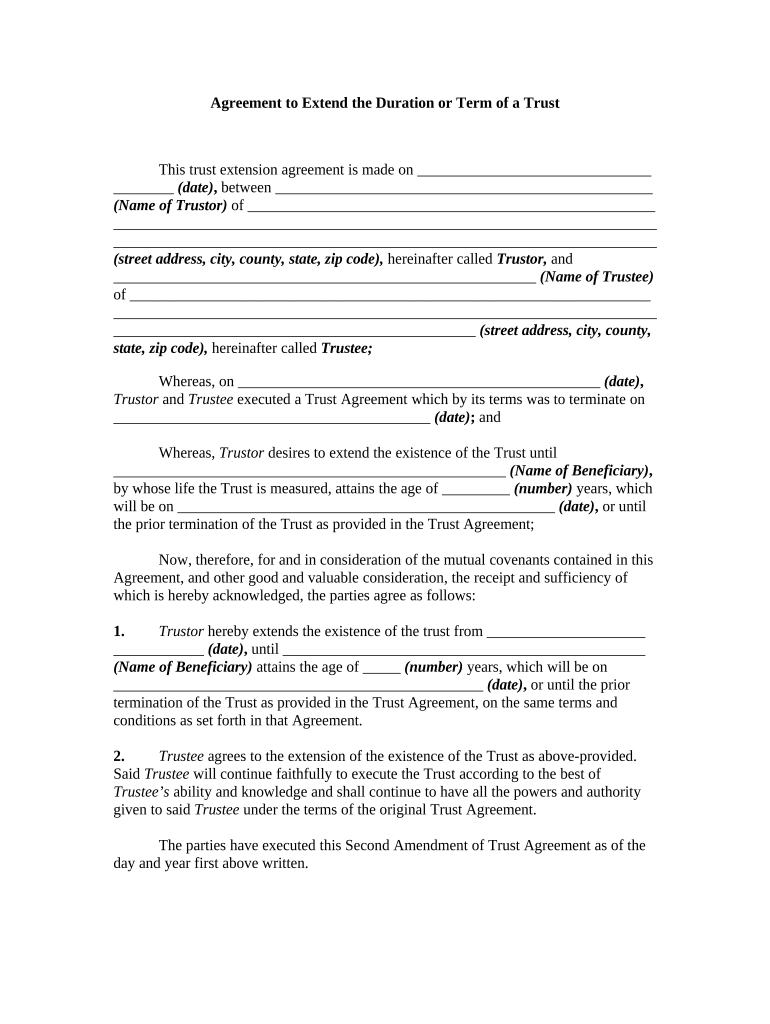
Settlor

Identify the grantor with full legal name, taxpayer ID where appropriate, and contact details to tie legal authority to an individual or entity.

Trustee Powers

List trustee authorities including investment discretion, distribution discretion, tax elections, and delegation powers to avoid later disputes.

Beneficiaries

Name beneficiaries and describe their interests, classes, contingent interests, and any per stirpes or per capita rules.

Assets

Describe initial property transferred, schedule attachments, and procedures for later funding of additional assets.

Amendment and Termination

Specify how the settlor or trustees may amend or terminate the trust, including required notices and successor trustee succession.

Essential data elements to collect and verify

Settlor Name: Full legal name
Trustee Name: Full legal name
Beneficiary Details: Names and DOBs
Asset Description: Real property, accounts
Effective Date: MM/DD/YYYY
Governing Law: State name

Step-by-step: completing an Agreement of Trust

Follow these sequential steps to prepare, execute, and fund the trust while meeting common formalities and reducing legal risk.

  • 01
    Draft terms: Draft or review trust provisions with attorney input.
  • 02
    Identify assets: List initial and future funding items precisely.
  • 03
    Sign and notarize: Execute with signatures plus notary or witness if state law requires.
  • 04
    Fund trust: Transfer titles, retitle accounts, or record deeds as needed.

Where to send or file the executed Agreement of Trust

After execution, route copies to key parties, update titles, and store originals in secure records to preserve proof of terms and funding status.

  • Trustee copy: Give an executed copy to each trustee for administration.
  • Beneficiary notice: Provide beneficiaries copies per notice provisions.
  • Title transfer: Record deeds at the county recorder when real property is transferred.
  • Custodial records: Place originals with attorney, bank, or secure digital vault.

Configuring the online completion workflow

Set up a predictable, auditable workflow for drafting, signing, and storing the Agreement of Trust to maintain chain of custody and reduce errors.

Field Configuration
Signature Order Sequential or parallel routing
Authentication Email, SMS code, or advanced ID verification
Notary Support Enable remote notarization where permitted
Storage Encrypted archive with audit log

Distribution channels and technical requirements

Choose delivery channels that match signer access and legal requirements for identity verification.

  • Email links: Easy for recipients; consider authentication.
  • Secure portal: Preferred for sensitive documents.
  • Remote notary: Supports jurisdictional notarization where allowed.

Typical timelines and time-sensitive actions

Certain tasks around a trust have time sensitivity for tax, funding, and legal effect. Observe these common deadlines to avoid unintended consequences.

Execution date importance:

Effective date sets tax year and statutory timing

Deed recording:

Record promptly after transfer to protect title

Tax filings:

Trust tax returns follow IRS timelines for trusts

Beneficiary notices:

Provide notices within the period stated in the trust

Account retitling:

Retitle accounts as soon as trustee accepts role

Key milestones from drafting to funding

A sequential milestone view helps track responsibility and timing during trust setup and activation.

01

Draft Approval

Finalize terms and confirm parties agree.

02

Execution

Signatures, witnesses, and notary steps occur here.

03

Recordation

Record deeds or other required instruments.

04

Funding Complete

Assets are legally transferred into the trust.

Common mistakes to avoid when preparing a trust agreement

  • Using informal or imprecise beneficiary descriptions that create ambiguity and invite litigation.
  • Failing to retitle assets or record deeds, leaving trust unfunded and ineffective for estate purposes.
  • Omitting successor trustee provisions or clear removal procedures, which complicates administration on incapacity.
  • Relying on unsigned or improperly witnessed amendments that may be unenforceable in probate or court proceedings.

Consequences and legal risks of an incorrect Agreement of Trust

Probate exposure: Assets not properly transferred may revert to probate.
Tax penalties: Incorrect filings can trigger IRS penalties.
Breach claims: Trustees risk litigation for exceeding powers.
Title defects: Recording errors can cloud property title.
Invalid amendments: Improperly executed changes may be invalid.
Notary noncompliance: Fails formal acknowledgment requirements.

Practical examples of organizations using e-signatures for trusts

These examples show real users adopting digital workflows for trust and estate documents while maintaining compliance and auditability.

Optica Ventures LLC

Optica Ventures adopted an online signing workflow for trust instruments to simplify execution across remote parties.

  • The interface remains simple for internal teams and clients.
  • The result streamlined turnaround and reduced mailing and scheduling delays while preserving auditable signature records for trustees and beneficiaries.

Fertility Centers of Illinois

A healthcare organization used digital signatures for estate and trust releases linked to patient referrals.

  • The team cited reliable API integrations with back-office systems.
  • By combining secure signing with integration, they maintained compliance for sensitive records and improved administrative processing without adding manual steps.

Who has authority to sign an Agreement of Trust

Settlor — Individual

The settlor or grantor who creates the trust must sign to establish the trust; if the settlor is incapacitated, a previously appointed agent under a valid power of attorney may have limited signing authority subject to state law and the power s scope.

Trustee — Institution

A corporate or individual trustee signs to accept fiduciary duties; institutional trustees typically require board or internal authorization and an officer s signature block showing capacity.

Comparing eSignature options for executing an Agreement of Trust

Select an eSignature provider that meets identity verification, audit trail, and retention requirements for trust execution. The table compares core pricing and compliance features across common vendors.

signNow DocuSign Adobe Sign PandaDoc HelloSign
Starting Price $8/user/mo $15/user/mo $14/user/mo $19/user/mo $15/user/mo
Free Trial 7-day free trial No No Yes, limited Yes, limited
Bulk Send Yes Yes Yes Yes No
Audit Trail Yes Yes Yes Yes Yes
HIPAA Compliant Yes Yes Yes No No
Envelope Cap No cap 100 envelopes/user/yr Varies Varies Varies

Frequently asked questions about Agreement of Trust execution

Answers to common questions about e-signing, notarization, and amendments to help avoid execution errors and preserve enforceability.


Need help? Contact support

be ready to get more
Join over 28 million airSlate SignNow users