Establishing secure connection…Loading editor…Preparing document…

Agreement of Sale and Purchase

This template is fully customizable. Edit the text, fill out the fields, and send it for signature. Give it a try!
Agreement of Sale and Purchase

What an Agreement of Sale and Purchase Covers

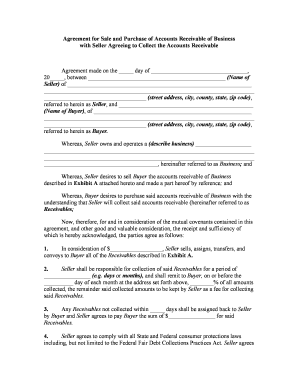
An Agreement of Sale and Purchase is a bilateral contract that records the terms under which a seller transfers ownership of goods, property, or business assets to a buyer. It identifies the parties, describes the asset, fixes the purchase price and payment terms, and sets conditions precedent such as inspections, financing, or regulatory approvals. The agreement allocates responsibilities for closing, delivery, taxes, title transfer, and risk of loss, and typically includes remedies for breach, escrow instructions, and dispute-resolution clauses enforceable under state contract law and subject to electronic execution rules like ESIGN and UETA.

Why a Clear Agreement Matters for Buyers and Sellers

A precise Agreement of Sale and Purchase reduces ambiguity, aligns expectations, preserves deposit and closing terms, and creates an enforceable record of obligations. When executed correctly it supports title transfer, financing, and regulatory filings while enabling electronic signatures that satisfy ESIGN (15 U.S.C. §7001) and state UETA frameworks.

Why a Clear Agreement Matters for Buyers and Sellers

Who Typically Prepares and Signs These Agreements

Common participants include the contracting buyer and seller plus intermediaries who facilitate the transaction.

  • Real estate brokers and agents: prepare and submit purchase contracts, manage disclosures and contingency dates.
  • Business owners and purchasers: use the agreement for asset or stock sales and to spell out transition terms.
  • Lenders, title companies, and attorneys: enforce closing conditions, review title, and coordinate recording or filing.

Each party should confirm who has authority to sign and whether notarization or witnesses are required under applicable state law.

Core Sections to Include in a Professional Agreement

A complete Agreement of Sale and Purchase organizes essential terms so obligations, timelines, and remedies are clear to all parties and third parties involved in closing.

Parties

Full legal names and business entity types for buyer and seller, including contact details and authorized signatory information to ensure enforceability and correct attribution.
Asset Description

Precise description of the property, goods, or business being sold, including legal description for real estate, serial numbers, or schedules of assets attached as exhibits.

Purchase Price

Total consideration, payment schedule, deposit/earnest money amount, escrow instructions, and any holdbacks or contingent payments tied to performance or adjustments.

Contingencies

Inspection, financing, title review, regulatory approvals, and other conditions precedent with clear deadlines and procedures for cure, waiver, or termination.

Closing & Transfer

Date, location, documents required at closing, duties for delivery of title or goods, prorations, recording instructions, and how risk of loss transfers.

Remedies & Miscellaneous

Breach remedies, indemnities, governing law, dispute resolution, confidentiality, and any allocation of closing costs or taxes.

Step-by-Step: From Draft to Final Execution

Complete these sequential steps to produce a legally enforceable and operational sale agreement.

  • 01
    Draft: Insert parties, asset details, price, and contingencies.
  • 02
    Negotiate: Track changes, confirm contingencies, and set deadlines.
  • 03
    Execute: All parties sign, date, and notarize if required.
  • 04
    Close: Fulfill conditions, transfer title, and record as necessary.

Configuring an Online Completion Workflow

Set digital fields and signer steps to match the agreement's sequence and authentication needs before sending for signature.

Field Configuration
Auto-fill buyer data Populate name/address via template variables to reduce manual entry.
Conditional contingencies Show inspection clause fields only if buyer selects inspection option.
Signer authentication Choose email, SMS code, or stronger KBA for lender-level verification.
Document routing Set signing order: seller, buyer, lender, title agent, then archive.

Where to Send, File, and Deliver the Executed Agreement

Know the intended recipients and official filing points so the signed agreement triggers downstream actions smoothly.

  • Buyer & Seller: Each receives a fully executed copy for accounting and records.
  • Title Company / Lender: Send to title and lender for closing, payoff and recording preparations.
  • County Recorder: Record deed or transfer instruments at the county recorder’s office when required.
  • Tax Authorities: File transfer tax forms and any required state/local notices after closing.

Digital Signing and Distribution Options

Choose delivery channels and signer authentication appropriate to transaction sensitivity and recipient capabilities.

  • Email: Standard delivery for most signers and audit trail capture.
  • In-person kiosk: Supports face-to-face signing at closing or reception.
  • Integrations: Supports Salesforce, NetSuite, Google Workspace, Box, and other systems.

Ensure the chosen platform supports required audit trails, optional notarization workflows, and the level of signer authentication demanded by lenders or regulators.

Common Deadlines and Dates to Track in the Agreement

Include explicit deadline fields and calendar reminders for contingencies, inspections, financing, and closing to avoid inadvertent defaults.

Agreement Effective Date:

Date when rights and obligations begin; use MM/DD/YYYY.

Inspection Contingency Deadline:

Final date to complete inspections and request repairs.

Financing Approval Date:

Date by which buyer must secure loan commitment.

Closing Date:

Date title transfers and funds are disbursed.

Recording Deadline:

Date by which deed or transfer must be recorded.

Key Milestones from Offer to Recorded Transfer

A sequential milestone view helps parties and agents track progress from offer through recording and post-closing tasks.

01

Offer Submitted

Seller receives signed offer; earnest money deposited.

02

Due Diligence

Inspections and title review completed within contingency period.

03

Financing Approved

Lender issues commitment and any conditions are cleared.

04

Closing & Recording

Documents executed, funds exchanged, and deed recorded.

Essential Fields to Capture in the Agreement

Buyer Name: Full legal name
Seller Name: Full legal name
Property Description: Legal description
Purchase Price: Numeric and written
Effective Date: MM/DD/YYYY
Signatures: Sign and date

Common Legal and Financial Risks to Note

Contract Voidable: Fraud or misrepresentation
Loss of Deposit: Breach of contract
Recording Delay: Clouds title risk
Tax Exposure: Incorrect transfer tax
1099 Penalties: See IRC §6721
I-9 Violations: Paperwork fines possible

Frequent Preparation Errors to Avoid

  • Using informal or abbreviated party names that do not match title or formation records, which can delay recording or create enforceability questions.
  • Leaving contingency deadlines vague or unspecified, causing missed cure windows and unintended contract termination or disputes over deposit forfeiture.
  • Failing to attach referenced exhibits or schedules—asset lists, legal descriptions, or escrow instructions—that are necessary to identify what is transferred.
  • Incorrectly formatted dates or inconsistent price language (numerals vs words) that create ambiguity about payment obligations and may invite litigation.

eSignature Pricing and Feature Snapshot for Agreement Execution

Compare core pricing and capabilities relevant to executing Agreements of Sale and Purchase; signNow appears first in the vendor list as the example platform.

signNow DocuSign Adobe Sign PandaDoc HelloSign
Starting Price $8/user/mo $15/user/mo $14/user/mo $19/user/mo $15/user/mo
Free Trial 7-day free trial Varies by plan Varies by plan Varies by plan Varies by plan
Bulk Send Yes Yes Yes Yes Varies
Audit Trail Yes Yes Yes Yes Yes
HIPAA Compliant Yes (BAA) Varies by plan Varies by plan Varies by plan Varies by plan
Envelope Cap No cap 100 envelopes/user/year Varies Varies Varies

Frequently Asked Questions About Execution and Enforceability

Answers to common legal and technical questions about signing, notarization, amendment, and recordkeeping for an Agreement of Sale and Purchase.


Need help? Contact support

be ready to get more
Join over 28 million airSlate SignNow users