Establishing secure connection…Loading editor…Preparing document…

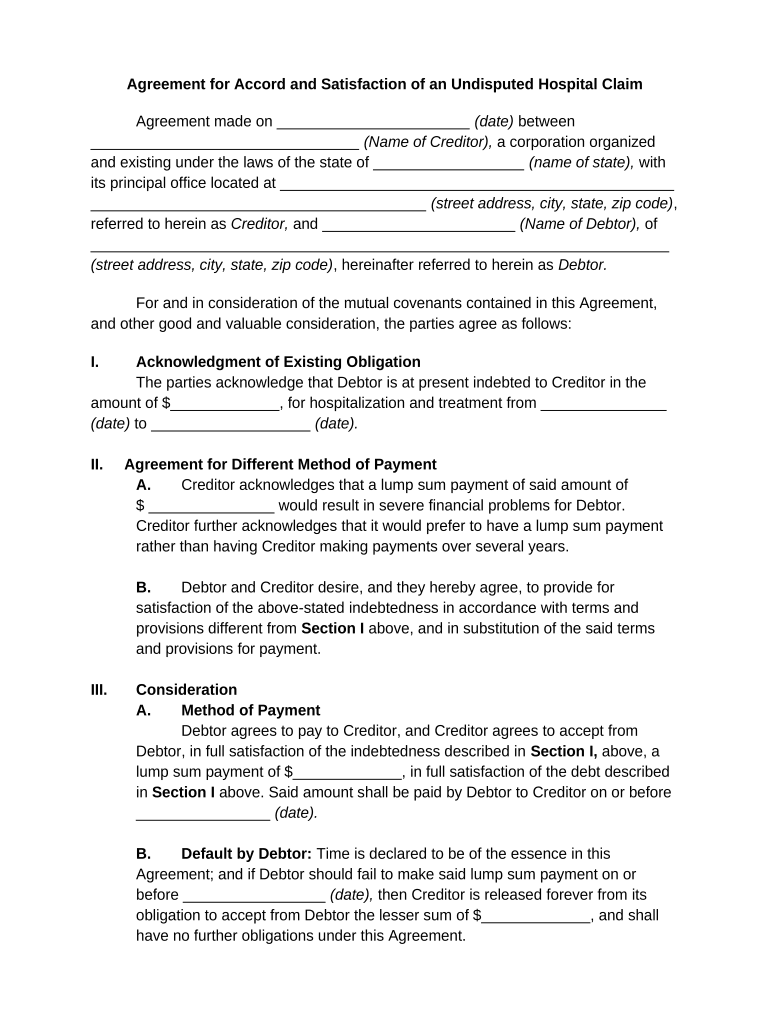
Agreement for Accord and Satisfaction of Hospital Claim

This template is fully customizable. Edit the text, fill out the fields, and send it for signature. Give it a try!
Agreement for Accord and Satisfaction of Hospital Claim

What this Agreement for Accord and Satisfaction of Hospital Claim Is

An Agreement for Accord and Satisfaction of Hospital Claim is a written settlement that resolves a disputed hospital bill or related claim by specifying payment, release, or other terms that discharge the obligation once performed. It records the parties, the claim amount or compromise amount, the consideration exchanged, and any release language that prevents future collection on the same claim. Courts treat properly executed accords and satisfactions as contract-based settlements; ensure the agreement clearly documents intent to settle, the scope of release, and any conditional payment mechanics.

Why a Clear Accord and Satisfaction Matters

A formal accord and satisfaction avoids duplicate collection, clarifies rights, and reduces litigation risk by documenting the negotiated settlement and consideration. For healthcare matters, include HIPAA-compliant language when protected health information is referenced, and specify governing law, dispute resolution, and effective date to improve enforceability.

Why a Clear Accord and Satisfaction Matters

Who typically prepares and signs this agreement

Hospital billing departments, patients or guarantors, and insurers commonly negotiate and sign these settlement agreements.

  • Hospital billing or finance teams that manage patient accounts and negotiate reductions or lump-sum settlements.
  • Patients, guarantors, or their authorized representatives who accept the settlement terms to avoid further collection activity.
  • Health insurers or third-party payors that agree to contribution or subrogation releases tied to the settlement.

Use clear authority lines and include contact details to ensure the agreement is actionable and attributable.

Who can sign on behalf of each party

Hospital Signatory

Chief billing officer or an authorized billing manager typically signs for the hospital; corporate hospitals may require an officer with written delegation or a signature stamp tied to internal authority documents to ensure enforceability.

Patient / Representative

The patient, guarantor, or a person with a valid power of attorney should sign; if an agent signs, attach the POA or written authorization to demonstrate authority and prevent later challenges to the settlement.

Step-by-step: completing an accord and satisfaction

Follow these steps to produce a clear, enforceable settlement agreement for a hospital claim.

  • 01
    Identify Parties: List patient, hospital, insurer, and any agents with full details.
  • 02
    Describe Claim: Summarize services, dates, and the dispute or account number.
  • 03
    Set Terms: Specify payment amount, timing, and conditions for satisfaction.
  • 04
    Execute Properly: Have authorized signatories sign, date, and witness/notarize if required.

How to customize and complete this agreement online

Configure an electronic workflow to collect signatures, attach supporting records, and record audit trails.

Field Configuration
Signer Order Sequential or parallel routing depending on approval needs
Authentication Email + SMS code or stronger ID verification for sensitive settlements
Attachments Attach EOBs, itemized bills, and POA documents as required
Audit Trail Enable timestamp, IP, and action logs for each signer

Where to send the completed agreement

Route the signed agreement to all parties and retain copies in secure records for compliance and audit.

  • Hospital Billing Office: Primary recipient to update account and stop collection
  • Patient or Representative: Provide an executed copy to the settling party
  • Insurer or Subrogation Unit: Send where contributions or liens are involved
  • Internal Legal / Records: Store executed agreement in corporate records

Digital signing and file formats to use

Choose a platform that supports secure PDF/Word signing, audit trails, and HIPAA protections when needed.

  • Supported Formats: PDF, DOCX, HTML
  • Integrations: Salesforce, Microsoft 365, NetSuite
  • Authentication: Email, SMS code, or KBA

Ensure the provider supports audit logs, long-term storage exports, and any required BAA for healthcare records.

eSignature platform comparison for completing settlement agreements

Comparison of common eSignature providers by baseline pricing and core capabilities relevant to hospital claim settlements.

signNow DocuSign Adobe Sign PandaDoc HelloSign
Starting Price $8/user/mo $15/user/mo $14/user/mo $19/user/mo $15/user/mo
Free Trial 7-day trial Varies by plan Varies by plan Varies by plan Varies by plan
Bulk Send Yes Yes Yes Yes Varies
Audit Trail Yes Yes Yes Yes Yes
HIPAA Compliant Yes Yes Yes No No

Security and compliance items to include with electronic execution

Encryption in Transit: TLS 1.2/1.3
Encryption at Rest: AES-256
HIPAA Support: BAA required for PHI
Audit Trail: Timestamps, IP, and action log
Authentication: Email, SMS, 2FA options
Regulatory Frameworks: ESIGN, UETA, 21 CFR Part 11 support

Key risks and legal consequences of a flawed agreement

Unenforceable Release: Ambiguous release language can allow later suits
HIPAA Exposure: Improper PHI disclosure may trigger penalties
Authority Disputes: Signer lacked authority: settlement may be void
Tax Implications: Settlement amounts may produce reporting obligations
Revocation Risk: Improper execution procedures risk revocation
Collection Continuation: Incomplete satisfaction may allow further collection

Common preparation mistakes to avoid

  • Failing to describe the claim precisely, leaving room for later disputes over scope and dates of service.
  • Using vague consideration language such as 'mutual satisfaction' instead of stating a clear dollar amount or action.
  • Not documenting the authority of the person signing for an organization, which invites challenges to enforceability.
  • Overlooking HIPAA or state privacy requirements when attaching medical records or itemized bills as exhibits.

Typical timelines and processing expectations

Set clear deadlines for acceptance, payment, and performance to avoid ambiguity about when obligations are satisfied.

Acceptance Window:

30 days to accept the settlement is a common contractual period

Payment Processing:

Allow 30–45 days for check clearance or ACH reconciliation

Document Retention:

Retain executed agreement at least 3 years; HIPAA 6 years for PHI

Dispute Notice:

Require written notice within a defined period, e.g., 14–30 days

Statute of Limitations:

State debt collection limitations vary; confirm local expiry dates

Key milestones in the settlement lifecycle

Track these milestones so payment, release, and recording obligations occur in the correct sequence.

01

Negotiation

Parties agree on amount and release terms.

02

Drafting

Prepare written accord with exhibits and definitions.

03

Execution

Authorized signatories sign, date, and notarize if necessary.

04

Satisfaction

Payment made and account updated as settled.

Best practices for accurate, efficient completion

Adopt a checklist and standard language to reduce errors and speed processing across cases.

Use standardized settlement templates
Maintain a single approved template that includes clear release language, defined claim scope, signature blocks with capacity lines, and optional exhibits to minimize drafting errors and legal review time.
Attach supporting documents
Include itemized bills, EOBs, POAs, and insurer correspondence as exhibits so the settlement references concrete records and reduces later disagreements about what was resolved.
Record authority and capacity
Document the signer’s title and attach written delegation or corporate resolution for third-party signers to prevent post-execution authority disputes.
Preserve audit trails for eSignatures
Use an eSignature provider that records timestamps, IP addresses, and authentication details and retain the certificate of completion to support enforceability under ESIGN and UETA.

Real-world examples of digital settlement workflows

Two examples show how healthcare operators and small providers use digital signing to finalize settlements and retain compliance records.

Fertility Centers Example

John Butler, Founder, Fertility Centers of Illinois, adopted digital workflows to close patient settlements online.

  • The team used integrated eSign and storage to attach itemized bills and POA documents.
  • This approach reduced turnaround time and ensured secure recordkeeping while meeting HIPAA BAA requirements and audit needs.

Community Hospital Example

Tim Martin, Founder, Martin Properties, used an eSignature system for coordinating third-party payments.

  • The solution automated routing to billing, patient, and insurer.
  • Automation cut administrative follow-up and provided verifiable audit trails that supported collections and internal compliance reviews.

Frequently asked questions about hospital claim settlements

Answers to common questions on enforceability, signatures, HIPAA, and electronic execution for accord and satisfaction agreements.


Need help? Contact support

be ready to get more
Join over 28 million airSlate SignNow users