Parties
Identify each party by full legal name, entity type, address, and authorized signer designation to ensure enforceability and correct contracting capacity.
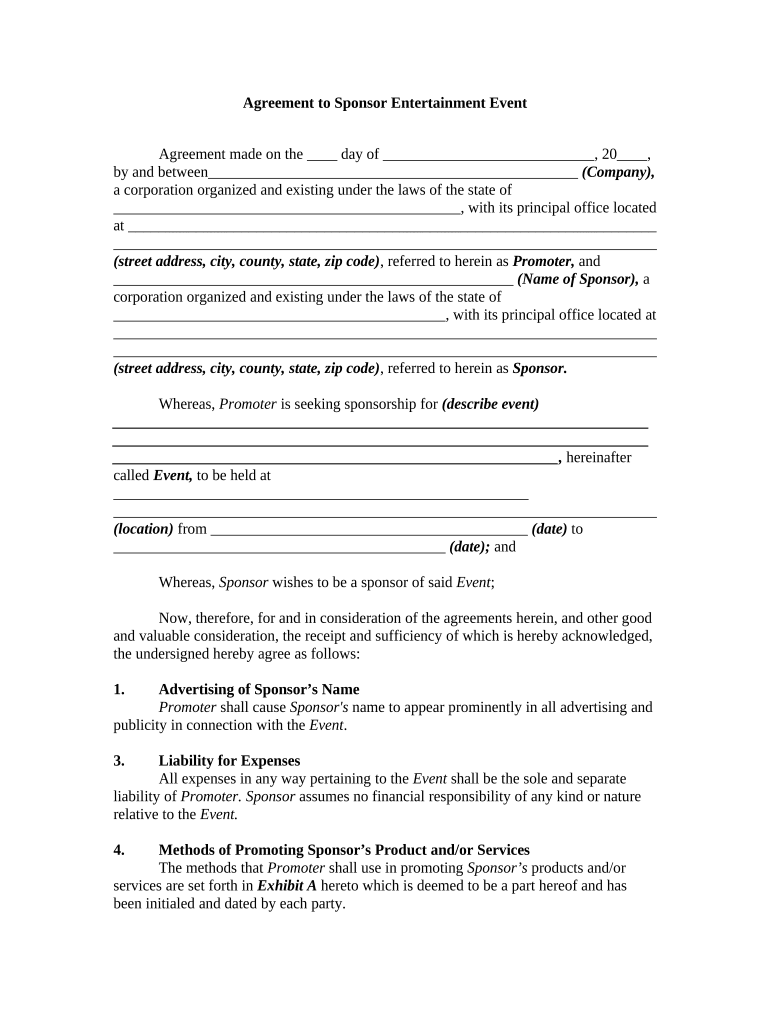
A written sponsorship agreement reduces disputes by documenting scope, payment terms, and deliverables while allocating insurance and indemnity responsibilities.

Common parties include corporate sponsors, event promoters, venues, and talent representatives who need documented commercial terms.
Clear role definitions in the agreement improve execution and reduce last‑minute disputes between sponsor, promoter, and venue.
| Field | Configuration |
|---|---|
| Authentication | Email link or SMS code; use stronger KBA for high-risk deals |
| Routing Order | Sequential routing: organizer → sponsor → venue |
| Conditional Fields | Show insurance fields only if third-party services involved |
| Storage Format | Save final executed PDF/A with audit trail attached |
Choose a delivery method that meets authentication and retention needs for the parties involved.
Ensure the chosen channel supports required audit trails, document retention, and any state-specific notarization rules.
Identify each party by full legal name, entity type, address, and authorized signer designation to ensure enforceability and correct contracting capacity.
Specify total fee, deposit, installment dates, reimbursement terms, and consequences for late payment or nonpayment including interest or contract termination.
List sponsor entitlements (logo placement, mentions, tickets), delivery deadlines, technical specifications, and acceptance criteria for each deliverable.
State required insurance types and limits, name additional insureds if needed, and include mutual indemnity clauses allocating liability for claims.
Define effective and end dates, termination rights for breach, force majeure, cure periods, and post-termination obligations such as final accounting.
Specify the state law governing the agreement and preferred dispute resolution method (arbitration or courts) to reduce jurisdictional uncertainty.
Date by which all parties must sign to lock in sponsorship benefits.
Initial payment date to secure event placement or activation.
Deadline to supply COI naming required additional insureds.
Date to file permits with local authorities and regulators.
Last payment date and reconciliation deadline after event completion.
| signNow | DocuSign | Adobe Sign | PandaDoc | HelloSign | |
|---|---|---|---|---|---|
| Starting Price | $8/user/mo | $15/user/mo | $14/user/mo | $19/user/mo | $15/user/mo |
| Free Trial | 7-day free trial | Varies | Varies | Yes, limited | Yes, limited |
| Bulk Send | Yes | Yes | Yes | Yes | No |
| Audit Trail | Yes | Yes | Yes | Yes | Yes |
| HIPAA Compliant | Yes | Yes | Yes | No | No |
| Envelope Cap | No cap | 100 envelopes/user/year | Varies | Varies | Varies |
Optica reduced turnaround by using electronic signatures for sponsorship contracts
Martin Properties processed sponsorship and venue contracts end-to-end online
A company officer or other authorized representative with contracting authority must sign; verify corporate resolution or delegation for agencies and nonprofits.
The organizer’s chief executive, events director, or a contract manager with delegated authority typically signs; agents must present proof of authorization.