Establishing secure connection…Loading editor…Preparing document…

Agreement Under 37 37A for Workers Compensation Massachusetts

This template is fully customizable. Edit the text, fill out the fields, and send it for signature. Give it a try!
Agreement Under 37 37A for Workers Compensation Massachusetts

What the Agreement Under 37 37A for Workers Compensation Massachusetts Is

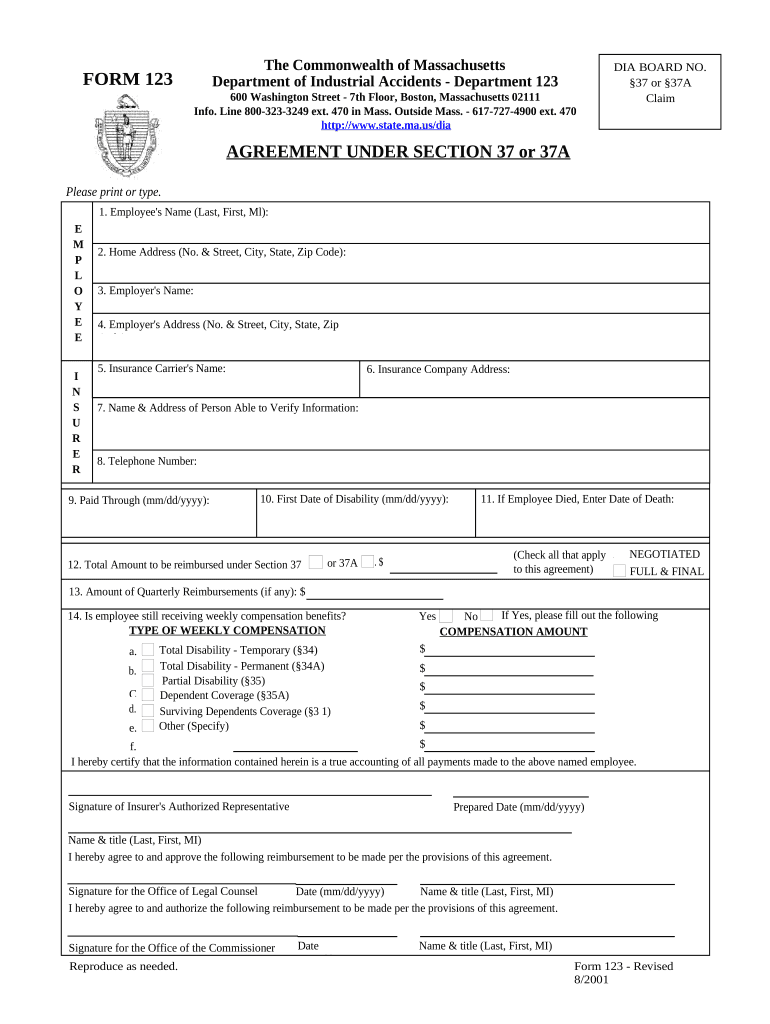
An Agreement Under 37 37A for Workers Compensation Massachusetts is a written settlement and release used to resolve a workers' compensation claim in Massachusetts under the framework described by the state's workers' compensation statutes. The document records the parties, the injury or claim, the agreed payment or weekly benefit structure, and any conditions for reopening or future medical care. Many agreements must be submitted to the Massachusetts Department of Industrial Accidents or an authorized adjudicator for review and approval before they are effective as to compensation rights.

Why Use an Agreement Under 37 37A for Workers Compensation Massachusetts

An approved agreement creates certainty: it defines the settlement terms, allocates future responsibility, and, when accepted by the agency or judge, closes the listed claim while preserving clear documentation for payroll, insurance, and tax purposes.

Why Use an Agreement Under 37 37A for Workers Compensation Massachusetts

Who Typically Prepares and Signs These Agreements

This agreement is used by employers, carriers, injured workers, and their counsel or representatives when negotiating a final settlement.

  • Employer representatives or HR professionals who manage return-to-work and claims administration.
  • Insurance claims adjusters and legal counsel negotiating settlement amounts and release language.
  • Injured workers or their attorneys who accept the terms and authorize resolution of the claim.

Step-by-step: Completing the Agreement Under 37 37A for Workers Compensation Massachusetts

Follow these ordered steps to prepare a clear, approvable agreement and reduce processing delays when filing with the Massachusetts agency or insurer.

  • 01
    Collect claim data: Identify claimant, employer, insurer, claim number.
  • 02
    Draft terms: Specify settlement amount, payment schedule, and releases.
  • 03
    Obtain approvals: Secure insurer and claimant signatures and any attorney approval.
  • 04
    File for approval: Submit to the Department of Industrial Accidents as required.

Typical online workflow configuration for completing and filing the agreement

Configure your digital workflow to collect signatures, identify signers, and attach supporting documents before filing.

Field Configuration
Claim Details Required; read-only after upload
Signature Order Sequential or parallel as negotiated
Authenticator Email + SMS code or stronger
Attachments Medical reports, authorization letters

How eSubmission and approval generally proceed

A straightforward eSubmission sequence helps ensure the agreement reaches the agency with complete metadata and a clear audit trail.

  • Prepare document: Populate agreement fields and attach exhibits.
  • Sign electronically: Each party signs using an accepted eSignature method.
  • Submit to agency: File the signed agreement with the state workers' compensation authority.
  • Agency review: Agency reviews for adequacy and may approve or request modifications.

Digital signing considerations and platform requirements

Use a platform that supports secure eSigning, audit trails, and attachments so the agreement is auditable for agency review.

  • Authentication: Email or SMS code
  • Document formats: PDF and DOCX supported
  • Integrations: Case management systems

Penalties and risks from incorrect or incomplete agreements

Denial of Approval: Agency may refuse to approve settlement
Payment Delays: Processing and benefit payments may be delayed
Reopening Risk: Ambiguous releases can allow future claims
Tax Consequences: Incorrect tax reporting obligations
Invalid Signatures: Disputed or unauthenticated signatures
Recordkeeping Violations: Failure to retain required records

Common preparation mistakes to avoid

  • Using inconsistent names or claim numbers that do not match the agency record, which slows approval.
  • Omitting clear payment schedules—unclear timing triggers disputes and delayed disbursement of funds.
  • Failing to document attorney fees or liens, which can affect net proceeds and create post-settlement disputes.
  • Neglecting to attach medical exhibit summaries or authorization forms required for agency review.

Practical tips for accurate and efficient completion

Adopt a consistent template, capture required metadata, and confirm signer authority before filing to reduce rework and agency inquiries.

Use a standard template
Create a consistent agreement form that includes all commonly required fields and exhibits to avoid omissions.
Confirm identities
Verify signers with government ID or strong electronic authentication to prevent signature disputes.
Document attorney liens
Record any counsel fee agreements and lien releases explicitly to show net settlement distribution.
Attach supporting exhibits
Include medical summaries and payment breakdowns so the agency can review efficiently.

Key components to include in the Agreement Under 37 37A for Workers Compensation Massachusetts

Ensure the agreement contains the essential clauses and exhibits an agency reviewer expects to see to reduce revision cycles and secure approval.

Parties

Clear identification of claimant, employer, insurer, and representatives, with contact details and claim number.
Recitals

Brief factual background summarizing the injury, dates, and scope of the claim being resolved.

Settlement Terms

Precise payment amounts, schedules, lump sum or weekly structure, and handling of medical expense obligations.

Release Scope

Explicit release language describing which claims are barred and any limited exceptions retained by claimant.

Allocation

Breakout for attorney fees, liens, medical costs, and net payable amounts to claimant.

Signatures and Dates

Signed and dated signature blocks for parties, representatives, and any witness or notary information required.

Who signs and what authority they must have

Claimant — Injured Worker

The claimant must sign to accept the settlement and release. If represented, the claimant's attorney may sign with evidence of client authorization and a retainer or fee agreement attached.

Employer / Carrier Rep

An authorized insurer adjuster or employer representative signs to bind the payer. Include printed name, title, and a statement of authority or company signature block.

Real examples showing how similar agreements are used

These short case arcs illustrate practical application and operational results from live implementations.

Tim Martin, Martin Properties

Martin Properties used a standardized settlement template to reduce back-and-forth with counsel and speed approvals.

  • Template standardized fields and exhibits.
  • Outcome: Faster finalization, consistent filings, and reduced administrative rework for property-related workplace claims.

Dan Rotelli, BIS

BIS integrated eSigning into claims workflows to capture signatures remotely and attach medical exhibits online.

  • Remote signing with audit trail.
  • Outcome: Improved documentation, secure storage, and a clearer audit trail for agency review and internal records.

eSignature vendor comparison when completing and filing these agreements

Compare common vendor features relevant to secure signing, audit trails, HIPAA compliance, and bulk workflows used when processing workers' compensation settlement agreements.

signNow DocuSign Adobe Sign PandaDoc HelloSign
Starting Price $8/user/mo $15/user/mo $14/user/mo $19/user/mo $15/user/mo
Free Trial Yes, 7-day free trial Varies Varies Varies Varies
Bulk Send Yes Yes Yes Yes Varies
Audit Trail Yes Yes Yes Yes Yes
HIPAA Compliant Yes Yes Yes No No

Timing and typical deadlines to watch

Observe both internal and agency deadlines to avoid late filings or payment delays; timelines often depend on how quickly all parties sign and whether agency approval is required.

Execution:

Execute promptly when terms are agreed to avoid changed circumstances.

Agency Filing:

File with the agency per its submission rules without undue delay.

Payment Schedule Start:

State the initial payment date in the agreement.

Document Retention Start:

Retention begins on effective date of the agreement.

Tax Reporting:

Report as required in the tax year the payment is made.

FAQs and troubleshooting for the Agreement Under 37 37A for Workers Compensation Massachusetts

Answers to common questions help avoid procedural errors and clarify filing and signing expectations when using electronic or paper processes.


Need help? Contact support

be ready to get more
Join over 28 million airSlate SignNow users