Establishing secure connection… Loading editor… Preparing document…
Navigation

Fill and Sign the Agreement Web Maintenance Form
Fill and Sign the Agreement Web Maintenance Form

How it works

Open the document and fill out all its fields.
Apply your legally-binding eSignature.
Save and invite other recipients to sign it.

Rate template

4.4
63 votes
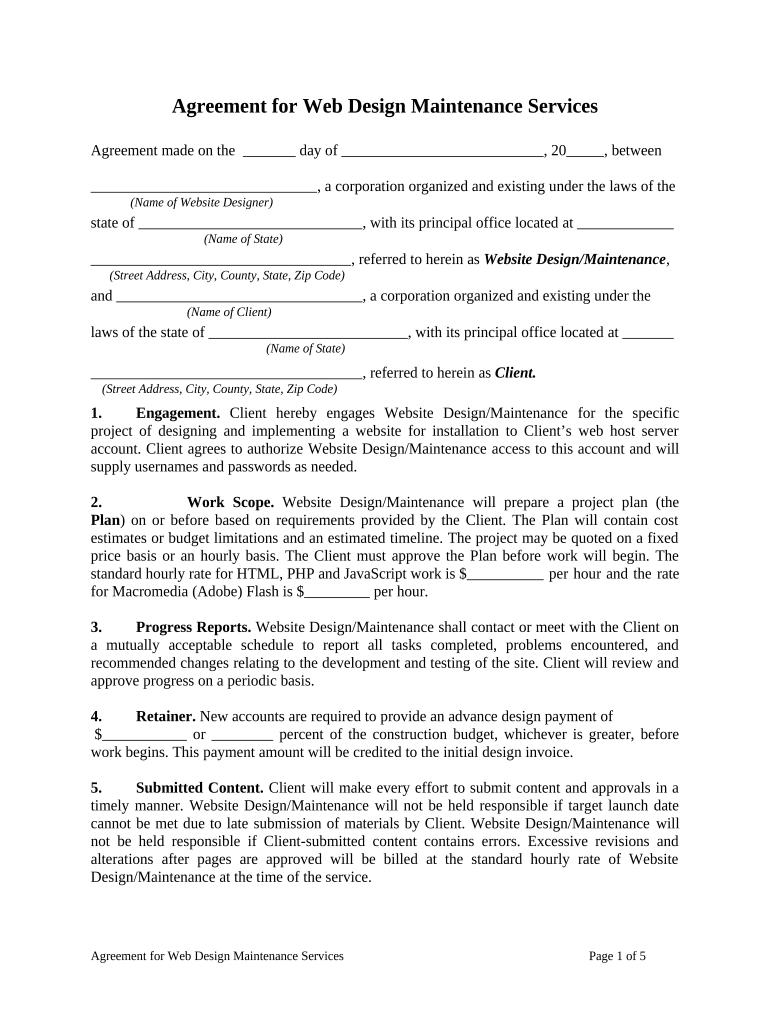
Agreement for Web Design Maintenance Services Agreement made on the       day of       , 20       , between       , a corporation organized and existing under the laws of the (Name of Website Designer) state of       , with its principal office located at (Name of State)       , referred to herein as Website Design/Maintenance , (Street Address, City, County, State, Zip Code) and       , a corporation organized and existing under the (Name of Client) laws of the state of       , with its principal office located at (Name of State)       , referred to herein as Client. (Street Address, City, County, State, Zip Code) 1. Engagement. Client hereby engages Website Design/Maintenance for the specific project of designing and implementing a website for installation to Client’s web host server account. Client agrees to authorize Website Design/Maintenance access to this account and will supply usernames and passwords as needed. 2. Work Scope. Website Design/Maintenance will prepare a project plan (the Plan ) on or before based on requirements provided by the Client. The Plan will contain cost estimates or budget limitations and an estimated timeline. The project may be quoted on a fixed price basis or an hourly basis. The Client must approve the Plan before work will begin. The standard hourly rate for HTML, PHP and JavaScript work is $       per hour and the rate for Macromedia (Adobe) Flash is $       per hour. 3. Progress Reports. Website Design/Maintenance shall contact or meet with the Client on a mutually acceptable schedule to report all tasks completed, problems encountered, and recommended changes relating to the development and testing of the site. Client will review and approve progress on a periodic basis. 4. Retainer. New accounts are required to provide an advance design payment of $       or       percent of the construction budget, whichever is greater, before work begins. This payment amount will be credited to the initial design invoice. 5. Submitted Content. Client will make every effort to submit content and approvals in a timely manner. Website Design/Maintenance will not be held responsible if target launch date cannot be met due to late submission of materials by Client. Website Design/Maintenance will not be held responsible if Client-submitted content contains errors. Excessive revisions and alterations after pages are approved will be billed at the standard hourly rate of Website Design/Maintenance at the time of the service. Agreement for Web Design Maintenance Services Page 1 of 5 6. Site Changes and Updates. After website is published, Website Design/Maintenance will provide       days of minor updates and changes. These changes include simple text (Number) editing, such as spelling corrections, and similar items that do not require reformatting or re- editing of the site layout design. Not included are creating new graphics, redesign of navigation, layout or style, replacing all text on a page, etc. Major changes and updates will be billed as new work at the applicable hourly rate of Website Design/Maintenance at the time the service is performed. 7. Maintenance vs. Hourly Rate. Any and all changes to a website requested by the Client will be invoiced monthly at the standard hourly rate. Alternately, a website maintenance plan is available. Website Maintenance includes monitoring, revising, editing, or otherwise changing existing web pages to keep your website up to date. The periodic addition of new web pages is also part of maintenance services except during the first       months of maintenance. (Number) Changes to shopping cart pages are not included. Search engine optimization (SEO) services are sold separately and are not included in monthly maintenance. Maintenance may include up to       hours work each month. Excessive work will be charged at the standard hourly rate. (Number) 8. Content Services. Website Design/Maintenance can provide content services including digital photography and video. Rates depend on application and will be quoted on request. 9. Search Engine Optimization Services (SEO). Website Design/Maintenance will provide search engine optimization services on request. This work is done in accordance with industry best practices and experience. However, Website Design/Maintenance makes no warranties or representations of any kind regarding search engine results or position. Rates depend on application and will be quoted on request. 10. Search Engine Submittal. Website designs are typically designed to optimize search engine performance and new websites registered with key search engine companies. However, Website Design/Maintenance makes no warranties or representations of any kind regarding search engine results or position. 11. Campaign Management. Monitoring and management of paid search engine campaigns such as Google, Bing and Yahoo are available for an extra fee and quoted on request. These services are not included in Maintenance. 12. Third Party Contractors. Website Design/Maintenance reserves the right to contract third party consultants and/or subcontractors if needed. 13. Copyrights and Trademarks. Client represents to Website Design/Maintenance and unconditionally guarantees that any elements of text, media, photos, or other artwork furnished to Website Design/Maintenance for inclusion in the website are either owned by Client, or that Client has license or permission from the rightful owner to use each of these elements. Client will hold harmless, protect, and defend Website Design/Maintenance and its subcontractors from any claim or suit arising from the use of such elements furnished by Client. Website Agreement for Web Design Maintenance Services Page 2 of 5 Design/Maintenance will endeavor to utilize only original or properly licensed content. Content whose source cannot be documented or is otherwise determined to be unlicensed will be removed. 14. Domain Names. At Client’s request, Website Design/Maintenance will make reasonable efforts to transfer ownership and/or registration information of any domain names which were registered on behalf of Client. There will be a $       fee to change the owner of record. 15. Copyright to Web Pages. Site design and graphical elements created by Website Design/Maintenance are owned by Website Design/Maintenance and copyright is not transferred to Client. Upon final payment for design services, the Client is assigned rights to use as a website the design, graphics, and text contained in the finished assembled website. Rights to photos, graphics, source code, media, work-up files, and computer programs are specifically not transferred to the Client, and remain the property of their respective owners. Copyright to Client supplied text and images are retained by Client and will not be disclosed or reused by Website Design/Maintenance unless permission is granted in writing by Client. Website Design/Maintenance and its subcontractors retain the right to display graphics and other Web design elements as examples of their work in their respective portfolios. Website Design/Maintenance reserves the right to include a credit line and hyperlink back to its business website on all web pages designed. 16. Website Design/Maintenance has the right to monitor the service electronically from time to time and to disclose any information as necessary to satisfy the law, or to protect itself or its subscribers. Website Design/Maintenance reserves the right to refuse to post or to remove any information or materials, in whole or in part, that, in its sole discretion, are unacceptable, undesirable, or in violation of this Agreement. Client may discontinue service at any time by providing       day’s written notice to Website Design/Maintenance. Any services which (Number) were prepaid may be refunded on a prorated basis by check within       days. Any amounts (Number) due Website Design/Maintenance at the time service is discontinued must be paid before the domain name will be released. Design service payments and retainers are not refundable. 17. Confidential Information. Website Design/Maintenance acknowledges and agrees that the source materials and technical and marketing plans or other sensitive business information, as specified by the Client, including all materials containing such information, which are supplied by the Client to Website Design/Maintenance or developed by Website Design/Maintenance in the course of developing the site are to be considered confidential information. Information shall not be considered confidential if it is already publicly known through no act of Website Design/Maintenance . 18. Backup of Data. Website Design/Maintenance maintains periodic backups of files and data for accounts which subscribe to Maintenance only. For all other accounts, Client’s use of the service is at Client’s sole risk and Website Design/Maintenance is not responsible for files and data residing on your account. Website Design/Maintenance agrees to take full responsibility Agreement for Web Design Maintenance Services Page 3 of 5 for files and data transferred and to maintain all appropriate backup of files and data stored on Website Design/Maintenance servers. 19. Website Promotion. Website Design/Maintenance makes no warranties or representations of any kind for the promotion of any website. 20. No Warranties. Website Design/Maintenance makes no warranties or representations of any kind for the services being offered. The service is provided on an " as is " and " as available " basis without warranties of any kind, either express or implied, including but not limited to warranties of title, non-infringement, or implied warranties of merchantability or fitness for a particular purpose. No advice or information given by Website Design/Maintenance or its agents or employees shall create a warranty. Website Design/Maintenance provides no warranty that the service will be uninterrupted or error free or that any information, software or other material accessible on the service is free from viruses or other harmful components. Under no circumstances shall Website Design/Maintenance be liable for any direct, indirect, special, punitive, or consequential damages that result in any way from Client’s use of or inability to use the service, or for third parties' use of the service to access Client’s Web space, or to access the Internet or any part thereof, or Client’s or any third parties' reliance on or use of information, services, or merchandise provided on or through the service, or that result from mistakes, omissions, interruptions, deletion of files, errors, defects, delays in operation or transmission, or any failure of performance. If Client is dissatisfied with the Website Design/Maintenance service or any of its terms, conditions, rules, policies, guidelines, or practices, Client’s sole and exclusive remedy is to discontinue using the service. 21. Laws Affecting Electronic Commerce. From time to time governments enact laws and levy taxes and tariffs affecting Internet electronic commerce. The Client agrees it is solely responsible for complying with such laws, taxes, and tariffs, and will hold harmless, protect, and defend Website Design/Maintenance and its subcontractors from any claim, suit, penalty, tax, or tariff arising from the Client's exercise of Internet electronic commerce. 22. Payment. In order for Website Design/Maintenance to remain in business, Client’s payments must be made promptly. Website Design/Maintenance reserves the right to remove Client’s web pages from viewing on the Internet until payment is made and account current. Client agrees to pay any collection and attorney fees. 23. Severability. The invalidity of any portion of this Agreement will not and shall not be deemed to affect the validity of any other provision. If any provision of this Agreement is held to be invalid, the parties agree that the remaining provisions shall be deemed to be in full force and effect as if they had been executed by both parties subsequent to the expungement of the invalid provision. 24. No Waiver. The failure of either party to this Agreement to insist upon the performance of any of the terms and conditions of this Agreement, or the waiver of any breach of any of the terms and conditions of this Agreement, shall not be construed as subsequently waiving any such terms and conditions, but the same shall continue and remain in full force and effect as if no such forbearance or waiver had occurred. Agreement for Web Design Maintenance Services Page 4 of 5 25. Governing Law. This Agreement shall be governed by, construed, and enforced in accordance with the laws of the State of       . (Name of State) 26. Notices. Unless provided herein to the contrary, any notice provided for or concerning this Agreement shall be in writing and shall be deemed sufficiently given when sent by certified or registered mail if sent to the respective address of each party as set forth at the beginning of this Agreement. 27. Mandatory Arbitration. Notwithstanding the foregoing, and anything herein to the contrary, any dispute under this Agreement shall be required to be resolved by binding arbitration of the parties hereto. If the parties cannot agree on an arbitrator, each party shall select one arbitrator and both arbitrators shall then select a third. The third arbitrator so selected shall arbitrate said dispute. The arbitration shall be governed by the rules of the American Arbitration Association then in force and effect. 28. Entire Agreement. This Agreement shall constitute the entire agreement between the parties and any prior understanding or representation of any kind preceding the date of this Agreement shall not be binding upon either party except to the extent incorporated in this Agreement. 29. Modification of Agreement. Any modification of this Agreement or additional obligation assumed by either party in connection with this Agreement shall be binding only if placed in writing and signed by each party or an authorized representative of each party. 30. Assignment of Rights. The rights of each party under this Agreement are personal to that party and may not be assigned or transferred to any other person, firm, corporation, or other entity without the prior, express, and written consent of the other party. 31. Counterparts. This Agreement may be executed in any number of counterparts, each of which shall be deemed to be an original, but all of which together shall constitute but one and the same instrument. 32. Compliance with Laws. In performing under this Agreement, all applicable governmental laws, regulations, orders, and other rules of duly-constituted authority will be followed and complied with in all respects by both parties. WITNESS our signatures as of the day and date first above stated.             (Name of Website Designer) (Name of Client) By: By: (P rinted Name & Office in Corporation) (P rinted Name & Office in Corporation)             (Signature of Officer) (Signature of Officer) Agreement for Web Design Maintenance Services Page 5 of 5

Useful suggestions for getting your ‘Agreement Web Maintenance’ online

Are you fed up with the inconvenience of managing paperwork? Look no further than airSlate SignNow, the leading eSignature solution for individuals and businesses. Bid farewell to the tedious process of printing and scanning documents. With airSlate SignNow, you can effortlessly finalize and sign documents online. Take advantage of the robust tools embedded in this intuitive and cost-effective platform and transform your document management approach. Whether you need to sign forms or gather eSignatures, airSlate SignNow handles everything with ease, needing just a few clicks.

Adhere to this comprehensive guide:

  1. Access your account or sign up for a complimentary trial with our service.
  2. Select +Create to import a file from your device, cloud storage, or our form collection.
  3. Open your ‘Agreement Web Maintenance’ in the editor.
  4. Click Me (Fill Out Now) to modify the document on your end.
  5. Insert and designate fillable fields for other individuals (if necessary).
  6. Proceed with the Send Invite settings to solicit eSignatures from others.
  7. Save, print your copy, or convert it into a reusable template.

Don’t worry if you need to collaborate with your colleagues on your Agreement Web Maintenance or send it for notarization—our platform provides everything you need to accomplish such activities. Create an account with airSlate SignNow today and elevate your document management to new levels!

Here is a list of the most common customer questions. If you can’t find an answer to your question, please don’t hesitate to reach out to us.

Need help? Contact Support

The best way to complete and sign your agreement web maintenance form

Save time on document management with airSlate SignNow and get your agreement web maintenance form eSigned quickly from anywhere with our fully compliant eSignature tool.

How to Sign a PDF Online How to Sign a PDF Online

How to complete and sign forms online

Previously, coping with paperwork took lots of time and effort. But with airSlate SignNow, document management is quick and simple. Our robust and easy-to-use eSignature solution lets you easily complete and electronically sign your agreement web maintenance form online from any internet-connected device.

Follow the step-by-step guide to eSign your agreement web maintenance form template online:

  • 1.Register for a free trial with airSlate SignNow or log in to your account with password credentials or SSO authentication.
  • 2.Click Upload or Create and import a form for eSigning from your device, the cloud, or our form collection.
  • 3.Click on the file name to open it in the editor and utilize the left-side toolbar to fill out all the empty fields properly.
  • 4.Place the My Signature field where you need to approve your form. Type your name, draw, or import a picture of your handwritten signature.
  • 5.Click Save and Close to finish editing your completed form.

As soon as your agreement web maintenance form template is ready, download it to your device, export it to the cloud, or invite other people to electronically sign it. With airSlate SignNow, the eSigning process only takes a couple of clicks. Use our powerful eSignature tool wherever you are to manage your paperwork effectively!


How to Sign a PDF Using Google Chrome How to Sign a PDF Using Google Chrome

How to fill out and sign paperwork in Google Chrome

Completing and signing paperwork is simple with the airSlate SignNow extension for Google Chrome. Installing it to your browser is a fast and beneficial way to deal with your paperwork online. Sign your agreement web maintenance form template with a legally-binding eSignature in a few clicks without switching between applications and tabs.

Follow the step-by-step guide to eSign your agreement web maintenance form in Google Chrome:

  • 1.Go to the Chrome Web Store, find the airSlate SignNow extension for Chrome, and install it to your browser.
  • 2.Right-click on the link to a form you need to approve and select Open in airSlate SignNow.
  • 3.Log in to your account with your credentials or Google/Facebook sign-in option. If you don’t have one, you can start a free trial.
  • 4.Utilize the Edit & Sign menu on the left to fill out your sample, then drag and drop the My Signature option.
  • 5.Insert a photo of your handwritten signature, draw it, or simply enter your full name to eSign.
  • 6.Verify all the details are correct and click Save and Close to finish editing your paperwork.

Now, you can save your agreement web maintenance form template to your device or cloud storage, email the copy to other people, or invite them to electronically sign your document via an email request or a secure Signing Link. The airSlate SignNow extension for Google Chrome improves your document workflows with minimum time and effort. Try airSlate SignNow today!


How to Sign a PDF in Gmail How to Sign a PDF in Gmail How to Sign a PDF in Gmail

How to complete and sign paperwork in Gmail

When you receive an email with the agreement web maintenance form for approval, there’s no need to print and scan a file or save and re-upload it to a different program. There’s a better solution if you use Gmail. Try the airSlate SignNow add-on to promptly eSign any documents right from your inbox.

Follow the step-by-step guidelines to eSign your agreement web maintenance form in Gmail:

  • 1.Navigate to the Google Workplace Marketplace and find a airSlate SignNow add-on for Gmail.
  • 2.Set up the program with a related button and grant the tool access to your Google account.
  • 3.Open an email containing an attachment that needs approval and use the S sign on the right panel to launch the add-on.
  • 4.Log in to your airSlate SignNow account. Choose Send to Sign to forward the document to other parties for approval or click Upload to open it in the editor.
  • 5.Drop the My Signature option where you need to eSign: type, draw, or upload your signature.

This eSigning process saves time and only takes a few clicks. Take advantage of the airSlate SignNow add-on for Gmail to adjust your agreement web maintenance form with fillable fields, sign documents legally, and invite other individuals to eSign them al without leaving your inbox. Enhance your signature workflows now!


How to Sign a PDF on a Mobile Device How to Sign a PDF on a Mobile Device How to Sign a PDF on a Mobile Device

How to fill out and sign paperwork in a mobile browser

Need to quickly fill out and sign your agreement web maintenance form on a smartphone while working on the go? airSlate SignNow can help without the need to set up extra software programs. Open our airSlate SignNow tool from any browser on your mobile device and add legally-binding electronic signatures on the go, 24/7.

Follow the step-by-step guidelines to eSign your agreement web maintenance form in a browser:

  • 1.Open any browser on your device and follow the link www.signnow.com
  • 2.Sign up for an account with a free trial or log in with your password credentials or SSO authentication.
  • 3.Click Upload or Create and pick a file that needs to be completed from a cloud, your device, or our form library with ready-made templates.
  • 4.Open the form and fill out the empty fields with tools from Edit & Sign menu on the left.
  • 5.Add the My Signature area to the form, then type in your name, draw, or add your signature.

In a few simple clicks, your agreement web maintenance form is completed from wherever you are. When you're done with editing, you can save the document on your device, build a reusable template for it, email it to other individuals, or ask them to electronically sign it. Make your documents on the go quick and efficient with airSlate SignNow!


How to Sign a PDF on iPhone How to Sign a PDF on iPhone

How to complete and sign forms on iOS

In today’s corporate environment, tasks must be done rapidly even when you’re away from your computer. With the airSlate SignNow app, you can organize your paperwork and sign your agreement web maintenance form with a legally-binding eSignature right on your iPhone or iPad. Install it on your device to conclude contracts and manage documents from anywhere 24/7.

Follow the step-by-step guidelines to eSign your agreement web maintenance form on iOS devices:

  • 1.Open the App Store, search for the airSlate SignNow app by airSlate, and install it on your device.
  • 2.Launch the application, tap Create to import a template, and choose Myself.
  • 3.Choose Signature at the bottom toolbar and simply draw your signature with a finger or stylus to eSign the form.
  • 4.Tap Done -> Save after signing the sample.
  • 5.Tap Save or use the Make Template option to re-use this paperwork later on.

This process is so easy your agreement web maintenance form is completed and signed in just a few taps. The airSlate SignNow application works in the cloud so all the forms on your mobile device remain in your account and are available whenever you need them. Use airSlate SignNow for iOS to improve your document management and eSignature workflows!


How to Sign a PDF on Android How to Sign a PDF on Android

How to complete and sign forms on Android

With airSlate SignNow, it’s simple to sign your agreement web maintenance form on the go. Set up its mobile app for Android OS on your device and start enhancing eSignature workflows right on your smartphone or tablet.

Follow the step-by-step guide to eSign your agreement web maintenance form on Android:

  • 1.Go to Google Play, find the airSlate SignNow application from airSlate, and install it on your device.
  • 2.Sign in to your account or create it with a free trial, then upload a file with a ➕ key on the bottom of you screen.
  • 3.Tap on the imported document and select Open in Editor from the dropdown menu.
  • 4.Tap on Tools tab -> Signature, then draw or type your name to electronically sign the form. Fill out blank fields with other tools on the bottom if necessary.
  • 5.Use the ✔ button, then tap on the Save option to end up with editing.

With an intuitive interface and full compliance with major eSignature standards, the airSlate SignNow application is the best tool for signing your agreement web maintenance form. It even operates without internet and updates all document modifications when your internet connection is restored and the tool is synced. Complete and eSign documents, send them for eSigning, and create re-usable templates whenever you need and from anywhere with airSlate SignNow.

Sign up and try Agreement web maintenance form
  • Close deals faster
  • Improve productivity
  • Delight customers
  • Increase revenue
  • Save time & money
  • Reduce payment cycles

