Establishing secure connection…Loading editor…Preparing document…

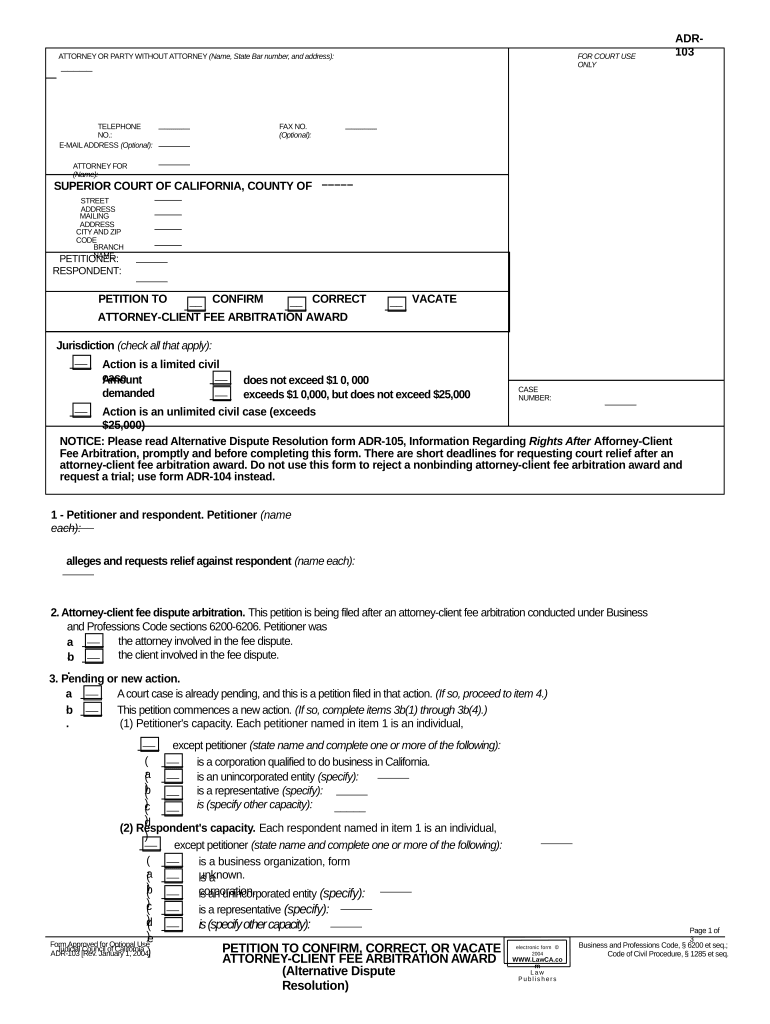
California Petition to Confirm, Correct, or Vacate Attorney-Client Fee Arbitration Award

This template is fully customizable. Edit the text, fill out the fields, and send it for signature. Give it a try!
California Petition to Confirm, Correct, or Vacate Attorney-Client Fee Arbitration Award

What this California petition does and when it applies

The California Petition to Confirm, Correct, or Vacate Attorney-Client Fee Arbitration Award is a court filing used to request judicial review of an arbitration determination involving attorney fees under California law. Parties may seek confirmation to enter the award as a judgment, correction to fix clerical or mathematical errors, or vacation to set aside the award for statutory grounds. The petition summarizes the arbitration award, states the legal basis for relief, and attaches the arbitration record. It initiates court control over an arbitration fee decision and triggers the statutorily prescribed timelines and procedural safeguards.

Why filing this petition matters for fee awards

Filing this petition allows a party to convert an arbitration award into a court judgment, correct clerical or mathematical errors, or challenge awards procured by fraud or evident partiality. It preserves appellate rights and creates enforceable remedies under California procedure.

Why filing this petition matters for fee awards

Who typically files or responds to these petitions

Attorneys representing clients, individual litigants, law firms, and opposing parties commonly file petitions to confirm, correct, or vacate attorney-client fee arbitration awards.

  • Plaintiff or defendant counsel seeking judgment enforcement or reversal of fee determinations.
  • Arbitration claimants who need a court judgment to enable collection on the award.
  • Law firms protecting fee allocations or disputing arbitrator calculations and accounting.

Essential elements to include in your petition

Core elements of the California Petition to Confirm, Correct, or Vacate Attorney-Client Fee Arbitration Award organize pleadings, evidence, and statutory grounds for relief.

Caption

Identify the court, case number, parties, and counsel contact information exactly as on the arbitration award and prior filings to ensure correct docketing and service under California rules.
Statement

Provide a concise procedural history, arbitration date, arbitrator identity, and the award amount plus calculation details so the court can assess the scope and basis of the fee decision.

Award Copy

Attach a certified or signed copy of the arbitration award, including award exhibits and the arbitrator’s signed findings, to establish the document sought for confirmation or challenge.

Grounds

Specify statutory grounds for correction or vacation, such as mistake, arbitrator misconduct, or exceeding powers, linking factual allegations to the applicable code sections.

Relief

State whether you seek confirmation and entry of judgment, correction of errors, or vacatur, and describe any requested costs, pre-judgment interest, or enforcement steps.

Service

Include proof of service on all parties and the arbitration provider per California Code of Civil Procedure requirements to satisfy jurisdiction and notice obligations.

Required case data and key fields

Signer Identity: Name and contact details.
Award Details: Date, amount, and arbitrator.
Case Caption: Court, case number, parties.
Grounds Cited: Legal basis for relief.
Attachments: Certified award and exhibits.
Service Proof: Declaration or proof of service.

Potential procedural and substantive risks

Statute of Limitations: Missed deadlines can bar relief.
Sanctions Risk: Frivolous petitions may incur sanctions.
Fee Exposure: Potential adverse fee awards.
Service Defects: Improper service can delay or dismiss.
Enforcement Limits: Judgment may be subject to stay.
Record Gaps: Insufficient evidence weakens petition.

Common preparation mistakes to avoid

  • Failing to attach the complete arbitration award, including exhibits or arbitrator signatures, leads courts to deny confirmation or require supplementation and causes delays.
  • Relying on vague allegations rather than specific statutory grounds like corruption, evident partiality, or arbitrator excess of power often fails to meet the higher vacatur standard.
  • Using incorrect service procedures or omitting certificates of service under California rules risks dismissal for lack of notice or jurisdictional defects.
  • Missing statutory deadlines for filing a petition after the award or for serving opposing parties can irrevocably forfeit judicial remedies and increase exposure to liability.

Step-by-step: preparing and filing the petition

Follow these sequential steps to prepare, serve, and file a California petition to confirm, correct, or vacate an attorney-client fee arbitration award.

  • 01
    Review Award: Confirm the award text and signatures.
  • 02
    Identify Grounds: Map facts to statutory vacatur or correction grounds.
  • 03
    Gather Evidence: Collect exhibits, billing records, and arbitration transcript.
  • 04
    File Petition: Draft petition, attach proof of service, and submit to court.

Filing flow from petition to possible judgment

This flow outlines drafting, service, court filing, and potential judgment entry steps for fee arbitration awards in California.

  • Draft Petition: Set out facts, grounds, and relief sought.
  • Serve Parties: Serve all parties and arbitration provider per rules.
  • File with Court: Submit petition and pay filing fees.
  • Notice Hearing: Attend hearing or obtain default judgment.

Online workflow configuration checklist

Configuration checklist for an online workflow to prepare and submit the petition electronically, including e-signature and document management settings.

Field Configuration
Document Format Use PDF/A or flattened PDF with attached exhibits.
Signature Method Electronic signature compliant with ESIGN and UETA.
Authentication Email link plus optional SMS verification code.
Storage Encrypted storage with audit trail retention.

Technical and compliance considerations for eSubmission

Electronic submission and eSignature rely on secure platforms that meet legal standards for authentication, audit trail, and record retention for court filings.

  • Integrations: Supports court e-filing portals.
  • Formats: PDF, DOCX accepted; flatten attachments.
  • Compliance: Meet ESIGN, UETA, HIPAA where required.

Timing and scheduling considerations

Key timing considerations for filing and serving petitions under California arbitration statutes and court rules must be observed.

Filing Promptly:

File without undue delay after receiving the arbitration award.

Service Deadlines:

Serve all parties according to court rules and local practice.

Hearing Scheduling:

Courts set hearings or issue default judgments after filing and service.

Appeal Windows:

If judgment is entered, appellate deadlines follow state appellate rules.

Confirm vs Vacate Timing:

Timing may affect available remedies and evidentiary standards.

eSignature vendor feature and pricing snapshot for petition workflows

Comparison of eSignature vendors and features relevant to submitting the California petition electronically for filing and service.

signNow DocuSign Adobe Sign PandaDoc HelloSign
Starting Price $8/user/mo $15/user/mo $14/user/mo $19/user/mo $15/user/mo
Free Trial Yes, 7-day trial Varies by plan Varies by plan Varies by plan Varies by plan
Bulk Send Yes Yes Yes Yes No
Audit Trail Yes Yes Yes Yes Yes
HIPAA Compliant Yes Yes Yes No No

Representative real-world scenarios

Representative scenarios show when parties file petitions to confirm, correct, or vacate attorney-client fee arbitration awards.

Law Firm Enforcement

A mid-size law firm sought confirmation to convert an arbitration fee award into a state court judgment to enforce collection against a former client.

  • Court corrected a posting error but confirmed the award and entered judgment allowing collection.
  • The firm attached detailed billing ledgers and the arbitrator’s award, served all parties correctly, and obtained a judgment that permitted garnishment and lien enforcement where permitted by state law.

Challenge for Error

An individual petitioner moved to correct a clerical arithmetic error in the arbitration award that materially overstated fees.

  • Court corrected the arithmetic error.
  • The petitioner supplied the arbitration transcript and billing entries demonstrating the miscalculation; the court issued a corrected award without vacating the substantive fee determination.

Practical tips for an accurate and defensible petition

Practical guidance to minimize filing errors and improve the chance of favorable judicial resolution in fee arbitration cases.

Document the fee petition thoroughly and clearly
Include itemized billing, retainers, time entries, and correspondence. Tie billing entries to services rendered and explain any redactions. Courts expect precise, contemporaneous records when assessing accuracy of fee awards and possible corrections.
Match names and case caption exactly
Use party names and counsel information identical to the arbitration record. Mismatched names can cause docketing errors or service failures. Double-check client names, firm names, and case numbers before filing to avoid procedural dismissal.
Provide statutory grounds with specific facts
State the specific statutory provision (for example, evident partiality, excess of powers, or corruption) and tie factual allegations to legal standards. Courts require factual support rather than conclusory statements to vacate an award.
Preserve and serve all parties properly
File appropriate proof of service, serve the arbitration provider where required, and maintain service records. Improper service is a common defect that can delay determinations or lead to dismissal on jurisdictional grounds.

Roles involved in the petition process

Lead Counsel

Lead counsel for the petitioner prepares the petition, compiles billing records, drafts the memorandum of points and authorities, and certifies service. They coordinate with the arbitration provider and manage filings to ensure the court receives a complete administrative record.

Responding Counsel

Responding counsel reviews the petition, evaluates defenses to confirmation, and may move to vacate or correct. They analyze arbitrator conduct, billing entries, and jurisdictional issues, and decide whether to negotiate, oppose, or seek stay pending appeal.

Common questions and practical answers

Answers to common questions about preparing, filing, serving, and electronically signing a California Petition to Confirm, Correct, or Vacate Attorney-Client Fee Arbitration Award.


Need help? Contact support

be ready to get more
Join over 28 million airSlate SignNow users