Establishing secure connection…Loading editor…Preparing document…

Assignment Beneficiary Form

This template is fully customizable. Edit the text, fill out the fields, and send it for signature. Give it a try!
Assignment Beneficiary Form

What the Assignment Beneficiary Form Is and when it applies

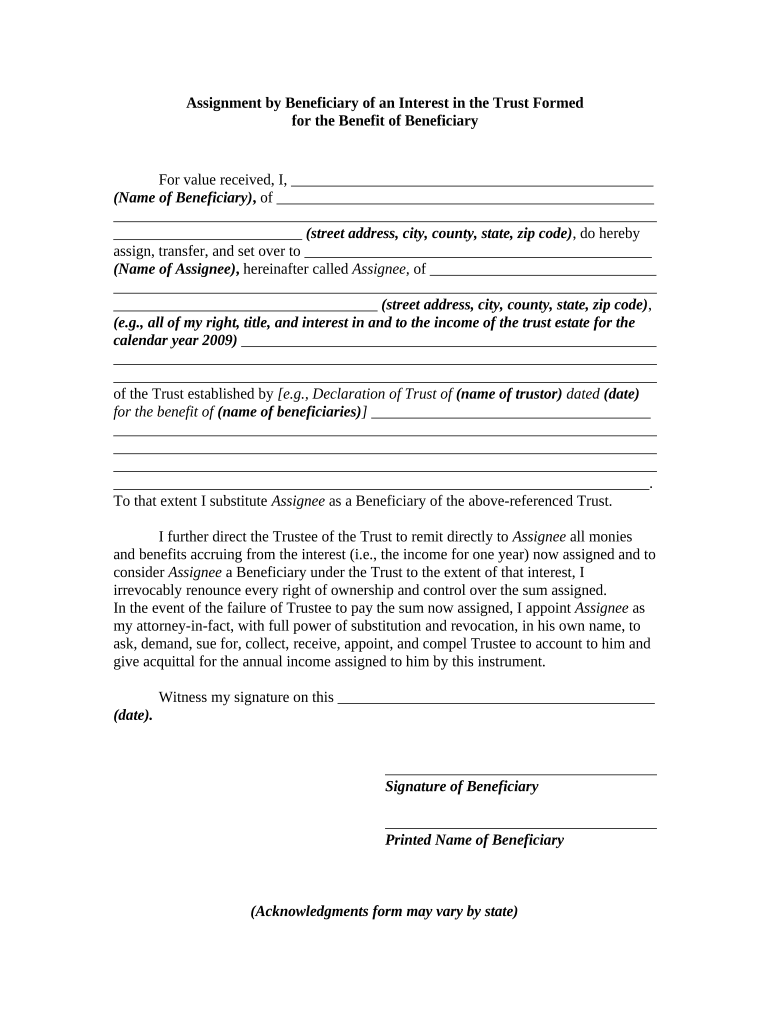
The Assignment Beneficiary Form is a legal document used to transfer an existing assignment of rights, benefits, or proceeds from one party to a named beneficiary. It records the assignor, assignee, description of the underlying contract or policy, effective date, and any conditions or consideration. Organizations use this form to change the recipient of payments, royalties, insurance proceeds, or contract rights without drafting a new agreement. Proper completion ensures clear chain-of-title, supports accounting and tax reporting, and reduces disputes about entitlement to future payments or benefits.

Why a formal Assignment Beneficiary Form matters

Using a formal Assignment Beneficiary Form clarifies who receives future payments or proceeds, reduces administrative errors, and creates an audit trail for compliance and tax reporting. It helps prevent disputes, supports beneficiary verification, and documents the assignor’s intent and effective date.

Why a formal Assignment Beneficiary Form matters

Who commonly completes and relies on this form

Typical users include corporate legal teams, benefits administrators, trustees, insurers, and individuals assigning contractual payments or policy proceeds.

  • Corporate legal and finance teams handling assignment of receivables, royalties, or contract proceeds.
  • Insurance companies and benefits administrators updating payee designations for claims or policy payouts.
  • Trustees, estate executors, and individuals transferring rights under wills, trusts, or assignment agreements.

Step-by-step: completing an Assignment Beneficiary Form

Follow this sequence to complete and execute the Assignment Beneficiary Form accurately and preserve legal effect.

  • 01
    Prepare Document: Gather the original assignment, contract identifiers, and beneficiary tax information.
  • 02
    Confirm Authority: Verify signers' legal authority and any required corporate approvals or trust instruments.
  • 03
    Complete Fields: Enter names, TINs, dates, and assignment details using MM/DD/YYYY format and full legal names.
  • 04
    Execute & Distribute: Sign, notarize if required, and send copies to the payor, beneficiary, and records custodian.

Typical digital workflow for the form

Typical workflow for completing, signing, and delivering the Assignment Beneficiary Form using secure digital tools.

  • Upload: Upload the draft form and supporting documents to your signing platform.
  • Place Fields: Insert signature, date, and text fields for each required party.
  • Authenticate: Choose signer authentication method such as email, SMS, or KBA for verification.
  • Distribute: Send signed copies to the payor, beneficiary, and your records system automatically.

Platform requirements and integration considerations

Platforms should support PDF, DOCX, and secure audit logs for Assignment Beneficiary Forms and integrations with payor portals.

  • Formats Supported: PDF, DOCX, and fillable forms supported.
  • Integrations Available: Salesforce, NetSuite, Google Workspace, Box.
  • Authentication Options: Email, SMS, OAuth, and SSO sign-in methods.

eSignature vendor comparison for executing assignment forms

Cost and feature comparison for common eSignature providers relevant to executing Assignment Beneficiary Forms, with signNow listed first for reference.

signNow DocuSign Adobe Sign PandaDoc HelloSign
Starting Price $8/user/mo $15/user/mo $14/user/mo $19/user/mo $15/user/mo
Free Trial 7-day free trial Varies Varies Varies Varies
Bulk Send Yes Yes Yes Yes No
Audit Trail Yes Yes Yes Yes Yes
HIPAA Compliant Yes Yes Yes No No

Penalties and practical risks of incorrect or incomplete forms

Payment Delays: Incorrect beneficiary information causes payment suspension and reconciliation delays.
Tax Withholding: Incorrect TIN triggers 24% backup withholding and remittance obligations.
IRS Penalties: Late or incorrect reporting may be penalized under IRC §6721.
Contract Disputes: Ambiguity or missing authority can lead to litigation or claims.
Invalid Assignment: Insufficient signing authority or missing notarization can void the transfer.
Notary/Witness Failures: Missing notary or witness signatures may cause payor rejection.

Security, encryption, and compliance to consider

Encryption: TLS 1.2/1.3 in transit; AES-256 at rest.
Certifications: SOC 2 Type II and ISO 27001 attestations available.
HIPAA: BAA available when handling protected health information.
21 CFR Part 11: Options exist to support compliance for regulated records.
ESIGN / UETA: Electronic signatures meet U.S. legal equivalence requirements.
Audit Trail: Time-stamped logs capture signer identity and actions.

Practical best practices to avoid errors and speed processing

Practical steps to reduce errors and speed processing when preparing Assignment Beneficiary Forms in both paper and electronic workflows.

Verify signer authority and approvals
Confirm each signer’s authority before execution. For corporate signers obtain a board resolution or officer certification; for trustees provide trust excerpts. Failure to verify authority can void assignments and lead to costly disputes.
Include full identifiers for accuracy
Provide contract or policy numbers, precise account identifiers, and full legal names. Avoid abbreviations and include payor contact details to speed reconciliation and prevent misapplied payments.
Maintain an auditable signing history
Retain signed copies, timestamped audit logs, and notarizations where applicable. For electronic signatures use tamper-evident storage and record signer authentication to support enforceability.
Confirm acceptance and payout process with payor
Notify the payor in advance and confirm their required documentation and verification steps. Early coordination prevents payment holds and ensures assignment is applied to the correct account.

Sample eSignature workflow settings for online completion

Configure your eSignature workflow to capture signatures, identity, and retention metadata for Assignments Beneficiary Forms.

Field Configuration
Select signer authentication method (email/SMS/KBA) Email or SMS one-time passcode recommended for signer authentication and basic identity assurance.
Define required fields and formats Require signature, printed name, date (MM/DD/YYYY), and TIN fields to prevent incomplete submissions.
Notarization or RON workflow configuration Enable Remote Online Notarization where accepted or allow upload of wet-ink notarized scans when required.
Notification and distribution settings Email signed copies to payor, beneficiary, and records custodian automatically for reconciliation and retention.

Frequently asked questions about the Assignment Beneficiary Form

Answers to frequent questions about completing, validating, and updating Assignment Beneficiary Forms, including common errors, notarization, and electronic signature considerations.


Need help? Contact support

be ready to get more
Join over 28 million airSlate SignNow users