Establishing secure connection…Loading editor…Preparing document…

California Citation for Publication Under Welfare and Institutions Code Section 294

This template is fully customizable. Edit the text, fill out the fields, and send it for signature. Give it a try!
California Citation for Publication Under Welfare and Institutions Code Section 294

What the California Citation for Publication Under Welfare and Institutions Code Section 294 Is

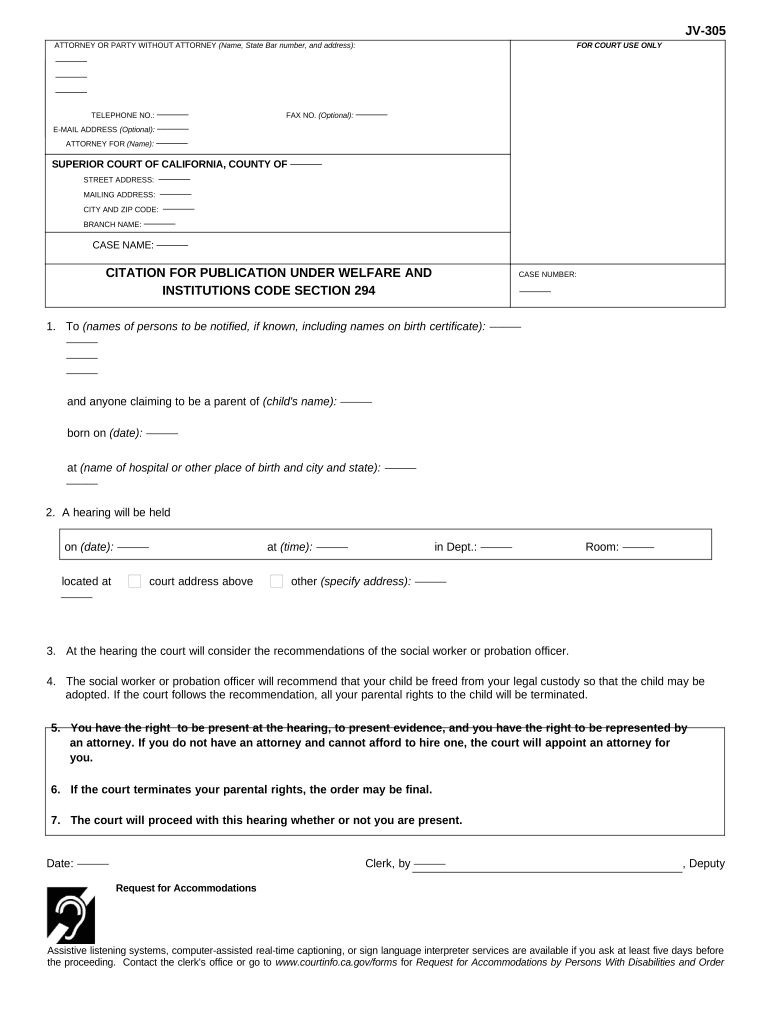
The California Citation for Publication under Welfare and Institutions Code Section 294 is a court-issued notice used when a party required to be served cannot be located for personal service and the court authorizes service by publication. It informs interested parties of pending juvenile or welfare-related proceedings, summarizes the nature of the petition or order, and explains where and when a respondent may appear. The citation is issued under a court order, is published in specified media per court instructions, and typically requires an affidavit of publication to be filed as proof of service.

Why the Citation for Publication Matters

Service by publication provides a court-approved method to notify absent or unknown parties when personal service is not possible. Properly prepared citations establish procedural due process, allow the case to proceed without delay, and create a documented record of efforts to locate the respondent.

Why the Citation for Publication Matters

Who Prepares and Uses This Citation

The citation is typically prepared by petitioning parties, their attorneys, or court staff when the court authorizes service by publication.

  • Court clerks and judicial officers who issue publication orders and record filings.
  • Attorneys and legal representatives handling juvenile or dependency proceedings.
  • County publishing vendors or newspapers that run the court-ordered notice.

Core Elements to Include in a Professional Citation for Publication

A clear, court-compliant citation contains standardized headings, case identifiers, respondent description, publication schedule, and filing directions so that it satisfies the court order and enables the publisher to produce a verifiable affidavit of publication.

Case Details

Court name, case number, branch or department and title of the action as shown on the court order; these anchor the citation to the docket and must be exact.
Respondent Identification

Name and any known aliases or last-known addresses; describe the respondent’s status (e.g., parent, alleged guardian) to avoid ambiguity in identifying who is being noticed.

Nature of Proceeding

Concise statement of the petition or order (for example, dependency hearing or termination matter) so the public notice accurately describes the purpose of the filing.

Publication Schedule

Dates and frequency required by the court for publication (for example, weekly for a specified number of weeks); follow the exact schedule ordered by the court.

Appearance Instructions

Location, date, and time of the hearing or the deadline to respond; include the court address and contact information for clarity.

Affidavit Reminder

A note that an affidavit of publication must be filed with the court after the publisher completes the run, including any required attachments or proof of service.

Required Data Elements and Technical Details

Court Identifier: Exact court name
Case Number: Official docket number
Respondent Name: Full legal name
Publication Dates: Start and end dates
Hearing Information: Date and location
Filing Proof: Affidavit of publication

Step-by-Step: Completing a Citation for Publication

Follow these sequential steps to prepare the citation consistent with the court order and to document publication properly.

  • 01
    Confirm Court Order: Review the order authorizing publication and copy the required language.
  • 02
    Populate Citation: Enter case, respondent, and hearing details exactly as ordered.
  • 03
    Send to Publisher: Submit the citation and schedule to the court-approved newspaper.
  • 04
    File Affidavit: Obtain and file the affidavit of publication with the court promptly.

How Service by Publication Works in Practice

This process overview explains the flow from court authorization to filing proof so you can coordinate each responsibility clearly.

  • Order Issued: Court grants permission when personal service cannot be completed.
  • Citation Drafted: Petitioner completes citation language per the order.
  • Publication Runs: Newspaper runs the notice according to the schedule.
  • Affidavit Filed: Publisher provides affidavit, which is filed with the court.

Digital Workflow Setup for Online Completion and Submission

Set up a digital workflow that captures required fields, routes to publisher or counsel, and retains a tamper-evident record of each step.

Field Configuration
Case Number Field Required, read-only after entry
Publication Dates Field Date picker, MM/DD/YYYY
Publisher Upload Attach publisher proof PDF
Affidavit Storage Archive PDF with timestamped audit trail

Technical and Distribution Considerations for eSubmission

Verify that your platform supports the file formats and authentication levels required by your court and the publisher before e-submitting any citation.

  • File Formats: PDF, DOCX supported
  • Authentication: Email or SMS code
  • Integrations: Court eFile or cloud storage

Key Timing Points and Filing Expectations

Keep track of court-ordered publication dates, publisher lead time, and filing deadlines for the affidavit of publication to ensure procedural compliance.

Court Publication Schedule:

Follow the exact dates and frequency specified in the court order.

Publisher Lead Time:

Allow several business days for newspaper processing and scheduling.

Affidavit Filing Deadline:

File the affidavit of publication promptly after the final run per court rules.

Hearing Date Impact:

Confirm the hearing date does not precede completion of required publication.

Record Retention:

Maintain copies of the citation and affidavit as court records.

Milestones: From Order to Filed Proof

A simple milestone sequence helps track tasks and avoid missed steps when serving by publication.

01

Order Authorization

Court issues authorization to serve by publication after attempts at personal service.

02

Citation Preparation

Prepare the notice using exact case identifiers and court language.

03

Publication Execution

Publisher runs the notice on the ordered dates and provides proof.

04

Affidavit Filed

File publisher affidavit and any supplemental documentation with the court.

Common Mistakes to Avoid When Preparing the Citation

  • Using an incorrect case number or court branch, which prevents proper docket matching and delays processing.
  • Failing to mirror the court’s required publication language exactly, causing the publisher’s affidavit to be rejected.
  • Scheduling publication too close to the hearing date, leaving insufficient time to file the affidavit.
  • Not obtaining or filing the publisher’s affidavit of publication, which undermines proof of service.

Penalties and Risks of Incorrect or Incomplete Citation

Case Delay: Proceedings may be continued or dismissed
Service Defect: Service may be ruled ineffective
Court Rejection: Affidavit may be rejected by clerk
Additional Costs: Extra publication runs or filings required
Lost Rights: Failure to notify can affect legal claims
Sanctions: Court may impose procedural sanctions

How Publication Differs from Other Notice Methods

Compare core attributes of personal service, mailed notice, and publication so you can choose the method authorized or required by the court.

Criteria Personal Service Publication
Availability when respondent located when respondent unknown
Proof of Service process server affidavit publisher affidavit
Typical Speed faster slower due to run schedule
Use Case direct delivery last resort notice

Representative eSignature Pricing for Handling Publication Documents

Platforms differ by price model and feature set; signNow and competitors offer tiered plans that affect bulk sending, audit trails, and enterprise capabilities.

signNow DocuSign Adobe Sign PandaDoc HelloSign
Starting Price $8/user/mo $15/user/mo $14/user/mo $19/user/mo $15/user/mo
Free Trial 7-day free trial Yes Yes Yes Yes
Bulk Send Yes Yes Yes Yes No
Audit Trail Yes Yes Yes Yes Yes
HIPAA Compliant Yes Yes Yes No No

Practical Examples and Related Customer Perspectives

Real-world examples illustrate how digital workflows and clear publication practices reduce administrative friction and create reliable proof of service.

Tim Martin — Martin Properties

Tim Martin found online execution reduced travel and delays when managing legal notices.

  • He noted cross-device signing worked for remote staff.
  • As founder, he emphasized consistent recordkeeping and secure storage to support subsequent court filings without physical paperwork.

Dan Rotelli — BIS

Dan Rotelli selected a secure e-signature workflow to align with compliance priorities.

  • He cited SOC 2 as an influencing factor.
  • The result was a centralized audit trail and fewer follow-ups when coordinating publication and affidavit filing across departments.

Practical Tips for Accurate and Efficient Completion

Follow these best practices to reduce rework, ensure court acceptance, and maintain a clear audit trail for publication-based service.

Mirror Court Language Exactly
Copy the order’s required notice text and schedule verbatim; deviations can invalidate the affidavit and require republishing.
Confirm Publisher Requirements
Verify the newspaper’s format, lead time, and required attachments before submitting the citation to avoid missed runs.
Archive Proof Immediately
Obtain the publisher’s affidavit in PDF with metadata and store it with the case file and audit trail for future reference.
Limit Attorney Review Scope
Use counsel to verify legal sufficiency rather than edit boilerplate language to reduce costs and speed processing.

Frequently Asked Questions About the Citation for Publication

Answers to common questions about preparing, publishing, and filing citations under Welfare and Institutions Code Section 294 to help avoid common pitfalls.


Need help? Contact support

be ready to get more
Join over 28 million airSlate SignNow users