Establishing secure connection…Loading editor…Preparing document…

Texas Call Agreement

This template is fully customizable. Edit the text, fill out the fields, and send it for signature. Give it a try!
Texas Call Agreement

What the Texas Call Agreement Is and when it applies

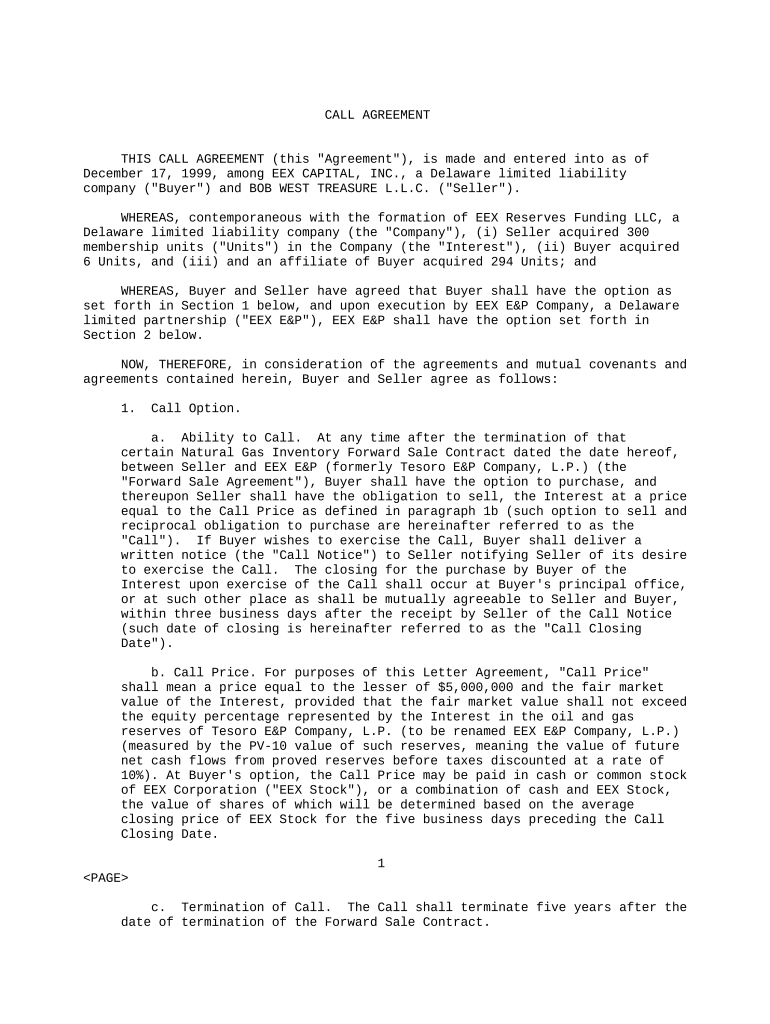
A Texas Call Agreement is a written contract used to document the terms under which one party grants another the right to call, purchase, or otherwise exercise a predetermined right related to property, services, or a contractual obligation in Texas. It typically identifies the parties, the subject matter of the call right, the exercise period, pricing or consideration, notice procedures, and any conditions precedent. While format and wording vary by use case, the agreement functions as a binding commercial instrument when signed by authorized parties and executed according to applicable Texas law and federal electronic signature rules.

Why a clear Texas Call Agreement matters

A well-drafted Texas Call Agreement defines rights, timelines, and remedies so parties avoid ambiguity and disputes; it supports enforceability, helps allocate risk, and clarifies payment and notice mechanics under Texas contract principles and federal e-signature law.

Why a clear Texas Call Agreement matters

Typical users and stakeholders for a Texas Call Agreement

Parties who commonly prepare or sign a Texas Call Agreement include business owners, real estate brokers, lenders, corporate legal teams, and contractors involved in contingent purchase or option arrangements.

  • Real estate brokers and investors who use call options to secure future purchase rights with defined exercise windows.
  • Corporate counsel and contracting officers who need formal notice, consideration, and remedies language for commercial options.
  • Lenders and finance teams that include call provisions tied to loan events or refinancing conditions.

Core elements to include in a professional Texas Call Agreement

A complete agreement combines clear party identification with precise mechanics for exercising the call right, delivered notices, compensation, and the legal framework governing disputes.

Parties

Full legal names and entity types for each party, including principal contact information and a statement of signing authority to bind the organization.
Subject Matter

A precise description of what may be called (property, securities, services), including identifiers such as legal descriptions, serial numbers, or contract references as needed.

Exercise Terms

How and when the call may be exercised, notice procedures, deadlines, price or pricing formula, and any conditions precedent or waivers.

Consideration

The payment, credit, or other exchange that supports the call right; specify currency, payment timing, and remedies for nonpayment.

Termination

Events causing termination or expiration of the call right, including survival clauses for obligations that continue post-termination.

Governing Law

Choice-of-law provision naming Texas law (if desired), venue for disputes, and any required dispute resolution steps such as mediation or arbitration.

Required information typically collected in the agreement

Signer identity: Full legal name
Effective date: MM/DD/YYYY
Consideration: Dollar amount
Notice address: Street, city, state
Authority proof: Title or corporate role
Attached exhibits: Schedules or descriptions

Step-by-step: Completing a Texas Call Agreement

Follow these steps to prepare a clear, enforceable agreement and reduce follow-up questions.

  • 01
    Draft basic terms: Identify parties, subject, price, and exercise window.
  • 02
    Add procedures: Specify how notices are delivered and who receives them.
  • 03
    Confirm authority: Have signers verify they can bind their entities.
  • 04
    Execute and retain: Sign, date, and store executed copies in a secure system.

How to configure a digital completion workflow

Set up routing, authentication, and retention in your e-signature workflow before sending to signers.

Field Configuration
Signature fields Assign signer-specific fields
Authentication Email, SMS code, or KBA
Routing order Sequential or parallel
Retention Export to secure storage

Digital signing and file format considerations

Choose a platform that supports secure PDF and DOCX upload, audit trails, and the authentication level you require before sending the agreement.

  • File formats: PDF, DOCX supported
  • Integrations: CRM and storage connectors
  • Security: TLS and AES encryption

Where to send the completed Texas Call Agreement

Determine final recipients and storage locations before execution to ensure timely notice and enforceability.

  • Primary recipient: Designated party contact in agreement
  • Legal counsel: Counsel retains for dispute defense
  • Finance or escrow: If funds or escrow are involved
  • Document repository: Secure cloud or local record system

Typical timelines, response windows, and processing notes

Common timing elements affect enforceability; record deadlines clearly in the agreement.

Exercise deadline:

Exact closing date and time zone

Notice period:

How many days before exercise notice is required

Payment deadline:

Due date for required consideration

Record retention:

How long executed copies are kept

Dispute period:

Time allowed to provide written objections

Common mistakes to avoid when preparing the agreement

  • Failing to identify signatory authority, which can render the agreement unenforceable or subject to challenge.
  • Using vague timing language for exercise windows or notice periods that leads to disputes over timeliness.
  • Omitting clear payment mechanics or escrow instructions, causing uncertainty about when the call becomes effective.
  • Relying on oral promises or side agreements that conflict with the written call agreement and undermine clarity.

Legal and practical risks from an incorrect agreement

Unenforceability: Court may refuse enforcement
Financial exposure: Damages or lost remedies
Tax implications: Mischaracterized payment treatment
Data breach: Confidentiality losses
Signature disputes: Invalid or unauthenticated signers
Missed deadlines: Loss of rights to exercise

Two practical examples of how a Texas Call Agreement is used

These short scenarios illustrate common commercial contexts where call provisions are practical and enforceable.

Real Estate Option

A developer secures an option to buy a tract of land for future development during a two-year planning period.

  • The buyer pays option consideration to hold the right.
  • The agreement specifies exercise notice format, escrow funding instructions, and a closing deadline so the parties avoid disputes when exercising the option.

Supply Call Right

A manufacturer grants a distributor the right to call a fixed quantity of components at preset prices over 12 months.

  • The contract includes monthly call forecasts and minimum volumes.
  • It includes remedies for missed calls, payment mechanics, and an audit clause to confirm delivered quantities and compliance with the pricing formula.

Typical eSignature pricing and feature comparison for handling agreements

When selecting an eSignature provider for legally binding execution, compare price, bulk-send capability, audit trails, HIPAA compliance, and envelope or usage caps.

signNow DocuSign Adobe Sign PandaDoc HelloSign
Starting Price $8/user/mo $15/user/mo $14/user/mo $19/user/mo $15/user/mo
Free Trial 7-day free trial No No Yes, limited Yes, limited
Bulk Send Yes Yes Yes Yes No
Audit Trail Yes Yes Yes Yes Yes
HIPAA Compliant Yes Yes Yes No No

Frequently asked questions about the Texas Call Agreement

Answers to common execution, validity, and amendment questions for Texas Call Agreements, with practical next steps for typical issues.


Need help? Contact support

be ready to get more
Join over 28 million airSlate SignNow users