Establishing secure connection…Loading editor…Preparing document…

Claim Denial Form

This template is fully customizable. Edit the text, fill out the fields, and send it for signature. Give it a try!
Claim Denial Form

What a Claim Denial Form Is and when it's used

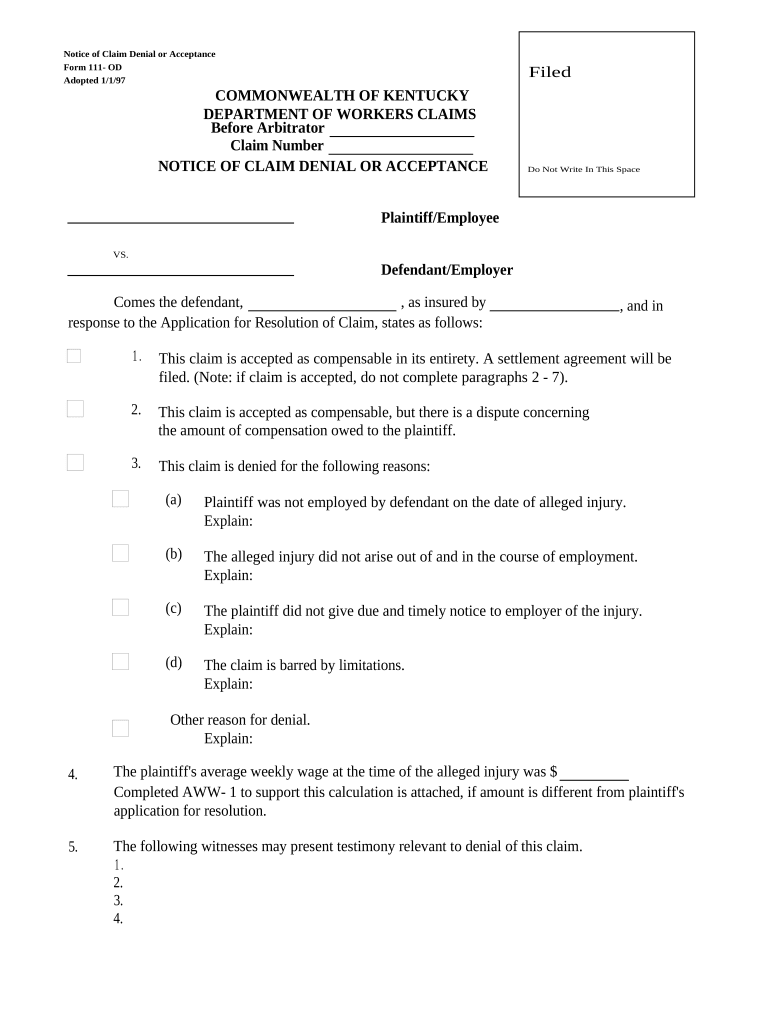
A Claim Denial Form documents an insurer, benefits administrator, or program sponsor’s decision to deny a claimant’s request for coverage, benefits, reimbursement, or other claim relief. It records the claimant’s details, the claim reference, specific reasons for denial, relevant policy or contract citations, and information about appeal rights and deadlines. The form serves as the formal notice that triggers any internal appeals process, external review rights, or legal remedies and forms the official record used by both the issuer and the recipient for subsequent steps.

Why a clear Claim Denial Form matters

A well‑crafted denial form creates a clear audit trail, reduces misunderstandings, and documents the legal basis for the decision. It helps the claimant understand options for appeal, preserves compliance with notice rules, and reduces the risk of avoidable disputes.

Why a clear Claim Denial Form matters

Who typically prepares and receives this form

Organizations and individuals interact with claim denials in different roles; the form bridges internal decision makers and external claimants.

  • Claims team specialists preparing and documenting the denial using internal case notes and policy citations.
  • HR or benefits administrators issuing denials for workplace benefits, COBRA, or other employer-sponsored plans.
  • Policyholders, beneficiaries, or third‑party providers receiving the notice and using it to determine appeal options.

Step-by-step: completing a Claim Denial Form

Follow these steps to prepare a defensible, consistent denial notice that supports appeals and recordkeeping.

  • 01
    Verify Claim: Confirm claim identifiers and policy data before drafting.
  • 02
    Document Reason: Cite policy clauses and factual findings clearly.
  • 03
    State Remedies: List appeal steps, deadlines, and contact details.
  • 04
    Sign and Record: Apply authorized signature and save the PDF copy.

How to customize and complete the form online

Configure an online workflow to reduce manual errors and create an auditable record for each denial.

Field Configuration
Claim ID lookup Link to CRM or insurer database for autofill
Conditional Reasoning Show reason fields based on denial category selection
Appeal links Include dynamic links to appeal forms or portals
Retention rule Attach record retention tag per policy

Where to send or file the completed form

Routing decisions affect legal service, appeal timing, and compliance. Choose the correct destination based on claimant preference and regulatory rules.

  • Claimant Delivery: Mail, certified mail, email, or secure portal per policy
  • Internal Record: Store in case management system for audit
  • Regulatory Filing: Submit copies to regulator if required
  • Legal Counsel: Send to counsel for high‑risk denials

Digital signing and distribution considerations

Ensure the chosen platform supports required authentication strength, captures the signing audit trail, and preserves a tamper-evident record for regulatory or legal review.

  • Authentication: Email, SMS, or stronger
  • Audit Trail: Timestamp, IP, action log
  • Delivery Options: Email, portal, or bulk send

Common timelines and response expectations

Timelines depend on the plan, statute, or regulator. Confirm applicable deadlines before issuing a denial.

Issue Date:

Denial effective on the Date of Denial field

Appeal Window:

Often 30–180 days depending on policy or law

Internal Review:

Allow 7–30 days for internal appeals processing

Regulator Notice:

Some states require reporting timelines for certain denials

Record Retention Start:

Begins on Date of Denial for retention calculations

Common mistakes to avoid when preparing denials

  • Using vague or boilerplate denial reasons that fail to explain factual basis and policy citations, which invites appeal and regulatory scrutiny.
  • Failing to include clear appeal instructions or accurate deadlines, leaving claimants unsure how to proceed and possibly extending dispute timelines.
  • Not preserving the signed, time‑stamped record and audit trail, which weakens the issuer’s position in audits or litigation.
  • Sending notices to incorrect or outdated contact details without verifying address, causing service defects and potential statutory noncompliance.

Potential legal and operational risks

Regulatory fines: State insurer penalties
Civil litigation: Breach or bad‑faith claims
Appeal costs: Administrative and legal fees
Reputational harm: Negative public disclosure
Data breaches: Privacy violation exposure
Statutory noncompliance: Missed notice requirements

Security and compliance features to consider

In-transit encryption: TLS 1.2/1.3
At-rest encryption: AES-256 encryption
Audit trail: Detailed signing logs
HIPAA support: BAA available
Regulatory frameworks: ESIGN and UETA compliance
Certifications: SOC 2 Type II, ISO 27001

Typical eSignature pricing and capability snapshot

Basic vendor pricing and feature differences relevant when selecting an eSignature provider to send Claim Denial Forms.

signNow DocuSign Adobe Sign PandaDoc HelloSign
Starting Price $8/user/mo $15/user/mo $14/user/mo $19/user/mo $15/user/mo
Free Trial 7-day free trial Varies Varies Varies Varies
Bulk Send Yes Yes Yes Yes No
Audit Trail Yes Yes Yes Yes Yes
HIPAA Compliant Yes Yes Yes No No
Envelope Cap No cap 100 envelopes/user/year Varies Varies Varies

Real-world examples of electronic notice workflows

Organizations use eSignature and structured denial forms to standardize notices, speed delivery, and preserve records.

Optica Ventures (Brian Fitzgibbons, COO)

The team standardized claim notices for faster processing and fewer errors.

  • The interface supported remote signing.
  • Brian said the interface is simple and easy to use for the team and customers, helping reduce back‑and‑forth on administrative notices while preserving a clear audit trail.

Tech Data (Bob Dutkowsky, CEO)

Centralized notice templates improved consistency across business units.

  • Bulk distribution handled high volume.
  • Bob noted the solution improved internal and external customer service and increased speed to revenue by reducing manual mailing and tracking tasks.

Primary signers and approvers

Claims Manager

Responsible for drafting and approving denial language, ensuring factual accuracy and policy citation. Typically retains case notes, communicates appeal procedures, and archives the signed form for compliance and audit trails.

Policyholder Representative

Receives the denial, reviews appeal rights, and coordinates any supplemental information. Their acknowledgment or electronic signature represents receipt for procedural and appeals tracking.

Practical tips to reduce errors and disputes

Follow these practices to make denials defensible, transparent, and easier to appeal when necessary.

Use precise citations
Reference exact policy sections, contract clauses, and dates of service to give claimants clear reasons and reduce follow‑up disputes.
Keep consistent templates
Standardize language and required fields to minimize omissions and ensure each denial includes appeal steps and contact points.
Preserve the audit trail
Store the signed PDF and metadata (timestamps, IP, signer email) to support compliance reviews and any subsequent legal analysis.
Verify recipient information
Confirm mailing addresses and preferred electronic delivery channels to avoid service defects and statutory notice failures.

Frequently asked questions about the Claim Denial Form

Answers to common operational, legal, and technical questions encountered when issuing denials.


Need help? Contact support

be ready to get more
Join over 28 million airSlate SignNow users