Establishing secure connection… Loading editor… Preparing document…
Navigation

Fill and Sign the Court of Washington No Plaintiff Order for Competency Form
Fill and Sign the Court of Washington No Plaintiff Order for Competency Form

How it works

Open the document and fill out all its fields.
Apply your legally-binding eSignature.
Save and invite other recipients to sign it.

Rate template

4.8
56 votes
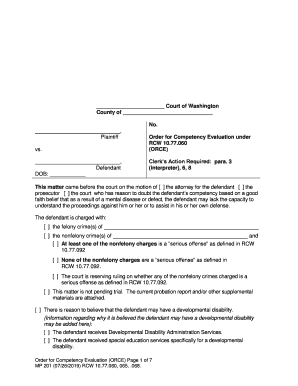
Order for Competency Evaluation (ORCE) Page 1 of 7 MP 201 ( 07 /28/ 2019 ) RCW 10.77.060 , 065, .068. Court of Washington County of , Plaintiff vs. , Defendant DOB: ____________ No. Order for Competency Evaluation under RCW 10.77.060 (ORCE) Clerk’s Action Required: para. 3 (interpreter), 6, 8 This matter came before the cour t on the motion of [ ] the attorney for the defendant [ ] the prosecutor [ ] the court who has reason to doubt the defendant’s competency based on a good faith belief that as a result of a mental disease or defect, the defendant may lack the capaci ty to understand the proceedings against him or her or to assist in his or her own defense. The defendant is charged with: [ ] the felony crime(s) of [ ] the nonfelony crime(s) of and [ ] At least one of the nonfelony charges is a “serious offense” as defined in RCW 10.77.092 [ ] None of the nonfelony charges are a “serious offense” as defined in RCW 10.77.092. [ ] The court is reserving ruling on whether any of the nonfelony crimes charged is a serious offense as defined in RCW 10.77.092. [ ] Th is matter is not pending trial. The current probation report and/or other supplemental materials are attached. [ ] There is reason to believe that the defendant may have a developmental disability. (Information regarding why it is believed the defendant may have a developmental disability may be added here): [ ] The defendant receives Developmental Disability Administration Services. [ ] The defendant received special education services specifically for a developmental disability. Order for Competency Evaluation (ORCE) Page 2 of 7 MP 201 ( 07 /28/ 2019 ) RCW 10.77.060 , 065, .068. [ ] Other [ ] The following additional information supports the request for evaluation . (Information regarding why it is believed the defendant is not competent may be added here): The court finds that there is reason to doubt the defendant’s competency and that t he defendant is in need of a forensic mental health evaluation; and The court orders : 1. Evaluation. The court orders a competency evaluation of the defendant. The defendant is to be evaluated by: [ ] Hospital evaluator: a qualified expert who shall be approved by the prosecuting attorney, and who is designated by the Secretary of the Department of Social and Health Services (DSHS). [ ] Other: The evaluation shall be completed as specified below . 2. Place of Evaluation . The evaluation shall occur at the following location (check only one ): [ ] Evaluation in a Jail/Detention Facility. The defendant is held in ___________________ _________________________ Jail/Detention facility, and the examination shall take place in that facility. If the defenda nt is transferred to another Jail/Detention facility, the Jail/Detention facility and the parties are to immediately inform the DSHS at the contact information listed on the final page of this order. If the defendant is transferred to another Jail/Detenti on facility, the examination shall take place in that facility. If the evaluator determines that the evaluation should take place at a facility designated by DSHS, then the evaluator shall notify the court, the prosecutor, and the defense attorney of that fact, as soon as is reasonably practicable. Written notice and a conformed copy of this order, without more, shall direct transport in compliance with this order. [ ] Out -of -Custody Evaluation. As the defendant is not currently in custody, the defenda nt’s attorney shall contact DSHS to schedule and arrange an appointment for examination at an agreed location. [ ] The defendant is held in ____________________________________. The evaluation may occur at that location. If the defendant is incarcera ted or committed to another treatment facility before the evaluation, the defendant’s attorney shall immediately notify DSHS. A Order for Competency Evaluation (ORCE) Page 3 of 7 MP 201 ( 07 /28/ 2019 ) RCW 10.77.060 , 065, .068. separate order must be entered to authorize in -patient examination if necessary to complete the evaluation. [ ] In-Patient Eval uation. The examination is to occur at the State Hospital or other secure facility determined by DSHS. The defendant is committed to the care and custody of DSHS for up to 15 days from the date of admission to the facility, based upon the following (check the appropriate finding): [ ] The defendant is charged with murder in the first or second degree; Or [ ] The court finds that it is more likely than not that an evaluation in the jail will be inadequate to complete an accurate evaluation; Or [ ] The co urt finds that an evaluation outside the jail setting is necessary for the health, safety, or welfare of the defendant. If the defendant is released from Jail/Detention facility or released to a treatment facility under RCW 71.05 prior to the examination, the defendant’s attorney shall notify DSHS which shall schedule an appointment for an examination at an agreed location. If the defendant is in custody, transportation shall be arranged as stated in this order. If the defendant is released from custody p rior to the examination, the defendant’s attorney shall contact DSHS to schedule an appointment for admission to the facility. A released defendant must obtain medical clearance prior to admission to the facility. 3. Evaluation Requirements The followin g requirements supplement those found in chapter 10.77 RCW: [ ] Developmental Disabilities Professional. Based upon advisement that the defendant may have a developmental disability, the evaluation must be performed by a developmental disabilities profes sional. [ ] Interpreter. The defendant requires the services of an interpreter in the following language: ______________________ [ ] Defense Attorney Presence . The defense attorney requests notification of the time and place of the evaluation at the contact information provided below. The defense attorney may be contacted at : ___________________________________ (Only check this box if defense counsel wants notice and opportunity to be present.) [ ] The evaluation may proceed without the defense att orney present if notice has been provided. [ ] The evaluation may not proceed without the defense attorney present. The current criminal charge(s) shall not be discussed with the defendant outside the forensic interview . Order for Competency Evaluation (ORCE) Page 4 of 7 MP 201 ( 07 /28/ 2019 ) RCW 10.77.060 , 065, .068. Defense attorney is available on (dates and times during the day, evening, and any weekend in the next ____ days): . [ ] Defense Expert . A defense expert has been appointed under RCW 10.77.060 and DSHS is directed to contact the defense attorney to determine whether the expert will be witnessing DSHS’s evaluation. [ ] Additional Evaluation Requirements . 4. Report Contents and Distribution The evaluator shall distribute the report to the court, prosecuting attorney, defense attorney, the designated crisis responder (DCR), and the professional person at the Jail/Detention facility. Distribution of the evaluation report by a facility providing inpatient services shall ordinarily be accomplished within two working days or less following the final evaluation of the defendant. The rep ort of the evaluation shall include the following pursuant to RCW 10.77.060:  A description of the nature of the evaluation;  A diagnosis or description of the current mental status of the defendant;  COMPETENCY : If the defendant suffers from a mental dise ase or defect, or has a developmental disability, an opinion as to competency;  NON -FELONY, SERIOUS OFFENSE: For a non -felony defendant charged with at least one serious offense, an opinion as to whether the defendant is unlikely to be restored within the statutory restoration period ;  DCR EVALUATION: An opinion as to whether the defendant should be evaluated by a designated crisis responder under chapter 71.05 RCW.  Other: The secretary may execute such agreements as appropriate and necessary to impleme nt this section, which may include designation of more than one evaluator. 5. Timing Evaluation: The evaluation shall be completed and the report distributed within the timelines set out under RCW 10.77.065 and .068 and relevant legal authority , inclu ding: Trueblood v. Wash ington State Dep artment of Social and Health Services , 101 F. Supp. 3d 1010 ( W.D. Wash. 2015) , vacated on other grounds , 822 F.3d 1037 (9th Cir. 2016); Trueblood v. Washington State Department of Social and Health Services , No. C14 - 1178 MJP , 2017 WL 1488479, 2017 U.S. Dist. LEXIS 65532 (W.D. Wash. Apr. 26, 2017) (Order Adopting (in Part) the Parties’ Mediated Settlement Agreement). In-jail Evaluations : Defendant shall be evaluated in-jail and the evaluation report distributed within 14 days of the receipt of this order or 21 days from the signature date of this order, whichever is shorter. Inpatient Evaluations : In -jail defendants who are ordered to receive an inpatient evaluation shall be admitted within 7 days of receipt of this order or 14 days from Order for Competency Evaluation (ORCE) Page 5 of 7 MP 201 ( 07 /28/ 2019 ) RCW 10.77.060 , 065, .068. the signature date of this order, whichever is shorter. Distribution of an eva luation report by a facility providing inpatient services shall ordinarily be accomplished within two working days or less following the final evaluation of the defendant. Out -of -custody Evaluations : Pursuant to RCW 10.77.068 , there is a performance tar get of 21 days or less for an out -of-custody evaluation and the distribution of the evaluation report . The court will consider a future motion by either party, DSHS, and/or the designated evaluator for an extension of the statutory deadline due to good cau se. To facilitate such a motion if needed, the court and parties agree that the parties, DSHS, or the Attorney General’s Office, need not adhere to the local rules regarding notice and are presumptively granted a motion to shorten time for any Motion to E xtend Reporting Date for Good Cause. [ ] The court finds good cause to extend the timing of the evaluation and the distribution of the report until (date) because: . [ ] Other: . 6. Records In accordance with RCW 10.77.060 , the evaluator is gra nted access to all records held by any mental health, medical, educational, or correctional facility that relate to the present or past mental, emotional, or physical condition of the defendant for the purpose of conducting the examination. In considerat ion of the urgent nature of this evaluation, it is ordered that all records requested by the evaluator shall be provided as soon as possible, but no later than 2 days from the date requested. For the purpose of this evaluation , the evaluator is also spec ifically granted access to records containing information regarding alcohol and drug abuse evaluation and treatment, and the authority to disclose this information to the undersigned court, the prosecuting attorney, the defense counsel , and others as desig nated in RCW 10.77.060 and 10.77.065. Access and authority to disclose is granted in compliance with the confidentiality requirements set forth in RCW 70.96A.150 and 42 CFR Part 2. Within 24 hours of the signing of this order:  The clerk of the court sha ll provide this order and the charging documents, including the request for bail and certification of probable cause to DSHS. [ ] Instead of the clerk of the court providing these documents, they shall be provided by ____________________________________.  The prosecuting attorney shall provide the discovery packet, including a statement of the defendant’s criminal history, to DSHS or the county appointed evaluator. If the defense provides this information, the prosecuting attorney shall be included in the communication so that duplicates are not sent . Order for Competency Evaluation (ORCE) Page 6 of 7 MP 201 ( 07 /28/ 2019 ) RCW 10.77.060 , 065, .068.  The jail administrator shall provide the defendant’s medical clearance information to DSHS, if this order requires transportation of the defendant to a facility designated by DSHS. 7. Transportation and Discha rge The Jail/Detention facility shall transport the in -custody defendant from the Jail/Detention facility to the facility designated by DSHS and back. Transportation to the facility shall occur within 1 day of the receipt of an offer of admission of the d efendant for competency evaluation. Any facility providing inpatient services related to competency shall discharge the defendant as soon as the facility determines that the defendant is competent to stand trial. Discharge shall not be postponed during th e writing and distribution of the evaluation report. If the defendant is discharged to the custody of a Jail/Detention facility, the Jail/Detention facility must continue the medication regimen prescribed by the facility, when clinically appropriate, unle ss the defendant refuses to cooperate with medication and there is no forced medication order in effect. 8. Next Hearing The next hearing date is scheduled for: . [ ] A separate scheduling order shall be filed (if required by local practice). If the defen dant is admitted to a facility designated by DSHS from a Jail/Detention facility, the defendant shall be returned to jail before this court date, except as provided below: [ ] All parties agree [ ] to waive the presence of the defendant or [ ] to the defendant’s remote participation at a subsequent competency hearing or presentation of an agreed order if the recommendation of the evaluator is for continuation of the stay of criminal proceedings, or if the opinion of the evaluator is that the defendant remains incompetent and there is no remaining restoration period, and the hearing is held prior to the expiration of the authorized commitment period. 9. Immunity Agreement [ ] The parties have not made any immunity agreement. ( If no box is checked, this is the default .) [ ] The parties stipulate that statements, admissions, or confessions made by a defendant in the course of a court -ordered evaluation under this chapter are not admissible into evidence against the defendant on the issue of guilt in any criminal proceeding, unless the defendant has placed his or her mental health at issue. The statement is admissible for any other purpose or proceeding allowed by law. This prohibition may not be used to argue for derivative suppression of other evidence la wfully obtained as a result of an otherwise inadmissible statement, admission, or confession. Order for Competency Evaluation (ORCE) Page 7 of 7 MP 201 ( 07 /28/ 2019 ) RCW 10.77.060 , 065, .068. 10 . Stay of Proceedings [ ] All time from the entry of this order and during this examination period and until this court enters an order finding the defendant to be competent to proceed is excluded from the calculation of time for trial under CrR 3.3, CrRLJ 3.3, and JuCR 7.8. [ ] The case is at the post -sentencing stage. Jurisdiction is tolled. RCW 10.77.050; State v. Campbell, 95 Wn.2d 954, 957 (1981) . Da ted Judge Print Name: Approved as to form Approved as to form Deputy Prosecuting Attorney Attorney for the Defendant Print Name : Print Name: WSBA No. WSBA No. Contact and Distribution List (contact information including ema il address, phone, and/or fax should be included to receive scheduling communications and/or reports). 1. State Hospital/DSHS [ ] Eastern State eshfsuadmin@dshs.wa.gov [ ] Western State OFMHSCOURTORDERS@dshs.wa.gov [ ] DSHS/Child Study and Treatment Center 2. Ordering Court 3. Jail/Detention Facility 4. DCR 5. Prosecuting Attorney 6. Defense Attorney 7. Alternate contact for defense 8. Other

Useful suggestions for finalizing your ‘Court Of Washington No Plaintiff Order For Competency ’ online

Fed up with the complications of managing documents? Look no further than airSlate SignNow, the premier digital signature platform for both individuals and businesses. Bid farewell to the tedious routine of printing and scanning documents. With airSlate SignNow, you can effortlessly complete and sign documents online. Take advantage of the extensive features integrated into this user-friendly and cost-effective service and transform your method of document management. Whether you need to authorize forms or gather signatures, airSlate SignNow makes it all simple, needing only a few clicks.

Adhere to this comprehensive guide:

  1. Access your account or begin a free trial with our service.
  2. Click +Create to upload a document from your device, cloud storage, or our collection of templates.
  3. Open your ‘Court Of Washington No Plaintiff Order For Competency ’ in the editor.
  4. Click Me (Fill Out Now) to finish the document on your part.
  5. Include and designate fillable fields for others (if needed).
  6. Proceed with the Send Invite settings to request eSignatures from others.
  7. Save, print your version, or turn it into a reusable template.

Don’t fret if you need to work with others on your Court Of Washington No Plaintiff Order For Competency or send it for notarization—our solution equips you with everything you require to achieve such objectives. Sign up with airSlate SignNow today and take your document management to the next level!

Here is a list of the most common customer questions. If you can’t find an answer to your question, please don’t hesitate to reach out to us.

Need help? Contact Support

The best way to complete and sign your court of washington no plaintiff order for competency form


Save time on document management with airSlate SignNow and get your court of washington no plaintiff order for competency form eSigned quickly from anywhere with our fully compliant eSignature tool.

How to Sign a PDF Online How to Sign a PDF Online

How to complete and sign documents online

In the past, dealing with paperwork took lots of time and effort. But with airSlate SignNow, document management is easy and fast. Our powerful and easy-to-use eSignature solution allows you to effortlessly fill out and eSign your court of washington no plaintiff order for competency form online from any internet-connected device.

Follow the step-by-step guide to eSign your court of washington no plaintiff order for competency form template online:

  • 1.Register for a free trial with airSlate SignNow or log in to your account with password credentials or SSO authorization option.
  • 2.Click Upload or Create and import a form for eSigning from your device, the cloud, or our form catalogue.
  • 3.Click on the file name to open it in the editor and utilize the left-side toolbar to fill out all the blank fields appropriately.
  • 4.Put the My Signature field where you need to eSign your sample. Type your name, draw, or import a picture of your regular signature.
  • 5.Click Save and Close to accomplish editing your completed form.

After your court of washington no plaintiff order for competency form template is ready, download it to your device, save it to the cloud, or invite other parties to electronically sign it. With airSlate SignNow, the eSigning process only requires a few clicks. Use our robust eSignature tool wherever you are to handle your paperwork effectively!


How to Sign a PDF Using Google Chrome How to Sign a PDF Using Google Chrome

How to complete and sign documents in Google Chrome

Completing and signing documents is easy with the airSlate SignNow extension for Google Chrome. Adding it to your browser is a fast and productive way to manage your paperwork online. Sign your court of washington no plaintiff order for competency form sample with a legally-binding electronic signature in just a few clicks without switching between programs and tabs.

Follow the step-by-step guidelines to eSign your court of washington no plaintiff order for competency form in Google Chrome:

  • 1.Go to the Chrome Web Store, find the airSlate SignNow extension for Chrome, and add it to your browser.
  • 2.Right-click on the link to a document you need to approve and choose Open in airSlate SignNow.
  • 3.Log in to your account using your credentials or Google/Facebook sign-in buttons. If you don’t have one, sign up for a free trial.
  • 4.Utilize the Edit & Sign menu on the left to complete your sample, then drag and drop the My Signature option.
  • 5.Insert a picture of your handwritten signature, draw it, or simply enter your full name to eSign.
  • 6.Make sure all information is correct and click Save and Close to finish editing your paperwork.

Now, you can save your court of washington no plaintiff order for competency form sample to your device or cloud storage, email the copy to other individuals, or invite them to eSign your form via an email request or a secure Signing Link. The airSlate SignNow extension for Google Chrome improves your document workflows with minimum effort and time. Try airSlate SignNow today!


How to Sign a PDF in Gmail How to Sign a PDF in Gmail How to Sign a PDF in Gmail

How to fill out and sign forms in Gmail

When you receive an email containing the court of washington no plaintiff order for competency form for approval, there’s no need to print and scan a file or download and re-upload it to another tool. There’s a much better solution if you use Gmail. Try the airSlate SignNow add-on to promptly eSign any paperwork right from your inbox.

Follow the step-by-step guide to eSign your court of washington no plaintiff order for competency form in Gmail:

  • 1.Go to the Google Workplace Marketplace and find a airSlate SignNow add-on for Gmail.
  • 2.Set up the program with a related button and grant the tool access to your Google account.
  • 3.Open an email with an attached file that needs approval and use the S sign on the right sidebar to launch the add-on.
  • 4.Log in to your airSlate SignNow account. Opt for Send to Sign to forward the file to other people for approval or click Upload to open it in the editor.
  • 5.Drop the My Signature field where you need to eSign: type, draw, or import your signature.

This eSigning process saves efforts and only requires a couple of clicks. Use the airSlate SignNow add-on for Gmail to update your court of washington no plaintiff order for competency form with fillable fields, sign forms legally, and invite other people to eSign them al without leaving your mailbox. Boost your signature workflows now!


How to Sign a PDF on a Mobile Device How to Sign a PDF on a Mobile Device How to Sign a PDF on a Mobile Device

How to complete and sign documents in a mobile browser

Need to rapidly fill out and sign your court of washington no plaintiff order for competency form on a smartphone while working on the go? airSlate SignNow can help without the need to install extra software applications. Open our airSlate SignNow tool from any browser on your mobile device and create legally-binding electronic signatures on the go, 24/7.

Follow the step-by-step guide to eSign your court of washington no plaintiff order for competency form in a browser:

  • 1.Open any browser on your device and follow the link www.signnow.com
  • 2.Sign up for an account with a free trial or log in with your password credentials or SSO option.
  • 3.Click Upload or Create and import a file that needs to be completed from a cloud, your device, or our form catalogue with ready-made templates.
  • 4.Open the form and fill out the blank fields with tools from Edit & Sign menu on the left.
  • 5.Place the My Signature field to the sample, then enter your name, draw, or upload your signature.

In a few easy clicks, your court of washington no plaintiff order for competency form is completed from wherever you are. When you're finished editing, you can save the file on your device, build a reusable template for it, email it to other people, or invite them electronically sign it. Make your paperwork on the go prompt and effective with airSlate SignNow!


How to Sign a PDF on iPhone How to Sign a PDF on iPhone

How to complete and sign documents on iOS

In today’s business community, tasks must be completed rapidly even when you’re away from your computer. With the airSlate SignNow application, you can organize your paperwork and approve your court of washington no plaintiff order for competency form with a legally-binding eSignature right on your iPhone or iPad. Set it up on your device to close deals and manage documents from just about anywhere 24/7.

Follow the step-by-step guide to eSign your court of washington no plaintiff order for competency form on iOS devices:

  • 1.Open the App Store, find the airSlate SignNow app by airSlate, and set it up on your device.
  • 2.Launch the application, tap Create to add a form, and choose Myself.
  • 3.Select Signature at the bottom toolbar and simply draw your signature with a finger or stylus to eSign the sample.
  • 4.Tap Done -> Save right after signing the sample.
  • 5.Tap Save or utilize the Make Template option to re-use this paperwork in the future.

This process is so easy your court of washington no plaintiff order for competency form is completed and signed in a few taps. The airSlate SignNow app works in the cloud so all the forms on your mobile device are kept in your account and are available any time you need them. Use airSlate SignNow for iOS to improve your document management and eSignature workflows!


How to Sign a PDF on Android How to Sign a PDF on Android

How to fill out and sign forms on Android

With airSlate SignNow, it’s simple to sign your court of washington no plaintiff order for competency form on the go. Set up its mobile application for Android OS on your device and start improving eSignature workflows right on your smartphone or tablet.

Follow the step-by-step guidelines to eSign your court of washington no plaintiff order for competency form on Android:

  • 1.Go to Google Play, search for the airSlate SignNow application from airSlate, and install it on your device.
  • 2.Log in to your account or create it with a free trial, then import a file with a ➕ key on the bottom of you screen.
  • 3.Tap on the uploaded file and choose Open in Editor from the dropdown menu.
  • 4.Tap on Tools tab -> Signature, then draw or type your name to electronically sign the template. Fill out empty fields with other tools on the bottom if needed.
  • 5.Use the ✔ key, then tap on the Save option to end up with editing.

With an easy-to-use interface and total compliance with main eSignature standards, the airSlate SignNow application is the perfect tool for signing your court of washington no plaintiff order for competency form. It even operates offline and updates all form changes when your internet connection is restored and the tool is synced. Complete and eSign documents, send them for approval, and make re-usable templates whenever you need and from anywhere with airSlate SignNow.

Sign up and try Court of washington no plaintiff order for competency form
  • Close deals faster
  • Improve productivity
  • Delight customers
  • Increase revenue
  • Save time & money
  • Reduce payment cycles

