Establishing secure connection…Loading editor…Preparing document…

Petition Form

This template is fully customizable. Edit the text, fill out the fields, and send it for signature. Give it a try!
Petition Form

What a Petition Form Is and When it’s Used

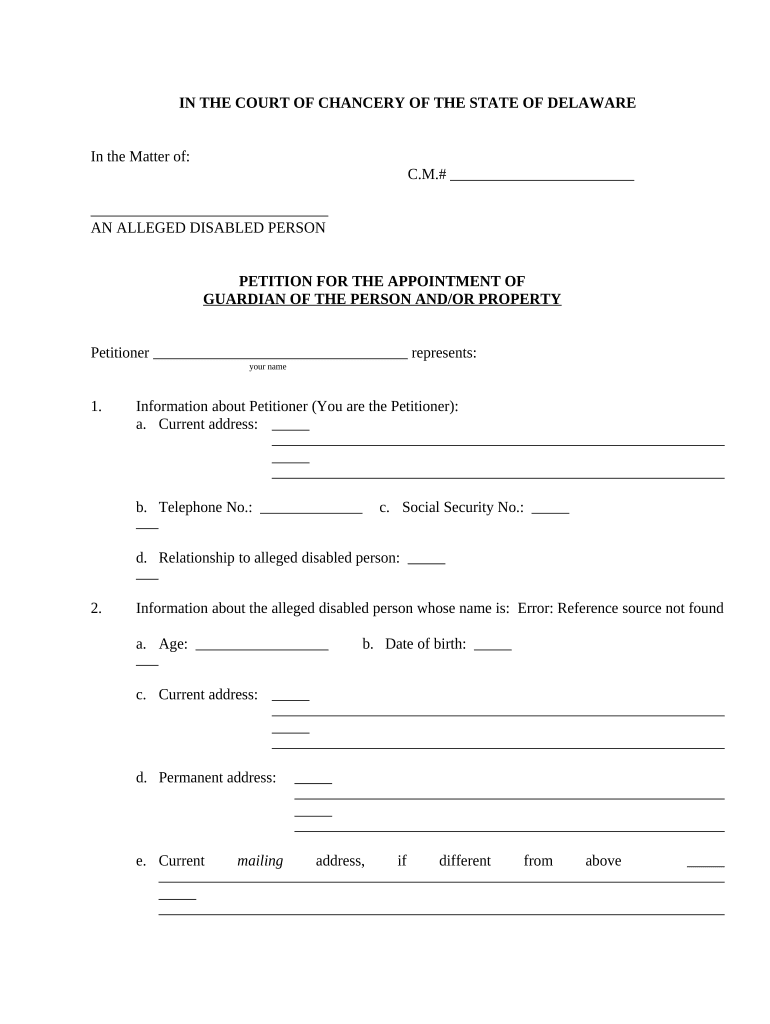
A Petition Form is a formal written request submitted to a court, administrative agency, or other decision-making body seeking an order, relief, or recognition of rights. Petitions vary by jurisdiction and subject matter — examples include civil case petitions, guardianship petitions, immigration petitions, and administrative appeals. The form typically identifies parties, states jurisdictional facts, summarizes relevant events, and requests specific relief. Many jurisdictions accept electronically signed petitions when legal and local rules permit; always confirm court or agency filing rules before eSubmission to ensure procedural compliance.

Why a Clear Petition Form Matters

A properly prepared Petition Form organizes facts, establishes jurisdiction, and frames legal relief, reducing risks of dismissal or delay. Clear petitions improve reviewers’ ability to act, speed processing, and provide a durable record when combined with an audit trail and compliant eSignature methods under federal and state e-signature laws.

Why a Clear Petition Form Matters

Who Commonly Prepares and Files Petition Forms

The responsible filer should confirm standing, venue, and any local formatting or eFiling requirements before submission.

  • Law firms and solo practitioners preparing court filings and appeals.
  • Government and agency staff submitting administrative petitions and regulatory appeals.
  • Nonprofit or business representatives filing organizational or licensing petitions.

Typical Roles Involved

Petitioner — Attorney

An attorney prepares the petition, verifies jurisdictional facts, assembles supporting exhibits, and certifies service. They review statutes and local rules to avoid procedural defects and may sign declarations under penalty of perjury on behalf of the petitioner.

Agency Officer

An administrative officer or in-house counsel files agency petitions and ensures required attachments, proof of notice, and fee payments are included. They coordinate internal approvals and track response deadlines and status.

Security, Compliance, and Platform Considerations

Encryption In Transit: TLS 1.2 / 1.3
Encryption At Rest: AES-256 encryption
Certifications: SOC 2 Type II, ISO 27001
HIPAA Support: BAA available
Audit Trail: Timestamps, IP, action log
Legal Compliance: ESIGN and UETA compliant

Stepwise Process to Prepare and File a Petition

Follow a consistent sequence to reduce errors and meet procedural requirements.

  • 01
    Draft: Assemble facts, exhibits, and jurisdictional citations.
  • 02
    Review: Verify parties, dates, and attachments for accuracy.
  • 03
    Sign: Execute with required signature method or notarization.
  • 04
    File: Submit to court or agency per local eFiling or mail rules.

Typical Submission Flow for an Electronic Petition

A standard eSubmission workflow moves the document from preparation through signature to storage and service.

  • Prepare Document: Upload form, attach exhibits, and place fields.
  • Authenticate Signer: Select email, SMS, or higher assurance method.
  • Execute Signature: Signer reviews and applies eSignature.
  • File & Store: Transmit per court rules and retain audit trail.

Digital Workflow Settings to Configure

Configure fields and authentication before sending to avoid rework and ensure admissibility.

Field Configuration
Signature Authentication Email link, SMS code, or multi-factor depending on court/agency rules
Conditional Fields Show attachments or additional questions only when applicable
Routing Order Set signers and reviewers in required sequence
Retention Settings Enable automatic retention and export of signed PDFs

Platform and File Requirements for eSubmission

Choose a platform that preserves audit trails, supports required authentication, and exports ISO-standard signed PDFs for courts or agencies.

  • File Formats: PDF and DOCX supported
  • Integrations: Salesforce, NetSuite, Google Workspace
  • Authentication: Email, SMS, KBA, SSO available

Common Deadlines and Timing Considerations

Deadlines vary by court, agency, and matter type; confirm applicable timelines in the governing rules or local practice guides.

Filing Deadlines:

Court or agency rules set initial filing windows; some petitions are time-barred.

Response Deadlines:

Opposing party typically has a statutory period to respond after service.

Service Deadlines:

Proof of service may be required within a set number of days after filing.

Hearing Scheduling:

Hearing dates depend on docket availability and notice requirements.

Statute of Limitations:

Limitations may preclude relief if the petition is filed late.

Key Milestones from Draft to Hearing

Track milestones to ensure timely service, filing, and readiness for any scheduled hearing.

01

Drafting Completed

Prepare petition text and attach supporting exhibits for filing.

02

Execution Completed

All required signatures, notarizations, and declarations are obtained.

03

Filed with Court

Submit petition per eFiling or clerk’s office procedures.

04

Hearing or Review

Appear or await agency decision per notice schedule.

Essential Elements Every Professional Petition Should Include

A professional petition is organized, cites jurisdictional authority, and plainly states the requested relief and supporting facts to facilitate judicial or administrative review.

Caption

Sets out the court/agency name, case number, parties, and contact information in the format required by local rules.
Jurisdiction Statement

Concise statement of why the court or agency has authority to hear the matter with statutory citations when applicable.

Statement of Facts

Chronological, relevant facts supported by exhibits, avoiding argumentative language in the primary petition text.

Legal Basis

Cite controlling statutes, regulations, or case law that support the relief requested, summarized clearly.

Relief Requested

Explicit, itemized description of the specific orders or remedies the petitioner seeks, including temporary relief if needed.

Exhibits and Proofs

Labeled exhibits (A, B, etc.) and declarations or affidavits that authenticate documentary evidence.

Practical Tips for Accurate Petition Preparation

Adopt consistent practices to minimize rejection risk and make petitions straightforward to review.

Confirm Proper Venue and Standing
Verify that the chosen court or agency has subject-matter jurisdiction and the petitioner has standing to bring the claim before filing.
Attach and Reference Exhibits Clearly
Label exhibits sequentially, reference them in the petition text, and include an exhibit index to aid clerks and reviewers.
Use Consistent Party Names
Use the exact legal names of parties across all documents; inconsistent naming can result in service or enforcement issues.
Retain Signed Originals
Keep signed originals or certified copies securely and maintain an audit trail for eSigned versions.

Common Errors That Delay or Defeat Petitions

  • Filing in the wrong jurisdiction or venue, which can lead to dismissal or transfer requests and additional delay.
  • Omitting required exhibits or failing to authenticate documents, resulting in evidentiary objections or summary denial.
  • Using inconsistent or abbreviated party names that hamper service or verification of identities by the court or agency.
  • Applying an improper signature method or failing to follow notarization rules for declarations and affidavits.

Consequences of an Incorrect or Late Petition

Dismissal Risk: Court may dismiss untimely petitions
Sanctions: Court can impose monetary or procedural sanctions
Fee Forfeiture: Filing fees may be forfeited or not refunded
Service Failure: Improper service can void proceedings
Perjury Exposure: False declarations risk criminal penalties
Evidentiary Limits: Missing proofs can weaken the case

How a Petition Differs from Other Court Documents

Compare common document types to clarify purpose, filing effects, and typical contents at a glance.

Criteria Petition Complaint Motion
Primary Purpose request relief initiate claim ask court for action
Typical Contents facts & relief cause of action grounds and supporting law
Timing initial or ancillary initial pleading any stage
Service Requirement yes usually yes usually may vary

eSignature Vendor Pricing and Feature Snapshot

Compare starter pricing and key feature availability across common eSignature providers. Confirm plan details with each vendor for advanced capabilities.

signNow DocuSign Adobe Sign PandaDoc HelloSign
Starting Price $8/user/mo $15/user/mo $14/user/mo $19/user/mo $15/user/mo
Free Trial 7-day free trial No No Yes, limited Yes, limited
Bulk Send Yes Yes Yes Yes No
Audit Trail Yes Yes Yes Yes Yes
HIPAA Compliant Yes Yes Yes No No
Envelope Cap No cap 100 envelopes/user/year Varies Varies Varies

Real-World Petition Form Scenarios

Two concise examples show how petition forms are used in practice and what supporting materials are commonly attached.

Administrative Appeal

A small business files an administrative petition challenging a licensing decision, attaches the agency determination and exhibits

  • The petition sets jurisdiction, chronology, and requested relief
  • The filer includes proof of prior notice, a certificate of service, and a concise statement of grounds for review for efficiency at intake.

Guardianship Petition

A family member files a guardianship petition accompanied by medical declarations and evaluations

  • The document lists parties, proposed guardian, and factual basis
  • The petition includes notarized declarations, medical exhibits, and a proposed order to streamline court review.

Frequently Asked Questions About Petition Forms

Answers to common questions about signatures, notarization, eSubmission, and retention when preparing petition forms.


Need help? Contact support

be ready to get more
Join over 28 million airSlate SignNow users