Establishing secure connection…Loading editor…Preparing document…

Washington Designation of and Consent by In-State Agent

This template is fully customizable. Edit the text, fill out the fields, and send it for signature. Give it a try!
Washington Designation of and Consent by In-State Agent

What the Washington Designation of and Consent by In-State Agent Is

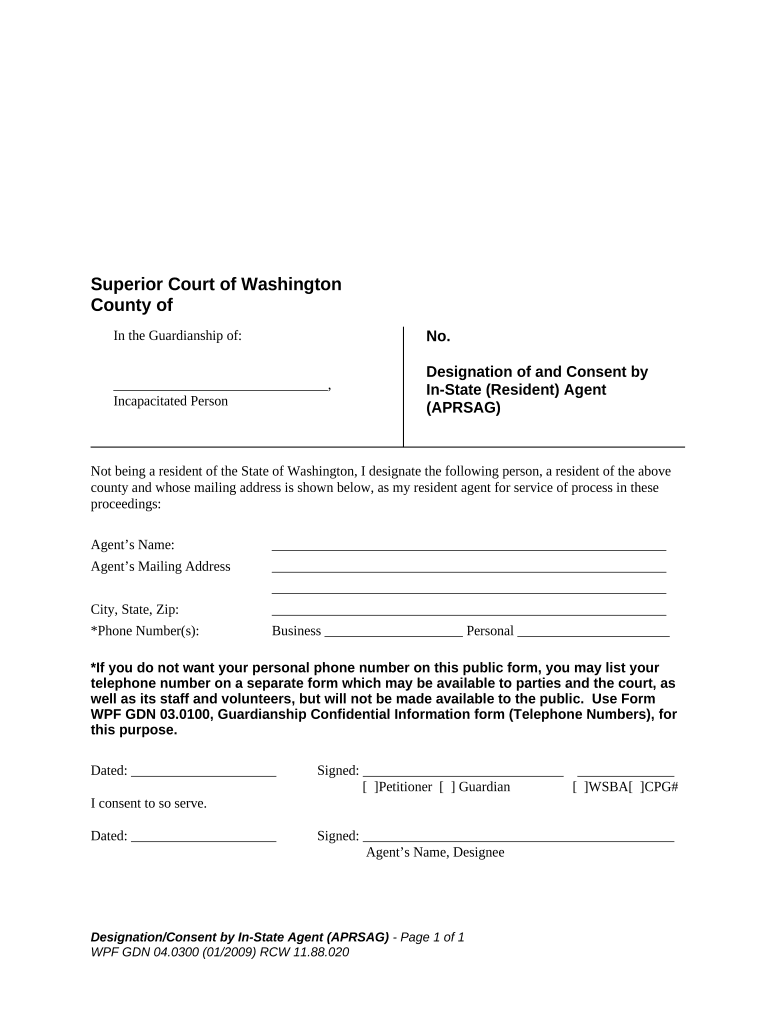
The Washington Designation of and Consent by In-State Agent is a written instrument by which an out-of-state person or entity appoints a resident agent in Washington to accept service of process and consents to that agent’s authority. This document is commonly used when a nonresident business, fiduciary, or litigation party needs a locally available representative for legal notices, administrative proceedings, or service related to state litigation. The form clarifies contact details, the scope of authority, an effective date, and signatures from both the appointing party and the in-state agent.

Why This Designation Matters for Compliance and Service

Using a clear, signed designation ensures the appointing party can be served in Washington without repeated jurisdictional disputes and creates a reliable local contact for regulators and courts.

Why This Designation Matters for Compliance and Service

Who Typically Completes This Designation

These parties commonly file or sign a designation when they require a resident agent for legal service or regulatory contact in Washington.

  • Out-of-state corporations and LLCs registering to do business or responding to Washington actions.
  • Attorneys or litigation clients who need a Washington contact for service of process.
  • Nonresident trustees, executors, or fiduciaries with Washington-related assets or proceedings.

Properly executed designations reduce delays, avoid default judgments caused by missed service, and support clear jurisdictional records.

Core Elements Included in a Professional Designation

A complete designation includes identifying information for both parties, a clear statement of appointment and consent, an effective date, scope of authority, signature blocks, and any notarization or witness provisions required by Washington law or the receiving authority.

Appointing Party

Full legal name and business entity type of the nonresident party.
In-State Agent

Agent name, Washington street address, and contact phone or email.

Scope of Authority

Explicit consent to accept service of process and receive notices.

Effective Date

Date when the appointment and consent begin to operate.

Signatures

Signature block for appointing party and accepting in-state agent.

Authentication

Notary acknowledgement or witness lines if the recipient requires them.

Essential Data Points to Include

Appointor Name: Legal entity name
Agent Name: Full individual name
Agent Address: Street address
Contact Info: Phone and email
Effective Date: MM/DD/YYYY
Signature Date: MM/DD/YYYY

Step-by-Step: Completing the Designation Form

Follow these steps in order to prepare a valid designation that meets common Washington practice and filing expectations.

  • 01
    Verify Names: Confirm entity and agent names against official records.
  • 02
    Enter Contact Details: Provide a physical Washington address and reliable contact info.
  • 03
    Set Effective Date: Use MM/DD/YYYY and confirm timing with counsel if needed.
  • 04
    Sign and Authenticate: Have parties sign; complete notary or witness steps if required.

How Service and Consent Operate After Filing

Understanding the flow after execution helps ensure timely receipt of legal notices and proper jurisdictional response.

  • Appointment: Appointor names the agent and grants authority in writing.
  • Agent Acceptance: Agent signs to confirm receipt and consent.
  • Service Delivery: Process servers or agencies deliver legal papers to agent address.
  • Recordkeeping: Agent retains records and forwards notices to appointor.

Typical Digital Workflow Settings for Online Completion

When completing the form online, configure fields and signer order to mirror the physical signature sequence and required authentication.

Field Configuration
Signature Field Required for appointor and agent
Date Field MM/DD/YYYY format
Address Field Street address validation
Authentication Email or SMS code

Digital Signing and Technical Considerations

Choose a platform that preserves audit trails, supports required authentication, and can produce a tamper-evident signed record for retention.

  • Document Format: PDF or DOCX preserved with audit trail
  • Authentication Methods: Email link, SMS code, or higher assurance
  • Audit Trail: Timestamp, IP, and action logs

Ensure the chosen eSignature solution complies with ESIGN and UETA standards and supports retention and export of the signed record in a secure, auditable format.

Timing Considerations and Common Deadlines

Timelines depend on the purpose of the designation and any parallel filings; allow time for acceptance, notarization, and delivery to relevant agencies.

Effective Date:

Set by the parties (MM/DD/YYYY)

Agent Acceptance:

Should be signed promptly to avoid service gaps

Filing to Agency:

File with agency if statute requires registration

Service Response:

Deadlines for responding to service depend on the underlying process

Record Retention:

Retain originals per applicable retention rules

Key Processing Milestones After Execution

Track these milestones from execution through final record retention to ensure compliance and readiness to respond to service.

01

Execution

Parties sign and date the designation document.

02

Notarization

Complete if the receiving authority requires acknowledgement.

03

Filing/Registration

Submit to any required agency or attach to case file.

04

Retention

Store signed record according to legal retention periods.

Common Preparation Pitfalls to Avoid

  • Using an informal or abbreviated name that does not match formation documents can cause rejection or jurisdictional challenges in court or with state agencies.
  • Providing a P.O. box rather than a physical Washington address may render the document ineffective for service of process in jurisdictions that require a street address.
  • Failing to secure the in-state agent’s signed acceptance can result in disputes about whether the agent assumed authority to accept notices on behalf of the appointing party.
  • Skipping required notarization or witness steps where an agency or court expects a notarized acknowledgement may delay acceptance or give rise to evidentiary objections.

Consequences of an Incorrect or Incomplete Designation

Default Risk: Missed service can lead to default judgments
Rejection: Agency may refuse filing
Delayed Defense: Response deadlines can be shortened
Jurisdictional Dispute: Opposing parties may contest service
Regulatory Penalty: Fines or administrative actions possible
Increased Costs: Attorney and re-filing fees

eSignature Vendor Pricing and Feature Snapshot

Common eSignature options differ by price model, envelope limits, and compliance capabilities; signNow appears first for direct feature comparison.

signNow DocuSign Adobe Sign PandaDoc HelloSign
Starting Price $8/user/mo $15/user/mo $14/user/mo $19/user/mo $15/user/mo
Free Trial 7-day free trial, no credit card required Varies by vendor Varies by vendor Varies by vendor Varies by vendor
Bulk Send Available (Business Premium) Varies by plan Varies by plan Varies by plan Varies by plan
Audit Trail Yes Yes Yes Yes Yes
HIPAA Compliant Yes (BAA available) Varies by plan Varies by plan Varies by plan Varies by plan
Envelope Cap No envelope cap 100 envelopes/user/year limit Varies by plan Varies by plan Varies by plan

Frequently Asked Questions and Practical Answers

Answers address common execution, electronic signing, notarization, and filing questions encountered when preparing this designation in Washington.


Need help? Contact support

be ready to get more
Join over 28 million airSlate SignNow users