Establishing secure connection…Loading editor…Preparing document…

Agreement Between Adjoining Landowners Regarding Encroachment

This template is fully customizable. Edit the text, fill out the fields, and send it for signature. Give it a try!
Agreement Between Adjoining Landowners Regarding Encroachment

What this encroachment agreement is and when it applies

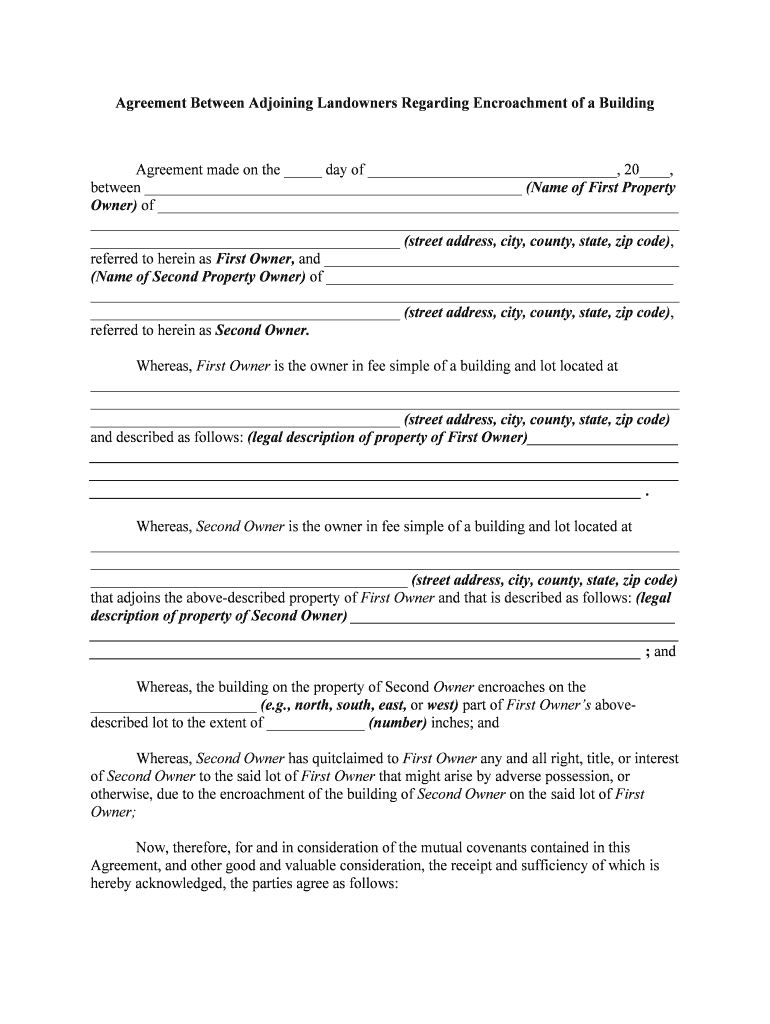
The Agreement Between Adjoining Landowners Regarding Encroachment is a written contract in which neighboring property owners document an existing or potential intrusion across a boundary, define its dimensions, and set terms for use, maintenance, removal, compensation, and dispute resolution. The instrument typically references the legal descriptions, attaches a survey or exhibit, identifies rights that run with the land or are personal to the parties, and specifies whether the instrument will be recorded with the county land records to provide public notice and affect title priority.

Why a formal written agreement matters

A clear agreement allocates liability, documents consent or easement rights, and reduces the risk of costly boundary litigation. It improves marketability by clarifying title exceptions for buyers and lenders and provides a recorded remedy or notice that beneficiaries and insurers can rely on under applicable state property law.

Why a formal written agreement matters

Who typically prepares and uses this agreement

Common users include homeowners, title professionals, and advisors managing boundary issues before sale, refinance, or construction.

  • Adjoining homeowners negotiating a mutually acceptable resolution without immediate litigation or court involvement.
  • Title and escrow companies documenting encumbrances during sale or refinance transactions and advising on recording impact.
  • Attorneys and surveyors preparing legal descriptions, plats, and boundary line agreements for recording and enforcement.

Representative signers and their roles

Homeowner

A homeowner whose fence, driveway, shed, or landscaping extends across a property line. They use the agreement to document consent, specify removal or maintenance obligations, allocate costs, and reduce the risk of future adverse-possession or title disputes while preserving resale clarity.

Title Officer

A title or escrow officer who needs written proof of encumbrances prior to closing. They rely on recorded agreements to clear title exceptions, determine whether endorsements are available, and advise lenders about potential curative steps or coverage limitations.

Core elements to include in a professional encroachment agreement

A complete agreement balances precise technical description with enforceable terms: legal description, survey exhibit, explicit rights and duties, compensation or easement language, dispute-resolution clauses, and instructions for recording and priority.

Legal Description

Provide the parcel legal description and tax parcel ID exactly as shown on the deed; include metes and bounds or lot and block references to eliminate ambiguity for title examiners and recorder offices.
Survey Exhibit

Attach a dated, signed survey or scaled diagram showing the encroachment dimensions, reference monuments, and distances to the established boundary line; label the encroaching structures clearly.

Rights & Obligations

Define who may use, maintain, repair, or remove the encroaching improvement, specify responsibility for costs, and indicate whether the permission is temporary, conditional, or a permanent easement.

Compensation Terms

State any one-time payment, periodic fee, or in-kind consideration, the payment schedule, and whether the consideration runs with the land or is personal to the named parties.

Dispute Resolution

Specify governing law, notice requirements, cure periods, and whether mediation or arbitration is required before litigation, and identify the forum for resolving disputes.

Recording & Priority

State if the agreement will be recorded, who pays recording fees, and how the recorded instrument affects mortgage priority, title exceptions, and notice to successors in interest.

Step-by-step: completing the agreement

Follow a clear sequence: identify parties, attach a survey, describe the encroachment, allocate obligations, secure signatures, notarize if required, and record to provide public notice.

  • 01
    Identify Parties: Enter full legal names matching the deed and title report.
  • 02
    Describe Encroachment: Specify dimensions, location relative to boundary, and installation or discovery date.
  • 03
    Set Terms: Define maintenance, removal, compensation, access, and duration or easement terms.
  • 04
    Sign & Record: Obtain signatures, notarize if required, and record with the county recorder to protect successors.

Digital workflow configuration for reliability and evidence

When completing the agreement electronically, configure fields, signer order, authentication, and attachments to preserve evidentiary integrity and streamline recording.

Field Configuration
Signature Method Allow electronic signatures; require authentication level appropriate to risk.
Signer Order Set sequential or parallel signing depending on negotiation flow.
Attachments Require survey and exhibits as mandatory uploads before signing.
Authentication Use email link, SMS code, or KBA for higher-assurance transactions.

Typical process from survey to recording

The process generally begins with a survey and negotiation, followed by drafting, execution with appropriate authentication or notarization, and optional recording at the county recorder's office.

  • Survey: Attach or reference a current boundary survey for precision.
  • Negotiation: Document concessions, explicit timelines, and any payments or easements.
  • Execution: All parties sign; use notary or electronic notarization if required.
  • Recording: File with the county recorder to notify successors and affect title priority.

Technical requirements for electronic completion and signature

Choose a platform that supports common file formats, audit trails, and signer authentication appropriate to the document's legal risk.

  • Formats: PDF and DOCX formats supported
  • Integrations: Works with title and escrow systems
  • Authentication: Email, SMS, or advanced MFA

Security and compliance considerations for electronic handling

Encryption: TLS 1.2/1.3 in transit
At Rest: AES-256 encryption at rest
Audit Trail: Full timestamps, IP, and action log
HIPAA BAA: BAA available upon request
ESIGN/UETA: Compliant with ESIGN and UETA
Access Controls: Role-based access and SSO

Key legal risks if the agreement is incorrect or incomplete

Boundary Litigation: Costs and court orders
Quiet Title Risk: Title defects persist
Adverse Possession: Increased claim risk
Recording Errors: Loss of priority
Invalid Agreement: Improper signatures void
Insurance Exposure: Unreported encumbrance risk

Common mistakes to avoid when preparing the agreement

  • Failing to include a precise legal description or survey can make the agreement ambiguous, leading to disputes over the actual location and extent of the encroachment.
  • Using informal language or vague remedies such as 'reasonable time' leaves timing and cost allocation unresolved and increases the likelihood of litigation.
  • Not recording the agreement when it affects title or grants an easement can leave subsequent purchasers unaware and undermine title insurance coverage.
  • Incorrect party names, missing signatures, or unsigned exhibits commonly invalidate the document or delay recording and closing transactions.

Pricing and feature snapshot for common eSignature providers

A concise comparison of entry-level pricing and selected features to consider when choosing an eSignature provider for executing encroachment agreements.

signNow DocuSign Adobe Sign PandaDoc HelloSign
Starting Price $8/user/mo $15/user/mo $14/user/mo $19/user/mo $15/user/mo
Free Trial 7-day free trial Varies Varies Varies Varies
Bulk Send Yes (Business Premium) Varies by plan Varies by plan Varies by plan Varies by plan
HIPAA Compliant Yes Yes Yes No No
Envelope Cap No cap 100 envelopes/user/year Varies Varies Varies

Frequently asked questions about execution, recording, and enforceability

Answers to common questions about whether the agreement is binding, notarization needs, recording, electronic signatures, corrections, and revocation.


Need help? Contact support

be ready to get more
Join over 28 million airSlate SignNow users