Establishing secure connection… Loading editor… Preparing document…
Navigation

Fill and Sign the Equal Work Purchase Form

Fill and Sign the Equal Work Purchase Form

How it works

Open the document and fill out all its fields.
Apply your legally-binding eSignature.
Save and invite other recipients to sign it.

Rate template

4.6
47 votes
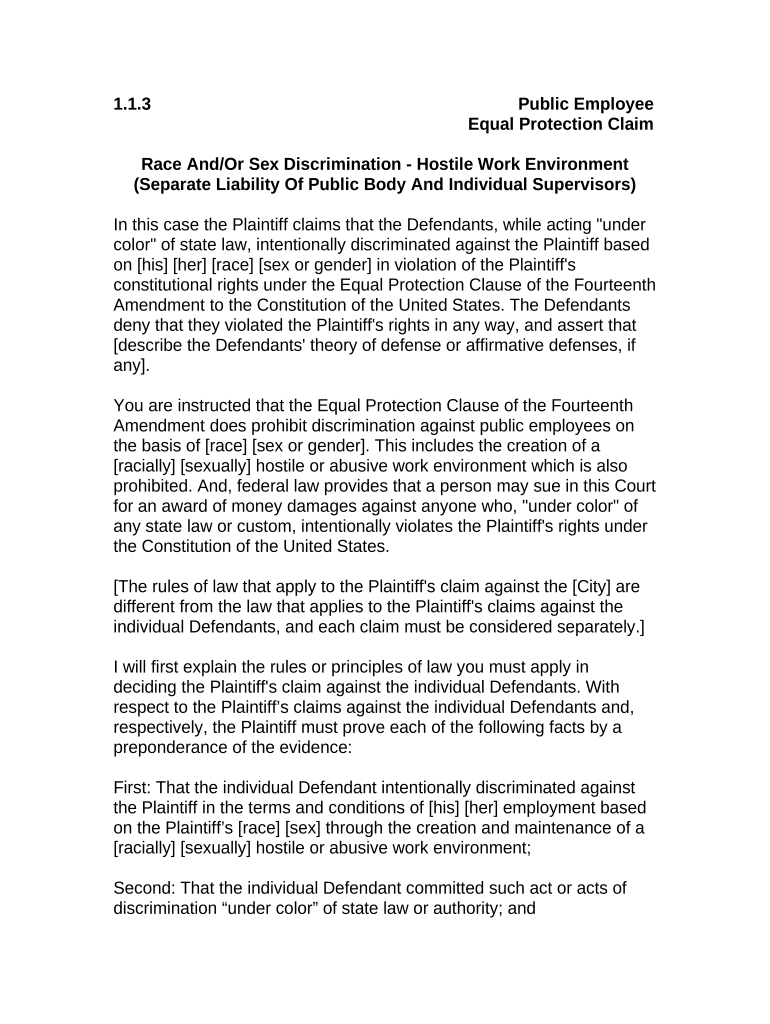
1.1.3 Public Employee Equal Protection Claim Race And/Or Sex Discrimination - Hostile Work Environment (Separate Liability Of Public Body And Individual Supervisors) In this case the Plaintiff claims that the Defendants, while acting "under color" of state law, intentionally discriminated against the Plaintiff based on [his] [her] [race] [sex or gender] in violation of the Plaintiff's constitutional rights under the Equal Protection Clause of the Fourteenth Amendment to the Constitution of the United States. The Defendants deny that they violated the Plaintiff's rights in any way, and assert that [describe the Defendants' theory of defense or affirmative defenses, if any]. You are instructed that the Equal Protection Clause of the Fourteenth Amendment does prohibit discrimination against public employees on the basis of [race] [sex or gender]. This includes the creation of a [racially] [sexually] hostile or abusive work environment which is also prohibited. And, federal law provides that a person may sue in this Court for an award of money damages against anyone who, "under color" of any state law or custom, intentionally violates the Plaintiff's rights under the Constitution of the United States. [The rules of law that apply to the Plaintiff's claim against the [City] are different from the law that applies to the Plaintiff's claims against the individual Defendants, and each claim must be considered separately.] I will first explain the rules or principles of law you must apply in deciding the Plaintiff's claim against the individual Defendants. With respect to the Plaintiff’s claims against the individual Defendants and, respectively, the Plaintiff must prove each of the following facts by a preponderance of the evidence: First: That the individual Defendant intentionally discriminated against the Plaintiff in the terms and conditions of [his] [her] employment based on the Plaintiff’s [race] [sex] through the creation and maintenance of a [racially] [sexually] hostile or abusive work environment; Second: That the individual Defendant committed such act or acts of discrimination “under color” of state law or authority; and Third: That the individual Defendant’s act or acts were the proximate or legal cause of damages sustained by the Plaintiff. [In the verdict form that I will explain in a moment, you will be asked to answer a series of questions concerning each of these factual issues.] A [racially] [sexually] hostile or abusive work environment means (1) an environment in which an employee is continuously and repeatedly subjected to [racially] [sexually] offensive acts or statements, or to different treatment based on [race] [sex]; (2) such treatment or such acts or statements are unwelcome and have not been invited or solicited by the employee's own acts or statements; (3) such treatment or such acts or statements resulted in a work environment that was so permeated with discriminatory intimidation, ridicule or insult of sufficient severity or pervasiveness that it materially altered the conditions of the Plaintiff’s employment; (4) that a reasonable person, as distinguished from someone who is unduly sensitive, would have found the workplace to be hostile or abusive; and (5) that the Plaintiff personally believed the workplace environment to be hostile or abusive. Whether a workplace environment is "hostile" or "abusive" can be determined only by looking at all the circumstances, including the frequency of the discriminatory conduct; its severity; whether it was physically threatening or humiliating; and whether it unreasonably interfered with the employee's work performance. The effect on the employee's psychological well being is also relevant to determining whether the Plaintiff actually found the workplace environment to be hostile or abusive; but while psychological harm, like any other relevant factor, may be taken into account, no single factor is required. Conduct that only amounts to ordinary socializing in the workplace such as occasional horseplay, sexual flirtation, sporadic or occasional use of abusive language, gender related jokes, and occasional teasing, does not constitute an abusive or hostile environment. Only extreme conduct amounting to a material change in the terms and conditions of employment is actionable. [In this case the parties have stipulated or agreed that the individual Defendant(s) acted "under color" of state law, and you should, therefore, accept that fact as proven.] [A state or local official acts "under color" of the authority of the state not only when the official acts within the limits of the official's lawful authority, but also when the official acts without or beyond the official's lawful authority. In order for unlawful or unconstitutional acts of an official to be done "under color" of state law, however, the acts must be done while the official was purporting or pretending to act in the performance of official duty; that is, the unlawful act must be an abuse or misuse of power which is possessed by the official only because [he] [she] is an official. In this case, therefore, you must determine whether the individual Defendant had supervisory authority over the Plaintiff in the terms and conditions of the Plaintiff's employment, and whether such Defendant abused or misused that authority by intentionally discriminating against the Plaintiff because of the Plaintiff's [race] [sex]. You will note that proof of intentional discrimination on the part of the individual Defendant is required; any evidence of mere negligence or the failure to exercise reasonable care in supervising other employees is insufficient. The Plaintiff must prove that the individual Defendant committed intentionally discriminatory acts, either personally 62 or through the direction of others, or that the Defendant knowingly and deliberately acquiesced in discriminatory acts being committed by the Defendant's subordinates without intervening to stop such discrimination. For damages to be the proximate or legal result of wrongful conduct, it must be shown that, except for such conduct, the damages would not have occurred. I will now explain the rules or principles of law you must apply in deciding the Plaintiff’s claim against the [City] Ordinarily, a corporation - - including a public body or agency such as the [City of ] - - is legally responsible for the acts of its employees carried out in the regular course of their job duties as employees. This is known in the law as the doctrine of "respondent superior" which means "let the superior respond" for any losses or injuries wrongfully caused by its employees in the performance of their jobs. This doctrine does not apply, however, in a case such as this where the Plaintiff claims a violation of constitutional rights. In such a case it is not enough for the Plaintiff to prove that [he] [she] was discriminated against on the basis of [race] [sex] by other employees of the [City]; rather the [City of ] can be held liable only if you find that the deprivation of the Plaintiff's constitutional right to equal protection of law was the direct result of a [City] policy or custom that created a [racially] [sexually] hostile or abusive work environment. In order to prevail on the claim against the [City] the Plaintiff must prove each of the following facts by a preponderance of the evidence: First: That the Plaintiff was treated differently than other employees in the terms and conditions of [his] [her] employment by the [City]; Second: That such different treatment was the intended result of a [racially] [sexually] hostile or abusive work environment which had become a [City] policy or custom, as hereafter defined; and Third: That the Plaintiff suffered damages as a proximate or legal result of such [City] policy or custom. [In the verdict form that I will explain in a moment, you will be asked to answer a series of questions concerning each of these factual issues.] A policy or custom means a persistent, widespread or repetitious course of conduct by public officials or employees that, although not authorized by, or which may even be contrary to, written law or express municipal policy, is so consistent, pervasive and continuous that the [City] policy makers must have known of it, so that, by their acquiescence, such policy or custom has acquired the force of law without formal adoption or announcement. The Court has determined that the [City's] policy makers, within the meaning of this instruction, were the [City Manager and the City Council]. Finally, for damages to be the proximate or legal result of a wrongful [City] policy or custom, it must be shown that, except for such policy or custom, the damages would not have occurred. If you find in favor of the Plaintiff and against the Defendant, you will then consider the issue of the Plaintiff's damages. In considering the issue of the Plaintiff's damages, you are instructed that you should assess the amount you find to be justified by a preponderance of the evidence as full, just and reasonable compensation for all of the Plaintiff's damages, no more and no less. Compensatory damages are not allowed as a punishment and must not be imposed or increased to penalize the Defendant. Also, compensatory damages must not be based on speculation or guesswork because it is only actual damages that are recoverable. [On the other hand, compensatory damages are not restricted to actual loss of time or money; they cover both the mental and physical aspects of injury - - tangible and intangible. Thus, no evidence of the value of such intangible things as emotional pain and mental anguish has been or need be introduced. In that respect it is not value you are trying to determine, but an amount that will fairly compensate the Plaintiff for those claims of damage. There is no exact standard to be applied; any such award should be fair and just in the light of the evidence.] You should consider the following elements of damage, to the extent you find them proved by a preponderance of the evidence, and no others: (a) Net lost wages and benefits to the date of trial; (b) Emotional pain and mental anguish. [(c) Punitive damages, if any (as explained in the Court’s instructions)] [You are instructed that any person who claims damages as a result of an alleged wrongful act on the part of another has a duty under the law to "mitigate" those damages - - that is, to take advantage of any reasonable opportunity that may have existed under the circumstances to reduce or minimize the loss or damage. So, if you should find from a preponderance of the evidence that the Plaintiff failed to seek out or take advantage of a business or employment opportunity that was reasonably available under all the circumstances shown by the evidence, then you should reduce the amount of the Plaintiff's damages by the amount that could have been reasonably realized if the Plaintiff had taken advantage of such opportunity.] [The Plaintiff also claims that the acts of the Defendant were done with malice or reckless indifference to the Plaintiff's federally protected rights so as to entitle the Plaintiff to an award of punitive damages in addition to compensatory damages. If you find for the Plaintiff, and if you further find that the Defendant did act with malice, or reckless indifference to the Plaintiff’s federally protected rights, the law would allow you, in your discretion, to assess punitive damages against the Defendant as punishment and as a deterrent to others. If you find that punitive damages should be assessed against the Defendant, you may consider the financial resources of the Defendant in fixing the amount of such damages [and you may assess punitive damages against one or more of the Defendants, and not others, or against more than one Defendant in different amounts].] 1.1.3 Public Employee Equal Protection Claim Race And/Or Sex Discrimination - Hostile Work Environment (Separate Liability Of Public Body And Individual Supervisors) SPECIAL INTERROGATORIES TO THE JURY Do you find from a preponderance of the evidence: 1. That the individual Defendant intentionally discriminated against the Plaintiff in the terms or conditions of [his] [her] employment based on the Plaintiff’s [race] [sex] through the creation and maintenance of a [racially] [sexually] hostile or abusive work environment? Answer Yes or No [Note: If you answered “No” to Question No. 1 you need not answer the remaining questions.] [2. That the individual Defendant committed such act or acts of discrimination “under color” of state law or authority? Answer Yes or No] 2. That the individual Defendant’s act or acts were the proximate or legal cause of damages sustained by the Plaintiff? Answer Yes or No 3. That the [racially] [sexually] hostile or abusive work environment had become a [city] policy or custom, as defined in the Court’s instructions, for which the [city] would be legally responsible? Answer Yes or No 4. That the Plaintiff should be awarded damages to compensate for a net loss of wages and benefits to the date of trial? Answer Yes or No If your answer is Yes, in what amount? $       5. That the Plaintiff should be awarded damages to compensate for emotional pain and mental anguish? Answer Yes or No If your answer is Yes, in what amount? $       6. That the Defendant acted with malice or with reckless indifference to the Plaintiff’s federally protected rights and that punitive damages should be assessed against the Defendant? Answer Yes or No If your answer is Yes, in what amount? $       SO SAY WE ALL. Foreperson DATED:       ANNOTATIONS AND COMMENTS Gender based discrimination against public employees by their employers is a violation of the Fourteenth Amendment. Bohen v. City of East Chicago, Indiana, 799 F.2d 1180 (7th Cir. 1986); Starrett v. Wadley, 876 F.2d 808 (10th Cir. 1989); Andrews v. City of Philadelphia, 895 F.2d 1469 (3d Cir. 1990); Trautvetter v. Quick, 916 F.2d 1140 (7th Cir. 1990); Pontarelli v. Stone, 930 F.2d 104 (1st Cir. 1991). The definition of a sexually hostile work environment is derived directly from Harris v. Forklift Systems, Inc., 510 U.S. 17, 114 S.Ct. 367, 126 L.Ed.2d 295 (1993). See also, Oncale v. Sundowner Offshore Services, Inc., 523 U.S. 75, 118 S.Ct. 998, 140 L.Ed.2d 201 (1998); Faragher v. City of Boca Raton, 524 U.S. 775, 118 S.Ct. 2275, 141 L.Ed.2d 662 (1998). Supervisor liability for constitutional violations (denial of equal protection) is discussed in Cross v. State of Alabama, 49 F.3d 1490 (11th Cir.), reh’g denied, 59 F.3d 1248 (11th Cir. 1995). The definition of policy or custom is derived from Monell v. Department of Social Services, 436 U.S. 658, 98 S.Ct. 2018, 56 L.Ed.2d 611 (1978). See also, Fundiller v. City of Cooper City, 777 F.2d 1436 (11th Cir. 1985). With regard to remedies, see the Annotations and Comments following Federal Claims Instruction 1.1.1, supra.

Valuable tips for finalizing your ‘Equal Work Purchase’ online

Are you fed up with the inconvenience of managing paperwork? Look no further than airSlate SignNow, the premier eSignature solution for individuals and small to medium-sized businesses. Wave farewell to the monotonous routine of printing and scanning documents. With airSlate SignNow, you can effortlessly complete and sign paperwork online. Utilize the robust features incorporated into this user-friendly and cost-effective platform and transform your method of document management. Whether you need to approve forms or gather digital signatures, airSlate SignNow streamlines the process with just a few clicks.

Follow these comprehensive steps:

  1. Access your account or sign up for a free trial with our service.
  2. Select +Create to upload a file from your device, cloud storage, or our form collection.
  3. Open your ‘Equal Work Purchase’ in the editor.
  4. Click Me (Fill Out Now) to set up the form on your end.
  5. Add and designate fillable fields for others (if necessary).
  6. Proceed with the Send Invite settings to solicit eSignatures from additional parties.
  7. Download, print your copy, or convert it into a reusable template.

Don't fret if you need to work with your colleagues on your Equal Work Purchase or send it for notarization—our platform provides you with all the tools necessary to accomplish these tasks. Register with airSlate SignNow today and elevate your document management to new levels!

Here is a list of the most common customer questions. If you can’t find an answer to your question, please don’t hesitate to reach out to us.

Need help? Contact Support

The best way to complete and sign your equal work purchase form

Save time on document management with airSlate SignNow and get your equal work purchase form eSigned quickly from anywhere with our fully compliant eSignature tool.

How to Sign a PDF Online How to Sign a PDF Online

How to fill out and sign documents online

Previously, dealing with paperwork required pretty much time and effort. But with airSlate SignNow, document management is quick and simple. Our powerful and easy-to-use eSignature solution allows you to easily fill out and eSign your equal work purchase form online from any internet-connected device.

Follow the step-by-step guidelines to eSign your equal work purchase form template online:

  • 1.Register for a free trial with airSlate SignNow or log in to your account with password credentials or SSO authentication.
  • 2.Click Upload or Create and import a file for eSigning from your device, the cloud, or our form collection.
  • 3.Click on the document name to open it in the editor and use the left-side menu to fill out all the blank areas accordingly.
  • 4.Put the My Signature field where you need to approve your sample. Provide your name, draw, or upload a picture of your handwritten signature.
  • 5.Click Save and Close to accomplish modifying your completed document.

Once your equal work purchase form template is ready, download it to your device, save it to the cloud, or invite other individuals to eSign it. With airSlate SignNow, the eSigning process only requires a couple of clicks. Use our powerful eSignature tool wherever you are to manage your paperwork productively!

How to Sign a PDF Using Google Chrome How to Sign a PDF Using Google Chrome

How to fill out and sign forms in Google Chrome

Completing and signing paperwork is simple with the airSlate SignNow extension for Google Chrome. Installing it to your browser is a quick and productive way to deal with your paperwork online. Sign your equal work purchase form sample with a legally-binding electronic signature in a couple of clicks without switching between applications and tabs.

Follow the step-by-step guide to eSign your equal work purchase form in Google Chrome:

  • 1.Navigate to the Chrome Web Store, search for the airSlate SignNow extension for Chrome, and install it to your browser.
  • 2.Right-click on the link to a form you need to eSign and select Open in airSlate SignNow.
  • 3.Log in to your account using your credentials or Google/Facebook sign-in option. If you don’t have one, sign up for a free trial.
  • 4.Use the Edit & Sign toolbar on the left to complete your template, then drag and drop the My Signature field.
  • 5.Insert a photo of your handwritten signature, draw it, or simply type in your full name to eSign.
  • 6.Verify all information is correct and click Save and Close to finish editing your form.

Now, you can save your equal work purchase form sample to your device or cloud storage, email the copy to other individuals, or invite them to electronically sign your document via an email request or a protected Signing Link. The airSlate SignNow extension for Google Chrome enhances your document workflows with minimum effort and time. Start using airSlate SignNow today!

How to Sign a PDF in Gmail How to Sign a PDF in Gmail How to Sign a PDF in Gmail

How to fill out and sign documents in Gmail

When you get an email with the equal work purchase form for signing, there’s no need to print and scan a document or download and re-upload it to another program. There’s a better solution if you use Gmail. Try the airSlate SignNow add-on to rapidly eSign any documents right from your inbox.

Follow the step-by-step guidelines to eSign your equal work purchase form in Gmail:

  • 1.Go to the Google Workplace Marketplace and look for a airSlate SignNow add-on for Gmail.
  • 2.Set up the program with a related button and grant the tool access to your Google account.
  • 3.Open an email containing an attached file that needs approval and utilize the S symbol on the right panel to launch the add-on.
  • 4.Log in to your airSlate SignNow account. Select Send to Sign to forward the document to other parties for approval or click Upload to open it in the editor.
  • 5.Drop the My Signature field where you need to eSign: type, draw, or upload your signature.

This eSigning process saves time and only takes a few clicks. Use the airSlate SignNow add-on for Gmail to adjust your equal work purchase form with fillable fields, sign documents legally, and invite other parties to eSign them al without leaving your inbox. Improve your signature workflows now!

How to Sign a PDF on a Mobile Device How to Sign a PDF on a Mobile Device How to Sign a PDF on a Mobile Device

How to complete and sign paperwork in a mobile browser

Need to quickly submit and sign your equal work purchase form on a mobile phone while working on the go? airSlate SignNow can help without needing to set up extra software apps. Open our airSlate SignNow solution from any browser on your mobile device and create legally-binding eSignatures on the go, 24/7.

Follow the step-by-step guide to eSign your equal work purchase form in a browser:

  • 1.Open any browser on your device and go to the www.signnow.com
  • 2.Sign up for an account with a free trial or log in with your password credentials or SSO authentication.
  • 3.Click Upload or Create and add a file that needs to be completed from a cloud, your device, or our form library with ready-made templates.
  • 4.Open the form and fill out the empty fields with tools from Edit & Sign menu on the left.
  • 5.Place the My Signature field to the sample, then type in your name, draw, or upload your signature.

In a few simple clicks, your equal work purchase form is completed from wherever you are. Once you're done with editing, you can save the document on your device, create a reusable template for it, email it to other people, or invite them electronically sign it. Make your documents on the go prompt and efficient with airSlate SignNow!

How to Sign a PDF on iPhone How to Sign a PDF on iPhone

How to complete and sign forms on iOS

In today’s business world, tasks must be completed rapidly even when you’re away from your computer. Using the airSlate SignNow app, you can organize your paperwork and sign your equal work purchase form with a legally-binding eSignature right on your iPhone or iPad. Set it up on your device to conclude contracts and manage documents from just about anywhere 24/7.

Follow the step-by-step guidelines to eSign your equal work purchase form on iOS devices:

  • 1.Open the App Store, find the airSlate SignNow app by airSlate, and set it up on your device.
  • 2.Launch the application, tap Create to add a form, and choose Myself.
  • 3.Select Signature at the bottom toolbar and simply draw your signature with a finger or stylus to eSign the form.
  • 4.Tap Done -> Save right after signing the sample.
  • 5.Tap Save or take advantage of the Make Template option to re-use this document later on.

This process is so easy your equal work purchase form is completed and signed in just a couple of taps. The airSlate SignNow application works in the cloud so all the forms on your mobile device remain in your account and are available whenever you need them. Use airSlate SignNow for iOS to enhance your document management and eSignature workflows!

How to Sign a PDF on Android How to Sign a PDF on Android

How to fill out and sign documents on Android

With airSlate SignNow, it’s easy to sign your equal work purchase form on the go. Set up its mobile application for Android OS on your device and start boosting eSignature workflows right on your smartphone or tablet.

Follow the step-by-step guide to eSign your equal work purchase form on Android:

  • 1.Go to Google Play, find the airSlate SignNow app from airSlate, and install it on your device.
  • 2.Sign in to your account or create it with a free trial, then upload a file with a ➕ key on the bottom of you screen.
  • 3.Tap on the uploaded document and choose Open in Editor from the dropdown menu.
  • 4.Tap on Tools tab -> Signature, then draw or type your name to eSign the sample. Fill out blank fields with other tools on the bottom if required.
  • 5.Use the ✔ button, then tap on the Save option to finish editing.

With a user-friendly interface and total compliance with main eSignature requirements, the airSlate SignNow application is the best tool for signing your equal work purchase form. It even works offline and updates all document adjustments when your internet connection is restored and the tool is synced. Complete and eSign documents, send them for approval, and make multi-usable templates anytime and from anywhere with airSlate SignNow.

Sign up and try Equal work purchase form
  • Close deals faster
  • Improve productivity
  • Delight customers
  • Increase revenue
  • Save time & money
  • Reduce payment cycles