Establishing secure connection…Loading editor…Preparing document…

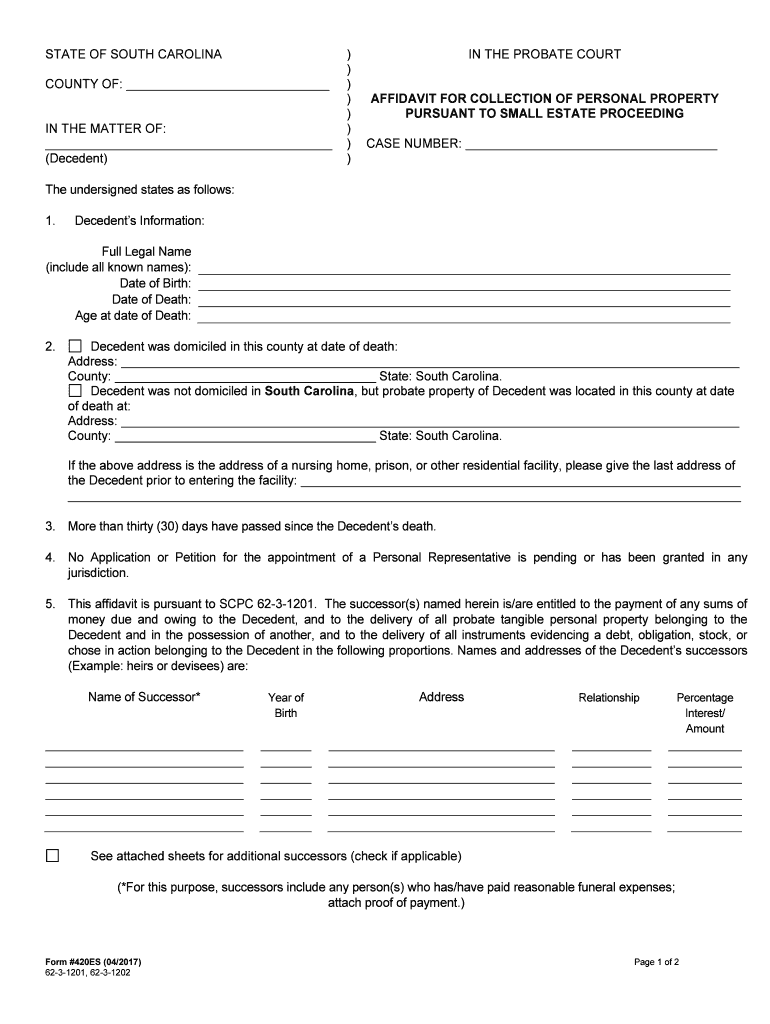
South Carolina Affidavit for Collection of Personal Property

This template is fully customizable. Edit the text, fill out the fields, and send it for signature. Give it a try!
South Carolina Affidavit for Collection of Personal Property

What the South Carolina Affidavit for Collection of Personal Property Is and when it’s used

The South Carolina Affidavit for Collection of Personal Property is a sworn written statement used to document a creditor’s claim to tangible personal property and the facts supporting collection or repossession. It identifies the claimant and the current possessor, describes the property with sufficient detail for identification, and records the factual basis for collection, such as default, storage, or permitted seizure. The affidavit is signed under oath before an authorized official, typically a notary public, and becomes part of the legal record used to request return, foster voluntary turnover, or support litigation if the claim is disputed.

Why this affidavit matters for lawful collection

A properly completed affidavit documents facts under oath, supports lawful possession or recovery, and creates a record suitable for courts, storage facilities, or third parties reviewing ownership claims.

Why this affidavit matters for lawful collection

Typical users and where the form fits in workflow

Organizations and individuals use this affidavit to document possession claims, support collection actions, and create a notarized record for third-party review.

  • Secured creditors and lenders asserting rights to pledged personal property during default or repossession proceedings.
  • Repossession and recovery companies documenting chain of custody and factual grounds for collection.
  • Attorneys and claim administrators preparing evidence for contested recovery or small-claims hearings.

Use the affidavit alongside bills of sale, notices, or inventory lists to make a complete and defensible collection package.

Representative signers and their roles

Brian Fitzgibbons, COO

As COO of a portfolio manager, the signer documents factual grounds for collection and ensures the affidavit is notarized and attached to supporting inventory and account statements for legal and audit purposes.

Tim Martin, Founder

As a property manager, the signer uses the affidavit to record chain-of-custody details, confirm notifications to occupants, and support a subsequent transfer or sale when lawful possession is established.

Core elements to include in a professional South Carolina affidavit

A complete affidavit contains standard headings and a sworn statement plus verifiable identifiers so third parties can confirm the claim without additional discovery. Accuracy, notarization, and supporting attachments are essential to avoid disputes.

Caption

Court or company heading, case number if applicable, and a clear title identifying the document as the Affidavit for Collection of Personal Property; establishes context and routing for the record.
Claimant Details

Full legal name, mailing address, contact information, and capacity (secured creditor, storage facility agent, repossession agent) so the claimant can be contacted and liability can be assessed.

Respondent Details

Full legal name and last known address of the owner or possessor; include identifiers such as account numbers to tie the affidavit to the underlying contract.

Property Description

Precise description of each item (make, model, serial number, VIN, distinguishing marks) and quantity so items are uniquely identifiable during transfer or sale processes.

Statement of Facts

Chronological factual recitation describing default, storage, retrieval attempts, notices given, and legal basis for collection; include dates and supporting documentary references.

Oath and Notary

Signature block with printed name, date, and notarization statement; the affidavit must be sworn to before an authorized official to satisfy evidentiary requirements.

Required information and short-format checklist

Claimant Name: Full legal name
Respondent Name: Full legal name
Property Details: Make, model, serial/VIN
Relevant Dates: Default, notice, seizure dates
Supporting Docs: Contracts, notices, invoices
Notary Statement: Official signature block

Step-by-step: preparing and executing the affidavit

Follow this sequence to prepare a legally defensible affidavit and reduce the chance of rejection or challenge.

  • 01
    Gather Documents: Collect contracts, invoices, notices, and identification.
  • 02
    Describe Property: Record serial numbers and unique identifiers.
  • 03
    Draft Statement: Chronologically state facts supporting collection.
  • 04
    Notarize Signature: Sign under oath before an authorized notary.

How the affidavit moves through a typical collection workflow

A clear routing sequence ensures parties receive copies and actions follow required timelines.

  • Preparation: Claimant assembles affidavit and attachments.
  • Execution: Affiant signs and notarizes the affidavit.
  • Distribution: Copies sent to respondent and relevant third parties.
  • Follow-up: Enforcement action or filing if disputed.

How to set up a digital workflow for this affidavit

Configure form fields, signer authentication, attachments, and routing rules for secure electronic completion and recordkeeping.

Field Configuration
Authentication Email link | SMS code
Notarization In-person notary | RON where allowed
Attachments PDF support | image uploads
Routing Sequential signing | copy to counsel

Digital signing and technical compatibility

Use a platform that supports PDF and DOCX, enforces authentication, and preserves an immutable audit trail for legal admissibility.

  • File formats: PDF and DOCX supported
  • Authentication: Email, SMS, or two-factor
  • Integrations: CRM and storage systems

Confirm the platform supports notarization workflows or remote online notarization where state law permits; retain the audit trail with signed copies.

Timing considerations and common timeframes

Timelines vary by context: prompt notice, timely notarization, and preservation of records reduce disputes. Confirm local deadlines before action.

Immediate Execution:

Affidavit should be signed and notarized as soon as facts are verified.

Notice Periods:

Provide any contractually required notice to the respondent prior to collection.

Preservation:

Retain originals and attachments pending dispute resolution.

County Filings:

File or record only if required by local ordinance or court process.

Dispute Deadlines:

Respond to challenges promptly to prevent forfeiture of rights.

Key processing milestones from claim to resolution

A sequence-focused timeline helps teams track actions, evidence collection, and legal steps until possession or dispute resolution.

01

Stage 1: Evidence Collection

Assemble contracts, invoices, communications, and item identifiers for the affidavit.

02

Stage 2: Affidavit Execution

Draft, sign, and notarize the affidavit to create a sworn record.

03

Stage 3: Delivery and Notice

Serve the respondent and send copies to storage or legal counsel as required.

04

Stage 4: Enforcement or Hearing

Proceed with lawful recovery steps or present affidavit in court if contested.

Common preparation mistakes to avoid

  • Using incomplete property descriptions that omit serial numbers or unique identifiers and cause misidentification in transfer or sale.
  • Failing to attach supporting documents such as the underlying contract, notice letters, or storage invoices referenced in the affidavit.
  • Signing without notarization or using an incorrect notary block that invalidates the sworn statement for evidentiary purposes.
  • Mismatched party names or inconsistent formatting that triggers identity verification issues or delays in enforcement.

Risks and potential legal consequences

Perjury Exposure: Criminal penalties
Civil Liability: Damages for wrongful seizure
Invalid Claim: Rejected by court or third party
Tax Consequences: Reporting errors or liabilities
Delayed Recovery: Lost opportunity to recover property
Record Rejection: Appellate or evidentiary exclusion

Real-world examples of online affidavit use and recordkeeping

The following brief cases illustrate practical uses of sworn collection affidavits paired with digital workflows and robust audit trails.

Optica Ventures LLC

Optica used standardized affidavits to document possession claims quickly.

  • The approach ensured clear property descriptions for auctions.
  • The company attached invoices and records, reducing disputes and improving traceability during transfers and sales.

Martin Properties

A property manager replaced paper affidavits with notarized digital forms.

  • Mobile signing captured sworn statements onsite.
  • The result preserved chain-of-custody and expedited resolution of tenant property disputes while maintaining compliant, auditable records.

Practical tips for accurate and efficient completion

Follow these practical recommendations to minimize delays, strengthen evidentiary value, and reduce post-execution disputes.

Confirm legal description and identifiers
Double-check VINs, serial numbers, and other unique identifiers against original invoices or contracts to avoid misidentification and possible claim rejection.
Attach clear supporting documentation
Include copies of the underlying contract, notice letters, invoices, and any correspondence referenced. Proper attachments strengthen the affidavit’s evidentiary weight.
Use consistent party names and formats
Enter claimant and respondent names exactly as on legal documents, including business suffixes, to avoid identity verification issues and delays.
Record notarization and preserve the audit trail
Ensure notarization is completed per state rules and keep digital audit logs, timestamps, and signer authentication records alongside the affidavit.

eSignature vendor pricing and capability snapshot for affidavit workflows

Compare starting prices and essential capabilities across popular eSignature providers to evaluate platform fit for affidavit preparation and notarization workflows.

signNow DocuSign Adobe Sign PandaDoc HelloSign
Starting Price $8/user/mo $15/user/mo $14/user/mo $19/user/mo $15/user/mo
Free Trial 7-day free trial No No No No
Bulk Send Yes Yes Yes Yes No
Audit Trail Yes Yes Yes Yes Yes
Envelope Cap No cap 100 envelopes/user/year Varies by plan Varies by plan Varies by plan

Frequently asked questions about completing and using the affidavit

Answers to common practical and legal questions help reduce execution errors and clarify next steps when issues arise.


Need help? Contact support

be ready to get more
Join over 28 million airSlate SignNow users