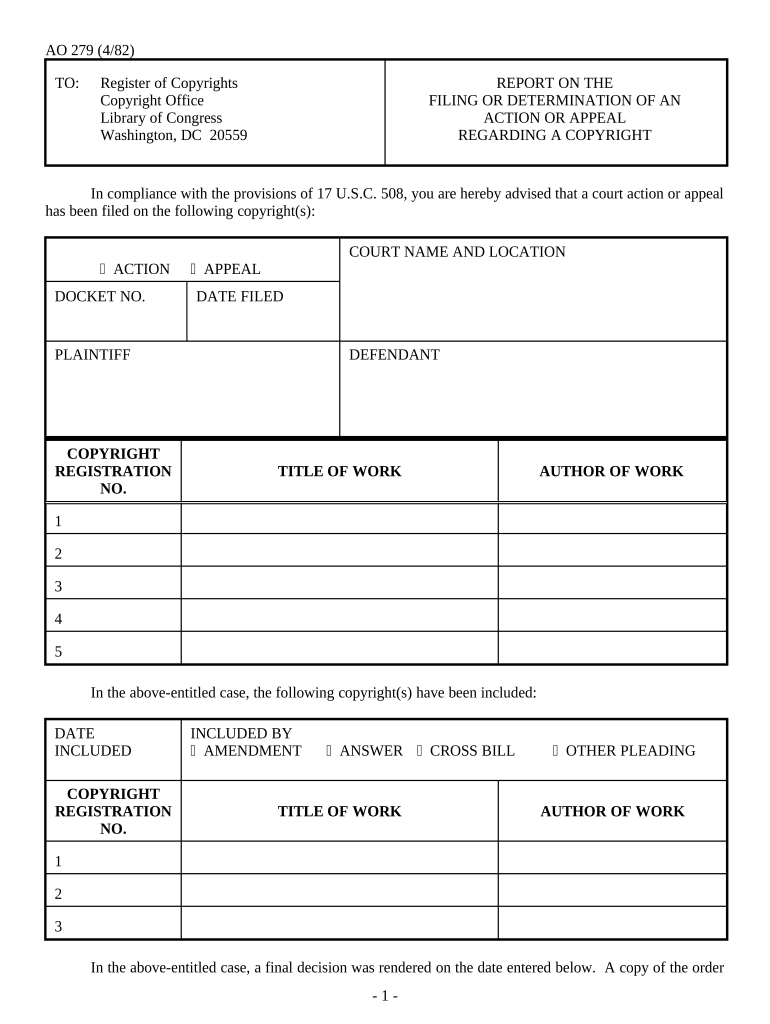
Report on the Filing or Determination of an Action or Appeal Regarding a Copyright
What this report is and when it applies
Why accurate reporting matters for copyright disputes
Timely and accurate reporting documents legal developments connected to a registration, which can affect eligibility for statutory remedies and evidentiary weight in enforcement actions. The report helps third parties, licensing partners, and registries track the status of contested works and reduces downstream administrative friction across litigation and settlement processes.
Who typically prepares and supplies this report
Common users prepare or supply this report when litigation or an appeal involves registered or pending copyrights.
- Copyright owners and their counsel who must preserve statutory remedies and notify the Register.
- Publishers, licensees, and content platforms responding to claims or updating rights records.
- Courts, clerks, and administrative agencies that receive and process the reported case details.
Smaller creators may use templates with legal review, while large organizations integrate reporting into compliance workflows.
Representative signers and preparers
Brian Fitzgibbons, COO
At Optica Ventures, the COO uses standardized reports to ensure litigation and registration records match. Centralized workflows reduce manual follow-up with registries, streamline counsel coordination, and preserve documentation necessary to support statutory damage calculations during enforcement.
Tim Martin, Founder
A property firm's founder standardized reporting to reduce administrative delays when marketing disputes escalated to litigation. Integrating signed reports into transaction files improved transparency for brokers and minimized operational interruptions while preserving evidence for licensing or settlement negotiations.
Step-by-step: completing and submitting the report
-
01Gather documents: Collect complaint, registration, and certified judgments before starting.
-
02Complete fields: Enter case identifiers, parties, dates, and disposition information carefully.
-
03Attach evidence: Attach certified pleadings and supporting exhibits in PDF format.
-
04Sign and submit: Obtain authorized signature, then submit per receiving office rules.
Recommended online workflow settings for electronic filing
| Field | Configuration |
|---|---|
| Case Number | Auto-validate against registration or docket format to prevent typographical errors. |
| Dates | Use MM/DD/YYYY with a date picker to ensure consistent formatting. |
| Signatures | Enable eSignature, request signer authentication, and require a completion certificate. |
| Attachments | Require searchable PDF attachments and configure size limits and naming conventions. |
How electronic submission typically operates
-
Upload: Upload the completed report and supporting PDFs.
-
Place Fields: Add signature, date, and initials fields where required.
-
Authenticate: Choose signer verification method (email, SMS, or KBA).
-
Send: Route to signers and record the audit trail.
Technical considerations for eSubmission and signing
For electronic submission, ensure the platform supports secure signing, multi-factor authentication, and an unalterable audit trail.
- Formats: Supports PDF, DOCX, and PDF/A
- Authentication: Email, SMS, or advanced KBA
- Audit Trail: Timestamps, IP, action history included
eSignature vendor pricing and feature snapshot relevant to this report
| signNow | DocuSign | Adobe Sign | PandaDoc | HelloSign | |
|---|---|---|---|---|---|
| Starting Price | $8/user/mo | $15/user/mo | $14/user/mo | $19/user/mo | $15/user/mo |
| Free Trial | 7-day trial | Varies | Varies | Varies | Varies |
| Bulk Send | Yes | Yes | Yes | Yes | No |
| Audit Trail | Yes | Yes | Yes | Yes | Yes |
| HIPAA Compliant | Yes | Yes | Yes | No | No |
Consequences and risks of incorrect or late reporting
Common mistakes that delay processing
- Using an incorrect registration number or referencing the wrong deposit copy can delay processing and undermine the reported claim.
- Entering inconsistent party names between the report and court filings leads to administrative confusion and may require amended reports or additional filings.
- Skipping required disposition details — such as judgment date, settlement terms, or appeal outcome — reduces the report’s usefulness and may trigger requests for clarification.
- Failing to attach a certified copy of the judgment, settlement, or complaint commonly triggers requests for supplemental documentation and slows finalization.
Practical best practices for accurate, efficient completion
Real-world examples of report use
Optica Ventures
Optica Ventures used the report process to record litigation tied to content licensing and to align registration status with court filings.
- Process improved filing accuracy and speed.
- By consolidating case metadata, attaching certified pleadings, and maintaining an auditable record, the organization reduced requests for supplemental information and ensured public records reflected current litigation status without repeated clerk follow-ups.
Martin Properties
A real estate firm used the report to document a copyright dispute over marketing materials and to synchronize agency records with court dockets.
- Reduced administrative backlog and delays.
- Centralized reporting and signed attachments allowed faster verification by opposing counsel and internal compliance teams, reducing turnaround time for settlement discussions and preserving audit evidence for future licensing negotiations.
Timelines, filing windows, and processing expectations
Initial Filing:
Submit when the action or appeal is filed with a court
Disposition Update:
Report final judgment, settlement, or dismissal within 30 days
Appeal Status:
Update when notice of appeal is filed or decided
Amendments:
File corrected report promptly after discovering errors
Processing Time:
Agency acknowledgment often within 2–6 weeks
Key milestones from filing through final disposition
Filing Occurs
Case filed in court; obtain docket number and date.
Serve Parties
Service completed and proof available for attachments.
Report Submitted
Submit report with attachments to the receiving office.
Final Update
Report judgment, settlement, or appeal outcome promptly.
Frequently asked questions and troubleshooting
-
When must the report be filed or updated?
File the report when a civil action or appeal involving the copyrighted work is filed or when there is a final disposition to report. Timely updates after judgments or settlements reduce administrative follow-ups and help preserve evidentiary records for enforcement.
-
Are electronic signatures valid for this report?
Yes. Electronic signatures are generally valid under the ESIGN Act and UETA where adopted, provided the signer demonstrates intent, consents to electronic records, and the platform retains a reproducible record of the transaction. Verify agency acceptance for specific forms.
-
Can I correct or amend a submitted report?
If you discover an error, submit an amended or corrected report per the receiving office’s instructions. Include the corrected fields, a brief explanation, and any supporting documents; retain originals and maintain a clear audit trail to document changes.
-
What supporting documents should be attached?
Attach certified pleadings, the complaint, judgment or settlement documents, and evidence of registration or deposit where applicable. Clear labeling and searchable PDF formats reduce processing delays; missing attachments are a common cause of supplemental document requests.
-
Who has authority to sign the report?
An authorized representative or counsel for the party identified in the report must sign. For organizations, use an officer or an individual with signing authority; inconsistent or unsigned reports risk administrative rejection or requests for confirmation.
-
Are notarization or witness signatures required?
Most agencies do not require notarization for this report, but state rules for related instruments may vary. If a notary or witnesses are required by jurisdiction or accompanying documents, follow the local notary commission rules or court directions.