Establishing secure connection… Loading editor… Preparing document…
Navigation

Fill and Sign the Fillable Online Phone Number 6 Fax Email Print pdfFiller Form
Fill and Sign the Fillable Online Phone Number 6 Fax Email Print pdfFiller Form

How it works

Open the document and fill out all its fields.
Apply your legally-binding eSignature.
Save and invite other recipients to sign it.

Rate template

4.4
39 votes
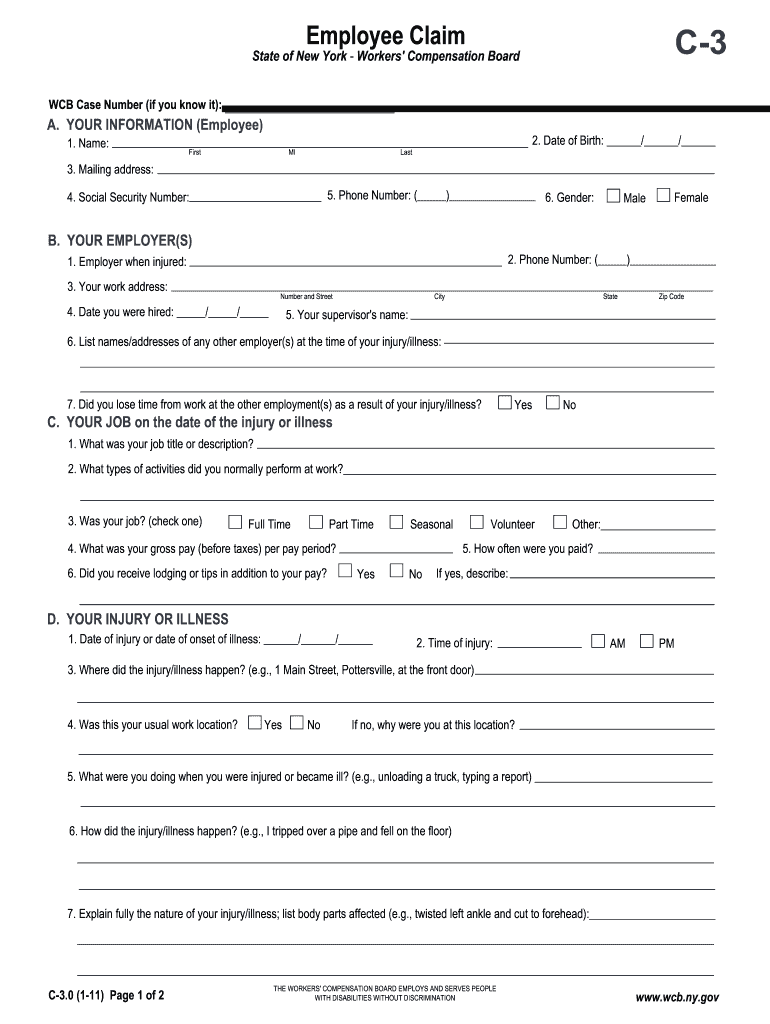
Employee Claim State of New York - Workers' Compensation Board THE WORKERS' COMPENSATION BOARD EMPLOYS AND SERVES PEOPLE WITH DISABILITIES WITHOUT DISCRIMINATION C-3 Number and Street \ City State \ Zip Code B. YOUR EMPLOYER(S) 1. Employer when injured: 3. Your work address: 6. List names/addresses of any other employer(s) at the time of your i\ njury/illness: 7. Did you lose time from work at the other employment(s) as a result \ of your injury/illness? No Yes Female A. YOUR INFORMATION (Employee) 1. Name: 3. Mailing address: 4. Social Security Number: 6. Gender: Male C. YOUR JOB on the date of the injury or illness 1. What was your job title or description? 2. What types of activities did you normally perform at work?__________\ _______________________________________________________ 3. Was your job? (check one) Full Time Part Time Seasonal Volunteer Other:____________________ 4. What was your gross pay (before taxes) per pay period? 5. How often were you paid? Yes 6. Did you receive lodging or tips in addition to your pay? If yes, describe: No D. YOUR INJURY OR ILLNESS 3. Where did the injury/illness happen? (e.g., 1 Main Street, Pottersvi\ lle, at the front door) If no, why were you at this location? No Yes 4. Was this your usual work location? 5. What were you doing when you were injured or became ill? (e.g., unlo\ ading a truck, typing a report) _______________________________ WCB Case Number (if you know it): Fill out this form to apply for workers' compensation benefits because o\ f a work injury RUZRUNUHODWHGLOOQHVV7\SHRUprint neatly. This form may also be filled out on-line at www.wcb.ny.gov. Number and Street/PO Box/Apartment No. City \ State Zip Code 7. Will you need a translator if you have to attend a Board hearing? Yes No If yes, for what language? 6. How did the injury/illness happen? (e.g., I tripped over a pipe and \ fell on the floor) 7. Explain fully the nature of your injury/illness; list body parts aff\ ected (e.g., twisted left ankle and cut to forehead):______________________ First MI \ Last 5. Your supervisor's name: 2. Date of Birth: ______/______/______ 5. Phone Number: (_____)_______________ 2. Phone Number: (_____)_______________ 4. Date you were hired: _____/_____/_____ 1. Date of injury or date of onset of illness: ______/______/______ AM PM 2. Time of injury: www.wcb.ny.gov C-3.0 (1-11) Page 1 of 2 - - No No D. YOUR INJURY OR ILLNESS continued If yes, what? No Yes 8. Was an object (e.g., forklift, hammer, acid) involved in the injur\ y/illness? 9. Was the injury the result of the use or operation of a licensed moto\ r vehicle? If yes, your vehicle employer's vehicle other vehicle License plate number (if known): If your vehicle was involved, give name and address of your motor vehic\ le insurance carrier: 10. Have you given your employer (or supervisor) notice of injury/ill\ ness? in writing orally If yes, notice was given to: ____________________________________ 11. Did anyone see your injury happen? If yes, list names:________________________________________ F. MEDICAL TREATMENT FOR THIS INJURY OR ILLNESS None received (skip to question F-5) 3. Where did you receive your first off site medical treatment for your \ injury/illness? none received Doctor's office Emergency Room Clinic/Hospital/Urgent Care Hospital Stay over 24 hours Name and address where you were first treated: 4. Are you still being treated for this injury/illness? Give the name and address of the doctor(s) treating you for this injur\ y/illness: 5. Do you remember having another injury to the same body part or a simi\ lar illness? 6. Was the previous injury/illness work related? If yes, were you working for the same employer that you work for now? No Yes No Yes Yes No Yes No Yes No Yes Yes An individual may sign on behalf of the employee only if he or she is le\ gally authorized to do so and the employee is a minor, mentally incompetent or incapacitated. I am hereby making a claim for benefits under the Workers' Compensation \ Law. My signature affirms that the information I am providing is true and accurate to the best of my knowledge and belief. Employee's Signature: Print Name: On behalf of Employee: Print Name: If yes, were you treated by a doctor? No Yes If yes, provide the names and addresses of the doctor(s) who treate\ d you and COMPLETE AND FILE FORM C-3.3 TOGETHER WITH THIS FORM: Any person who knowingly and with INTENT TO DEFRAUD presents, causes to \ be presented, or prepares with knowledge or belief that it will be presented to, or by an insurer, or self-insurer, any information\ containing any FALSE MATERIAL STATEMENT or conceals an y material fact, SHALL BE GUILTY OF A CRIME and subject to substantial FIN\ ES AND IMPRISONMENT. YOUR NAME:________________________________________________ DATE OF INJURY/ILLNESS: ______/______/______ Date notice given: _____/_____/_____ limited duty E. RETURN TO WORK 1. Did you stop work because of your injury/illness?2. Have you returned to work? regular duty 3. If you have returned to work, who are you working for now? Same employer New employer Self employed 4. What is your gross pay (before taxes) per pay period? How often are you paid? No Yes No Yes , on what date? _____/_____/_____ , skip to Section \ F. If yes, on what date? _____/_____/_____ Date: _____/_____/_____ Date: _____/_____/_____ 1. What was the date of your first treatment? ______/______/______ 2. Were you treated on site? Yes No Phone Number: (_____)_______________Phone Number: (_____)_______________ Unknown First MI \ Last C-3.0 (1-11) Page 2 of 2 I certify to the best of my knowledge, information and belief, formed af\ ter an inquiry reasonable under the circumstances, that the allegations and other factual matters asserted above have evidentiary support, or are likely to have e\ videntiary support after a reasonable opportunity for further investigations or discovery. Signature of Attorney/Representative (if any): Print Name: Title: ID No., if any: R Date: _______/_______/_______ If Licensed Representative, License No.: Expiration Date: _______/_______/_______ www.wcb.ny.gov C-3.3 (12-09) Limited Release of Health Information (HIPAA) State of New York - Workers' Compensation Board C-3.3 WCB Case No. (if you know it):___________________________ To Claimant: If you received treatment for a previous injury to the same body part or for an illness similar to the one descr\ ibed in your current Claim, fill out this form. This form allows the health care providers yo\ u list below to release health care information about your previous injury/ illness to your employer's workers' compensation insurer. The federal HI\ PAA law (Health Insurance Portability and Accountabilit y Act of 1996) says you have a right to get a copy of this form. If you do not understa\ nd this form, talk to your legal representative. If you do not have a legal representative, the Advocate for Injured Workers at the Workers' Compens\ ation Board can help you. Call: 800-580-6665. To Health Care Provider: A copy of this HIPAA-compliant release allows you to disclose health informati\ on. If you send records to the employer's workers' compensation insurer in response to this release, al\ so mail copies to the Claimant's legal representative. (If no legal representative is listed below, send copies to the Claimant.) Health ca\ re providers who release records must follow New York st ate law and HIPAA. This release is: Voluntary. Your health care provider(s) must give you the same care,payment terms, and benefits, whether you sign this form or not. Limited. It gives your health care provider(s) permission to release only those health records that are related to the previous illness/condition \ you describe below. Temporary. It ends when your current claim for compensation is established or disallowed and all appeals are exhausted. Revocable. You can cancel this release at any time. To cancel, send a letter to the health care provider(s) listed on this form. Also, send a copy \ of your letter to your employer's workers' compensation insurer and the Workers'\ Compensation Board. Note: You may not cancel this release with respect to medical records already provided. For records only. It gives your health care provider(s) listed on this form permission to send copies of your health care records to your employer's\ workers' compensation insurer. This form does NOT allow your health care provider(s) to release the following types of information: HIV-related information Psychotherapy notes Alcohol/Drug treatment Mental Health treatment (unless you check below) Verbal information (your health care providers maynot discuss your health care information with anyone) Any medical records released will become part of your workers' compensa\ tion file and are confidential under the Workers' Compensation Law. A. YOUR INFORMATION (Claimant) 1. Name:________________________________________________________________\ __ 2. Social Security Number:______-_____-______ 3. Mailing Address: ______________________________________________\ ___________________________________________________ 4. Date of Birth: ______/______/______ 5. Date of the current i\ njury/illness: ______/_______/_______ 6. Current injury/illness, including all body parts injured:______\ _______________________________________________________________ _____________________________________________________________\ _________________________________________________ 7. Your legal representative's name and address (if any):______\ _____________________________________________________________ ____________________________________________________________\ __________________________________________________ Check here if you allow your health care provider(s) to release mental health care information. B. YOUR HEALTH CARE PROVIDER(S) (List all health care providers who treated you for a previous injury to the same body part or similar illness. If more than 2 providers attach their contact information to t\ his form.) 1. Provider:__________________________________________________________\ ________ 2. Phone Number: (______)_______________ 3. Mailing Address: _____________________________________________\ ____________________________________________________ 4. Other provider (if any):____________________________________\ ___________________ 5. Phone Number: (______)_______________ 6. Mailing Address:______________________________________________\ ___________________________________________________ C. READ AND SIGN BELOW. I hereby request that the health care provider(s) listed above give \ my employer's workers' compensation insurer copies of all health records related to any previous injury/illn\ ess, to all body parts, described above. _____________________________________________________________\ _______________________________________________ If the claimant is unable to sign, the person signing on his/her behalf must fill out and sign below: _____________________________________________________________\ _________________________________________________ Claimant's signature (ink only -- use blue ballpoint pen, if possible.)\ Date Your name Relationship to Claimant \ Signature (ink only -- use blue ballpoint pen, if possible.) Date Versión en español al reverso de la forma. www.wcb.ny.gov C-3.3 (12-09) WCB Case No. (if you know it) (Número de caso WCB [si lo sabe]) Divulgación limitada de información sobre la salud (HIPAA) Estado de NuevaYork - Junta de Compensación Obrera (WCB) C-3.3 Al reclamante: Si usted recibió tratamiento por una lesión anterior en la misma p\ arte del cuerpo o por una enfermedad similar a la que motiva ahora su reclamación, complete este formulario. Este formulario les p\ ermite a los proveedores de salud que usted señala a continuación divulgar a la compañía de seguros de compensación obrera de su empleador\ la información sobre su salud relacionada con su lesión/enfermedad anterior. La Ley federal HIPAA (Ley de portabilidad y responsabilidad d\ el seguro de salud de 1996) establece que usted tiene derecho a recibir una copia de este formulario. Si no comprende este formulario, hable con\ su representante legal. Si no tiene un representante legal, el Representante de los obreros lesionados de la Junta de Compensación O\ brera puede ayudarlo. Llame al 800-580-6665. Al proveedor de salud: Una copia de esta divulgación, redactada según lo que establece la ley HIPAA\ , le permite divulgar información sobre la salud. Si envía los registros al asegurador de compensación obrera\ del empleador en respuesta a la presente divulgación, también debe enviar por correo copias al representante legal del reclamante. (Si a continua\ ción no se especifica un representante legal, envíe las copias al reclamante). Los proveedores de salud que divulgan los registros deben \ cumplir con las leyes del estado de Nueva York y la HIPAA. Esta divulgación es: Voluntaria. Su(s) proveedor(es) de salud deben otorgarle la misma atención, condiciones de pago y beneficios, independientemente de que\ usted firme este formulario o no. Limitada. Le otorga a su(s) proveedor(es) de salud permiso para divulgar únicamente los registros médicos que se relacionen con la enfermed\ ad/ afección anterior que usted describe a continuación. Temporal. Termina cuando se otorgue o desestime su actual reclamación de compensación y se hayan agotado todas las apelaciones. Revocable. Usted puede cancelar esta divulgación en cualquier momento. Para hacerlo, envíe una carta al (a los) proveedor(es) de salud q\ ue se indican en este formulario. Además, envíe una copia de su carta a \ la compañía de seguros de compensación obrera de su empleador y a \ la Junta de Compensación Obrera. Nota: No podrá cancelar esta divulgación en lo que se refiere a registros médicos que ya se hayan provisto. Solamente para registros. Le otorga a su(s) proveedor(es) de salud que se indica(n) en este formulario permiso para enviar copias de sus registr\ os de salud a la compañía de seguros de compensación obrera de su emp\ leador. Este formulario NO autoriza a su(s) proveedor(es) de salud a divulgar los siguientes tipos de información: Información relacionada con el VIH Notas de terapia psicológica Tratamientos por abuso de alcohol o drogas Tratamiento de salud mental (a menos que usted lo indique a continuación) Información verbal (sus doctores no pueden hablar con nadie sobre su información de salud) Los registros médicos divulgados se incorporarán a su expediente d\ e compensación obrera y son confidenciales conforme a la Ley de compensación obrera. A. YOUR INFORMATION (Claimant) INFORMACIÓN PERSONAL (Reclamante\ ) 1. Name (Nombre) \ 2. Social Security Number (Número de seguro social) 3. Mailing Address (Dirección postal) 4. Date of Birth (Fecha de nacimiento) \ 5. Date of the current injury/illness (Fecha de la lesión/enfermedad actual) 6. Current injury/illness, including all body parts injured (Desc\ ripción de la lesión/enfermedad actual, incluyendo todas las partes del cuerpo lesionadas) 7. Your legal representative's name and address (if any) (Nom\ bre y dirección de su representante legal [si corresponde]) Check here if you allow your health provider(s) to release mental health care information. (Marque aquí si autoriza a su(s) proveedor(es) de\ salud a divulgar información sobre tratamientos de salud mental.) B. YOUR HEALTH CARE PROVIDERS (List all health care providers who treated you for a previous injury to the same body part or similar illness. If more than 2 providers, attach their contact information to \ this form. SU(S) PROVEEDOR(ES) DE SALUD (Enumere todos los proveedores de salud que le han tratado por lesiones\ previas a las mismas areas del cuerpo ó por enfermedades semejantes.Si son más de 2 pro\ veedores, adjunte su información de contacto a este formulario.) 1. Provider (Proveedor de salud) 2. Phone \ Number (N o de teléfono) 3. Mailing Address (Dirección postal) 4. Other provider (if any) (Otro proveedor [si corresponde]) \ 5. Phone Number (N o de teléfono) 6. Mailing Adress (Dirección postal) C . READ AND SIGN BELOW I hereby request that the health care provider(s) listed above give my\ employer's workers' compensation insurer copies of all health records related to any previous injury/illn\ ess, to all body parts, described above. LEA Y FIRME A CONTINUACIÓN. Por la presente solicito que los proveedores de salud aquí enumerados\ le provean al asegurador de compensación obrera de mi patrono copias de todos los records médicos relacionados\ a cualquier lesión/enfermedad aquí enumeradas. If the claimant is unable to sign, the person signing on his/her behalf must fill out and sign below: ( Si el reclamante no puede firmar, la persona que firme el formulario en su nombre y representación debe ll\ enar y firmar a continuación) Claimant's signature (Firma del reclamante ) use solo tinta - preferib\ lemente azul Date (Fecha) Your name (Su nombre) Relationship to Claimant (Relación co\ n el reclamante) Signature(Firma) Date(Fecha) CONTESTA LAS SIGUIENTES PREGUNTAS, EN INGLÉS SI ES POSIBLE, EN LOS ES\ PACIOS PROVISTOS Y FIRMA AL FRENTE DE LA FORMA. xxxxxxxxxxxxxxxxxxxxxxxxxxxxxxxxxxxxxxxxxxxxxxxxxxxxxxxxxxxxxxxxxxxxxxx\ xxxxxxxxxxxxxxxxxxxxxxxxxxxxxxxxxxx xxxxxxxxxxxxxxxxxxxxxxxxxxxxxxxxxxxxxxxxxxxxxxxxxxxxxxxxxxxxxxxxxxxxxxx\ xxxxxxxxxxxxxxxxxxxxxxxxxxxxxxxxxxx C‐3.0 (1‐11)  Instructions for Completing Employee Claim (Form C-3) Please complete this form and send it to the Workers' Compensation Board centralized mailing address listed at the end of these instructions. If you need additional help completing this form, contact the Workers' Compensation Board at 1-877-632-4996. You may also fill this form out online at wcb.ny.gov. If you do not have or know your Workers' Compensation Board Case Number, please leave this field blank. It is not required to process your claim. Remember to enter your name and the date of your injury/illness on the top of page two. Section A - Your Information (Employee): In Section A, enter your name, address and other requested information. Note on Item 7: Board hearings are conducted in English. If you need a translator, select Yes and indicate the language needed. Notification Pursuant to the New York Personal Privacy Protection Law (Public Officers Law Article 6-A) and the Federal Privacy Act of 1974 (5 U.S.C. § 552a). The Workers' Compensation Board's (Board’s) authority to request that claimants provide personal information, including their social security number, is derived from the Board’s investigatory authority under Workers' Compensation Law (WCL) § 20, and its administrative authority under WCL § 142. This information is collected to assist the Board in investigating and administering claims in the most expedient manner possible and to help it maintain accurate claim records. Providing your social security number to the Board is voluntary. There is no penalty for failure to provide your social security number on this form; it will not result in a denial of your claim or a reduction in benefits. The Board will protect the confidentiality of all personal information in its possession, disclosing it only in furtherance of its official duties and in accordance with applicable state and federal law. Section B - Your Employer(s): In Section B, enter the name, address, phone number and other information of the employer you were working for at the time of the injury/illness. Note: Your employer is the company or agency that issues your paycheck. If you are a contractor at a work site or office, the staffing agency or vendor who hired you is your employer, not the work site or office where you report to work. Section C - Your Job on the Date of the Injury or Illness: In Section C, enter your job title, work activities and pay information. Section D - Your Injury or Illness: In Section D, enter your injury or illness information. Item 1: Enter the date you were injured or the first date you noticed you became ill. If this is an illness or occupational disease, skip item 2. The date you were injured must be in month/day/year format. The year should be written as four digits, e.g., 2015. Item 2: Enter the time when the injury occurred. Check whether it was AM or PM. Item 3: Indicate the location where the injury/illness occurred, including the address of the building and the physical location in the building where the injury/illness happened. Item 4: Check whether this was your normal work location. If it was not, explain why you were at this location. Item 5: Describe in detail what you were doing at the time of the injury/illness (e.g., unloading boxes from a truck by hand). This explains the events leading up to the injury. Item 6: Describe in detail how the injury/illness occurred (e.g., I was lifting a heavy box off a truck). This should include all people and events involved in the injury/illness. Item 7: Indicate fully the nature and extent of your injury/illness, including all body parts injured. Be as specific as possible (e.g., I strained my back trying to lift a heavy box. It hurts to bend over or hold even lighter objects now). Item 8: Indicate if some object was involved in the accident other than a licensed motor vehicle. Other objects may include a tool (e.g., hammer), a chemical (e.g., acid), machinery (e.g., forklift or drill press), etc. Item 9: Indicate if a licensed motor vehicle was involved in the accident. If so, check if the motor vehicle involved was yours, your employer's, or a third party's. Include the license plate number (if known). If your vehicle was involved, fill out the name and address of your automobile liability insurance carrier. Item 10: Check if you gave your employer or supervisor notice of your injury or illness. If so, indicate who you gave notice to as well as if it was orally or in writing. Include the date you gave notice. Item 11: Check if anyone else saw the injury happen. If anyone did see it, include their name(s). Section E - Return to Work: Item 1: If you stopped working as a result of your work-related injury/illness, check Yes and indicate the date you stopped working. If you have not stopped working, check No and skip to the next section. Item 2: If you have since returned to work, check Yes. Also indicate on what date you started working again, as well as if you have returned to your Normal Duties or if you are on Limited or Restricted Duty. (If you have not returned to your full pre-injury or illness work duties, then you are on Limited Duty.) Item 3: If you have returned to work, indicate who you are working for now. Item 4: Enter your gross pay (before tax pay) per pay period for the job you are working at now. Indicate how often you are receiving a paycheck (weekly, bi-weekly, etc.). C‐3.0 (1‐11)  Section F - Medical Treatment for This Injury or Illness: Item 1: If you did not receive medical treatment for this injury/illness, check None Received and skip to item 5. Otherwise, enter the date you first received treatment for this injury/illness and complete the rest of this section. Item 2: Check if you were first treated on the job for this injury or illness. Item 3: Check the location where you first received off site medical treatment for your injury or illness. Include the name and address of the facility as well as the phone number (including area code). Item 4: If you are still receiving ongoing treatment for the same injury or illness, check Yes and indicate the name and address of the doctor(s) providing treatment as well as the phone number (including area code); otherwise, check No. Item 5: If you believe you already had an injury to the same body part or a similar illness, check Yes and indicate if you were treated by a doctor for this injury or illness. If you were treated by a doctor, indicate the name(s) and address(es) of the doctor(s) whom provided care and complete and file Form C-3.3 together with this form. Item 6: If you had a previous injury or illness, check if your previous injury or illness was work-related. If Yes, check if the injury or illness happened while working for your current employer. Sign Form C-3 in the place provided for Employee's Signature on page 2, print your name, and enter the date you signed the form. If a third-party is signing on behalf of the employee, that person should sign on the second signature line. If you have legal representation, your representative must complete and sign the attorney/representative's certification section on the bottom of page 2. What Every Worker Should Do in Case of On-The-Job Injury or Occupational Disease: 1. Immediately tell your employer or supervisor when, where and how you were injured. 2. Secure medical care immediately. 3. Tell your doctor to file medical reports with the Board and with your employer or its insurance carrier. 4. Make out this claim for compensation and send it to the nearest Workers' Compensation Board Office. (See below.) Failure to file within two years after the date of injury may result in your claim being denied. If you need help in completing this form, telephone or visit the nearest Workers' Compensation Board Office listed below. 5. Go to all hearings when notified to appear. 6. Go back to work as soon as you are able; compensation is never as high as your wage. Your Rights: 1. Generally, you are entitled to be treated by a doctor of your choice, provided he/she is authorized by the Board. If your employer is involved in a preferred provider organization (PPO) arrangement, you must obtain initial treatment from the preferred provider organization which has been designated to provide health care services for workers' compensation injuries. 2. DO NOT pay your doctor or hospital. Their bills will be paid by the insurance carrier if your case is not disputed. If your case is disputed, the doctor or hospital must wait for payment until the Board decides your case. In the event you fail to prosecute your case or the Board decides against you, you will have to pay the doctor or hospital. 3. You are also entitled to be reimbursed for drugs, crutches, or any apparatus properly prescribed by your doctor and for carfares or other necessary expenses going to and from your doctor's office or the hospital. (Get receipts for such expenses.) 4. You are entitled to compensation if your injury keeps you from work for more than seven days, compels you to work at lower wages, or results in permanent disability to any part of your body. 5. Compensation is payable directly and without waiting for an award, except when the claim is disputed. 6. Injured workers or dependents of deceased workers may represent themselves in matters before the Board or may retain an attorney or licensed representative to represent them. If an attorney or licensed representative is retained, his/her fee for legal services will be reviewed by the Board and if approved will be paid by the employer or insurance company out of any compensation benefits due. Injured workers or dependents of deceased workers should not directly pay anything to the attorney or licensed representative representing them in a compensation case. 7. If you need help returning to work, or with family or financial problems because of your injury, contact the Workers' Compensation Board office nearest you and ask for a rehabilitation counselor or social worker. This form should be filed by sending directly to the address listed below: New York State Workers' Compensation Board Centralized Mailing PO Box 5205 Binghamton, NY 13902-5205 Customer Service Toll-Free Number: 877-632-4996

Useful Advice for Completing Your ‘Fillable Online Phone Number 6 Fax Email Print Pdffiller’ Online

Are you fed up with the troubles of managing paperwork? Look no further than airSlate SignNow, the leading eSignature solution for individuals and small to medium-sized businesses. Bid farewell to the lengthy process of printing and scanning documents. With airSlate SignNow, you can effortlessly finalize and authorize paperwork online. Take advantage of the powerful features packed into this user-friendly and cost-effective platform and transform your method of document management. Whether you need to approve forms or gather eSignatures, airSlate SignNow manages it all with ease, requiring only a few clicks.

Adhere to this comprehensive guide:

  1. Sign in to your account or initiate a free trial with our service.
  2. Click +Create to upload a file from your device, cloud storage, or our form collection.
  3. Open your ‘Fillable Online Phone Number 6 Fax Email Print Pdffiller’ in the editor.
  4. Click Me (Fill Out Now) to finalize the document on your end.
  5. Add and designate fillable fields for others (if needed).
  6. Continue with the Send Invite settings to solicit eSignatures from others.
  7. Download, print your copy, or convert it into a reusable template.

Don’t be concerned if you need to collaborate with your team on your Fillable Online Phone Number 6 Fax Email Print Pdffiller or send it for notarization—our platform provides you with everything necessary to achieve such tasks. Register with airSlate SignNow today and elevate your document management to new heights!

Here is a list of the most common customer questions. If you can’t find an answer to your question, please don’t hesitate to reach out to us.

Need help? Contact Support
Fillable online phone number 6 fax email print signNow free
PDF filler
Fillable PDF template
Create fillable PDF forms free
Fillable PDF free
Edit fillable PDF
Fillable Document
Fillable form PDF download
Fillable online phone number 6 fax email print signNow free
Fillable PDF creator Canva
Fillable document
Sejda fillable PDF

The best way to complete and sign your fillable online phone number 6 fax email print pdffiller form


Save time on document management with airSlate SignNow and get your fillable online phone number 6 fax email print pdffiller form eSigned quickly from anywhere with our fully compliant eSignature tool.

How to Sign a PDF Online How to Sign a PDF Online

How to complete and sign paperwork online

In the past, working with paperwork required pretty much time and effort. But with airSlate SignNow, document management is fast and easy. Our robust and user-friendly eSignature solution lets you effortlessly fill out and electronically sign your fillable online phone number 6 fax email print pdffiller form online from any internet-connected device.

Follow the step-by-step guidelines to eSign your fillable online phone number 6 fax email print pdffiller form template online:

  • 1.Register for a free trial with airSlate SignNow or log in to your account with password credentials or SSO authentication.
  • 2.Click Upload or Create and import a file for eSigning from your device, the cloud, or our form collection.
  • 3.Click on the document name to open it in the editor and utilize the left-side menu to complete all the empty fields appropriately.
  • 4.Place the My Signature field where you need to eSign your form. Type your name, draw, or upload an image of your regular signature.
  • 5.Click Save and Close to finish editing your completed form.

As soon as your fillable online phone number 6 fax email print pdffiller form template is ready, download it to your device, save it to the cloud, or invite other parties to eSign it. With airSlate SignNow, the eSigning process only requires a few clicks. Use our robust eSignature solution wherever you are to manage your paperwork effectively!


How to Sign a PDF Using Google Chrome How to Sign a PDF Using Google Chrome

How to fill out and sign documents in Google Chrome

Completing and signing documents is simple with the airSlate SignNow extension for Google Chrome. Adding it to your browser is a quick and efficient way to deal with your paperwork online. Sign your fillable online phone number 6 fax email print pdffiller form template with a legally-binding eSignature in a few clicks without switching between tools and tabs.

Follow the step-by-step guidelines to eSign your fillable online phone number 6 fax email print pdffiller form in Google Chrome:

  • 1.Go to the Chrome Web Store, search for the airSlate SignNow extension for Chrome, and install it to your browser.
  • 2.Right-click on the link to a document you need to eSign and select Open in airSlate SignNow.
  • 3.Log in to your account with your password or Google/Facebook sign-in buttons. If you don’t have one, you can start a free trial.
  • 4.Utilize the Edit & Sign menu on the left to complete your sample, then drag and drop the My Signature field.
  • 5.Add a photo of your handwritten signature, draw it, or simply enter your full name to eSign.
  • 6.Make sure all data is correct and click Save and Close to finish editing your form.

Now, you can save your fillable online phone number 6 fax email print pdffiller form template to your device or cloud storage, send the copy to other individuals, or invite them to eSign your document with an email request or a protected Signing Link. The airSlate SignNow extension for Google Chrome enhances your document processes with minimum effort and time. Try airSlate SignNow today!


How to Sign a PDF in Gmail How to Sign a PDF in Gmail How to Sign a PDF in Gmail

How to fill out and sign documents in Gmail

Every time you get an email with the fillable online phone number 6 fax email print pdffiller form for approval, there’s no need to print and scan a document or save and re-upload it to another tool. There’s a better solution if you use Gmail. Try the airSlate SignNow add-on to rapidly eSign any documents right from your inbox.

Follow the step-by-step guide to eSign your fillable online phone number 6 fax email print pdffiller form in Gmail:

  • 1.Navigate to the Google Workplace Marketplace and locate a airSlate SignNow add-on for Gmail.
  • 2.Set up the program with a related button and grant the tool access to your Google account.
  • 3.Open an email with an attachment that needs signing and utilize the S sign on the right panel to launch the add-on.
  • 4.Log in to your airSlate SignNow account. Select Send to Sign to forward the file to other people for approval or click Upload to open it in the editor.
  • 5.Put the My Signature field where you need to eSign: type, draw, or upload your signature.

This eSigning process saves efforts and only requires a few clicks. Utilize the airSlate SignNow add-on for Gmail to adjust your fillable online phone number 6 fax email print pdffiller form with fillable fields, sign documents legally, and invite other parties to eSign them al without leaving your mailbox. Improve your signature workflows now!


How to Sign a PDF on a Mobile Device How to Sign a PDF on a Mobile Device How to Sign a PDF on a Mobile Device

How to complete and sign documents in a mobile browser

Need to rapidly fill out and sign your fillable online phone number 6 fax email print pdffiller form on a smartphone while working on the go? airSlate SignNow can help without the need to set up extra software apps. Open our airSlate SignNow solution from any browser on your mobile device and add legally-binding electronic signatures on the go, 24/7.

Follow the step-by-step guide to eSign your fillable online phone number 6 fax email print pdffiller form in a browser:

  • 1.Open any browser on your device and go to the www.signnow.com
  • 2.Register for an account with a free trial or log in with your password credentials or SSO option.
  • 3.Click Upload or Create and pick a file that needs to be completed from a cloud, your device, or our form library with ready-to go templates.
  • 4.Open the form and fill out the blank fields with tools from Edit & Sign menu on the left.
  • 5.Put the My Signature field to the sample, then type in your name, draw, or add your signature.

In a few simple clicks, your fillable online phone number 6 fax email print pdffiller form is completed from wherever you are. When you're finished editing, you can save the file on your device, generate a reusable template for it, email it to other people, or invite them electronically sign it. Make your paperwork on the go speedy and productive with airSlate SignNow!


How to Sign a PDF on iPhone How to Sign a PDF on iPhone

How to complete and sign forms on iOS

In today’s corporate environment, tasks must be accomplished quickly even when you’re away from your computer. With the airSlate SignNow application, you can organize your paperwork and sign your fillable online phone number 6 fax email print pdffiller form with a legally-binding eSignature right on your iPhone or iPad. Install it on your device to conclude contracts and manage documents from anywhere 24/7.

Follow the step-by-step guide to eSign your fillable online phone number 6 fax email print pdffiller form on iOS devices:

  • 1.Open the App Store, search for the airSlate SignNow app by airSlate, and install it on your device.
  • 2.Open the application, tap Create to upload a form, and choose Myself.
  • 3.Choose Signature at the bottom toolbar and simply draw your signature with a finger or stylus to eSign the sample.
  • 4.Tap Done -> Save right after signing the sample.
  • 5.Tap Save or take advantage of the Make Template option to re-use this document in the future.

This method is so easy your fillable online phone number 6 fax email print pdffiller form is completed and signed in just a couple of taps. The airSlate SignNow app works in the cloud so all the forms on your mobile device remain in your account and are available any time you need them. Use airSlate SignNow for iOS to boost your document management and eSignature workflows!


How to Sign a PDF on Android How to Sign a PDF on Android

How to fill out and sign paperwork on Android

With airSlate SignNow, it’s easy to sign your fillable online phone number 6 fax email print pdffiller form on the go. Set up its mobile app for Android OS on your device and start boosting eSignature workflows right on your smartphone or tablet.

Follow the step-by-step guide to eSign your fillable online phone number 6 fax email print pdffiller form on Android:

  • 1.Open Google Play, search for the airSlate SignNow application from airSlate, and install it on your device.
  • 2.Log in to your account or register it with a free trial, then add a file with a ➕ key on the bottom of you screen.
  • 3.Tap on the uploaded document and select Open in Editor from the dropdown menu.
  • 4.Tap on Tools tab -> Signature, then draw or type your name to eSign the form. Fill out empty fields with other tools on the bottom if needed.
  • 5.Use the ✔ key, then tap on the Save option to finish editing.

With a user-friendly interface and total compliance with primary eSignature requirements, the airSlate SignNow application is the best tool for signing your fillable online phone number 6 fax email print pdffiller form. It even operates without internet and updates all form changes when your internet connection is restored and the tool is synced. Fill out and eSign forms, send them for approval, and create re-usable templates anytime and from anywhere with airSlate SignNow.

Sign up and try Fillable online phone number 6 fax email print pdffiller form
  • Close deals faster
  • Improve productivity
  • Delight customers
  • Increase revenue
  • Save time & money
  • Reduce payment cycles

