Document type
Clear name such as 'Form W-2', 'General ledger', or 'Bank statement' to avoid ambiguity when retrieving records.
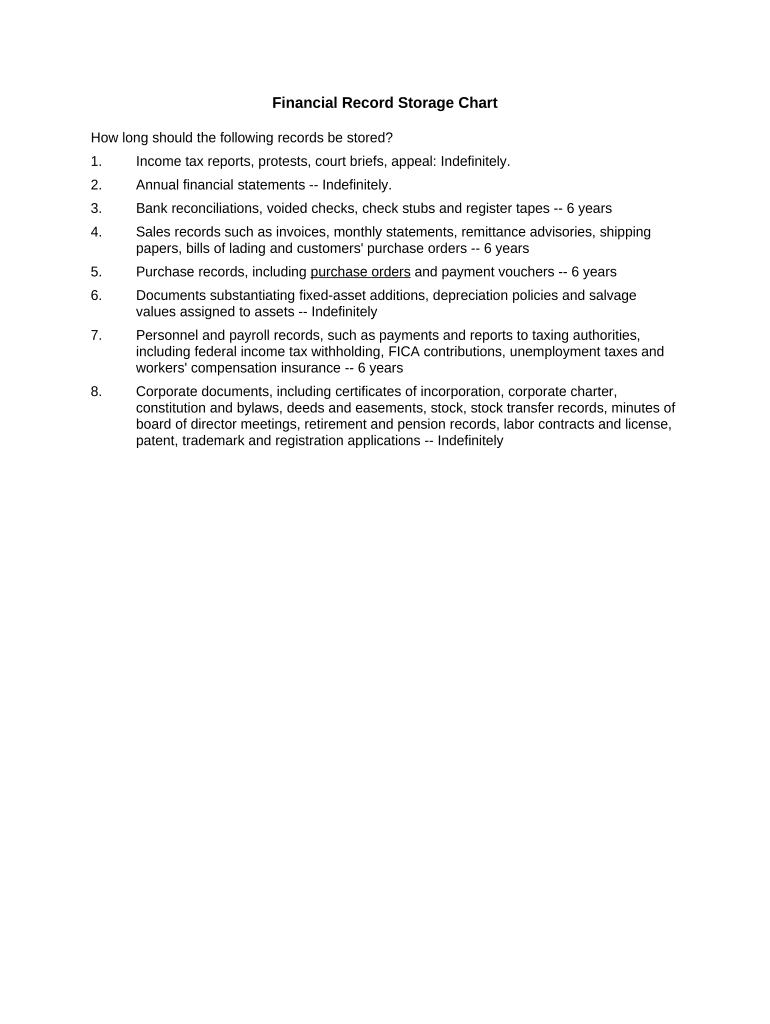
A concise chart reduces legal exposure by aligning document retention with IRS, HIPAA, SEC, and state requirements while improving operational efficiency through faster retrieval and fewer duplicative copies.

Finance, compliance, records management, and HR teams commonly create and maintain the chart to meet audits, litigation holds, and regulatory requests.
Smaller organizations may assign a single owner (controller or CFO); larger enterprises use cross-functional governance with documented review cycles.
A Records Manager or Records Officer is responsible for maintaining the chart, assigning storage locations, and coordinating retention updates. This role ensures policies map to legal citations and that access controls and audit logs are configured.
The CFO or delegated finance lead approves retention settings for tax and financial records, reviews the chart periodically, and certifies that destruction schedules align with accounting and tax reporting requirements.
Clear name such as 'Form W-2', 'General ledger', or 'Bank statement' to avoid ambiguity when retrieving records.
Exact duration expressed in years or until a triggering event, e.g., '3 years from filing' or '6 years from termination'.
Cite the regulating authority or statute such as IRC §6501(a), 45 CFR §164.530(j), or 17 CFR §240.17a-4 when applicable.
Specify onsite/offsite, cloud vendor, encrypted archive path, or folder name so custodians know where to locate originals or copies.
Define role-based permissions, MFA requirements, and audit logging to protect sensitive financial data.
Name the department or individual accountable for retention, review, and secure destruction at end of the retention period.
| Field | Configuration |
|---|---|
| Owner assignment | Automated task assigned to named custodian |
| Approval route | Two-step approval: Records Manager then CFO |
| Review cadence | Annual review with change log |
| Destruction trigger | Automated notification 60 days before scheduled destruction |
Ensure any chosen platform supports encryption, audit logs, role-based access, and reliable export formats.
For integration, prefer platforms with connectors to your ERP, cloud storage, and email systems so chart updates and record retrieval can be automated.
3 years from filing (IRC §6501(a))
6 years if substantial understatement (IRC §6501(a))
6 years from creation or last effective date (45 CFR §164.530(j))
3 years after hire or 1 year after termination, whichever is later (8 CFR §274a.2)
6 years for many books and records (17 CFR §240.17a-4)
Catalog documents and owners across departments.
Map each item to retention rules and legal citations.
Deploy chart in chosen platform and configure permissions.
Conduct annual reviews and update retention as laws change.
| signNow | DocuSign | Adobe Sign | PandaDoc | HelloSign | |
|---|---|---|---|---|---|
| Starting Price | $8/user/mo | $15/user/mo | $14/user/mo | $19/user/mo | $15/user/mo |
| Free Trial | Yes, 7-day free trial | No | No | Yes, limited | Yes, limited |
| Bulk Send | Yes (Business Premium) | Yes | Yes | Yes | No |
| Audit Trail | Yes | Yes | Yes | Yes | Yes |
| HIPAA Compliant | Yes (BAA available) | Yes | Yes | No | No |