Establishing secure connection…Loading editor…Preparing document…

Garnishment Notice

This template is fully customizable. Edit the text, fill out the fields, and send it for signature. Give it a try!
Garnishment Notice

What a Garnishment Notice Is and when it applies

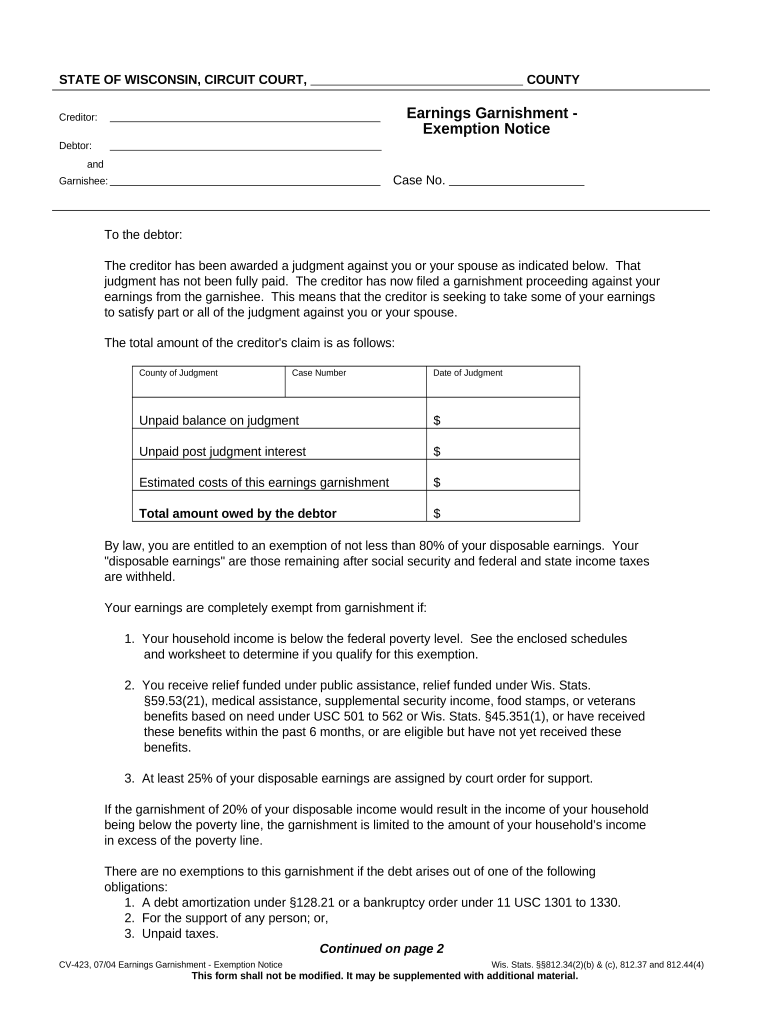
A Garnishment Notice is a formal written demand issued to an employer, bank, or third party directing them to withhold funds from a debtor's wages, bank account, or other assets and remit them to a judgment creditor or government agency. Notices typically follow a court judgment, tax assessment, or administrative order and identify the legal basis, withholding method, and remittance instructions. Precise identification of parties, case number, and calculation method is essential to avoid misapplied withholdings and to ensure enforceability.

Why an accurate Garnishment Notice matters

A clear, legally sufficient Garnishment Notice protects the creditor's collection rights, instructs third parties precisely, and reduces wrongful payments and disputes. Accurate notices minimize employer or bank liability and create an audit trail that supports enforcement and compliance.

Why an accurate Garnishment Notice matters

Primary users and stakeholders who handle Garnishment Notices

Common users include plaintiffs, collection attorneys, payroll administrators, and financial institutions responsible for withholding and remitting garnished funds.

  • Creditors and judgment holders seeking court-ordered collection through wage or bank account garnishment.
  • Employers and payroll teams required to process withholding and submit payments to the ordering authority.
  • Banks and custodians served with levies on deposit accounts must freeze and remit funds as directed.

Who signs and certifies a Garnishment Notice

Collection Attorney

A licensed attorney who obtains judgments, prepares and serves Garnishment Notices, and monitors compliance. They verify statutory prerequisites, calculate withholding amounts, coordinate filings with courts or agencies, and maintain proof of service and remittance records to support enforcement.

Payroll Manager

Responsible for implementing garnishment orders within payroll systems, calculating disposable earnings, applying priority rules for multiple garnishments, and remitting withheld amounts. Must ensure federal and state wage-law compliance to avoid employer liability and penalties.

Required data elements to include on the Garnishment Notice

Creditor: Full legal name and contact info
Debtor: Full legal name and SSN/identifier
Court/Jurisdiction: Court name and case number
Judgment Amount: Principal, interest, costs specified
Withholding Instructions: Amount, percentage, or calculation formula
Remittance Details: Where and how to send payments

Key legal risks if the Garnishment Notice is incorrect

Employer Liability: Damages and attorney fees possible
Statutory Penalties: State fines for failure to comply
Duplicate Garnishment Risk: Over-withholding creates reclaim claims
Tax Withholding Errors: Incorrect tax withholding penalties
Bank Freeze Exposure: Customer disputes and account litigation
Late Remittance: Interest or penalties by creditor

Common preparation and service mistakes to avoid

  • Failing to verify the judgment or obtain a proper court order before serving a garnishment notice, leading to invalid or unenforceable withholding.
  • Using incomplete debtor identifiers (for example, nickname or wrong SSN) that prevent correct matching of accounts and delay enforcement or cause misapplied withholdings.
  • Ignoring federal priority rules or existing garnishments, which can result in incorrect allocation of withheld wages and subsequent legal disputes among creditors.
  • Missing statutory service or notice requirements for the employer or bank, resulting in procedural defects and potential liability for the party served.

Step-by-step: prepare and serve a Garnishment Notice

Follow these steps to prepare, serve, and document a compliant Garnishment Notice to ensure enforceability and reduce processing errors.

  • 01
    Verify Judgment: Confirm court order, amount, and effective dates.
  • 02
    Complete Notice: Include creditor, debtor, calculation, and case details.
  • 03
    Serve Third Party: Deliver notice per state rules and obtain proof.
  • 04
    Record Remittance: Track payments, send receipts, and retain audit trail.

Configuring an online workflow for Garnishment Notices

Configure an online workflow to prepare, route, and archive Garnishment Notices while capturing signer authentication and remittance acknowledgements.

Field Configuration
Document Template Fillable PDF with conditional fields and calculations
Signer Authentication Email + SMS code; KBA optional
Signature Type Electronic signature with audit trail
Archival Signed PDF and audit log retained
Notifications Email and system notifications to parties

Delivery channels and technical requirements

Choose delivery and eSignature methods that comply with state law and the recipient's capabilities.

  • Accepted Formats: PDF, DOCX, or HTML formats supported
  • Integrations: Payroll, case management, cloud storage
  • Authentication: Email, SMS, KBA, or ID verification

Where to file or send a completed Garnishment Notice

Typical routing options for completed Garnishment Notices depend on the recipient and jurisdictional filing requirements.

  • To Employer: Serve payroll or HR department per state service rules.
  • To Bank: Deliver to bank's legal or levy processing unit.
  • To Court: File proof of service or return of garnishment as required.
  • To Agency: Send to tax or administrative agency with remittance instructions.

Key timelines and response expectations

Garnishment procedures include time-sensitive actions for service, employer response, and remittance; follow statutory deadlines closely.

Service Deadline:

Serve employer or bank promptly after judgment as state law requires.

Employer Response Time:

Typically 7–21 days to notify and begin withholding depending on state.

Payroll Cycle Impact:

Withholding applied in next payroll run following valid notice.

Remittance Schedule:

Remit withheld funds on dates specified by the notice or law.

Objection Window:

Debtor may object or claim exemptions within statutory period.

How federal tax levies differ from civil garnishments

Key differences between federal tax levies and state civil garnishments affect who is served, priority, and required notice procedures.

Criteria Federal Levy Civil Garnishment
Authority irs levy court judgment
Target accounts & wages wages & accounts
Notice Required final irs notice court order
Priority high priority subordinate priority

Pricing and feature snapshot for eSignature vendors used with Garnishment Notices

Quick pricing and capability overview for eSignature vendors commonly used to sign and exchange Garnishment Notices in U.S. workflows.

signNow DocuSign Adobe Sign PandaDoc HelloSign
Starting Price $8/user/mo $15/user/mo $14/user/mo $19/user/mo $15/user/mo
Free Trial 7-day free trial Varies by vendor Varies by vendor Varies by vendor Varies by vendor
Bulk Send Yes Yes Yes Yes No
Audit Trail Yes Yes Yes Yes Yes
HIPAA Compliant Yes Yes Yes No No

How to update, amend, or revoke a Garnishment Notice

Follow this procedure to update, revoke, or correct a Garnishment Notice and to notify affected parties and third parties accurately.

01

Verify Order:

Confirm court or agency permits amendment.
02

Prepare Amendment:

Create written amendment citing case number.
03

Serve Amendment:

Serve employer, bank, and debtor with proof.
04

Update Payroll:

Adjust withholding calculations immediately upon acceptance.
05

Document Retention:

Attach amendment to original notice and archive.
06

Confirm Remittance:

Reconcile payments and notify creditor of changes.

Real-world examples of digital document use for enforcement workflows

Operational examples show how organizations shift garnishment and enforcement paperwork to digital workflows to reduce turnaround and errors.

Martin Properties

Martin Properties moved notices and payroll coordination online to eliminate in-person handling and reduce processing time.

  • The team centralized templates and remittances.
  • "I can process and execute all of these documents online with 100% compliance and built-in security. Whether on mobile or working offline, I can get forms back to their necessary parties efficiently."

Optica Ventures LLC

A small litigation firm standardized garnishment templates and e-sign workflows to cut manual entry and mailing.

  • Automation reduced manual matching errors.
  • "The interface is simple and easy-to-use for our team; more importantly, it is just as easy for our customers."

Frequently asked questions about Garnishment Notices

Practical answers to common questions about preparing, serving, and processing Garnishment Notices in U.S. jurisdictions.


Need help? Contact support

be ready to get more
Join over 28 million airSlate SignNow users