Establishing secure connection…Loading editor…Preparing document…

Hudson Community Transcript Form

This template is fully customizable. Edit the text, fill out the fields, and send it for signature. Give it a try!
Hudson Community Transcript Form

What the Hudson Community Transcript Form Is and when it's used

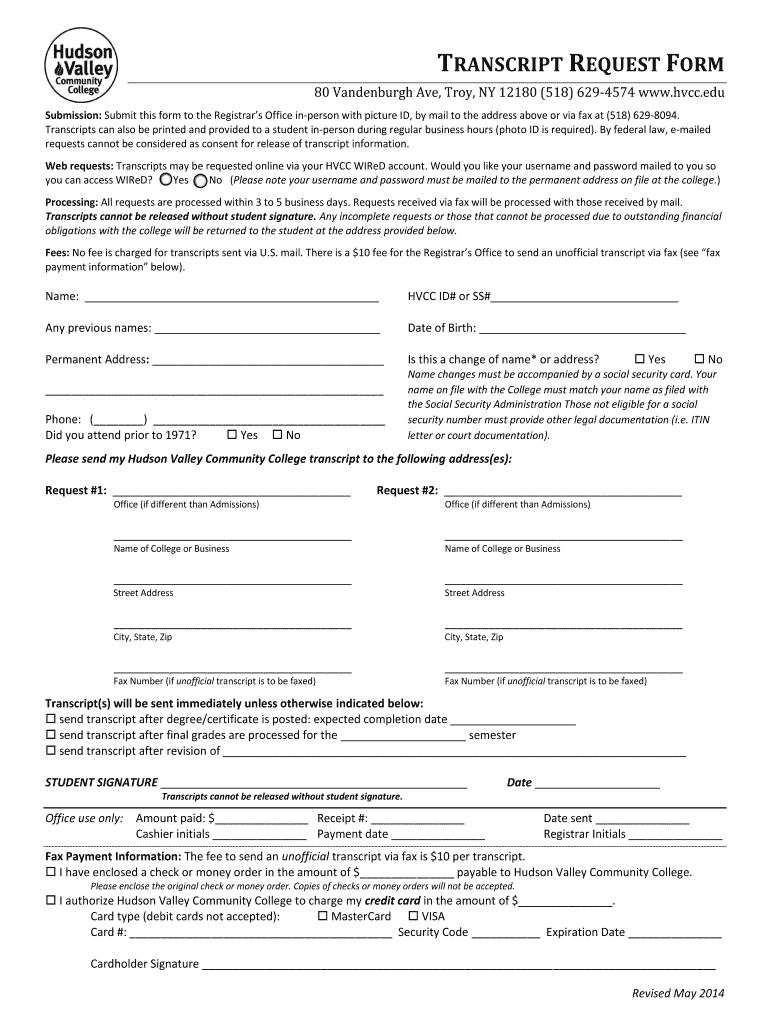
The Hudson Community Transcript Form is a standardized request used to authorize release of academic records from Hudson Community (or similarly named institutions) to third parties such as colleges, employers, licensing boards, or the student herself. It documents the requester, recipient, number and type of transcripts, delivery method, applicable fees, and the student's signature or electronic consent. The form also serves as an audit record for compliance with federal privacy rules and institutional policies when processing official academic transcripts.

Why completing the form correctly matters

A fully and accurately completed Hudson Community Transcript Form ensures timely processing, correct recipient delivery, and compliance with FERPA and institutional procedures. Clear authorization prevents delays, reduces reprocessing costs, and documents consent for release of protected student education records.

Why completing the form correctly matters

Who typically completes or receives this transcript form

The form is completed by current students, alumni, authorized third parties, or institutional staff preparing records for transfer or verification.

  • Current students requesting official transcripts for transfer, graduate applications, or employer submission.
  • Alumni requesting past records for credentialing, licenses, or personal record keeping.
  • Registrar or records office staff who verify identity, check holds, and fulfill the request.

Step-by-step process to request a Hudson Community transcript

Follow these ordered steps to complete and submit the transcript request accurately and securely.

  • 01
    Prepare ID: Gather your student ID and proof of identity.
  • 02
    Complete Form: Fill each field using the guidance above.
  • 03
    Select Delivery: Choose electronic, mail, or in-person pickup.
  • 04
    Submit Payment: Pay the transcript fee by the accepted method.

Where to send or file the completed transcript form

Identify the correct recipient routing to avoid delays; whether sending to another college, employer, or licensing board, follow the destination's instructions precisely.

  • Registrar's Office: Submit the form to Hudson Community Registrar for official release.
  • Electronic Recipient: Provide recipient email or secure delivery portal details for certified electronic transfer.
  • Mail Delivery: Confirm address and whether a sealed envelope is required.
  • Third-Party Agents: Authorize third-party services in writing if they will pick up or receive transcripts.

Digital submission and platform considerations

Many institutions accept the Hudson Community Transcript Form as an electronic record when it meets ESIGN and institutional requirements.

  • Accepted Formats: PDF, DOCX, or institution portal formats
  • Authentication: Email or SMS code verification
  • Integrations: Supports common SIS and cloud platforms

Key personal and institutional data elements on the form

Student Name: Legal full name
Date of Birth: MM/DD/YYYY
Student ID: Institutional identifier
Recipient Info: Name and mailing address
Consent: Signed release statement
Payment: Fee method and receipt

Consequences of incorrect or incomplete transcript requests

Processing Delay: Request will be delayed
Rejection: Form returned for correction
Privacy Breach: Unauthorized disclosure risk
Fee Loss: Nonrefundable payment
Application Impact: Missed deadlines
Legal Noncompliance: FERPA violation risk

Common mistakes to avoid when preparing the transcript form

  • Submitting an unsigned form or leaving the signature field blank; unsigned requests are frequently rejected and require resubmission causing processing delays.
  • Providing an incomplete recipient address or an incorrect institution name; misaddressed transcripts may be delayed or returned and can affect application deadlines.
  • Using outdated student information or failing to list former names; mismatched identity data increases verification time and may require additional documentation.
  • Choosing the wrong delivery method when the destination requires a sealed official copy or certified electronic delivery; incorrect delivery choices can invalidate the submission.

Typical timelines and processing expectations

Processing time varies by institution and delivery method; plan ahead for application deadlines and account for verification, holds, and mailing time.

Standard Processing Time:

3–10 business days for official copies

Rush Requests:

1–2 business days available at higher fee

Electronic Delivery:

Often same-day or 24–48 hours

Mail Delivery:

5–10 business days domestic typical

International Delivery:

2–4 weeks depending on courier

Essential components of a professional transcript request

A complete form includes identity verification, precise recipient details, delivery instructions, fee payment, explicit consent, and a valid signature or electronic equivalent.

Student Identification

Full legal name, date of birth, and student ID are used together to ensure the correct academic record is located before release.
Recipient Details

Provide the full name, department, and verified address or secure electronic recipient identifier to avoid misrouting or returned transcripts.

Delivery Method

Specify sealed paper, certified electronic delivery, or pickup; include courier preferences and whether an expedited option is required.

Authorization Language

Clear release wording that complies with FERPA and institutional policy ensures the registrar has documented consent to disclose education records.

Fees & Payment

Indicate payment method and attach receipt where required; note any fee waivers or reduced-cost alumni options.

Signature Block

Student signature or authenticated electronic signature with date is required; include parent/guardian signature for eligible dependent records.

Real-world transcript request examples and outcomes

Two common scenarios illustrate how to complete the Hudson Community Transcript Form for different recipients and delivery needs.

College Application

A recent graduate requests an official transcript to be sent to a graduate program

  • Chose certified electronic delivery for speed
  • The registrar verified identity, processed within two business days, and the program received a secure certified copy, meeting the admissions deadline.

Employer Verification

An alumni requests two copies for an employer and HR file

  • Selected one sealed mailed copy and one electronic copy
  • The mailed copy took seven business days; the electronic copy delivered in 24 hours and satisfied preliminary screening requirements.

Practical tips for accurate and efficient transcript requests

Follow these best practices to reduce processing time and prevent avoidable rejections or delays.

Verify Identity Details
Double-check that your legal name, former names, and student ID match institutional records; mismatches are the most common reason for manual verification and processing delays.
Confirm Recipient Requirements
Before submitting, confirm whether the recipient accepts electronic transcripts, requires sealed hard copies, or needs specific delivery instructions to avoid returned or undeliverable shipments.
Select Appropriate Delivery
Use certified electronic delivery when available for speed and traceability; choose expedited courier only when the recipient requires a physical sealed copy within a short timeframe.
Keep Proof of Submission
Retain receipts, confirmation emails, and any audit trail documents; these records support disputes or follow-up when a recipient claims nonreceipt or when deadlines are at risk.

Comparing eSignature providers for submitting the Hudson Community Transcript Form

Different eSignature vendors offer varying price points, compliance features, and bulk sending options; signNow appears first as a compliant, lower-cost option for high-volume transcript workflows.

signNow DocuSign Adobe Sign PandaDoc HelloSign
Starting Price $8/user/mo $15/user/mo $14/user/mo $19/user/mo $15/user/mo
Free Trial 7-day free trial, no credit card required Varies by vendor Varies by vendor Limited trial Limited trial
Bulk Send Yes (Premium tier) Yes Yes Yes No
Audit Trail Yes Yes Yes Yes Yes
HIPAA Compliant Yes Yes Yes No No

Frequently asked questions about the Hudson Community Transcript Form

Answers to common questions about electronic submission, FERPA consent, corrections, and delivery problems when using the transcript request form.


Need help? Contact support

be ready to get more
Join over 28 million airSlate SignNow users