Establishing secure connection… Loading editor… Preparing document…
Navigation

Fill and Sign the I 26 Roll Plot High Res Final South Carolina Department of Form
Fill and Sign the I 26 Roll Plot High Res Final South Carolina Department of Form

How it works

Open the document and fill out all its fields.
Apply your legally-binding eSignature.
Save and invite other recipients to sign it.

Rate template

4.6
51 votes
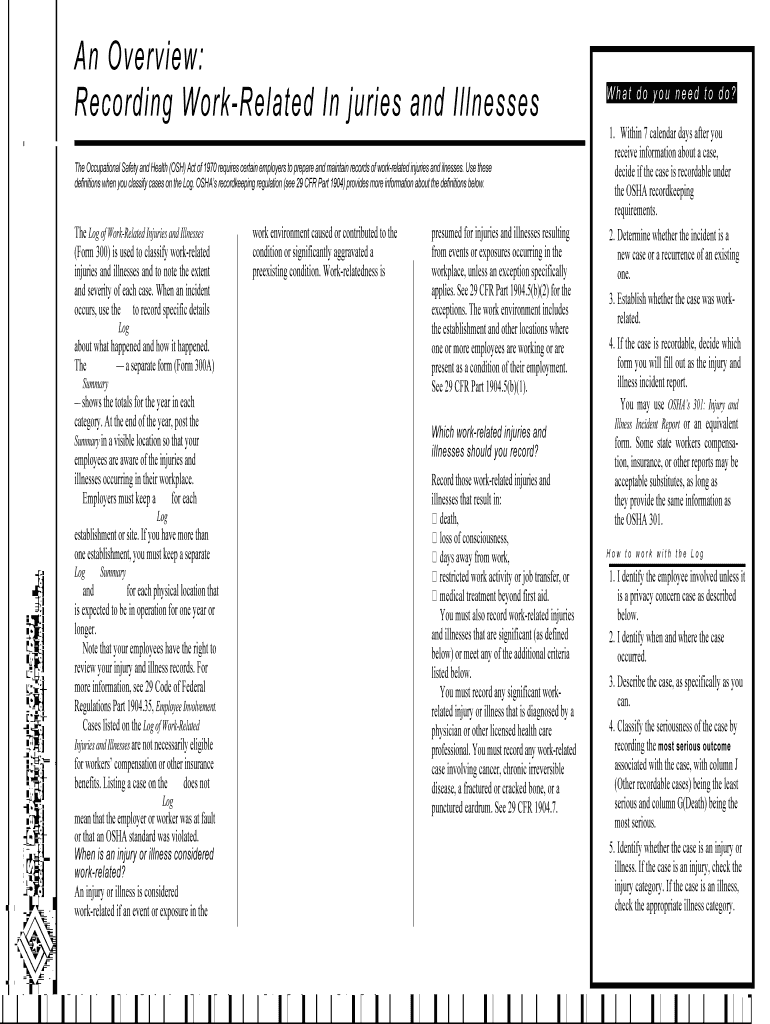
The Log of Work-Related Injuries and Illnesses (Form 300) is used to classify work-related injuries and illnesses and to note the extent and severity of each case. When an incident occurs, use the to record specific details Log about what happened and how it happened. The — a separate form (Form 300A) Summary — shows the totals for the year in each category. At the end of the year, post the Summary in a visible location so that your employees are aware of the injuries and illnesses occurring in their workplace. Employers must keep a for each Log establishment or site. If you have more than one establishment, you must keep a separate Log Summary and for each physical location that is expected to be in operation for one year or longer. Note that your employees have the right to review your injury and illness records. For more information, see 29 Code of Federal Regulations Part 1904.35, Employee Involvement. Cases listed on the Log of Work-Related Injuries and Illnesses are not necessarily eligible for workers’ compensation or other insurance benefits. Listing a case on the does not Log mean that the employer or worker was at fault or that an OSHA standard was violated. When is an injury or illness considered work-related? An injury or illness is considered work-related if an event or exposure in the work environment caused or contributed to the condition or significantly aggravated a preexisting condition. Work-relatedness is presumed for injuries and illnesses resulting from events or exposures occurring in the workplace, unless an exception specifically applies. See 29 CFR Part 1904.5(b)(2) for the exceptions. The work environment includes the establishment and other locations where one or more employees are working or are present as a condition of their employment. See 29 CFR Part 1904.5(b)(1). Which work-related injuries and illnesses should you record? Record those work-related injuries and illnesses that result in: ฀ death, ฀ loss of consciousness, ฀ days away from work, ฀ restricted work activity or job transfer, or ฀ medical treatment beyond first aid. You must also record work-related injuries and illnesses that are significant (as defined below) or meet any of the additional criteria listed below. You must record any significant work- related injury or illness that is diagnosed by a physician or other licensed health care professional. You must record any work-related case involving cancer, chronic irreversible disease, a fractured or cracked bone, or a punctured eardrum. See 29 CFR 1904.7. What do you need to do? 1. Within 7 calendar days after you receive information about a case, decide if the case is recordable under the OSHA recordkeeping requirements. 2. Determine whether the incident is a new case or a recurrence of an existing one. 3. Establish whether the case was work- related. 4. If the case is recordable, decide which form you will fill out as the injury and illness incident report. You may use OSHA’s 301: Injury and Illness Incident Report or an equivalent form. Some state workers compensa- tion, insurance, or other reports may be acceptable substitutes, as long as they provide the same information as the OSHA 301. How to work with the Log 1. I dentify the employee involved unless it is a privacy concern case as described below. 2. I dentify when and where the case occurred. 3. Describe the case, as specifically as you can. 4. Classify the seriousness of the case by recording the most serious outcome associated with the case, with column J (Other recordable cases) being the least serious and column G(Death) being the most serious. 5. Identify whether the case is an injury or illness. If the case is an injury, check the injury category. If the case is an illness, check the appropriate illness category. An Overview: Recording Work-Related In juries and Illnesses The Occupational Safety and Health (OSH) Act of 1970 requi res certain employers to prepare and maintain records of work-related injuries and ilnesses. Use these definitions when you classify cases on the Log. OSHA’s recordkee ping regulation (see 29 CFR Part 1904) provides more information about the definitions below. What are the additional criteria? You must record the following conditions when they are work-related: ฀ any needlestick injury or cut from a sharp object that is contaminated with another person’s blood or other potentially infectious material; ฀ any case requiring an employee to be medically removed under the requirements of an OSHA health standard; ฀ tuberculosis infection as evidenced by a positive skin test or diagnosis by a physician or other licensed health care professional after exposure to a known case of active tuberculosis. What is medical treatment? Medical treatment includes managing and caring for a patient for the purpose of combating disease or disorder. The following are not considered medical treatments and are NOT recordable: ฀ visits to a doctor or health care professional solely for observation or counseling; ฀ diagnostic procedures, including administering prescription medications that are used solely for diagnostic purposes; and ฀ any procedure that can be labeled first aid. () See below for more information about first aid. What is first aid? If the incident required only the following types of treatment, consider it first aid. Do NOT record the case if it involves only: ฀ using non-prescription medications at non- prescription strength; ฀ administering tetanus immunizations; ฀ cleaning, flushing, or soaking wounds on the skin surface; ฀ using wound coverings, such as bandages, BandAids ™ , gauze pads, etc., or using SteriStrips ™ or butterfly bandages. ฀ using hot or cold therapy; ฀ using any totally non-rigid means of support, such as elastic bandages, wraps, non-rigid back belts, etc.; ฀ using temporary immobilization devices while transporting an accident victim (splints, slings, neck collars, or back boards). ฀ drilling a fingernail or toenail to relieve pressure, or draining fluids from blisters; ฀ using eye patches; ฀ using simple irrigation or a cotton swab to remove foreign bodies not embedded in or adhered to the eye; ฀ using irrigation, tweezers, cotton swab or other simple means to remove splinters or foreign material from areas other than the eye; ฀ using finger guards; ฀ using massages; ฀ drinking fluids to relieve heat stress How do you decide if the case involved restricted work? Restricted work activity occurs when, as the result of a work-related injury or illness, an employer or health care professional keeps, or recommends keeping, an employee from doing the routine functions of his or her job or from working the full workday that the employee would have been scheduled to work before the injury or illness occurred. How do you count the number of days of restricted work activity or the number of days away from work? Count the number of calendar days the employee was on restricted work activity or was away from work as a result of the recordable injury or illness. Do not count the day on which the injury or illness occurred in this number. Begin counting days from the day the after incident occurs. If a single injury or illness involved both days away from work and days of restricted work activity, enter the total number of days for each. You may stop counting days of restricted work activity or days away from work once the total of either or the combination of both reaches 180 days. Under what circumstances should you NOT enter the employee’s name on the OSHA Form 300? You must consider the following types of injuries or illnesses to be privacy concern cases: ~ an injury or illness to an intimate body part or to the reproductive system, ฀ an injury or illness resulting from a sexual assault, ฀ a mental illness, ฀ a case of HIV infection, hepatitis, or tuberculosis, ฀ a needlestick injury or cut from a sharp object that is contaminated with blood or other potentially infectious material (see 29 CFR Part 1904.8 for definition), and ฀ other illnesses, if the employee independently and voluntarily requests that his or her name not be entered on the log. You must not enter the employee’s name on the OSHA 300 for these cases. Instead, enter Log “privacy case” in the space normally used for the employee’s name. You must keep a separate, confidential list of the case numbers and employee names for the establishment’s privacy concern cases so that you can update the cases and provide information to the government if asked to do so. If you have a reasonable basis to believe that information describing the privacy concern case may be personally identifiable even though the employee’s name has been omitted, you may use discretion in describing the injury or illness on both the OSHA 300 and 301 forms. You must enter enough information to identify the cause of the incident and the general severity of the injury or illness, but you do not need to include details of an intimate or private nature. What if the outcome changes after you record the case? If the outcome or extent of an injury or illness changes after you have recorded the case, simply draw a line through the original entry or, if you wish, delete or white-out the original entry. Then write the new entry where it belongs. Remember, you need to record the most serious outcome for each case. Classifying injuries An injury is any wound or damage to the body resulting from an event in the work environment. Examples: Cut, puncture, laceration, abrasion, fracture, bruise, contusion, chipped tooth, amputation, insect bite, electrocution, or a thermal, chemical, electrical, or radiation burn. Sprain and strain injuries to muscles, joints, and connective tissues are classified as injuries when they result from a slip, trip, fall or other similar accidents. Classifying illnesses Skin diseases or disorders Skin diseases or disorders are illnesses involving the worker’s skin that are caused by work exposure to chemicals, plants, or other substances. Examples: Contact dermatitis, eczema, or rash caused by primary irritants and sensitizers or poisonous plants; oil acne; friction blisters, chrome ulcers; inflammation of the skin. Respiratory conditions Respiratory conditions are illnesses associated with breathing hazardous biological agents, chemicals, dust, gases, vapors, or fumes at work. Examples: Silicosis, asbestosis, pneumonitis, pharyngitis, rhinitis or acute congestion; farmer’s lung, beryllium disease, tuberculosis, occupational asthma, reactive airways dysfunction syndrome (RADS), chronic obstructive pulmonary disease (COPD), hypersensitivity pneumonitis, toxic inhalation injury, such as metal fume fever, chronic obstructive bronchitis, and other pneumoconioses. gases; poisoning by benzene, benzol, carbon tetrachloride, or other organic solvents; poisoning by insecticide sprays, such as parathion or lead arsenate; poisoning by other chemicals, such as formaldehyde. All other illnesses All other occupational illnesses. Examples: Heatstroke, sunstroke, heat exhaustion, heat stress and other effects of environmental heat; freezing, frostbite, and other effects of exposure to low temperatures; decompression sickness; effects of ionizing radiation (isotopes, x-rays, radium); effects of nonionizing radiation (welding flash, ultra-violet rays, lasers); anthrax; bloodborne pathogenic diseases, such as AIDS, HIV, hepatitis B or hepatitis C; brucellosis; malignant or benign tumors; histoplasmosis; coccidioidomycosis. When must you post the Summary? You must post the only not the Summary — Log — by February 1 of the year following the year covered by the form and keep it posted until April 30 of that year. How long must you keep the Log and Summary on file? You must keep the and for Log Summary 5 years following the year to which they pertain. Do you have to send these forms to OSHA at the end of the year? No. You do not have to send the completed forms to OSHA unless specifically asked to do so. Poisoning Poisoning includes disorders evidenced by abnormal concentrations of toxic substances in blood, other tissues, other bodily fluids, or the breath that are caused by the ingestion or absorption of toxic substances into the body. Examples: Poisoning by lead, mercury, cadmium, arsenic, or other metals; poisoning by carbon monoxide, hydrogen sulfide, or other OSHA’s Form 300Log of Work-Related In juries and Illnesses You must record information about every work-related death and ab out every work-related injury or illness that involves loss of consciousness, restricted work activity or job transfer, days away from work, or medical treatment beyond first aid. You must also record significant work-related injuries and ilnesses that are diagnosed by a physician or licensed health care professional. You must also record work-related injuries and il lnesses that meet any of the specific recording criteria listed in 29 CFR Part 1904.8 through 1904.12. Feel free to use two lines for a single case if you need to. You must complete an Injury and Ilness Incident Report (OSHA Form 301 ) or equ ivalent form for each injury or illness recorded on this form. If you’re not sure whether a case is recordable, call your lo cal OSHA office for help. City Identify the person Describe the case Classify the case / month/day / month/day/ ----- month /day / month/day/ ----- month /day / ----- month /day / month/day/ month/day/ month/day/ month/day/ month/day/ month/day/ month/day Attention: This form contains information relating to employee health and must be used in a manner that protects the confidentiality of employees to the extent possible while the information is being used for occupational safety and health purposes. Year 20 __ __ U.S. Department of Labor Occupational Safety and Health Administration Form approved OMB no.1218-0176 State (F) Describe injury or illness, parts of body affected, and object/substance that directly injured or made person ill () e.g., Second degree burns on right forearm from acetylene torch Using these four categories, check ONLY the most serious result for each case: (G) (H) Job transfer or restriction(I) Other record-able cases(J) (A) (B) Case Employee’s name no. (C) Job title (e.g) ., Welder (D) Date of injury or onset of illness (E) Where the event occurred () e.g., Loading dock north end Enter the number ofdays the injured or Check the“Injury” column or ill worker was: choose one type of illness: Public reporting burden for this collection of information is estimated to average 14 minutes per response, incl uding time to review the instructions, search and gather the data needed, and complete and review the collection of informati on. Persons are not required to respond to the collection of information unless it displays a currently valid OMB control number. If you have any comme nts about these estimates or any other aspects of this data collection, contact: US Department of L abor, OSHA Office of Statistics, Room N- 3644, 200 Constitution Avenue, NW, Washington, DC 20210. Do not send the completed forms to this office.                                                                                                         Onjob Away transfer from or restriction work (K) (L) ____ ____ days days days days ____ ____ days days ____ ____ days days ____ ____ ____ ____ days days days days ____ ____ days days ____ ____ days days ____ ____ days days ____ ____ ____ ____ days days days days ____ ____ (M) ____ _ ---------------------------------------------------------------------- Page totals Be sure to transfer these totals to the Summary page (Form 300A) b efore you post it. Page____ of____

Valuable advice on setting up your ‘I 26 Roll Plot High Res Final South Carolina Department Of ’ online

Are you fed up with the inconvenience of handling paperwork? Look no further than airSlate SignNow, the premier electronic signature platform for both individuals and businesses. Bid farewell to the monotonous task of printing and scanning documents. With airSlate SignNow, you can effortlessly complete and sign documents online. Take advantage of the extensive features available in this user-friendly and cost-effective platform and transform your approach to document management. Whether you're looking to authorize forms or collect signatures, airSlate SignNow manages everything smoothly, with just a few clicks.

Adhere to this comprehensive guideline:

  1. Sign in to your account or create a free trial with our platform.
  2. Click +Create to upload a file from your device, cloud storage, or our template library.
  3. Access your ‘I 26 Roll Plot High Res Final South Carolina Department Of ’ in the editor.
  4. Click Me (Fill Out Now) to set up the form on your end.
  5. Add and designate fillable fields for others (if necessary).
  6. Continue with the Send Invite settings to solicit eSignatures from others.
  7. Save, print your version, or convert it into a reusable template.

No need to worry if you have to collaborate with others on your I 26 Roll Plot High Res Final South Carolina Department Of or send it for notarization—our service provides everything you need to complete such tasks. Register with airSlate SignNow today and enhance your document management to a higher standard!

Here is a list of the most common customer questions. If you can’t find an answer to your question, please don’t hesitate to reach out to us.

Need help? Contact Support

The best way to complete and sign your i 26 roll plot high res final south carolina department of form


Save time on document management with airSlate SignNow and get your i 26 roll plot high res final south carolina department of form eSigned quickly from anywhere with our fully compliant eSignature tool.

How to Sign a PDF Online How to Sign a PDF Online

How to complete and sign paperwork online

In the past, working with paperwork required pretty much time and effort. But with airSlate SignNow, document management is quick and simple. Our robust and easy-to-use eSignature solution allows you to effortlessly complete and electronically sign your i 26 roll plot high res final south carolina department of form online from any internet-connected device.

Follow the step-by-step guide to eSign your i 26 roll plot high res final south carolina department of form template online:

  • 1.Sign up for a free trial with airSlate SignNow or log in to your account with password credentials or SSO authorization option.
  • 2.Click Upload or Create and add a form for eSigning from your device, the cloud, or our form library.
  • 3.Click on the file name to open it in the editor and utilize the left-side menu to fill out all the blank fields accordingly.
  • 4.Drop the My Signature field where you need to approve your sample. Type your name, draw, or import a photo of your regular signature.
  • 5.Click Save and Close to finish modifying your completed form.

Once your i 26 roll plot high res final south carolina department of form template is ready, download it to your device, save it to the cloud, or invite other individuals to electronically sign it. With airSlate SignNow, the eSigning process only takes a few clicks. Use our powerful eSignature solution wherever you are to handle your paperwork successfully!


How to Sign a PDF Using Google Chrome How to Sign a PDF Using Google Chrome

How to fill out and sign forms in Google Chrome

Completing and signing documents is simple with the airSlate SignNow extension for Google Chrome. Installing it to your browser is a fast and beneficial way to deal with your forms online. Sign your i 26 roll plot high res final south carolina department of form template with a legally-binding eSignature in a few clicks without switching between applications and tabs.

Follow the step-by-step guide to eSign your i 26 roll plot high res final south carolina department of form template in Google Chrome:

  • 1.Go to the Chrome Web Store, find the airSlate SignNow extension for Chrome, and install it to your browser.
  • 2.Right-click on the link to a document you need to approve and choose Open in airSlate SignNow.
  • 3.Log in to your account with your credentials or Google/Facebook sign-in buttons. If you don’t have one, you can start a free trial.
  • 4.Use the Edit & Sign toolbar on the left to complete your template, then drag and drop the My Signature field.
  • 5.Insert a picture of your handwritten signature, draw it, or simply type in your full name to eSign.
  • 6.Make sure all data is correct and click Save and Close to finish modifying your paperwork.

Now, you can save your i 26 roll plot high res final south carolina department of form sample to your device or cloud storage, send the copy to other people, or invite them to eSign your document with an email request or a secure Signing Link. The airSlate SignNow extension for Google Chrome enhances your document workflows with minimum time and effort. Try airSlate SignNow today!


How to Sign a PDF in Gmail How to Sign a PDF in Gmail How to Sign a PDF in Gmail

How to complete and sign forms in Gmail

Every time you receive an email with the i 26 roll plot high res final south carolina department of form for signing, there’s no need to print and scan a document or download and re-upload it to a different program. There’s a better solution if you use Gmail. Try the airSlate SignNow add-on to rapidly eSign any paperwork right from your inbox.

Follow the step-by-step guidelines to eSign your i 26 roll plot high res final south carolina department of form in Gmail:

  • 1.Navigate to the Google Workplace Marketplace and find a airSlate SignNow add-on for Gmail.
  • 2.Install the program with a corresponding button and grant the tool access to your Google account.
  • 3.Open an email with an attachment that needs approval and utilize the S key on the right panel to launch the add-on.
  • 4.Log in to your airSlate SignNow account. Opt for Send to Sign to forward the file to other parties for approval or click Upload to open it in the editor.
  • 5.Place the My Signature field where you need to eSign: type, draw, or upload your signature.

This eSigning process saves efforts and only takes a few clicks. Use the airSlate SignNow add-on for Gmail to update your i 26 roll plot high res final south carolina department of form with fillable fields, sign forms legally, and invite other parties to eSign them al without leaving your mailbox. Boost your signature workflows now!


How to Sign a PDF on a Mobile Device How to Sign a PDF on a Mobile Device How to Sign a PDF on a Mobile Device

How to fill out and sign paperwork in a mobile browser

Need to rapidly complete and sign your i 26 roll plot high res final south carolina department of form on a smartphone while doing your work on the go? airSlate SignNow can help without needing to set up additional software apps. Open our airSlate SignNow tool from any browser on your mobile device and add legally-binding eSignatures on the go, 24/7.

Follow the step-by-step guide to eSign your i 26 roll plot high res final south carolina department of form in a browser:

  • 1.Open any browser on your device and follow the link www.signnow.com
  • 2.Register for an account with a free trial or log in with your password credentials or SSO authentication.
  • 3.Click Upload or Create and pick a file that needs to be completed from a cloud, your device, or our form collection with ready-made templates.
  • 4.Open the form and complete the blank fields with tools from Edit & Sign menu on the left.
  • 5.Put the My Signature field to the sample, then type in your name, draw, or upload your signature.

In a few easy clicks, your i 26 roll plot high res final south carolina department of form is completed from wherever you are. Once you're finished editing, you can save the file on your device, build a reusable template for it, email it to other people, or invite them electronically sign it. Make your paperwork on the go prompt and effective with airSlate SignNow!


How to Sign a PDF on iPhone How to Sign a PDF on iPhone

How to fill out and sign forms on iOS

In today’s business community, tasks must be completed quickly even when you’re away from your computer. Using the airSlate SignNow app, you can organize your paperwork and approve your i 26 roll plot high res final south carolina department of form with a legally-binding eSignature right on your iPhone or iPad. Install it on your device to conclude contracts and manage documents from anyplace 24/7.

Follow the step-by-step guide to eSign your i 26 roll plot high res final south carolina department of form on iOS devices:

  • 1.Go to the App Store, find the airSlate SignNow app by airSlate, and install it on your device.
  • 2.Open the application, tap Create to upload a form, and choose Myself.
  • 3.Opt for Signature at the bottom toolbar and simply draw your autograph with a finger or stylus to eSign the form.
  • 4.Tap Done -> Save right after signing the sample.
  • 5.Tap Save or utilize the Make Template option to re-use this document in the future.

This method is so simple your i 26 roll plot high res final south carolina department of form is completed and signed within a few taps. The airSlate SignNow app works in the cloud so all the forms on your mobile device remain in your account and are available any time you need them. Use airSlate SignNow for iOS to enhance your document management and eSignature workflows!


How to Sign a PDF on Android How to Sign a PDF on Android

How to fill out and sign forms on Android

With airSlate SignNow, it’s easy to sign your i 26 roll plot high res final south carolina department of form on the go. Install its mobile application for Android OS on your device and start improving eSignature workflows right on your smartphone or tablet.

Follow the step-by-step guidelines to eSign your i 26 roll plot high res final south carolina department of form on Android:

  • 1.Navigate to Google Play, find the airSlate SignNow app from airSlate, and install it on your device.
  • 2.Log in to your account or register it with a free trial, then import a file with a ➕ option on the bottom of you screen.
  • 3.Tap on the imported file and choose Open in Editor from the dropdown menu.
  • 4.Tap on Tools tab -> Signature, then draw or type your name to eSign the template. Complete blank fields with other tools on the bottom if required.
  • 5.Use the ✔ key, then tap on the Save option to finish editing.

With an intuitive interface and full compliance with main eSignature standards, the airSlate SignNow application is the best tool for signing your i 26 roll plot high res final south carolina department of form. It even operates without internet and updates all form modifications when your internet connection is restored and the tool is synced. Fill out and eSign documents, send them for approval, and create multi-usable templates whenever you need and from anyplace with airSlate SignNow.

Sign up and try I 26 roll plot high res final south carolina department of form
  • Close deals faster
  • Improve productivity
  • Delight customers
  • Increase revenue
  • Save time & money
  • Reduce payment cycles

