Establishing secure connection…Loading editor…Preparing document…

Incident Report Form

This template is fully customizable. Edit the text, fill out the fields, and send it for signature. Give it a try!
Incident Report Form

What the Incident Report Form Is and when it’s used

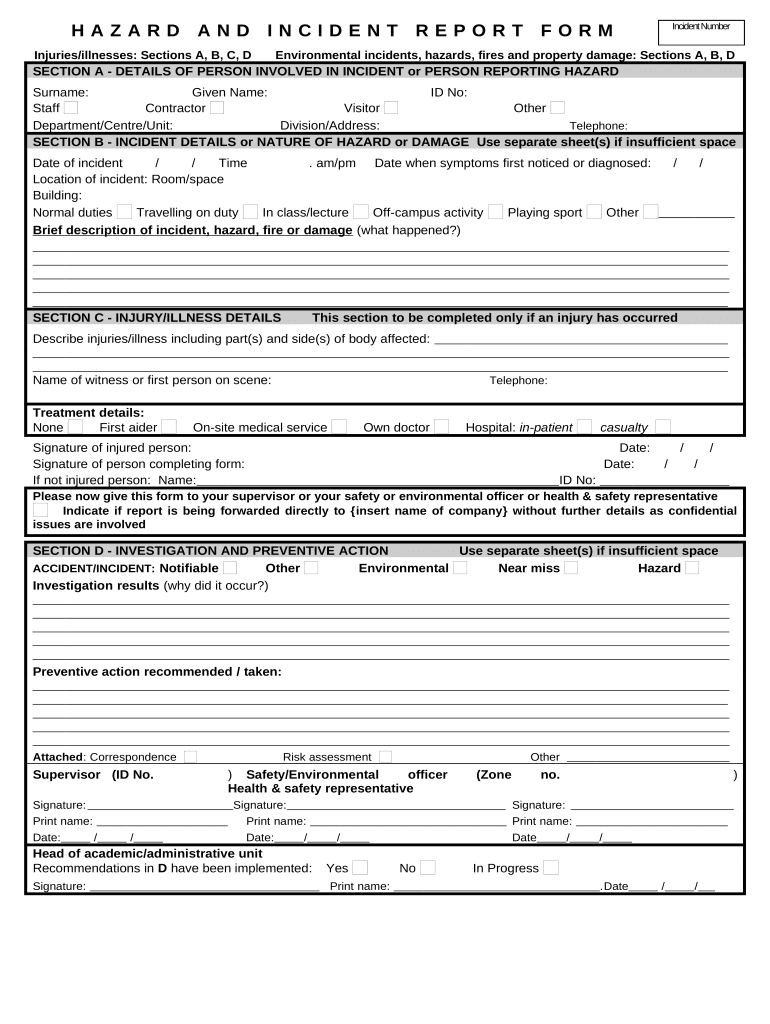
An Incident Report Form is a standardized document for recording facts about an accident, injury, near miss, security breach, property damage, or other operational incident. It captures who was involved, where and when the event occurred, a factual sequence of events, immediate actions taken, and any witnesses or supporting evidence. Organizations use completed incident reports for internal review, safety investigations, insurance claims, regulatory compliance, and to establish a record for corrective actions and trend analysis.

Why a clear Incident Report Form matters

A well‑designed Incident Report Form improves accuracy, speeds investigations, and creates a defensible record for insurance, regulatory, and legal review. Consistent reporting reduces information gaps that can hinder root‑cause analysis and corrective action planning.

Why a clear Incident Report Form matters

Who completes and reviews incident reports

Routing and retention responsibilities should be defined in policy so each role knows when to file, escalate, or preserve the report.

  • Frontline staff — person who observed or was involved; documents immediate facts and actions taken at the scene.
  • Supervisors and safety officers — verify details, add supervisory observations, and coordinate corrective measures and notifications.
  • Risk, HR, and compliance teams — review for regulatory reporting, insurance claims, disciplinary actions, and trend analysis.

Typical signers and approvers

Safety Manager

Responsible for investigating incidents, coordinating corrective actions, and maintaining the incident log. Reviews reports for root causes, documents preventive steps, and prepares regulatory notifications when required.

HR Manager

Handles employee‑related incidents, documents witness statements and any personnel actions, ensures confidentiality under privacy rules, and coordinates workplace accommodation or return‑to‑work planning as needed.

Essential sections every professional Incident Report Form should include

A complete form balances concise factual fields with spaces for narrative detail and supporting attachments. The following components help ensure consistency and legal defensibility.

Incident Header

Date, time, location, incident type, and unique report ID. This metadata enables indexing, search, and correlation with other records such as shift logs or surveillance footage.
Parties Involved

Names, roles, contact details, and affiliation for injured parties, witnesses, and reporting employees. Accurate identification is crucial for follow‑up, witness interviews, and insurance or legal processes.

Sequence of Events

A clear, chronological narrative of what happened, written in first person or as observed facts. Avoid speculation; note who said what and reference attached evidence like photos or video timestamps.

Immediate Actions

First aid, emergency services called, equipment shut‑down, containment measures, and any temporary fixes. Document times and names of responders for audit trails and care continuity.

Root‑Cause Indicators

Preliminary contributing factors such as equipment failure, procedure noncompliance, environmental conditions, or training gaps. Flag items that require further investigation or corrective action.

Signatures and Approval

Spaces for reporter signature, supervisor review, and final approval; include dates and a signatory role. Note whether signatures are electronic and the authentication method used.

Required data fields at a glance

Report ID: Unique identifier
Incident Date/Time: MM/DD/YYYY HH:MM
Location: Facility and precise area
Reporter Name: Full legal name
Witnesses: Names and contacts
Attachments: Photos, video, forms

Step‑by‑step: completing the Incident Report Form

Complete the form as soon as practical to preserve facts. Include evidence and route the report for review per policy.

  • 01
    Record Details: Enter date, time, location, and parties involved accurately.
  • 02
    Describe Facts: Write a chronological account without opinions or conjecture.
  • 03
    Attach Evidence: Upload photos, video, diagrams, and related documents.
  • 04
    Sign and Route: Sign, note authentication, and send to supervisor and records owner.

Configuring an online incident reporting workflow

When moving forms online, define field behaviors, routing rules, and retention policies to automate review and storage.

Field Configuration
Reporter Email Required; auto‑populate user profile
Photo Upload Accept JPG/PNG; required for injury/property claims
Supervisor Approval Conditional routing to supervisor if severity flag set
Retention Tag Apply retention policy label on submission

Digital signing and submission considerations

Confirm the chosen platform preserves a tamper‑evident record and meets any industry compliance needs such as HIPAA when handling health data.

  • Authentication: Email, SMS code, or stronger methods
  • Audit Trail: Capture IP, timestamp, and signer identity
  • File Formats: Accept PDF and DOCX with attachments

Where to file or send a completed Incident Report Form

Determine recipients and storage destinations before submission to ensure timely review and compliance with reporting obligations.

  • Immediate Supervisor: Receives form for validation and preliminary action within 24 hours.
  • Safety/Risk Team: Conducts investigation, assigns corrective actions, and logs the incident.
  • HR or Legal: Reviews for employee issues, privacy, or potential liability.
  • Records Archive: Stores final report per retention schedule and regulatory rules.

Timeframes and deadlines commonly tied to incident reports

Certain incidents trigger statutory or contractual reporting deadlines; document timelines help ensure timely compliance and insurance notice.

Immediate Notification:

Notify emergency services immediately when life‑threatening.

Internal Report:

File initial incident report within 24–72 hours.

OSHA Reporting:

Report fatalities within 8 hours; inpatient hospitalization within 24 hours (29 CFR 1904.39).

Insurance Notice:

Notify insurer per policy — often within 30 days.

Follow‑Up Investigation:

Complete root‑cause analysis within 7–30 days depending on severity.

Key milestones in incident handling

Track milestones from immediate actions through final record closure to ensure accountability and evidence preservation.

01

Immediate Response

Stabilize scene and render aid; document actions and times.

02

Initial Report Filed

Reporter submits form with attachments and witness names.

03

Investigation

Safety team gathers statements, evidence, and preliminary findings.

04

Corrective Action

Implement fixes and document completion for closure.

Common mistakes to avoid when preparing incident reports

  • Delaying the report and losing perishable details or evidence.
  • Including opinions or blame rather than factual observations.
  • Omitting witness contact information or relevant attachments.
  • Using inconsistent date/time formats that confuse timelines.

Risks and consequences of incomplete or late incident reports

Regulatory Fines: OSHA or agency penalties possible
Insurance Denial: Late notice can jeopardize claims
Legal Exposure: Weak record increases liability risk
Employee Safety: Unaddressed hazards cause repeat incidents
Data Loss: Evidence not preserved or corrupted
Reputational Harm: Public incidents mishandled attract scrutiny

Real‑world examples of incident report usage

These brief cases show how organizations use standardized incident reports to improve response and reduce risk.

Manufacturing Safety Incident

A production line worker reported a finger injury immediately via mobile form, including photos and equipment ID

  • Investigation showed a missing guard contributed to the event
  • The company implemented a machine guard retrofit across three lines and documented the corrective action to support the insurance claim and regulatory review.

Healthcare Patient Fall

A nurse filed a patient fall report capturing vital signs, witness statements, and room video timestamps

  • Early documentation preserved clinical details and informed treatment
  • The hospital used the completed report to update care plans, train staff, and meet HIPAA documentation requirements during audit.

Comparing eSignature options for Incident Report Form workflows

Platform choice affects cost, compliance, and volume handling. The table summarizes starting price, trial availability, bulk send, audit trail, HIPAA support, and envelope limits across vendors.

signNow DocuSign Adobe Sign PandaDoc HelloSign
Starting Price $8/user/mo $15/user/mo $14/user/mo $19/user/mo $15/user/mo
Free Trial Yes, 7-day free trial Yes, limited trial Yes, limited trial Yes, limited trial Yes, limited trial
Bulk Send Yes Yes Yes Yes No
Audit Trail Yes Yes Yes Yes Yes
HIPAA Compliant Yes (BAA) Yes (BAA available) Yes (BAA available) Varies by plan Varies by plan

FAQs and troubleshooting for Incident Report Forms

Answers to common questions about completing, submitting, and preserving incident reports in an organizational setting.


Need help? Contact support

be ready to get more
Join over 28 million airSlate SignNow users