Establishing secure connection… Loading editor… Preparing document…
Navigation

Fill and Sign the Instructions Declaration Form
Fill and Sign the Instructions Declaration Form

How it works

Open the document and fill out all its fields.
Apply your legally-binding eSignature.
Save and invite other recipients to sign it.

Rate template

4.6
33 votes
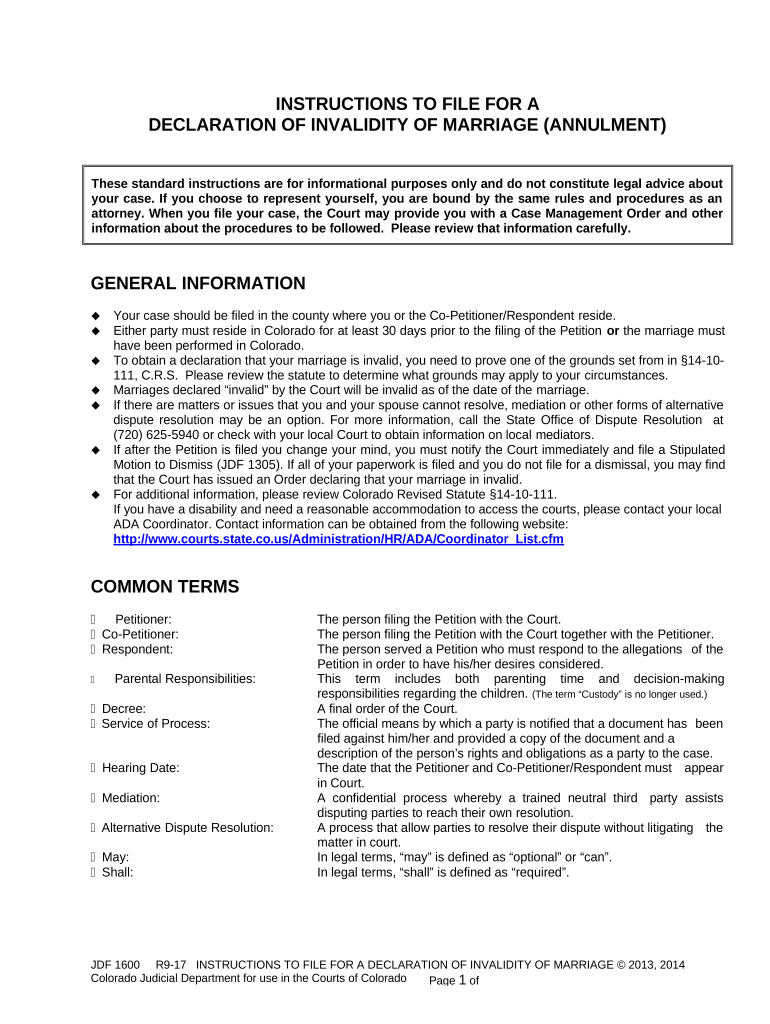
JDF 1600 R9-17 INSTRUCTIONS TO FILE FOR A DECLARATION OF INVALIDITY OF MARRIAGE © 2013, 2014 Colorado Judicial Department for use in the Courts of Colorado Page 1 of INSTRUCTIONS TO FILE FOR A DECLARATION OF INVALIDITY OF MARRIAGE (ANNULMENT) GENERAL INFORMATION  Your case should be filed in the county where you or the Co-Petitioner/Respondent reside.  Either party must reside in Colorado for at least 30 days prior to the filing of the Petition or the marriage must have been performed in Colorado.  To obtain a declaration that your marriage is invalid, you need to prove one of the grounds set from in §14-10- 111, C.R.S. Please review the statute to determine what grounds may apply to your circumstances.  Marriages declared “invalid” by the Court will be invalid as of the date of the marriage.  If there are matters or issues that you and your spouse cannot resolve, mediation or other forms of alternative dispute resolution may be an option. For more information, call the State Office of Dispute Resolution at (720) 625-5940 or check with your local Court to obtain information on local mediators.  If after the Petition is filed you change your mind, you must notify the Court immediately and file a Stipulated Motion to Dismiss (JDF 1305). If all of your paperwork is filed and you do not file for a dismissal, you may find that the Court has issued an Order declaring that your marriage in invalid.  For additional information, please review Colorado Revised Statute §14-10-111. If you have a disability and need a reasonable accommodation to access the courts, please contact your local ADA Coordinator. Contact information can be obtained from the following website: http://www.courts.state.co.us/Administration/HR/ADA/Coordinator_List.cfm COMMON TERMS  Petitioner: The person filing the Petition with the Court.  Co-Petitioner: The person filing the Petition with the Court together with the Petitioner.  Respondent: The person served a Petition who must respond to the allegations of the Petition in order to have his/her desires considered.  Parental Responsibilities: This term includes both parenting time and decision-making responsibilities regarding the children. (The term “Custody” is no longer used.)  Decree: A final order of the Court.  Service of Process: The official means by which a party is notified that a document has been filed against him/her and provided a copy of the document and a description of the person’s rights and obligations as a party to the case.  Hearing Date: The date that the Petitioner and Co-Petitioner/Respondent must appear in Court.  Mediation: A confidential process whereby a trained neutral third party assists disputing parties to reach their own resolution.  Alternative Dispute Resolution: A process that allow parties to resolve their dispute without litigating the matter in court.  May: In legal terms, “may” is defined as “optional” or “can”.  Shall: In legal terms, “shall” is defined as “required”.These standard instructions are for informational purposes only and do not constitute legal advice about your case. If you choose to represent yourself, you are bound by the same rules and procedures as an attorney. When you file your case, the Court may provide you with a Case Management Order and other information about the procedures to be followed. Please review that information carefully. JDF 1600 R9-17 INSTRUCTIONS TO FILE FOR A DECLARATION OF INVALIDITY OF MARRIAGE © 2013, 2014 Colorado Judicial Department for use in the Courts of Colorado Page 2 of If you do not understand this information, please contact an attorney. You may also contact the Family Court Facilitator at your local courthouse, if one is available in your Judicial District. § FEES The filing fee is $230.00. If you are unable to pay the filing fee, you must complete the Motion to File without Payment and Supporting Financial Affidavit (JDF 205) and submit to the Court. Once you submit the completed JDF 205 form and a blank Order (JDF 206), the Court will decide whether you need to pay the filing fee. Some courts require mediation or parenting classes and may require these fees to be paid upon the filing of the case. Other fees that a party to the case may encounter are as follows:  Response $116.00  Service Fees Varies (not payable through or to the Court)  Certification Fee $20.00  Copies of Documents (Documents on File) $.75 per page or $1.50 if double sided  Copies of Documents (Documents not on File) $.25 per page or $.50 if double sided FORMS To access a form online go to www.courts.state.co.us and click on the “Forms” tab. The packet/forms are available in PDF, WORD or EXCEL by selecting Divorce, Family Matters, Civil Unions – Divorce – Annulment. You may complete a form online and print or you may print it and type or print legibly in black ink. You may need all or some of these forms. Read these instructions carefully to determine what forms you may need. Some of the forms listed below are only necessary if you have children conceived through this marriage/relationship.  JDF 1000 Case Information Sheet  JDF 1104 Certificate of Compliance with Mandatory Financial Disclosures  JDF 1111 Sworn Financial Statement  JDF 1113 Parenting Plan  JDF 1115 Separation Agreement  JDF 1117 Support Order  JDF 1120 Notice of Domestic Relations Initial Status Conference  JDF 1121 Notice for Domestic Relations Status Conference  JDF 1125 Mandatory Disclosure – Form 35.1  JDF 1126 Court Authorization for Financial Disclosure  JDF 1129 Pretrial Statement  JDF 1601 Petition for Declaration of Invalidity of Marriage  JDF 1602 Summons for Declaration of Invalidity of Marriage  JDF 1602(a) Waiver and Acceptance of Service  JDF 1602(b) Return of Service  JDF 1603 Decree of Declaration of Invalidity of Marriage STEPS TO FILING YOUR CASE Step 1 : Complete Initial Forms. Selecting these instructions indicates that you are planning to file a case requesting the Court to declare a marriage invalid. You are filing jointly as Petitioner and Co-Petitioner or you are filing as Petitioner and naming the JDF 1600 R9-17 INSTRUCTIONS TO FILE FOR A DECLARATION OF INVALIDITY OF MARRIAGE © 2013, 2014 Colorado Judicial Department for use in the Courts of Colorado Page 3 of other party as “Respondent” if he/she did not sign the Petition filed in this case. The caption on the next page JDF 1600 R9-17 INSTRUCTIONS TO FILE FOR A DECLARATION OF INVALIDITY OF MARRIAGE © 2013, 2014 Colorado Judicial Department for use in the Courts of Colorado Page 4 of needs to be completed on all forms filed. Keep a copy of each form for your own records and make a copy to provide to the other party. District Court County, Colorado Court Address: In re the Marriage of: Petitioner and Co-Petitioner/Respondent: COURT USE ONLY Attorney or Party Without Attorney (Name and Address): Phone Number: E-mail: FAX Number: Atty. Reg. #: Case Number: Division Courtroom NAME OF FORM  Case Information Sheet (JDF 1000):  Please complete all sections of this form.  Petition for Declaration of Invalidity of Marriage (JDF 1601): At least one of the boxes on page 1 of the Petition must be checked, identifying the grounds to declare a marriage invalid. In addition, a written explanation supporting the facts must be identified on page 2 including the date or time frame that you became aware of the cause for this action. If none of the boxes apply to your situation, you may wish to consult with an attorney to determine if another action needs to be filed with the Court, e.g. Petition for Dissolution of Marriage.  Please complete all sections of this form.  If one party desires to have a prior name restored, that person must indicate that fact on the Petition (sections 11 and 12). If the Respondent requests a name change, he or she must file a signed response requesting the name change.  Summons for Declaration of Invalidity of Marriage (JDF 1602):  Only complete the Summons if you named the other party as the Respondent on the Petition and the other party did not sign the Petition.  Complete all sections in the caption. Step 2: You are Ready to File Your Case with the Court. Provide the Court with the Petition, Case Information Sheet, and Summons, if applicable.  Pay the $ 230.00 filing fee.  When you file your Petition, the Court may set an Initial Status Conference at the time of your filing and/or provide you with information on how and when to obtain future status conferences or hearing dates. Keep this information, as you may need it later.  Review the Court’s Case Management Order and other information to determine what you need to do next. Please read the information to inform you about the various procedures and timelines. Step 3: Serve the Papers only if both parties did not file as Petitioner/Co-Petitioner.  Once you have filed your Petition, the Court will provide you with a signed summons to serve your spouse.  The Court may require you to provide a copy of the Case Management Order and other information to the other party. JDF 1600 R9-17 INSTRUCTIONS TO FILE FOR A DECLARATION OF INVALIDITY OF MARRIAGE © 2013, 2014 Colorado Judicial Department for use in the Courts of Colorado Page 5 of  If you received a date for an Initial Status Conference, you must provide notice to all parties. This conference will take place no later than 42 days from the filing of the Petition.  Service options: Waiver and Acceptance of Service:  This is the easiest form of service. However, your spouse must be willing to accept the dissolution/legal separation papers and sign the waiver.  Have your spouse sign the Waiver and Acceptance of Service form – JDF 1602(a) before a Court Clerk or Notary Public.  File the signed original waiver with the Court. Personal Service:  Select the Sheriff’s Department, a private process server, or someone you know who is 18 years or older, who is not involved in the case, and who knows the rules of service to serve the Respondent.  Provide the process server with the Petition and Summons.  The process server will need to return the completed Return of Service – JDF 1602(b) to the Court for filing, or return it to you to bring and file with the Court. Service by Mail or Publication:  If you do not know where your spouse is you will need to use this method of service and should file these forms with the Court as soon as possible.  Service by mail or publication shall be allowed only upon approval by the Court. If this process is necessary, complete forms JDF 1301 and 1302. RESPONDENT FILES A RESPONSE The Respondent may file a response to the Petition. The filing fee is $116.00. The purpose of the response is for the Respondent to state in writing if he/she agrees or disagrees with the information in the Petition. All fees paid are non-refundable.  The Response form is JDF 1270.  The Respondent must file the original copy with the Court a mail a copy to the Petitioner. COMPLETE ADDITIONAL FORMS BEFORE YOUR INITIAL STATUS CONFERENCE OR AS IDENTIFED IN THE CASE MANAGEMENT ORDER The forms that you may need to finalize your case are identified on the next few pages. Take your time and make sure you have all current and necessary information to complete the forms accurately, as these forms provide valuable information to the Court upon which to order the division of property and debts, and spousal support/maintenance, if applicable.  Decree of Declaration of Invalidity of Marriage (JDF 1603):  Complete the caption only on this form.  Provide the Court with the number of copies you would like. If you want any of the copies to be certified, you will need to provide the Court with a certified copy fee of $20.00.  The Magistrate or Judge will complete the rest of the Decree and give you and your spouse a signed copy.  If you or the Co-Petitioner/Respondent request to have a name changed/restored, please complete this section on the Decree. Identify the restored name you or the Co-Petitioner/Respondent request.  Mandatory Disclosure – Form 35.1 (JDF 1125): This form identifies the documents that each party must provide to one another within 42 days after service of the Petition. JDF 1600 R9-17 INSTRUCTIONS TO FILE FOR A DECLARATION OF INVALIDITY OF MARRIAGE © 2013, 2014 Colorado Judicial Department for use in the Courts of Colorado Page 6 of  The documents identified in the Mandatory Disclosure form do not need to be filed with the Court, unless ordered by the Court except for the Sworn Financial Statement and Child Support Worksheets.  If a party does not timely provide the Mandatory Disclosures to the other party, the Court may impose sanctions.  Certificate of Compliance with Mandatory Financial Disclosures (JDF 1104): The purpose of this form is for each party to acknowledge to the Court that they provided the mandatory disclosure documents to the other party. This form must be filed with the Court within 42 days after the Petition was signed by the other party, the other party signed the Waiver and Acceptance of Service, or the other party was served with the Petition and Summons.  Each party shall complete and file a Certificate of Compliance with the Court when the mandatory disclosures documents have been provided to the other party. If you did not provide all of the mandatory disclosure items, please state why on this form.  Complete all sections on this form.  Complete the Certificate of Service portion identifying the method selected to provide the other party with a copy of this document.  Send the other party the information you have identified on the form.  Sworn Financial Statement (JDF 1111): This document must be filed within 42 days of service on the Respondent or 42 days after filing as Co- Petitioners. You must provide true and complete information to the Court about your assets, debts, and income. You can be assessed a fine or jailed for providing false information. In addition, your case can be reopened due to fraud. Complete and file with the Court a Supporting Schedules for Assets (JDF 1111SS), only if applicable to your case.  The Financial Statement must contain current personal and financial information to determine whether the Separation Agreement is fair to each party. Failure of a party to file a Sworn Financial Statement may result in a refusal by the Court to enter a Final Decree or the Court may impose sanctions against the party who does not file the required paperwork.  Each spouse must complete their own Financial Statement and all sections must be completed.  The form must be signed in the presence of a Court Clerk or Notary Public.  Separation Agreement (JDF 1115): The purpose of this form is to identify in writing what issues you and the other party have settled on regarding maintenance (spousal support) for either party and for the disposition of property and debt. The Court must follow the separation agreement as it pertains to the parties themselves and to property, unless the Court finds the agreement unconscionable, in which case it may order the parties to submit a revised agreement.  Complete all sections of this form either together or individually depending on the level of agreement and make sure all issues are addressed. If any unique situations exist, identify them in section 5 – “Other Terms”.  Please indicate if this is a full or partial agreement.  If this is a partial agreement you or the other party must complete JDF 1129 – Pretrial Statement. The purpose of this form is for you or the other party to identify to the Court issues that have not been resolved.  Each party should re-read this form to ensure that it accurately represents what you and your spouse have agreed to.  Parenting Plan (JDF 1113):  Please complete all sections of this form and make sure all issues are addressed. If any unique situations exist, identify them in Section F – “Other Terms”. The Parenting Plan should identify only JDF 1600 R9-17 INSTRUCTIONS TO FILE FOR A DECLARATION OF INVALIDITY OF MARRIAGE © 2013, 2014 Colorado Judicial Department for use in the Courts of Colorado Page 7 of those parties who will have court-ordered parenting time and decision-making responsibilities. Day care/babysitting arrangements do not need to be specifically identified on this form.  Please indicate if this is a full or partial parenting plan.  If this is a partial parenting plan you or the other party must complete JDF 1129 – Pretrial Statement. The purpose of this form is for you or the other party to identify to the Court what issues have not been resolved  Each party should re-read the parenting plan to be sure that it accurately represents what you and the other party have agreed to regarding the children or what you and the other party do not agree to.  Child Support Worksheets:  Automatic Calculation Option: New child support guidelines became effective on January 1, 2014. Software for electronically calculating child support based on the new guidelines can be found at www.courts.state.co.us – Go to “Self Help/Forms” > “All Forms and Instructions” > “Divorce, Family Matters, Civil Unions.” The link for Calculate Child Support/Maintenance is located under the “Custody & Child Support” section  Support Order (JDF 1117):  Complete the caption and the sections about the parties and children.  The Magistrate or Judge will complete the remaining sections of the Support Order and give you and your spouse a signed copy. SETTING STATUS CONFERENCE OR HEARING DATES Please review the Instructions to Set a Hearing and to Complete a Notice of Hearing or Status Conference Form – JDF 1122. It is important to notify the other party of the future status conference or hearing by completing the appropriate forms and sending the other party a copy.  If the Court has provided you with specific information on how to schedule a status conference or hearing in a Case Management Order you received at the time of filing, follow those procedures.  If the Court provided you with a date for a status conference when you filed your petition or at an initial status conference and both parties were not present, follow step 3 only. DETERMINE THE COURT’S PROCEDURE FOR TEMPORARY ORDERS Temporary Orders are optional for parties. When you meet with the Family Court Facilitator, Magistrate, or Judge during an Initial Status Conference you should discuss this issue, or you may request the Court to make temporary decisions about property, debts, allocation of parental responsibilities, child support, and spousal support/maintenance, if applicable, by requesting a Temporary Orders Hearing. A Motion for Temporary Orders (JDF 1106) can not be filed without prior approval of the Court pursuant to Colorado Rule of Civil Procedure 16.2(c)(4)(B). COURT HEARING The Judge or Magistrate may grant your request for a decree of invalidity and issue an Order/Decree as to division of property, debts, decision-making responsibilities, parenting time, child support, and maintenance, if any.  A hearing is required if you have children and both parties are not represented by an attorney. You may want to check with the Court to determine if both parties are required to appear.  You may receive a copy of the Decree and Support Order, if applicable following the hearing.Parenting education classes may be required by the Court. This information should be in the Case Management Order or other information provided by the Court at the time the Petition is filed. JDF 1600 R9-17 INSTRUCTIONS TO FILE FOR A DECLARATION OF INVALIDITY OF MARRIAGE © 2013, 2014 Colorado Judicial Department for use in the Courts of Colorado Page 8 of  If any addresses have changed since the original case was filed, please provide current address information to the Court in writing.  Provide the Court with a self-addressed stamped envelope to receive a copy of the Order. If a Court is mandatory e-file, self-addressed stamped envelopes may not be required.

Useful suggestions for preparing your ‘Instructions Declaration Form’ online

Are you fed up with the inconvenience of handling paperwork? Look no further than airSlate SignNow, the leading eSignature solution for individuals and small to medium-sized businesses. Wave farewell to the monotonous process of printing and scanning documents. With airSlate SignNow, you can seamlessly finalize and sign documents online. Take advantage of the comprehensive features included in this straightforward and budget-friendly platform and transform your method of document management. Whether you need to approve forms or collect electronic signatures, airSlate SignNow manages it all with ease, requiring just a few clicks.

Adhere to this comprehensive guide:

  1. Access your account or register for a free trial with our service.
  2. Click +Create to upload a document from your device, cloud storage, or our template repository.
  3. Edit your ‘Instructions Declaration Form’ within the editor.
  4. Click Me (Fill Out Now) to finalize the document on your end.
  5. Include and designate fillable fields for other participants (if necessary).
  6. Proceed with the Send Invite settings to solicit eSignatures from others.
  7. Download, print your copy, or convert it into a reusable template.

No need to worry if you have to collaborate with your colleagues on your Instructions Declaration Form or submit it for notarization—our solution has everything you need to accomplish such tasks. Sign up with airSlate SignNow today and enhance your document management to new levels!

Here is a list of the most common customer questions. If you can’t find an answer to your question, please don’t hesitate to reach out to us.

Need help? Contact Support

The best way to complete and sign your instructions declaration form

Save time on document management with airSlate SignNow and get your instructions declaration form eSigned quickly from anywhere with our fully compliant eSignature tool.

How to Sign a PDF Online How to Sign a PDF Online

How to complete and sign forms online

Previously, coping with paperwork required lots of time and effort. But with airSlate SignNow, document management is quick and easy. Our robust and user-friendly eSignature solution allows you to effortlessly fill out and eSign your instructions declaration form online from any internet-connected device.

Follow the step-by-step guidelines to eSign your instructions declaration form template online:

  • 1.Sign up for a free trial with airSlate SignNow or log in to your account with password credentials or SSO authentication.
  • 2.Click Upload or Create and import a file for eSigning from your device, the cloud, or our form collection.
  • 3.Click on the file name to open it in the editor and use the left-side toolbar to fill out all the blank fields appropriately.
  • 4.Drop the My Signature field where you need to approve your sample. Type your name, draw, or import a picture of your handwritten signature.
  • 5.Click Save and Close to finish editing your completed document.

As soon as your instructions declaration form template is ready, download it to your device, export it to the cloud, or invite other people to eSign it. With airSlate SignNow, the eSigning process only takes several clicks. Use our powerful eSignature solution wherever you are to handle your paperwork efficiently!


How to Sign a PDF Using Google Chrome How to Sign a PDF Using Google Chrome

How to fill out and sign forms in Google Chrome

Completing and signing documents is simple with the airSlate SignNow extension for Google Chrome. Adding it to your browser is a quick and productive way to manage your paperwork online. Sign your instructions declaration form template with a legally-binding electronic signature in a few clicks without switching between applications and tabs.

Follow the step-by-step guide to eSign your instructions declaration form in Google Chrome:

  • 1.Navigate to the Chrome Web Store, locate the airSlate SignNow extension for Chrome, and add it to your browser.
  • 2.Right-click on the link to a document you need to sign and select Open in airSlate SignNow.
  • 3.Log in to your account using your credentials or Google/Facebook sign-in option. If you don’t have one, you can start a free trial.
  • 4.Use the Edit & Sign menu on the left to complete your template, then drag and drop the My Signature field.
  • 5.Add a picture of your handwritten signature, draw it, or simply enter your full name to eSign.
  • 6.Verify all information is correct and click Save and Close to finish modifying your paperwork.

Now, you can save your instructions declaration form sample to your device or cloud storage, send the copy to other people, or invite them to electronically sign your form via an email request or a secure Signing Link. The airSlate SignNow extension for Google Chrome improves your document workflows with minimum time and effort. Start using airSlate SignNow today!


How to Sign a PDF in Gmail How to Sign a PDF in Gmail How to Sign a PDF in Gmail

How to fill out and sign documents in Gmail

When you receive an email containing the instructions declaration form for signing, there’s no need to print and scan a file or save and re-upload it to a different program. There’s a better solution if you use Gmail. Try the airSlate SignNow add-on to quickly eSign any documents right from your inbox.

Follow the step-by-step guidelines to eSign your instructions declaration form in Gmail:

  • 1.Navigate to the Google Workplace Marketplace and locate a airSlate SignNow add-on for Gmail.
  • 2.Install the program with a related button and grant the tool access to your Google account.
  • 3.Open an email with an attachment that needs signing and utilize the S key on the right panel to launch the add-on.
  • 4.Log in to your airSlate SignNow account. Opt for Send to Sign to forward the file to other people for approval or click Upload to open it in the editor.
  • 5.Put the My Signature option where you need to eSign: type, draw, or upload your signature.

This eSigning process saves efforts and only takes a couple of clicks. Use the airSlate SignNow add-on for Gmail to adjust your instructions declaration form with fillable fields, sign paperwork legally, and invite other individuals to eSign them al without leaving your mailbox. Improve your signature workflows now!


How to Sign a PDF on a Mobile Device How to Sign a PDF on a Mobile Device How to Sign a PDF on a Mobile Device

How to fill out and sign documents in a mobile browser

Need to rapidly fill out and sign your instructions declaration form on a smartphone while doing your work on the go? airSlate SignNow can help without the need to set up additional software applications. Open our airSlate SignNow solution from any browser on your mobile device and create legally-binding eSignatures on the go, 24/7.

Follow the step-by-step guide to eSign your instructions declaration form in a browser:

  • 1.Open any browser on your device and follow the link www.signnow.com
  • 2.Create an account with a free trial or log in with your password credentials or SSO option.
  • 3.Click Upload or Create and pick a file that needs to be completed from a cloud, your device, or our form library with ready-made templates.
  • 4.Open the form and complete the blank fields with tools from Edit & Sign menu on the left.
  • 5.Add the My Signature field to the form, then enter your name, draw, or add your signature.

In a few easy clicks, your instructions declaration form is completed from wherever you are. Once you're finished editing, you can save the document on your device, create a reusable template for it, email it to other people, or invite them electronically sign it. Make your paperwork on the go prompt and effective with airSlate SignNow!


How to Sign a PDF on iPhone How to Sign a PDF on iPhone

How to fill out and sign documents on iOS

In today’s business community, tasks must be completed rapidly even when you’re away from your computer. With the airSlate SignNow app, you can organize your paperwork and sign your instructions declaration form with a legally-binding eSignature right on your iPhone or iPad. Set it up on your device to close deals and manage forms from anywhere 24/7.

Follow the step-by-step guidelines to eSign your instructions declaration form on iOS devices:

  • 1.Go to the App Store, find the airSlate SignNow app by airSlate, and set it up on your device.
  • 2.Open the application, tap Create to import a form, and choose Myself.
  • 3.Select Signature at the bottom toolbar and simply draw your signature with a finger or stylus to eSign the sample.
  • 4.Tap Done -> Save after signing the sample.
  • 5.Tap Save or take advantage of the Make Template option to re-use this paperwork in the future.

This method is so straightforward your instructions declaration form is completed and signed in just a couple of taps. The airSlate SignNow application works in the cloud so all the forms on your mobile device remain in your account and are available whenever you need them. Use airSlate SignNow for iOS to improve your document management and eSignature workflows!


How to Sign a PDF on Android How to Sign a PDF on Android

How to complete and sign forms on Android

With airSlate SignNow, it’s easy to sign your instructions declaration form on the go. Set up its mobile application for Android OS on your device and start boosting eSignature workflows right on your smartphone or tablet.

Follow the step-by-step guidelines to eSign your instructions declaration form on Android:

  • 1.Navigate to Google Play, find the airSlate SignNow application from airSlate, and install it on your device.
  • 2.Sign in to your account or create it with a free trial, then upload a file with a ➕ key on the bottom of you screen.
  • 3.Tap on the imported file and select Open in Editor from the dropdown menu.
  • 4.Tap on Tools tab -> Signature, then draw or type your name to electronically sign the template. Fill out empty fields with other tools on the bottom if needed.
  • 5.Utilize the ✔ key, then tap on the Save option to finish editing.

With an intuitive interface and total compliance with main eSignature requirements, the airSlate SignNow application is the perfect tool for signing your instructions declaration form. It even works offline and updates all record modifications once your internet connection is restored and the tool is synced. Fill out and eSign documents, send them for eSigning, and make multi-usable templates anytime and from anyplace with airSlate SignNow.

Sign up and try Instructions declaration form
  • Close deals faster
  • Improve productivity
  • Delight customers
  • Increase revenue
  • Save time & money
  • Reduce payment cycles

