Establishing secure connection…Loading editor…Preparing document…

Colorado District Civil Case Cover Sheet Instructions

This template is fully customizable. Edit the text, fill out the fields, and send it for signature. Give it a try!
Colorado District Civil Case Cover Sheet Instructions

What the Colorado District Civil Case Cover Sheet Instructions Cover

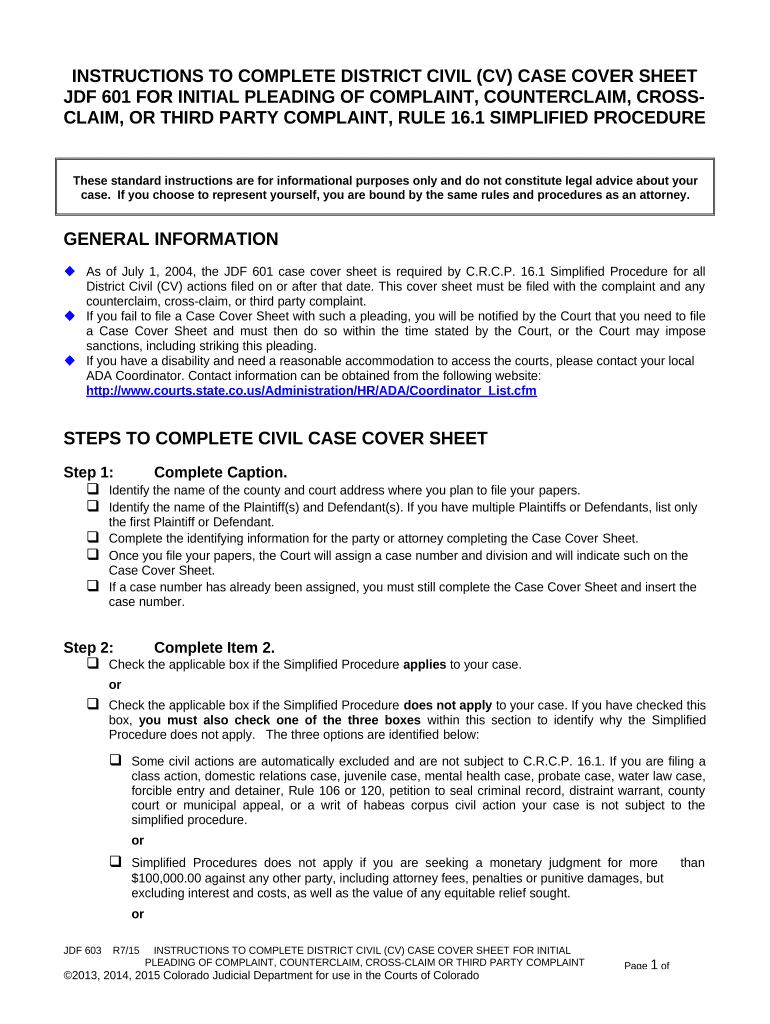
The Colorado District Civil Case Cover Sheet Instructions explain how to complete and submit the cover sheet that accompanies a civil complaint or other initiating pleading filed in Colorado district court. The cover sheet collects standardized administrative details—case type, party contact information, statutory basis for jurisdiction, and requested relief—so court clerks can route matters correctly, allocate case numbers, and apply local filing requirements. These instructions describe required fields, formatting expectations, common submission methods, and the relationship between the cover sheet and the filed pleading to help filers avoid processing delays or rejection.

Why Accurate Cover Sheet Completion Matters

Completing the cover sheet accurately ensures your case is classified correctly, assigned to the appropriate division, and processed without administrative delay. Accurate data reduces clerk follow-up, minimizes the risk of incorrect fee assessment, and helps preserve procedural deadlines.

Why Accurate Cover Sheet Completion Matters

Who Typically Prepares and Submits the Cover Sheet

The cover sheet is prepared by the party filing the initiating document or that party's attorney and provided to the court at the time of filing.

  • Self-represented litigants preparing a complaint or petition for filing with the district court.
  • Attorneys and paralegals filing civil matters on behalf of clients in Colorado district court.
  • Court clerks and intake staff who verify fields and route the case administratively.

If multiple parties file simultaneously, the originating filer completes the cover sheet and confirms the information with co-parties or counsel to ensure consistency across filings.

Step-by-Step: Completing and Submitting the Cover Sheet

Follow these sequential steps to prepare the cover sheet and file your initiating documents with the Colorado district court efficiently.

  • 01
    Prepare Complaint: Draft the complaint according to Colorado Rules of Civil Procedure.
  • 02
    Complete Cover Sheet: Enter caption, case type, relief, jurisdiction, and contact details on the cover sheet.
  • 03
    Assemble Attachments: Include summons, exhibits, civil cover sheet, and civil filing fee.
  • 04
    File with Clerk: Submit via the court's e-filing portal or in person per local clerk procedures.

How Filing and Routing Work After You Submit the Cover Sheet

The cover sheet directs administrative routing and supports case tracking. These steps summarize what the clerk's office does next.

  • Intake Review: Clerk verifies fees, completeness, and caption consistency with the complaint.
  • Case Numbering: A case number is assigned and recorded in the court system.
  • Division Assignment: Case type and jurisdiction influence assignment to the appropriate division or judge.
  • Scheduling: Clerk may set initial deadlines or require additional documents depending on case type.

Electronic Filing: Core Workflow Settings to Confirm

When filing electronically, verify these workflow settings in your e-filing system to ensure the cover sheet and complaint are transmitted correctly.

Document Type Mapping Set cover sheet to 'Civil Cover Sheet' so the court receives proper metadata.
File Format Upload PDFs compliant with PDF/A where possible to avoid display issues.
Signature Method Use approved electronic signature or attorney verification per court e-filing rules.
Service List Confirm e-service recipients and include correct email addresses for opposing counsel.
Cover Sheet Field Match Map cover sheet fields to complaint caption to prevent mismatches during intake.

Delivery Options and Technical Requirements

Colorado district courts accept filings via in-person delivery and electronic filing portals; local rules determine available methods.

  • e-Filing Portal: Use the court's approved e-filing vendor per local district rules; ensure PDF text is searchable.
  • In-Person Filing: Provide one original and the required number of copies if the clerk's office requests physical copies.
  • Email for Administrative Questions: Clerks may accept email queries but typically not email filings; check the district clerk's instructions.

Confirm the district clerk's preferred submission method prior to filing to avoid rejected filings and processing delays.

Risks and Consequences of Incorrect or Incomplete Cover Sheets

Filing Rejection: Incomplete cover sheets can prompt clerk rejection or require re-filing, delaying case processing.
Misclassification: Incorrect case type selection may route the matter to the wrong division and cause administrative transfer delays.
Fee Misassessment: Wrongly reported relief or case value can lead to underpayment or overpayment of filing fees.
Service Issues: Incorrect party contact information can prevent proper service and jeopardize procedural deadlines.
Evidence Gaps: Omitting required attachments listed on the cover sheet can cause evidentiary or procedural disputes.
Sanctions Risk: Repeated or material misstatements may expose filers to administrative sanctions or fee assessments under local rules.

Common Errors to Avoid When Completing the Cover Sheet

  • Mismatched party names between the complaint and cover sheet, causing clerical follow-up.
  • Leaving jurisdiction or case-type checkboxes blank or selecting multiple conflicting categories.
  • Failing to include numerical damage amounts where required for certain civil categories.
  • Uploading scanned images without searchable text, which can impede clerk review and e-filing processing.

Data and Security Considerations for Electronic Cover Sheets

Encryption: TLS 1.2/1.3 in transit; AES-256 at rest
Compliance: ESIGN and UETA recognition for e-signatures
HIPAA Support: HIPAA-compliant workflows available with appropriate agreements
Audit Trail: Timestamp, IP address, and signer attribution recorded
Access Controls: Role-based permissions and SSO/SAML options
Certifications: SOC 2 Type II and ISO 27001 attestations

Timing Considerations and Deadlines to Note

Filing timelines and deadlines related to a new civil action depend on the nature of the claim and subsequent service rules; observe these administrative timing items.

Filing Effective Date:

The filing date on the cover sheet or complaint governs statute-of-limitations calculations and priority.

Service Deadline:

Complete service within the period required by Colorado Rules of Civil Procedure to preserve claims.

Fee Payment Timing:

Pay filing fees at the time of submission to avoid rejection or administrative hold.

Amendment Windows:

Follow local rules on amending pleadings; timely amendments affect cover sheet accuracy.

Appeal and Post-Judgment:

Post-judgment filings require precise captioning and may need supplemental cover sheets per clerk guidance.

Key Milestones from Filing to Initial Case Management

This milestone sequence summarizes administrative stages from initial filing through early case management tasks.

01

File Complaint

Clerk accepts filing and assigns case number and docket entry.

02

Serve Defendant

Process server or party effect service per Colorado Rules of Civil Procedure.

03

Proof of Service Filed

File affidavit or certificate of service to confirm compliance with service rules.

04

Initial Case Management

Court issues scheduling order or sets status conference as appropriate.

Practical Tips for Accurate, Efficient Cover Sheet Completion

Adopt consistent internal checks and verification steps to avoid clerical errors and ensure smooth intake.

Use Centralized Templates
Standardize cover sheet entries across matters to reduce variance and misfiling; maintain a master template with current local rules.
Validate Party Names
Confirm legal entity names against formation documents or government records to prevent caption mismatches.
Cross-Check Amounts
Verify damage amounts and fee calculations before filing to avoid underpayment or fee dispute.
Archive Filed Copies
Store a complete PDF of the filed cover sheet and complaint with the clerk's stamped receipt for retention and audit trails.

Illustrative Filing Scenarios

These brief examples show how cover-sheet completion supports typical filing contexts and reduces administrative friction.

Contested Contract Case

A plaintiff files a breach of contract complaint and enters a clear damages amount on the cover sheet

  • The clerk assigns the case to civil division B based on case type
  • Accurate classification prevented transfer delays and allowed early scheduling within standard timelines, improving administrative predictability.

Medical Records-Related Claim

Counsel files a negligence claim referencing medical records and limits PHI on the public cover sheet

  • The filer uses sealed exhibits protocol for sensitive records
  • The court accepted the filing without redaction requests and preserved confidentiality while maintaining docket accuracy.

Frequently Asked Questions and Practical Answers

These FAQs address common uncertainties filers encounter when completing and submitting the Colorado District Civil Case cover sheet.


Need help? Contact support

be ready to get more
Join over 28 million airSlate SignNow users