Establishing secure connection…Loading editor…Preparing document…

Louisiana Revocable Inter Vivos Trust

This template is fully customizable. Edit the text, fill out the fields, and send it for signature. Give it a try!
Louisiana Revocable Inter Vivos Trust

What a Louisiana Revocable Inter Vivos Trust Is and When It Applies

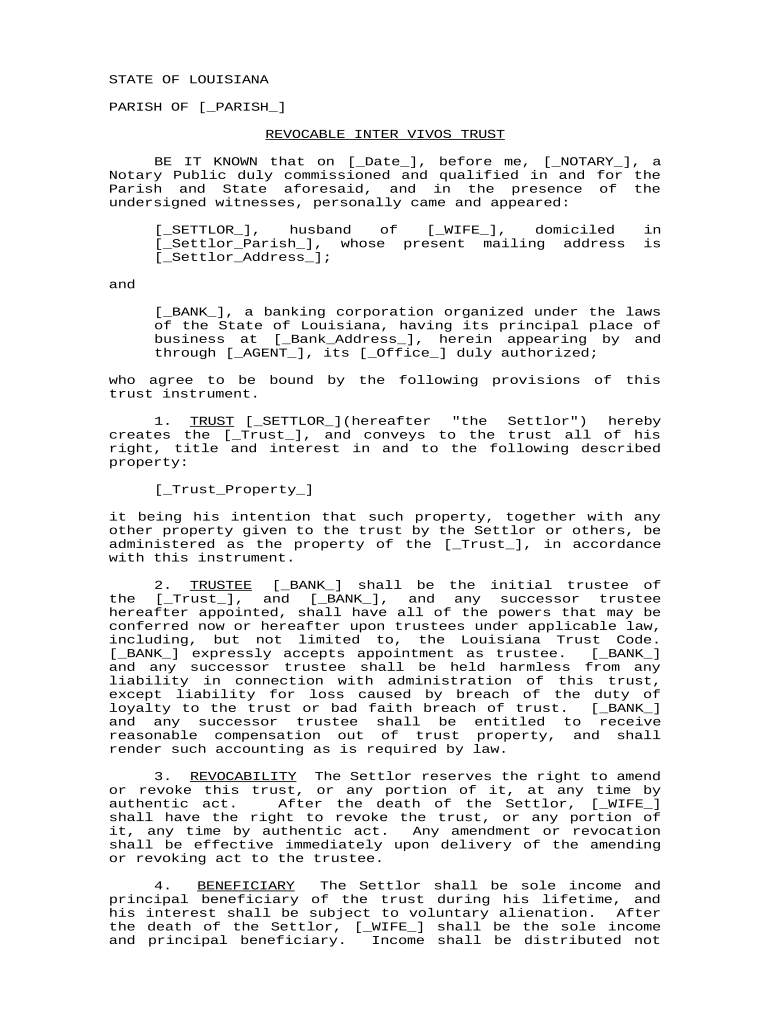
The Louisiana Revocable Inter Vivos Trust is a living trust created by a grantor during life to hold and manage assets for the grantor and named beneficiaries. It permits amendment or revocation by the grantor, names successor trustees for incapacity or death, and can streamline transfers for movable and immovable property. Properly funded, it helps avoid courts, preserves family privacy, and clarifies management powers if the grantor becomes incapacitated, but it must be executed with required formalities to be effective in Louisiana.

Primary Advantages and Legal Basis to Consider

A Louisiana Revocable Inter Vivos Trust reduces probate exposure, centralizes asset management, and preserves privacy while allowing the grantor to retain control. Electronic execution and many remote notarization workflows are recognized under federal ESIGN (15 U.S.C. ch. 96) and state UETA frameworks, subject to state exceptions.

Primary Advantages and Legal Basis to Consider

Who Commonly Uses This Trust and How It Helps Them

Typical users include individuals planning estates, married couples coordinating joint property, and professionals preparing trust-based succession plans in Louisiana.

  • Individual grantors who want to manage assets during life and plan for orderly succession
  • Married couples seeking joint trustee arrangements and simplified property transfer at death
  • Estate attorneys, financial planners, and professional trustees responsible for drafting and administering client trusts

Core Clauses You Should See in a Professional Trust

A complete Louisiana Revocable Inter Vivos Trust contains clauses that define grantor authority, trustee powers, successor appointment, distribution mechanics, incapacity planning, and revocation procedures to ensure predictable administration.

Trust Purpose

A clear statement of the trust's objective and the types of assets to be governed, clarifying intent for trustees and beneficiaries.
Grantor Powers

Specific rights for the grantor to amend, revoke, or act as trustee while alive, and instructions for actions during incapacity.

Trustee Authority

Detailed trustee powers including investment authority, distribution discretion, tax elections, and duties to beneficiaries and reporting.

Successor Trustees

Named successor trustees, alternates, and the process for appointment to ensure continuity if a trustee cannot serve.

Distribution Terms

How and when beneficiaries receive assets, including percentages, conditions, and contingent beneficiary provisions to avoid gaps.

Revocation Terms

How the grantor may revoke or amend the trust, required notices, and any necessary formalities for valid changes.

Step-by-Step: Execute and Fund a Louisiana Revocable Inter Vivos Trust

Follow these sequential steps to complete, execute, and fund a Louisiana Revocable Inter Vivos Trust accurately to preserve intent and avoid probate.

  • 01
    Draft: Define assets, trustees, beneficiaries, and powers clearly in the trust document.
  • 02
    Sign & Notarize: Sign before a notary and any required witnesses under Louisiana formalities.
  • 03
    Fund the Trust: Transfer titles, retitle accounts, and assign deeds to the trust name.
  • 04
    Record Transfers: Record real estate deeds and notify institutions to reflect the trust as owner.

Required Information and Key Data Elements

Grantor Full Name: Full legal name
Trust Name and Date: Formal trust title
Trustee Details: Names and contacts
Beneficiary Identifiers: Names and shares
Asset Schedule: Deeds and account IDs
Notary Acknowledgment: Notary signature block

Where to Send, File, and Who Receives Copies

This sequence outlines distribution and filing actions after execution to ensure the trust is effective and assets are controlled by trustees.

  • Original Trust: Keep with the grantor or original trustee in secure storage.
  • Trustee Copies: Provide certified copies to successor trustees and co-trustees.
  • Institution Notices: Send copies to banks, brokers, and title companies to retitle assets.
  • Recorded Deeds: Record deeds at the parish recorder when real estate transfers occur.

Digital Submission and Platform Requirements

Use secure PDF or DOCX formats and an eSignature provider supporting notarization workflows and audit trails.

  • Integrations: Salesforce, NetSuite, Google Workspace
  • File Formats: PDF, DOCX, HTML supported
  • Authentication: Email, SMS, or stronger

How to Set Up an Online Trust Signing Workflow

Configure an eSigning workflow that includes signature fields, a notary block, asset schedules, and recipient routing to trustees and institutions.

Field Configuration
Signature Placement Designate grantor, trustee, and witness signature fields
Notary Block Include space for notary acknowledgment and seal
Conditional Fields Use conditionals for successor trustee selection
Authentication Method Choose email, SMS code, or KBA

Who May Sign or Authorize Actions on the Trust

Grantor — Settlor

The person who creates the trust and transfers assets into it. The grantor signs trust documents, retains powers specified in the instrument, and may serve as initial trustee; accurate identity and execution preserve title transfers and tax reporting integrity.

Trustee — Fiduciary

An individual or corporate trustee named to manage trust assets and carry out distributions. Trustees must accept their role, follow fiduciary duties, and can sign bank forms and recorded documents to transfer or manage trust property.

Real-World Examples of How Louisiana Revocable Inter Vivos Trusts Are Used

These short scenarios show common use cases and how a properly drafted trust can change administration outcomes.

Family Estate Planning

A married couple consolidates real estate and bank accounts into a joint revocable trust to avoid probate and simplify succession.

  • They name successor trustees and specify distribution percentages.
  • After the primary grantor's incapacity, the successor trustee assumed immediate management, avoiding court guardianship and enabling quicker access to funds for care and household expenses.

Real Estate Holding

An individual transfers multiple properties into a revocable inter vivos trust to centralize management and prepare for long-term succession.

  • Deeds are retitled to the trust name.
  • Recording deeds and attaching an accurate Schedule A ensured title companies recognized trust ownership and facilitated rental income reporting and eventual transfer to beneficiaries with minimal delay.

Supporting Documents You Should Attach to the Trust

Including the right exhibits and supporting documents prevents delays and establishes clear evidence of asset ownership and intent.

Certificate of Trust

A concise statement of trust existence and trustee powers to show third parties without revealing detailed terms.

Schedule A

A detailed inventory of assets (deeds, accounts, policies) that are to be placed into the trust.

Recorded Deeds

Deeds retitled or recorded in the trust's name for immovable property to effect transfer.

Tax Documents

Any EIN assignment or tax forms relevant to trust accounts and reporting obligations.

Timing and Key Deadlines to Track When Creating a Trust

While there is no statutory waiting period, timely actions ensure the trust operates as intended and assets are protected.

Execution and Notarization:

Complete signatures and notary acknowledgement before funding assets.

Funding Window:

Retitle accounts and transfer deeds promptly after execution.

Record Deeds:

Record real estate deeds immediately to prevent title issues.

Tax Filings:

Obtain EIN if trust will be taxable and meet filing deadlines.

Review Schedule:

Verify Schedule A accuracy within 30 days of execution.

Key Milestones from Signing to Full Funding

Track these sequential milestones to move from executed document to a fully funded and operational trust.

01

Document Execution

Grantor signs trust before notary and required witnesses to form the trust.

02

Asset Retitling

Retitle bank accounts, investment accounts, and vehicles into the trust name.

03

Deed Recording

Record property deeds in the parish recorder's office as needed.

04

Institution Updates

Notify banks and insurers to update account ownership and beneficiary designations.

Common eSignature Vendors for Trust Execution and Notarization Workflows

Select an eSignature provider that supports notarization workflows, audit trails, and the integrations your trust process requires.

signNow DocuSign Adobe Sign PandaDoc HelloSign
Starting Price $8/user/mo $15/user/mo $14/user/mo $19/user/mo $15/user/mo
Free Trial 7-day free trial Varies by vendor Varies by vendor Varies by vendor Varies by vendor
Bulk Send Yes Yes Yes Yes No
Audit Trail Yes Yes Yes Yes Yes
HIPAA Compliant Yes Yes Yes No No

Common Pitfalls to Avoid When Preparing the Trust

  • Failing to transfer titles and accounts into the trust leaves assets subject to probate and frustrates intent.
  • Using vague beneficiary descriptions or percentages can create contestable ambiguities and family disputes.
  • Not including successor trustee instructions or alternates can cause delays and court involvement upon incapacity.
  • Omitting a notarization or required witness signatures in Louisiana can jeopardize enforceability and recording.

Consequences of an Incorrectly Prepared or Unfunded Trust

Invalid Execution: Possible unenforceability
Unfunded Trust: Assets may still probate
Tax Exposure: Misreporting or audit risk
Postponed Transfers: Delayed beneficiary access
Increased Costs: Legal and court fees
Litigation Risk: Higher contest likelihood

Frequently Asked Questions about the Louisiana Revocable Inter Vivos Trust

Answers to common questions about signing, notarization, funding, amendment, and electronic submission for Louisiana trusts.


Need help? Contact support

be ready to get more
Join over 28 million airSlate SignNow users