Establishing secure connection…Loading editor…Preparing document…

Assignment of Interest in Security Agreement

This template is fully customizable. Edit the text, fill out the fields, and send it for signature. Give it a try!
Assignment of Interest in Security Agreement

What the Assignment of Interest in Security Agreement Is

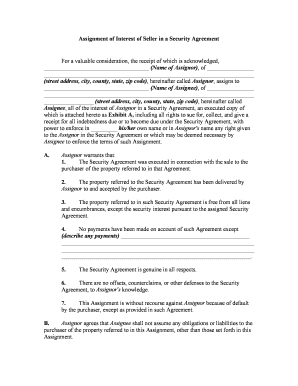
An Assignment of Interest in Security Agreement is a legal instrument transferring a secured party's rights, title, or interest in an existing security agreement to another party. It documents the assignment of collateral rights, any related obligations, and whether the assignor retains any residual obligations. The form clarifies which security interests continue to secure the underlying obligation and whether a financing statement amendment (UCC-3) or recording is required to perfect priority.

Why You Use an Assignment of Interest in Security Agreement

Use this assignment to transfer collateral rights cleanly, preserve priority under UCC Article 9, and show third parties and filing offices who holds secured rights. A clear written assignment reduces disputes over enforcement and filing errors.

Why You Use an Assignment of Interest in Security Agreement

Who Typically Prepares and Signs This Assignment

This document is used by lenders, buyers of loan portfolios, servicers, and borrowers when secured interests change hands.

  • Commercial lenders and banks preparing to sell or assign loans
  • Loan servicers documenting transfers of servicing or collateral rights
  • Private investors or special servicers purchasing secured interests

Because assignments affect perfection and priority, parties often involve counsel and record the change with the appropriate filing office.

Typical Signatories and Their Roles

Assignor — Lender

The assignor is the secured party transferring an interest. The assignor must identify the original security agreement, describe the interest being assigned, and warrant any factual statements about existing priority. Legal review by counsel is common to confirm authority to assign.

Assignee — New Secured Party

The assignee accepts the transferred interest and often agrees to succeed to rights and remedies. The assignee should verify the collateral description, outstanding obligations, and ensure any required UCC amendment or recording to protect priority is completed.

Essential Information to Include

Assignor Name: Full legal entity name
Assignee Name: Full legal entity name
Original Agreement: Date and title of security agreement
Collateral Description: Precise collateral details
Effective Date: MM/DD/YYYY format
UCC Filing Action: Amendment or new filing

Key Sections Found in a Professional Assignment

A complete assignment clearly identifies the sourced security agreement, the exact interest being transferred, representations and warranties, effective date, instructions for perfection (UCC-3 or recording), and signatures and notarization if required.

Recitals

Background describing the original security agreement and parties involved, including dates and instrument identifiers.
Assignment Clause

Language specifying the interest assigned (all or part), any retained rights, and scope of transfer.

Representations

Assignor statements about validity, absence of conflicting liens, and authority to assign.

Perfection Steps

Instructions to file UCC-3, update financing statements, or record where real property is involved.

Indemnities

Any indemnification for breaches or undisclosed encumbrances where applicable.

Execution Block

Signature lines, printed names, titles, dates, and notarization or witness fields if required.

Step-by-Step: Completing and Recording the Assignment

Follow these tasks in order to transfer rights and protect the assignee's priority under UCC Article 9.

  • 01
    Prepare Assignment: Draft assignment with full party details and collateral description.
  • 02
    Obtain Signatures: Have authorized signatories execute with required notarization.
  • 03
    File UCC Amendment: File UCC-3 or new financing statement in filing state.
  • 04
    Notify Relevant Parties: Inform obligors and service providers of the assignment.

Digital Workflow Settings for Online Completion

Configure an electronic workflow that captures intent, attribution, and retains a reproducible record to meet ESIGN/UETA standards.

Field Configuration
Signature Field Require explicit signature and date
Authentication Email plus SMS code for assignee
Audit Trail Capture IP, timestamp, and actions
Document Retention Enable PDF export with certificate

How Electronic Assignment and eFiling Typically Works

An electronic assignment workflow mirrors the paper process: draft, sign, verify identities, and file or record where necessary.

  • Draft: Upload and prepare the assignment document
  • Assign Fields: Add signature, date, and witness/notary fields
  • Signers Authenticate: Signers confirm identity via email/SMS/KBA
  • File: Export signed PDF and submit UCC-3 or recorder filing

Technical Requirements for eSigning and eFiling

Use an eSignature platform that supports audit trails, secure storage, and integrations with filing workflows.

  • Document Formats: PDF, Word DOCX supported
  • Integrations: Connectors for NetSuite, Salesforce, and cloud storage
  • Security: TLS 1.2/1.3 and AES-256 at-rest encryption

Ensure the platform also supports conditional fields, notarization workflows (RON or in-person), and the ability to produce a signed PDF with an audit certificate.

Timing Considerations and Typical Deadlines

Timelines vary by transaction complexity; prioritize signature, filing, and notice deadlines to preserve priority and avoid disputes.

Effective Date:

Date parties set on the assignment

UCC Filing:

File promptly to protect priority

Notice to Debtor:

Send as soon as assignment is effective

Recording (real property):

Record within county deadlines if deed interests involved

Retention Start:

Start retention clock on effective date

Key Milestones from Draft to Perfection

Track these sequential milestones to ensure the assignee obtains enforceable and perfected rights.

01

Draft Completed

Assignment prepared and reviewed by counsel

02

Executed by Parties

Signatures obtained and notarized as required

03

UCC-3 Filed

Filing made in the appropriate state system

04

Debtor Notified

Obligor receives notice of assignee

Common Pitfalls to Avoid

  • Using inconsistent entity names between the assignment and financing statement
  • Failing to describe collateral precisely, creating search or enforcement issues
  • Neglecting to file a UCC-3 or record where required, risking loss of priority
  • Omitting required notarization or witness language when state law or the original agreement demands it

Risks and Consequences of an Improper Assignment

Priority Loss: Loss of secured-party priority
Enforcement Delay: Court-ordered delays or additional remedies
Tax/Reporting Errors: Misstated ownership for tax filings
Invalid Transfer: Assignment may be void if assignor lacked authority
Notary Rejection: Recorder may reject unnotarized instruments
Increased Costs: Additional legal and filing fees

eSignature Pricing and Feature Comparison for Executing This Assignment

Compare typical starting prices and key capabilities useful when executing and filing assignments. signNow is listed first per platform comparison conventions.

signNow DocuSign Adobe Sign PandaDoc HelloSign
Starting Price $8/user/mo $15/user/mo $14/user/mo $19/user/mo $15/user/mo
Free Trial 7-day free trial Varies by plan Varies by plan Varies by plan Varies by plan
Bulk Send Yes Yes Yes Yes No
Audit Trail Yes Yes Yes Yes Yes
HIPAA Compliant Yes Yes Yes No No

Frequently Asked Questions and Troubleshooting

Answers to common questions about validity, perfection, eSignature, and recording for Assignments of Interest in Security Agreement.


Need help? Contact support

be ready to get more
Join over 28 million airSlate SignNow users