Establishing secure connection…Loading editor…Preparing document…

Mississippi Inventory for Conservatorship

This template is fully customizable. Edit the text, fill out the fields, and send it for signature. Give it a try!
Mississippi Inventory for Conservatorship

What the Mississippi Inventory for Conservatorship Is

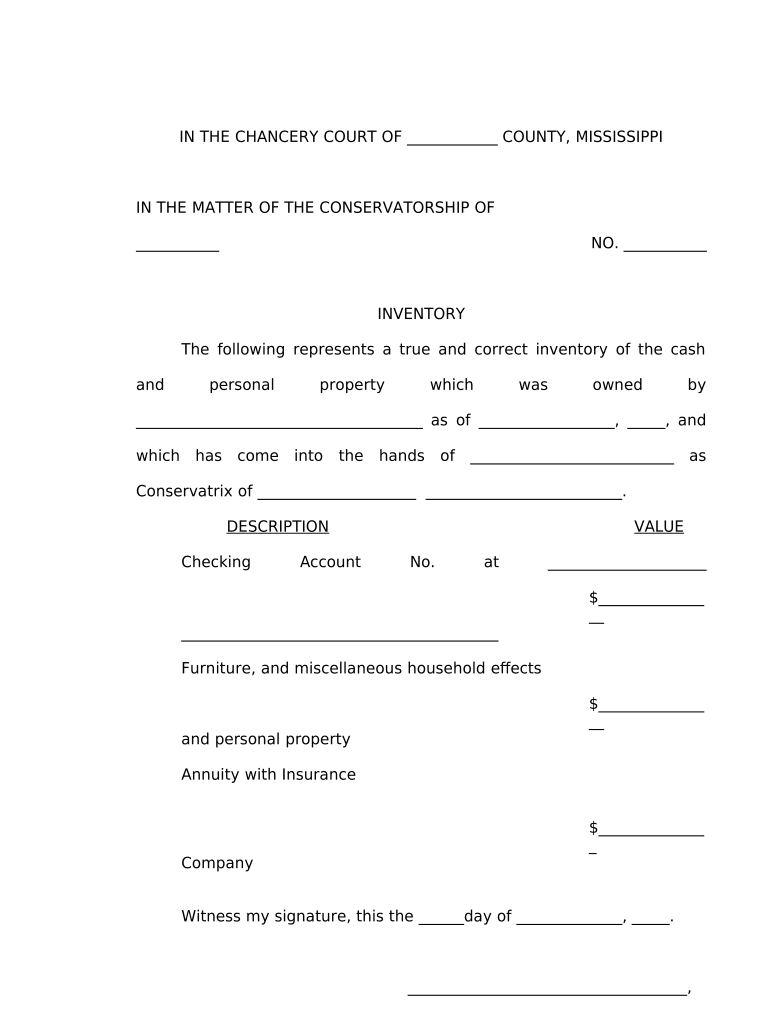
The Mississippi Inventory for Conservatorship is a court-focused inventory used in Mississippi probate proceedings to list a conservatee’s assets, liabilities, income, and recent transactions. It documents property types, locations, account numbers, estimated values, and any secured interests; it also discloses monthly income and recurring expenses. Conservators submit this inventory to the chancery court as part of initial bond requirements and periodic accounting. The form helps the court monitor estate management, prevent waste or misappropriation, and provide a clear record for creditors and interested parties during the conservatorship term.

Why an Accurate Inventory Matters to the Court and Conservator

A complete Mississippi Inventory for Conservatorship clarifies the conservatee’s financial position for the court, supports fiduciary accountability, and reduces disputes. Accurate inventories streamline accountings and protect the conservator from later allegations of neglect or improper management.

Why an Accurate Inventory Matters to the Court and Conservator

Who Typically Prepares and Relies on the Inventory

The inventory is completed by appointed conservators and their attorneys to report assets and financial activity to Mississippi chancery courts.

  • Individual conservators managing personal estates or guardianships overseeing adult wards.
  • Professional fiduciaries and trust companies administering assets under court supervision.
  • Attorneys preparing periodic accountings, petitions for approval, or bond adjustments.

Primary Roles Involved

Conservator

An individual or corporate fiduciary appointed by the chancery court to manage the conservatee’s person and estate; responsible for maintaining accurate inventories, filing accountings, handling receipts and disbursements, and complying with court orders and statutory reporting requirements in Mississippi.

Attorney

Licensed Mississippi attorney who prepares the inventory, advises the conservator on legal duties, ensures forms meet court local rules, and submits filings; often coordinates valuations, creditor notices, and petitions for court approval of transactions.

Essential Data Items to Include

Conservatee ID: Full legal name and date of birth.
Asset Description: Type, location, and account identifiers.
Estimated Value: Current fair market value estimate.
Liabilities: Outstanding debts, liens, and mortgages.
Income Sources: Monthly income, benefits, and pensions.
Supporting Docs: Statements, titles, appraisals, bills.

Common Consequences of Inaccurate Inventories

Late Filing: Court sanctions or surcharge.
Incorrect Values: Potential bond increase.
Missing Assets: Creditors' claims risk.
Fraud Allegations: Civil liability exposure.
Tax Consequences: Incorrect reporting penalties.
Notarization Faults: Rejected filings by court.

Avoidable Preparation Pitfalls

  • Omitting bank account numbers or using vague descriptions leads to ambiguity and forces supplemental filings or creditor disputes, delaying court approval of conservatorship accountings.
  • Failing to attach recent statements and appraisals increases verification time; courts commonly request originals or certified copies before accepting the inventory.
  • Mixing conservatee assets with the conservator’s personal property obscures fiduciary accountability and may prompt removal or bond adjustments.
  • Using estimated values without documenting valuation method exposes the conservator to credibility challenges and may require revaluation orders.

What a Professional Inventory Includes

A professional Mississippi inventory organizes asset classes, valuation notes, creditor information, and supporting documentation to meet chancery court expectations and ease periodic accounting.

Asset Categorization

Separate real property, bank accounts, securities, personal property, and intangible assets; include location, account numbers, and brief description so the court and creditors can clearly identify each asset during review.
Valuation Method

State appraisal dates, market sources, or broker statements used to estimate values; attach supporting appraisals or recent sale comparables when available to substantiate figures for the court record.

Income & Expenses

List recurring income sources, benefit payments, and monthly expenses; itemize amounts and attach bank statements or benefit letters to validate cash flow and show conservatorship budget management.

Liens & Debts

Identify mortgages, secured loans, and tax liens with creditor names, account numbers, outstanding balances, and supporting payoff statements to allow the court to assess encumbrances on estate property.

Supporting Documents

Attach copies of deeds, titles, bank statements, brokerage reports, appraisal certificates, insurance policies, and bills; label exhibits clearly so the clerk and judge can cross-reference entries.

Signature & Verification

Include conservator signature, date, and notarization if required by local rules; attorneys should certify accuracy and attach verification affidavits where statutes or local practice demand.

Step-by-Step: Prepare, Sign, and File the Inventory

Follow these steps to complete and submit the Mississippi Inventory for Conservatorship accurately to chancery court.

  • 01
    Gather Documents: Collect bank statements, titles, appraisals, and bills.
  • 02
    List Assets: Describe assets, locations, and account numbers.
  • 03
    Value Items: Provide estimated values and valuation sources.
  • 04
    Sign & File: Sign, notarize if required, and submit to court.

Typical Workflow From Drafting to Court Review

This workflow explains the common path from inventory preparation through court filing and periodic accountings in Mississippi conservatorships.

  • Prepare Draft: Compile detailed listings and supporting statements.
  • Review & Verify: Confirm balances and document authenticity.
  • Notarize if Needed: Obtain notarization or witness signatures.
  • File with Clerk: Submit to chancery court per local rules.

Configuring an Online Workflow for Inventory Assembly

Use this table to configure an online workflow for assembling, routing, and filing the Mississippi inventory with eSignature support.

Field Configuration
Signers Ordered routing; email and SMS authentication.
Fields Signature, initials, date, and conditional fields.
Notifications Email reminders and overdue escalation.
Storage PDF archival with audit trail retention.

Technical Requirements for eSubmission and Storage

Online filing requires a PDF/A-capable document, reliable internet, and an eSignature provider that preserves audit trails and timestamps.

  • Formats: PDF, DOCX, scanned images supported.
  • Integrations: Court e-filing and storage systems.
  • Auth Methods: Email link, SMS code, KBA.

Key Deadlines and Processing Expectations

Key filing and reporting deadlines for conservatorship inventories and accountings in Mississippi depend on initial appointment and court scheduling.

Initial Inventory Deadline:

Usually within 90 days of appointment unless court orders otherwise.

Periodic Accountings:

Timing set by court — often annual or biennial.

Emergency Reports:

As required immediately upon significant asset changes.

Bond Review:

Court may require bond increase following inventory errors.

Clerk Processing Time:

Local clerk processing varies from days to weeks.

Milestones from Appointment to Ongoing Accounting

Major milestones in processing a Mississippi conservatorship inventory from appointment through court approval and ongoing accountings.

01

Appointment

Court appoints conservator and sets inventory deadline.

02

Inventory Preparation

Conservator assembles asset list, valuations, and documents.

03

Filing & Review

File with chancery clerk; judge reviews and may request clarifications.

04

Ongoing Accountings

Periodic reports required; court may schedule hearings for approval.

Practical Examples From Typical Conservatorship Matters

Real-world examples show practical inventory use in Mississippi conservatorship cases and common court interactions daily.

County Chancery Case

A conservator compiled a complete inventory after appointment to satisfy the chancery court’s initial reporting requirement and to support a bond application.

  • Included appraisals and bank statements.
  • The court approved the inventory without further orders after verification; maintaining labeled exhibits and clear valuation notes reduced follow-up requests and allowed timely authorization for necessary medical and housing expenditures.

Accountings and Bond Review

In a complex estate with multiple rental properties, the conservator created a detailed inventory to support refinancing and tenant dispute resolution.

  • Valuations included CMA reports and mortgage statements.
  • Providing organized exhibits and creditor contact information expedited the court’s bond review and enabled negotiated settlements with lenders; the conservator avoided surcharge actions by documenting transactions and court-approved expenditures.

Practical Tips to Reduce Errors and Court Delays

Practical tips to improve accuracy and minimize court follow-ups when preparing the Mississippi inventory regularly.

Verify full account numbers and ownership titles
Cross-check each listed account against bank statements and beneficiary designations; correct any mismatched names before filing to prevent creditor confusion and to avoid requests for supplemental inventories or corrections that can delay approvals.
Document valuation sources and dates
Attach appraisal certificates, broker letters, or market comparable reports and record the valuation date; clear sourcing reduces judicial skepticism and supports fair market values used for bond determinations or sale authorizations.
Keep organized, labeled exhibits and index
Number and tab exhibits, reference them within the inventory entries, and provide an index; well-indexed supporting documents shorten clerk review times and help judges verify asset claims without ordering supplemental submissions.
Consult counsel for complex matters
Seek legal advice for contested assets, title disputes, or transactions requiring court authorization; attorneys can draft petitions, prepare bond modifications, and advise on whether notarization or additional affidavits are needed.

Pricing and Feature Comparison for eSignature Solutions

Compare core eSignature pricing and capabilities for common features relevant to filing and signing the Mississippi inventory.

signNow DocuSign Adobe Sign PandaDoc HelloSign
Starting Price $8/user/mo $15/user/mo $14/user/mo $19/user/mo $15/user/mo
Free Trial 7-day free trial Varies by plan Varies by plan Varies by plan Varies by plan
Bulk Send Yes Yes Yes Yes No
Audit Trail Yes Yes Yes Yes Yes
HIPAA Compliant Yes Yes Yes No No
Envelope Cap No envelope cap 100 envelopes/user/year Varies by plan Varies by plan Varies by plan

Frequently Asked Questions About the Mississippi Inventory

Frequently asked questions about preparing, signing, and filing the Mississippi Inventory for Conservatorship, including common procedural and technical issues.


Need help? Contact support

be ready to get more
Join over 28 million airSlate SignNow users