Establishing secure connection… Loading editor… Preparing document…
Navigation

Fill and Sign the Jury Instruction Defense Form
Fill and Sign the Jury Instruction Defense Form

How it works

Open the document and fill out all its fields.
Apply your legally-binding eSignature.
Save and invite other recipients to sign it.

Rate template

4.7
34 votes
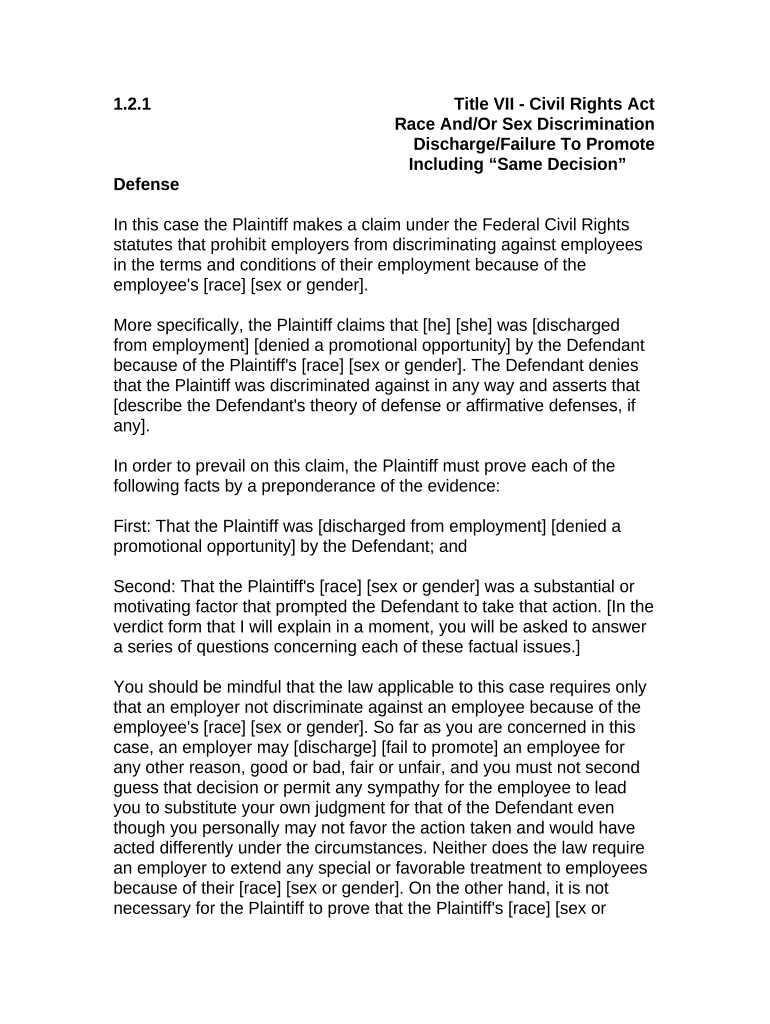
1.2.1 Title VII - Civil Rights Act Race And/Or Sex Discrimination Discharge/Failure To Promote Including “Same Decision” Defense In this case the Plaintiff makes a claim under the Federal Civil Rights statutes that prohibit employers from discriminating against employees in the terms and conditions of their employment because of the employee's [race] [sex or gender]. More specifically, the Plaintiff claims that [he] [she] was [discharged from employment] [denied a promotional opportunity] by the Defendant because of the Plaintiff's [race] [sex or gender]. The Defendant denies that the Plaintiff was discriminated against in any way and asserts that [describe the Defendant's theory of defense or affirmative defenses, if any]. In order to prevail on this claim, the Plaintiff must prove each of the following facts by a preponderance of the evidence: First: That the Plaintiff was [discharged from employment] [denied a promotional opportunity] by the Defendant; and Second: That the Plaintiff's [race] [sex or gender] was a substantial or motivating factor that prompted the Defendant to take that action. [In the verdict form that I will explain in a moment, you will be asked to answer a series of questions concerning each of these factual issues.] You should be mindful that the law applicable to this case requires only that an employer not discriminate against an employee because of the employee's [race] [sex or gender]. So far as you are concerned in this case, an employer may [discharge] [fail to promote] an employee for any other reason, good or bad, fair or unfair, and you must not second guess that decision or permit any sympathy for the employee to lead you to substitute your own judgment for that of the Defendant even though you personally may not favor the action taken and would have acted differently under the circumstances. Neither does the law require an employer to extend any special or favorable treatment to employees because of their [race] [sex or gender]. On the other hand, it is not necessary for the Plaintiff to prove that the Plaintiff's [race] [sex or gender] was the sole or exclusive reason for the Defendant's decision. It is sufficient if the Plaintiff proves that [race] [sex or gender] was a determinative consideration that made a difference in the Defendant’s decision. [If you find in the Plaintiff’s favor with respect to each of the facts that the Plaintiff must prove, you must then decide whether the Defendant has shown by a preponderance of the evidence that the Plaintiff would [have been dismissed] [not have been promoted] for other reasons even in the absence of consideration of the Plaintiff’s [race] [sex or gender]. If you find that the Plaintiff would [have been dismissed] [not have been promoted] for reasons apart from the Plaintiff’s [race] [sex or gender], then your verdict should be for the Defendant.] If you find for the Plaintiff and against the Defendant on its defense, you must then decide the issue of the Plaintiff’s damages: In considering the issue of the Plaintiff's damages, you are instructed that you should assess the amount you find to be justified by a preponderance of the evidence as full, just and reasonable compensation for all of the Plaintiff's damages, no more and no less. Compensatory damages are not allowed as a punishment and must not be imposed or increased to penalize the Defendant. Also, compensatory damages must not be based on speculation or guesswork because it is only actual damages that are recoverable. [On the other hand, compensatory damages are not restricted to actual loss of time or money; they cover both the mental and physical aspects of injury - - tangible and intangible. Thus, no evidence of the value of such intangible things as emotional and mental anguish has been or need be introduced. In that respect it is not value you are trying to determine, but an amount that will fairly compensate the Plaintiff for those claims of damage. There is no exact standard to be applied; any such award should be fair and just in the light of the evidence.] You should consider the following elements of damage, to the extent you find them proved by a preponderance of the evidence, and no others: (a) Net lost wages and benefits to the date of trial; (b) Emotional pain and mental anguish. [(c) Punitive damages, if any (as explained in the Court’s instructions)] [You are instructed that any person who claims damages as a result of an alleged wrongful act on the part of another has a duty under the law to "mitigate" those damages - - that is, to take advantage of any reasonable opportunity that may have existed under the circumstances to reduce or minimize the loss or damage. So, if you should find from a preponderance of the evidence that the Plaintiff failed to seek out or take advantage of a business or employment opportunity that was reasonably available under all the circumstances shown by the evidence, then you should reduce the amount of the Plaintiff's damages by the amount that could have been reasonably realized if the Plaintiff had taken advantage of such opportunity.] [The Plaintiff also claims that the acts of the Defendant were done with malice or reckless indifference to the Plaintiff's federally protected rights so as to entitle the Plaintiff to an award of punitive damages in addition to compensatory damages. In some cases punitive damages may be awarded for the purpose of punishing the Defendant for its wrongful conduct and to deter others from engaging in similar wrongful conduct. However, an employer may not be held liable for punitive damages because of discriminatory acts on the part of its managerial employees where those acts by such employees are contrary to the employer’s own good faith efforts to comply with the law by implementing policies and programs designed to prevent such unlawful discrimination in the workplace. So, an award of punitive damages would be appropriate only if you find for the Plaintiff and then further find from a preponderance of the evidence (1) that a higher management official of the Defendant personally acted with malice or reckless indifference to the Plaintiff’s federally protected rights, and (2) that the employer itself had not acted in a good faith attempt to comply with the law by adopting policies and procedures designed to prohibit such discrimination in the workplace. If you find that punitive damages should be assessed against the Defendant, you may consider the financial resources of the Defendant in fixing the amount of such damages. 1.2.1 Title VII - Civil Rights Act Race And/Or Sex Discrimination Discharge/Failure To Promote Including “Same Decision” Defense SPECIAL INTERROGATORIES TO THE JURY Do you find from a preponderance of the evidence: 1. That the Plaintiff was [discharged from employment] [denied a promotional opportunity] by the Defendant? Answer Yes or No 2. That the Plaintiff’s [race] [sex or gender] was a substantial or motivating factor that prompted the Defendant to take that action? Answer Yes or No [Note: If you answered No to either Question No. 1 or Question No. 2 you need not answer the remaining question.] 3. That the Plaintiff would have been [discharged from employment] [denied a promotional opportunity] for other reasons even in the absence of consideration of the Plaintiff’s [race] [sex or gender]? Answer Yes or No [Note: If you answered Yes to Question No. 3, you need not answer the remaining questions.] 4. That the Plaintiff should be awarded damages to compensate for a net loss of wages and benefits to the date of trial? Answer Yes or No If your answer is Yes, in what amount? $       5. That the Plaintiff should be awarded damages to compensate for emotional pain and mental anguish? Answer Yes or No If your answer is Yes, in what amount? $       6(a). That a higher management official of the Defendant acted with malice or reckless indifference to the Plaintiff’s federally protected rights? Answer Yes or No (b) If your answer is Yes, that the Defendant itself had not acted in a good faith attempt to comply with the law by adopting policies and procedures designed to prohibit such discrimination in the workplace? Answer Yes or No (c) If your answer is Yes, what amount of punitive damages, if any, should be assessed against the Defendant? $       . SO SAY WE ALL. Foreperson DATED:       ANNOTATIONS AND COMMENTS Following the Civil Rights Act of 1991, a prevailing plaintiff in a Title VII action may recover back pay, other past and future pecuniary losses, damages for pain and suffering, punitive damages (except that no punitive damages may be awarded against government agencies or political subdivisions), and reinstatement or front pay. Title 42 U.S.C. § 2000e-5(g)(1) specifically provides for the award of back pay from the date of judgment back to two years prior to the date the plaintiff files a complaint with the Equal Employment Opportunity Commission. This section also provides that interim earnings or amounts earnable with reasonable diligence by the person or persons discriminated against shall operate to reduce the back pay otherwise allowable. See Nord v. United States Steel Corp., 758 F.2d 1462, 1470-73 (11th Cir. 1985) (The purpose behind Title VII is to “make whole” the complainant, therefore back pay is recoverable up to the date judgment is entered); Crawford v. Western Elec. Co., Inc., 614 F.2d 1300 (5th Cir.), reh’g denied, 620 F.2d 300 (5th Cir. 1980) (Back pay relief under this subchapter is limited to the two years preceding the filing of a charge with the Commission, but liability of the employer for back pay may be based on acts occurring outside the two-year period if a current violation is shown). Back pay encompasses more than just salary, it also includes fringe benefits such as vacation, sick pay, insurance and retirement benefits. Pettway v. Am. Cast Iron Pipe Co., 494 F.2d 211, 263 (5th Cir.), reh’g denied, 494 F.2d 1296 (5th Cir. 1974); see also Crabtree v. Baptist Hosp. of Gadsden, Inc., 749 F.2d 1501 (11th Cir.1985); EEOC v. Joe’s Stone Crab, Inc., 15 F. Supp.2d 1364 (S.D. Fla. 1998). The award of compensatory and punitive damages in a Title VII employment discrimination action (exclusive of back pay, interest on back pay, or any other type of equitable relief authorized under 42 U.S.C. § 2000e-5(g)) is governed by 42 U.S.C. § 1981a. See 42 U.S.C. §§ 1981a(a)(1), (b)(2). Specifically, 42 U.S.C. § 1981a(b)(1) authorizes a prevailing plaintiff to receive compensatory and punitive damages if the plaintiff demonstrates that the employer engaged in a discriminatory practice “with malice or with reckless indifference to the plaintiff’s federally protected rights of an aggrieved individual.” Thus, a plaintiff must demonstrate some form of reckless or egregious conduct, such as: (1) a pattern of discrimination; (2) spite or malevolence; or (3) a blatant disregard for civil obligations. Dudley v. Wal-Mart Stores, Inc., 166 F.3d 1317, 1322-23 (11th Cir. 1999). In the Eleventh Circuit, punitive damages will ordinarily not be assessed against employers with only constructive knowledge of the violations. Id., Splunge v. Shoney’s, Inc., 97 F.3d 488, 491 (11th Cir. 1996). To get punitive damages a Title VII plaintiff must “show either that the discriminating employee was ‘high[] up the corporate hierarchy,’ or that ‘higher management’ countenanced or approved [his] behavior.” Dudley, 166 F.3d at 1323 (internal citations omitted). In Dudley, the Eleventh Circuit held that a store comanager and store manager were not sufficiently high enough up the employer’s corporate hierarchy to allow their discriminatory acts to be the basis for punitive damages against the corporation. Id. The award of such damages, however, is limited by § 1981a(b)(3) which provides caps on the amount of noneconomic compensatory and punitive damages awardable for Title VII actions as follows: The sum of the amount of compensatory damages awarded under this section for future pecuniary losses, emotional pain, suffering, inconvenience, mental anguish, loss of enjoyment of life, and other nonpecuniary losses, and the amount of punitive damages awarded under this section, shall not exceed, for each complaining party-- (A) in the case of a respondent who has more than 14 and fewer than 101 employees in each of 20 or more calendar weeks in the current or preceding calendar year, $50,000; (B) in the case of a respondent who has more than 100 and fewer than 201 employees in each of 20 or more calendar weeks in the current or preceding calendar year, $100,000; and (C) in the case of a respondent who has more than 200 and fewer than 501 employees in each of 20 or more calendar weeks in the current or preceding calendar year, $200,000; and (D) in the case of a respondent who has more than 500 employees in each of 20 or more calendar weeks in the current or preceding calendar year, $300,000. If a plaintiff seeks compensatory or punitive damages, either party may demand a trial by jury. See 42 U.S.C. § 1981a(c). Pursuant to this provision, the jury would determine the appropriate amount of compensatory and punitive damages to be awarded, (without being instructed of the statutory caps), and the court would then reduce the amount in accordance with the limitations stated in § 1981a if necessary. See 42 U.S.C. § 1981a(c)(2). It is clear that back pay is only recoverable through § 2000e-5(g)(1) of Title VII and does not fall within the purview of § 1981a limitations. See 42 U.S.C. § 1981a(b)(2); Landgraf v. USI Film Products, 511 U.S. 244, 253-55, 114 S.Ct. 1483, 1491, 128 L.Ed.2d 229 (1994) (stating § 1981a provides that award of compensatory damages excludes back pay to prevent double recovery). Because back pay is specifically exempted from the definition of compensatory damages, there is a question as to whether back pay is really a legal remedy and thus determined by the jury, or an equitable remedy determined by the court. Several other jurisdictions have held that back pay is an equitable remedy, in the same category as reinstatement or front pay, and determined only by the judge. However, Eleventh Circuit cases have stated that back pay is a legal issue for the jury. See e.g.,Waldrop v. Southern Company Services, Inc., 24 F.3d 152 (11th Cir. 1994); Ross v. Buckeye Cellulose Corp., 980 F.2d 648 (11th Cir. 1993) reh’g denied, 16 F.3d 1233 (11th Cir.), cert. denied, 513 U.S. 814, 115 S.Ct. 69, 130 L.Ed.2d 24 (1994). See also, Kemp v. Monge, 919 F Supp. 404 (M.D. Fla. 1996) (jury returned verdict for plaintiff in ADA case awarding back pay and compensatory damages, and court ruled on issue of reinstatement/front pay); Beesley v. Hartford Fire Ins. Co., 723 F. Supp. 635 (N.D. Ala. 1989) (holding that employee’s claim for back pay under Title VII was a request for a form of legal damages and therefore entitled to a trial by jury); Castle v. Sangamo Weston, Inc., 650 . Supp. 252 (M.D. Fla. 1986), rev’d on other grounds, 837 F.2d 1550 (11th Cir. 1988) (jury returned verdict on liability, back pay, damages, and liquidated damages in ADEA case). Some judges submit both back pay and front pay claims to the jury, ruling that the jury verdict will be treated as advisory under Federal Rule of Civil Procedure 39(c) should it be determined on appeal or otherwise that any part of the pay claims are equitable and not subject to jury trial as of right. There is also an issue as to whether the statutory reference to “future pecuniary losses” includes front pay. At least one other jurisdiction has held that “future pecuniary losses” includes front pay, and therefore, the jury determines what amount, if any, to award under this calculation, and it is included in the § 1981a(b)(3) caps. See Hamlin v. Charter Tp. Of Flint, 965 F. Supp. 984 (E.D. Mich. 1997) (holding that front pay represents compensation for "future pecuniary losses" and, therefore, is subject to statutory damages cap contained in Civil Rights Act of 1991; front pay is not a specifically authorized remedy under Title VII's enforcement provisions, so as to be exempt from damages cap). The Eleventh Circuit, however, has taken the opposite approach and held that front pay, because it is only awarded when reinstatement is impractical and only when the award of compensatory damages and back pay do not make the plaintiff “whole,” is really an equitable remedy to be determined by the court at the conclusion of the jury trial. Therefore, it appears that the § 1981a(b)(3) limitations do not apply. See, e.g., Nord v. United States Steel Corp., 758 F.2d 1462, 1473 (11th Cir.1985); Weaver v. Casa Gallardo, Inc., 922 F.2d 1515, 1528- 29 (11 th Cir.1991). See also, Walther v. Lone Star Gas Co., 952 F.2d 119, 127 (5th Cir. 1992) (When reinstatement is not feasible, the equitable remedy of front pay is available at the court's discretion. Because front pay is an equitable remedy, the court, rather than the jury, determines the amount of the award). Title VII also explicitly authorizes the award of attorney's fees to "the prevailing party." See 42 U.S.C. § 2000e-5(k). Thus, in Title VII cases, a district court "may in its discretion award attorney's fees to a prevailing defendant ... upon a finding that the plaintiff's action was frivolous, unreasonable, or without foundation, even though not brought in subjective bad faith." See Christiansburg Garment Co. v. EEOC, 434 U.S. 412, 421, 98 S.Ct. 694, 700, 54 L.Ed.2d 648 (1978). If the Defendant prevails on a “same decision” defense, the jury should award no compensatory or punitive damages, even though Plaintiff has proven that “race, color, religion, sex or national origin was a motivating factor.” See 42 USC § 2000e-5( g)(2)(B). Section 2000e-5(2)(B) provides that in such cases, the court may grant declaratory relief, limited injunctive relief and limited attorney fees and costs.

Helpful tips on finishing your ‘Jury Instruction Defense’ online

Are you fed up with the burden of handling documents? Look no further than airSlate SignNow, the premier e-signature solution for individuals and businesses. Bid farewell to the monotonous routine of printing and scanning documents. With airSlate SignNow, you can effortlessly finalize and sign documents online. Utilize the powerful features embedded in this user-friendly and affordable platform to transform your method of document management. Whether you need to authorize documents or collect signatures, airSlate SignNow manages it with ease, requiring just a few clicks.

Follow this detailed guide:

  1. Sign in to your account or sign up for a complimentary trial of our service.
  2. Click +Create to upload a file from your device, cloud storage, or our template library.
  3. Open your ‘Jury Instruction Defense’ in the editor.
  4. Click Me (Fill Out Now) to set up the form on your end.
  5. Add and allocate fillable fields for other participants (if necessary).
  6. Proceed with the Send Invite options to solicit eSignatures from others.
  7. Download, print your version, or convert it into a reusable template.

Don’t fret if you need to collaborate with your teammates on your Jury Instruction Defense or send it for notarization—our platform provides you with everything necessary to accomplish such tasks. Sign up with airSlate SignNow today and enhance your document management to new heights!

Here is a list of the most common customer questions. If you can’t find an answer to your question, please don’t hesitate to reach out to us.

Need help? Contact Support

The best way to complete and sign your jury instruction defense form

Save time on document management with airSlate SignNow and get your jury instruction defense form eSigned quickly from anywhere with our fully compliant eSignature tool.

How to Sign a PDF Online How to Sign a PDF Online

How to complete and sign paperwork online

Previously, coping with paperwork required lots of time and effort. But with airSlate SignNow, document management is quick and simple. Our robust and easy-to-use eSignature solution enables you to easily fill out and electronically sign your jury instruction defense form online from any internet-connected device.

Follow the step-by-step guidelines to eSign your jury instruction defense form template online:

  • 1.Sign up for a free trial with airSlate SignNow or log in to your account with password credentials or SSO authorization option.
  • 2.Click Upload or Create and import a form for eSigning from your device, the cloud, or our form collection.
  • 3.Click on the file name to open it in the editor and use the left-side menu to fill out all the blank fields appropriately.
  • 4.Put the My Signature field where you need to approve your sample. Provide your name, draw, or upload an image of your regular signature.
  • 5.Click Save and Close to finish modifying your completed form.

After your jury instruction defense form template is ready, download it to your device, export it to the cloud, or invite other individuals to electronically sign it. With airSlate SignNow, the eSigning process only requires a couple of clicks. Use our powerful eSignature tool wherever you are to handle your paperwork effectively!


How to Sign a PDF Using Google Chrome How to Sign a PDF Using Google Chrome

How to complete and sign paperwork in Google Chrome

Completing and signing paperwork is easy with the airSlate SignNow extension for Google Chrome. Adding it to your browser is a fast and beneficial way to deal with your forms online. Sign your jury instruction defense form sample with a legally-binding eSignature in a few clicks without switching between applications and tabs.

Follow the step-by-step guide to eSign your jury instruction defense form in Google Chrome:

  • 1.Go to the Chrome Web Store, locate the airSlate SignNow extension for Chrome, and add it to your browser.
  • 2.Right-click on the link to a document you need to sign and select Open in airSlate SignNow.
  • 3.Log in to your account with your credentials or Google/Facebook sign-in buttons. If you don’t have one, you can start a free trial.
  • 4.Utilize the Edit & Sign menu on the left to fill out your template, then drag and drop the My Signature field.
  • 5.Add a photo of your handwritten signature, draw it, or simply type in your full name to eSign.
  • 6.Make sure all the details are correct and click Save and Close to finish modifying your form.

Now, you can save your jury instruction defense form sample to your device or cloud storage, send the copy to other people, or invite them to eSign your form with an email request or a secure Signing Link. The airSlate SignNow extension for Google Chrome improves your document processes with minimum time and effort. Start using airSlate SignNow today!


How to Sign a PDF in Gmail How to Sign a PDF in Gmail How to Sign a PDF in Gmail

How to fill out and sign forms in Gmail

When you receive an email with the jury instruction defense form for approval, there’s no need to print and scan a file or save and re-upload it to a different tool. There’s a better solution if you use Gmail. Try the airSlate SignNow add-on to quickly eSign any paperwork right from your inbox.

Follow the step-by-step guide to eSign your jury instruction defense form in Gmail:

  • 1.Go to the Google Workplace Marketplace and locate a airSlate SignNow add-on for Gmail.
  • 2.Install the program with a corresponding button and grant the tool access to your Google account.
  • 3.Open an email with an attached file that needs approval and use the S symbol on the right sidebar to launch the add-on.
  • 4.Log in to your airSlate SignNow account. Select Send to Sign to forward the file to other parties for approval or click Upload to open it in the editor.
  • 5.Place the My Signature option where you need to eSign: type, draw, or import your signature.

This eSigning process saves efforts and only requires a few clicks. Utilize the airSlate SignNow add-on for Gmail to update your jury instruction defense form with fillable fields, sign paperwork legally, and invite other individuals to eSign them al without leaving your mailbox. Boost your signature workflows now!


How to Sign a PDF on a Mobile Device How to Sign a PDF on a Mobile Device How to Sign a PDF on a Mobile Device

How to fill out and sign documents in a mobile browser

Need to quickly fill out and sign your jury instruction defense form on a mobile phone while working on the go? airSlate SignNow can help without needing to set up additional software programs. Open our airSlate SignNow tool from any browser on your mobile device and create legally-binding electronic signatures on the go, 24/7.

Follow the step-by-step guide to eSign your jury instruction defense form in a browser:

  • 1.Open any browser on your device and go to the www.signnow.com
  • 2.Register for an account with a free trial or log in with your password credentials or SSO authentication.
  • 3.Click Upload or Create and import a file that needs to be completed from a cloud, your device, or our form collection with ready-to go templates.
  • 4.Open the form and fill out the blank fields with tools from Edit & Sign menu on the left.
  • 5.Place the My Signature area to the form, then enter your name, draw, or upload your signature.

In a few simple clicks, your jury instruction defense form is completed from wherever you are. As soon as you're done with editing, you can save the file on your device, generate a reusable template for it, email it to other people, or invite them eSign it. Make your paperwork on the go quick and efficient with airSlate SignNow!


How to Sign a PDF on iPhone How to Sign a PDF on iPhone

How to complete and sign paperwork on iOS

In today’s business community, tasks must be done quickly even when you’re away from your computer. With the airSlate SignNow mobile app, you can organize your paperwork and approve your jury instruction defense form with a legally-binding eSignature right on your iPhone or iPad. Install it on your device to conclude agreements and manage documents from just about anywhere 24/7.

Follow the step-by-step guide to eSign your jury instruction defense form on iOS devices:

  • 1.Go to the App Store, find the airSlate SignNow app by airSlate, and install it on your device.
  • 2.Open the application, tap Create to add a form, and choose Myself.
  • 3.Choose Signature at the bottom toolbar and simply draw your signature with a finger or stylus to eSign the form.
  • 4.Tap Done -> Save after signing the sample.
  • 5.Tap Save or use the Make Template option to re-use this paperwork later on.

This method is so straightforward your jury instruction defense form is completed and signed in just a few taps. The airSlate SignNow application works in the cloud so all the forms on your mobile device are kept in your account and are available whenever you need them. Use airSlate SignNow for iOS to improve your document management and eSignature workflows!


How to Sign a PDF on Android How to Sign a PDF on Android

How to complete and sign documents on Android

With airSlate SignNow, it’s simple to sign your jury instruction defense form on the go. Install its mobile app for Android OS on your device and start boosting eSignature workflows right on your smartphone or tablet.

Follow the step-by-step guidelines to eSign your jury instruction defense form on Android:

  • 1.Open Google Play, find the airSlate SignNow app from airSlate, and install it on your device.
  • 2.Sign in to your account or create it with a free trial, then upload a file with a ➕ option on the bottom of you screen.
  • 3.Tap on the imported document and choose Open in Editor from the dropdown menu.
  • 4.Tap on Tools tab -> Signature, then draw or type your name to electronically sign the form. Fill out empty fields with other tools on the bottom if required.
  • 5.Utilize the ✔ key, then tap on the Save option to end up with editing.

With an easy-to-use interface and full compliance with major eSignature laws and regulations, the airSlate SignNow app is the perfect tool for signing your jury instruction defense form. It even works without internet and updates all record changes when your internet connection is restored and the tool is synced. Fill out and eSign forms, send them for approval, and generate multi-usable templates whenever you need and from anyplace with airSlate SignNow.

Sign up and try Jury instruction defense form
  • Close deals faster
  • Improve productivity
  • Delight customers
  • Increase revenue
  • Save time & money
  • Reduce payment cycles

