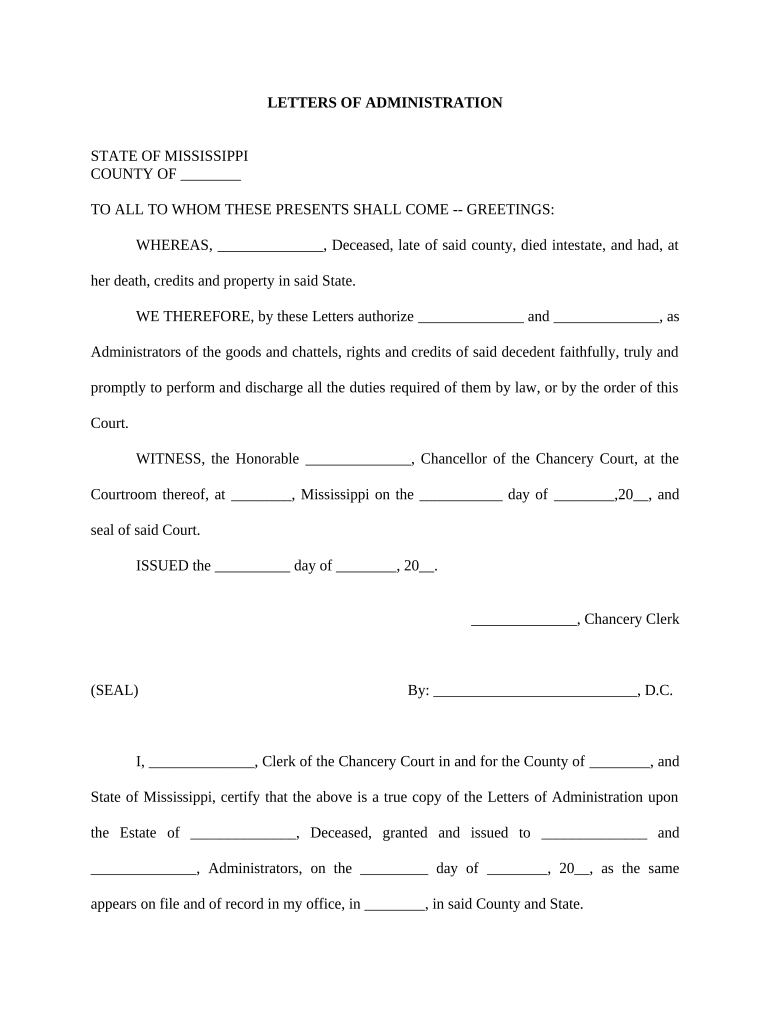
Mississippi Letters of Administration
What Mississippi Letters of Administration are and when they apply
Why obtaining Letters of Administration matters for estate settlement
Letters of Administration provide clear legal authority for a named administrator to manage a decedent's estate when there is no valid will or when an executor cannot serve. They enable transfer of assets, creditor resolution, and court-supervised distribution under Mississippi law.
Who typically files for Mississippi Letters of Administration
Common applicants who seek Mississippi Letters of Administration include family members and creditors petitioning for administration.
- Surviving spouse or adult child seeking fiduciary appointment in county probate court
- Creditors or interested parties filing to protect estate claims and ensure proper notice
- Attorneys preparing petitions and supporting affidavits for probate hearings on behalf of heirs
Step-by-step: completing and filing a Mississippi Letters of Administration petition
-
01Prepare Petition: Identify decedent, heirs, assets, and reason for administration.
-
02Gather Documents: Death certificate, heir lists, asset records, and creditor information.
-
03File with Court: Submit petition and fees to chancery or county probate court.
-
04Attend Hearing: Provide notice, answer questions, and obtain letters if granted.
Configuring an online workflow to complete and route the petition
| Workflow Field and Configuration Header | Use these settings to prepare online filing and signatures |
|---|---|
| Signature Authentication Method and Options | Email link, SMS code, or RON where state permits |
| Required Document Upload Types and Formats | Attach death certificate, inventory, and affidavits in PDF |
| Signer Role Assignment and Routing | Assign petitioner, attorney, and court clerk roles for routing |
| Audit Trail and Evidence Settings | Enable timestamps, IP logs, and completion certificate |
Where to file and how filings move through the court
-
File Petition: File original petition at local chancery or county probate court clerk
-
Serve Notice: Provide notice to heirs and interested parties per court rules
-
Attend Hearing: Appear at scheduled hearing and present supporting affidavits
-
Receive Letters: If granted, obtain certified Letters of Administration from clerk
Timing to expect: filings, notice, accounting, and distribution
Initial Petition Filing and Submission Timeframe:
File promptly after death once interested parties identified
Service, Notice, and Publication Deadlines:
Serve heirs and creditors per local rules, often within 30–90 days
Probate Hearing Scheduling and Court Calendar:
Hearing dates depend on court workload; may be scheduled in weeks or months
Inventory Filing and Final Accounting Deadlines:
Courts usually require inventory and periodic accountings; deadlines set by local statute or order
Final Distribution and Closing Timeline:
Distribution occurs after debts, taxes, and claims are resolved and court approves final accounting
Key milestones from filing to issuance of Letters
Petition Filed
Clerk accepts petition, assigns case number, and schedules initial review
Notice and Service
Serve heirs and publish notice if required; proof of service filed
Probate Hearing
Parties appear, court evaluates qualifications, may appoint administrator
Letters Issued
Court clerk issues certified Letters of Administration authorizing fiduciary powers
Common mistakes to avoid when preparing a petition
- Using incomplete or mismatched names causes delays; ensure the decedent's name matches the death certificate and all legal documents to avoid corrective filings.
- Failing to include all heirs or incorrect addresses can result in improper notice and later contested claims requiring additional hearings or amendments.
- Omitting required supporting documents such as death certificate, asset records, or affidavits often leads to petition rejection or continuance.
- Choosing incorrect venue or failing to post bond when ordered exposes the estate to creditor claims and can invalidate fiduciary actions.
Consequences and practical risks of errors or delays
Digital signing and e-submission: technical overview
Use electronic signing and e-filing where permitted to speed execution and provide audit trails.
- Supported Formats: PDF, DOCX, and image files
- Authentication Options: Email, SMS code, or multi-factor
- Integrations: Works with major CRMs and storage
Pricing and feature snapshot: eSignature vendors for probate workflows
| signNow | DocuSign | Adobe Sign | PandaDoc | HelloSign | |
|---|---|---|---|---|---|
| Starting Price | $8/user/mo | $15/user/mo | $14/user/mo | $19/user/mo | $15/user/mo |
| Free Trial | 7-day free trial, no credit card required | Varies by vendor | Varies by vendor | Varies by vendor | Varies by vendor |
| Bulk Send | Yes (Business Premium+) | Yes | Yes | Yes | No |
| Audit Trail | Yes | Yes | Yes | Yes | Yes |
| HIPAA Compliant | Yes | Yes | Yes | No | No |
| Envelope Cap | No cap | 100 envelopes/user/year | Varies by plan | Varies by plan | Varies by plan |
Frequently asked questions about Mississippi Letters of Administration
-
What are Letters of Administration?
They are court-issued documents appointing an administrator to settle an intestate decedent's estate, authorize asset control, and permit distributions under Mississippi probate procedures; the chancery or county probate court issues letters following petition, notice, and any necessary hearing.
-
Who may petition for Letters of Administration?
Typically a surviving spouse, adult child, other next of kin, creditor, or an interested party. Courts assess priority and may require bond, proof of relationship, and notice to heirs before appointment.
-
Can Letters be issued when a will exists?
If a valid will names an executor, the court typically issues Letters Testamentary to that executor. Letters of Administration are used when there is no valid will or when the nominated executor cannot or will not serve.
-
Are electronic signatures accepted for probate filings?
Electronic signatures are generally legally valid under the ESIGN Act (15 U.S.C. §7001) and UETA; however, court acceptance varies. Confirm with the local chancery or probate clerk whether e-submissions, e-signatures, or RON are permitted for probate filings.
-
What supporting documents are commonly required?
Common attachments include the certified death certificate, heir lists, asset inventories, affidavits of qualification, and any bond paperwork. Exact document lists and formatting are set by local court rules; file certified copies when possible.
-
How long should probate records be retained?
Retain probate records per federal and state rules: tax-related documents at least three years (IRC §6501(a)), HIPAA-related items six years (45 CFR §164.530(j)), and other probate files per court order or applicable state statute.