Establishing secure connection…Loading editor…Preparing document…

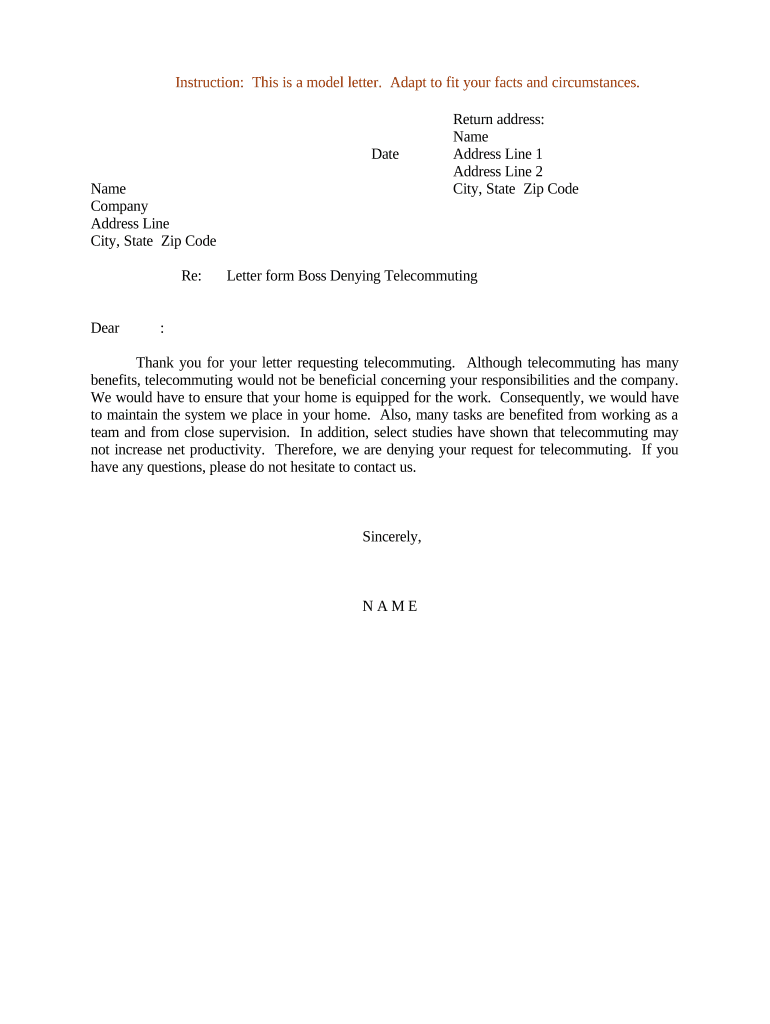
Letter Denying Telecommuting Request

This template is fully customizable. Edit the text, fill out the fields, and send it for signature. Give it a try!
Letter Denying Telecommuting Request

What a Letter Denying Telecommuting Request Is and When to Use It

A Letter Denying Telecommuting Request is a formal employer communication that documents the decision to deny an employee’s request to work remotely. It explains the factual and business reasons for the denial, references any applicable policy or operational constraints, and records any alternatives offered. The letter creates a clear paper trail for human resources and risk management, helps preserve consistent application of workplace policies, and may be used later to respond to employee appeals or regulatory inquiries.

Why a Clear, Documented Denial Matters

A carefully written denial reduces ambiguity, supports consistent HR practices, and documents legitimate business reasons. It can limit legal exposure and preserve evidence should disputes arise.

Why a Clear, Documented Denial Matters

Who Prepares and Receives This Letter

Employers, HR professionals, and direct managers typically prepare the letter after reviewing a telecommuting request and consulting policy or legal counsel.

  • Human Resources professional responsible for policy enforcement and recordkeeping
  • Hiring manager or direct supervisor who evaluated operational feasibility
  • Employee who submitted the telecommuting request and may appeal

Use the letter as an official personnel record; keep a copy in the employee file and provide the employee with their own dated copy.

Typical Signatories and Their Roles

HR Manager

Human resources staff often draft or review the denial to confirm policy alignment and to document nondiscriminatory business reasons. HR ensures the letter is retained in personnel records and coordinates any appeal process.

Direct Supervisor

A manager or supervisor typically provides operational details supporting the denial, signs or approves the letter, and communicates any temporary or partial accommodations considered.

Key Data Elements to Include

Employee Name: Full legal name
Request Date: MM/DD/YYYY
Position Title: Exact job title
Decision Date: MM/DD/YYYY
Reason Summary: Concise factual reason
Signature: Manager or HR sign-off

Consequences of an Incorrect or Vague Denial

Discrimination Claim: May invite ADA/Title VII allegations
Retaliation Risk: Could trigger protected activity claims
Recordkeeping Gap: Lack of documentation weakens defense
Unclear Policy: Inconsistent enforcement risk
Union Contract Issue: May conflict with collective bargaining
Regulatory Inquiry: May prompt agency review

Common Preparation Pitfalls to Avoid

  • Failing to cite the specific policy or business reason for denial, leaving the decision impressionistic and hard to defend.
  • Using subjective or evaluative language that could be interpreted as discriminatory rather than stating objective, job-related factors.
  • Neglecting to document interactive processes or accommodation requests tied to ADA or other laws, which can create legal exposure.
  • Not retaining a dated copy in personnel records or failing to notify the employee in writing of appeal rights, if applicable.

Step-by-Step: Drafting a Clear Denial Letter

Follow a consistent sequence to ensure the letter is accurate, factual, and defensible.

  • 01
    Confirm Request: Review the employee’s original submission and relevant policy.
  • 02
    Assess Impact: Document operational reasons and business impact.
  • 03
    Draft Notice: State the decision, reasons, and any alternatives offered.
  • 04
    Record and Deliver: Retain a signed copy in personnel file and give employee a copy.

Typical Routing and Approval Flow

A standard workflow ensures proper review, sign-off, and retention of the denial letter.

  • Employee Submission: Employee files telecommuting request to HR or manager.
  • Manager Review: Supervisor assesses role and operational constraints.
  • HR Review: HR checks policy and legal considerations.
  • Final Approval: Authorized signatory issues the written denial.

What to Put in the Letter: Essential Sections

Include clear, neutral sections that explain the decision, cite policy, and record next steps so the letter is complete and defensible.

Header

Date the letter and list employee name, job title, department, and request reference so the record ties to the specific telecommuting request and avoids ambiguity about which request was evaluated.
Opening

Start with a neutral statement that the request was reviewed and that, after consideration, management is issuing a denial to set a factual tone and avoid inflammatory language.

Reasoning

Provide objective, job-related facts that support the denial such as operational needs, on-site duties, security concerns, or documented performance issues without excess detail that isn’t job-related.

Policy Reference

Cite the specific telecommuting policy, employee handbook section, or collective bargaining provision relied on so reviewers can verify consistency with internal rules.

Alternatives Offered

If applicable, describe partial accommodations, flexible scheduling, trial periods, or other mitigations considered and why they were insufficient or not feasible.

Appeal and Record

Explain next steps, internal appeal rights or contact points, and confirm that the denial will be retained in the personnel file for future reference.

How to Configure a Digital Workflow for This Letter

Set up a consistent eWorkflow to route, sign, and retain denial letters using secure eSignature and HR document management.

Field Configuration
Template Create reusable denial template
Approver Define manager and HR approvers
Authentication Use email or SMS verification
Retention Auto-archive to HR system

Digital Delivery and eSignature Requirements

Use an eSignature platform that supports audit trails, secure storage, and industry integrations to maintain a reliable record of the denial.

  • Audit Trail: Capture IP, timestamp, and signer info
  • File Formats: Support PDF and DOCX archival
  • Integrations: Connect to HRIS and document stores

Ensure the chosen platform supports ESIGN/UETA compliance, optional advanced signer authentication for sensitive cases, and straightforward export for legal review or internal audits.

Timing and Processing Expectations

Manage timing so employees receive a timely written decision and HR retains evidence consistent with internal policy and legal obligations.

Acknowledgment Timeline:

Acknowledge receipt within 3–5 business days where possible

Decision Window:

Issue the written decision within company policy timeframe, commonly 7–14 days

Appeal Period:

Specify internal appeal or review period where applicable

Record Retention:

Retain the dated letter per retention policy

Notification Method:

Deliver by secure email and place copy in personnel file

Key Milestones in the Decision Process

Track milestones from request receipt through final file retention to ensure consistent handling and auditability.

01

Request Received

Log date and preserve employee submission for review.

02

Manager Assessment

Complete operational impact analysis and document findings.

03

HR Review

Confirm policy, ADA/FMLA considerations, and legal review if needed.

04

Decision Issued

Deliver dated denial letter and retain a signed copy in personnel file.

Sample eSignature Vendor Pricing and Capabilities

Basic vendor pricing and capability indicators to consider when selecting a platform for delivering and retaining denial letters; signNow is listed first per vendor comparison standards.

signNow DocuSign Adobe Sign PandaDoc HelloSign
Starting Price $8/user/mo $15/user/mo $14/user/mo $19/user/mo $15/user/mo
Free Trial 7-day free trial Varies by vendor Varies by vendor Varies by vendor Varies by vendor
Bulk Send Yes (Business Premium) Yes Yes Yes No
Audit Trail Yes Yes Yes Yes Yes
HIPAA Compliant Yes Yes Yes No No

FAQs — Common Questions About Denying Telecommuting Requests

Answers to typical questions about content, legality, and digital delivery of denial letters for HR administrators and managers.


Need help? Contact support

be ready to get more
Join over 28 million airSlate SignNow users