Establishing secure connection…Loading editor…Preparing document…

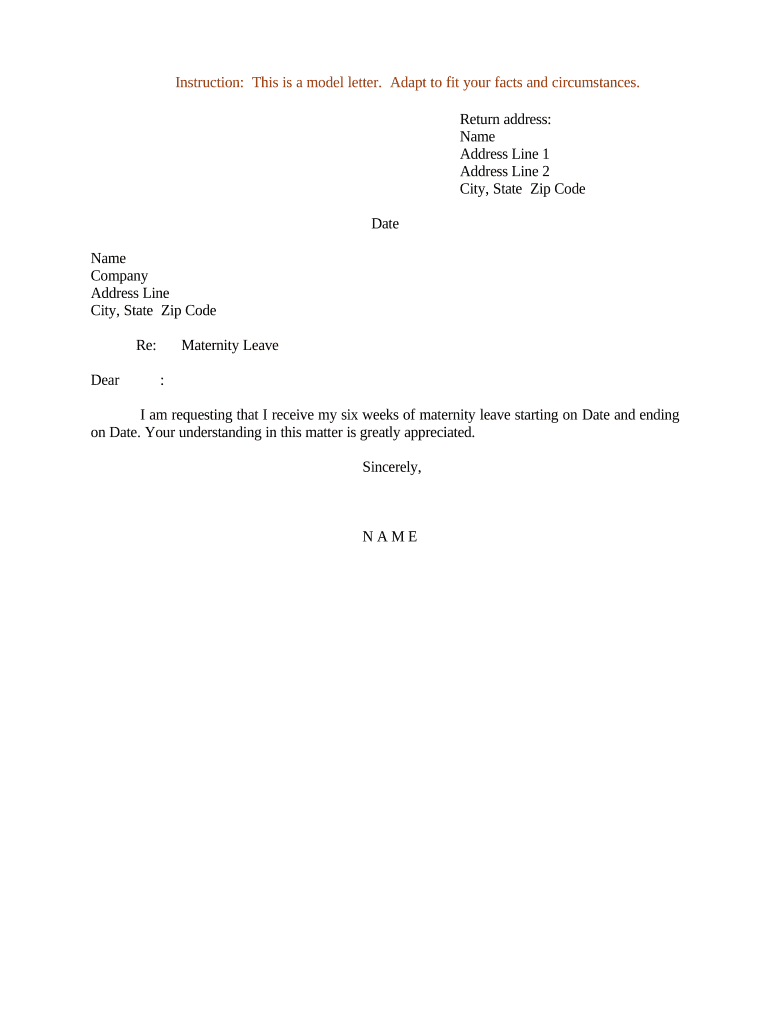
Maternity Leave Request Letter

This template is fully customizable. Edit the text, fill out the fields, and send it for signature. Give it a try!
Maternity Leave Request Letter

What a Maternity Leave Request Letter Is and When to Use It

A Maternity Leave Request Letter is a formal written notice from an employee to an employer requesting time away from work for pregnancy, childbirth, and postpartum recovery. It documents the requested leave dates, any expected intermittent or reduced-schedule needs, and the employee’s intent to use employer-provided or statutory leave (for example, FMLA or state paid family leave). The letter creates a record for HR, triggers benefit and payroll actions, and helps both parties plan coverage, accommodation, and return-to-work logistics.

Why a Clear Written Request Matters

A concise, dated request clarifies leave timing, protects job rights under federal or state law, and starts required HR processes for benefits and coverage.

Why a Clear Written Request Matters

Who Typically Prepares or Receives This Letter

Typical creators and recipients of maternity leave letters include working mothers and HR professionals managing leave.

  • Expectant employee — prepares the letter with dates, physician notes, and leave type requested.
  • Human resources team — records the request, confirms eligibility, and coordinates benefits and coverage.
  • Direct supervisor — plans workload coverage and communicates operational adjustments during the employee’s absence.

Clear roles reduce confusion and speed approval, payroll, and benefits coordination.

Step-by-step: Submitting a compliant maternity leave request

Follow these steps to prepare, document, and submit a complete request that HR can process quickly.

  • 01
    Confirm policy: Review company leave policy and federal/state eligibility before drafting request.
  • 02
    Draft letter: State dates, leave type, contact info, and intent to return or request accommodation.
  • 03
    Attach certification: Provide physician’s note or required forms to support start and expected duration.
  • 04
    Submit to HR: Send to HR and copy your manager; keep a dated copy for your records.

Core sections to include in a professional request

Use a clear structure so HR can verify eligibility, process benefits, and coordinate coverage without follow-up.

Header

Include your name, job title, department, employee ID, and the letter date so HR can match the request to payroll and personnel records.
Statement of request

Explicitly state that you are requesting maternity leave and name the statutory or employer-provided leave you intend to use (for example, FMLA or state paid leave).

Leave timeframe

Provide start date, expected return date, and note if dates are approximate or if intermittent leave may be needed.

Medical documentation

Reference attached medical certification or expected delivery date and include instructions for submitting additional documentation if required.

Pay and benefits

State whether you will use accrued paid leave concurrently and request information on benefit continuation, payroll deductions, and insurance coverage.

Signature

Sign and date the letter. If submitting electronically, use a compliant eSignature and retain the audit trail for records.

Essential data elements at a glance

Name: Full legal name
Employee ID: Payroll identifier
Dates: Start and return
Leave type: FMLA/state/employer
Medical proof: Physician certification
Signature: Signed and dated

Customizing and submitting an online request workflow

Configure these settings when using an HR portal or eSignature platform to ensure automatic routing and recordkeeping.

Field Configuration
Employee identifier field Required; auto-validate against HRIS
Leave type selector Mandatory dropdown with statutory options
Attachment upload Accept PDF/DOCX, limit 10 MB
Approval routing Route to HR then manager automatically

Where to send the letter and how it’s processed

Submit the request following your employer’s required channels so HR can confirm eligibility and begin benefits administration.

  • HR portal: Upload letter and attachments via the employer HRIS or benefits portal.
  • Email to HR: Send to the designated HR address and copy your direct supervisor.
  • Physical delivery: Deliver to HR in person or by certified mail if required by policy.
  • eSignature submission: Sign electronically with a compliant audit trail and submit to HR for processing.

Technical considerations for digital submission and eSignatures

Electronic submissions should meet legal and HR system requirements to maintain evidentiary value and privacy.

  • File formats: PDF and DOCX preferred
  • Authentication: Email link or SMS code recommended
  • Integrations: HRIS and document storage integrations

Ensure the chosen platform provides an audit trail, secure storage, and the ability to export signed records for payroll and legal compliance.

Timing and notice expectations

Provide timely notice to preserve statutory protections and enable HR to arrange coverage and benefits.

Foreseeable leave notice:

Provide at least 30 days’ notice when practicable for anticipated birth

Immediate/emergency notice:

Notify employer as soon as possible for unexpected complications

FMLA eligibility timing:

Confirm 12-month and hours-worked eligibility with HR

State paid leave timing:

Check state-specific filing windows and forms

Return-to-work notice:

Confirm intent to return and any accommodation needs before end date

Common mistakes that delay approval

  • Omitting employee ID or incorrect dates; HR cannot process without accurate identifiers and timeline.
  • Failing to attach required medical certification; missing paperwork often pauses leave approval and pay.
  • Not specifying leave type; unclear requests cause confusion over paid or unpaid benefits entitlement.
  • Using informal channels only; verbal notice without written request can lead to record discrepancies and disputes.

Risks of an incomplete or incorrect request

Leave denial: Incomplete requests risk denial or delay
Pay interruptions: Benefit or payroll gaps may occur
Loss of job protection: Failure to meet notice rules can affect protections
Disciplinary action: Unapproved absences may trigger discipline
Benefit termination: Insurance continuation may lapse
Tax implications: Incorrect withholding or reporting issues

Real-world examples of how a request is used

The format below shows concise, actionable examples employees can adapt to their situation.

Retail associate example

Employee provides estimated leave from 07/01/2026

  • Requests use of accrued sick and vacation concurrently
  • HR confirms eligibility, arranges temporary schedule coverage, and coordinates state paid leave application and payroll adjustments.

University lecturer example

Lecturer requests leave beginning 01/10/2027 for childbirth

  • Requests tenure-clock extension and reduced schedule upon return
  • Department approves modified teaching assignment and HR issues official leave confirmation with benefit continuation details.

Practical tips to get approval and preserve protections

Follow these best practices to reduce delays and protect your rights under employer and statutory policies.

Start early and document
Provide written notice as soon as dates are foreseeable, attach medical certification, and keep a dated copy. Early documentation helps preserve FMLA and state leave protections.
Be specific about dates
Use MM/DD/YYYY formatting for start and return dates and note whether dates are estimates; vagueness can delay scheduling and payroll adjustments.
Clarify pay intent
State whether you plan to use accrued paid leave concurrently or request unpaid leave so payroll can calculate benefits and deductions correctly.
Keep communications professional
Communicate through HR and your manager in writing, copy HR on medical documentation, and use secure channels to protect personal health information.

Example eSignature vendor comparison for submitting leave requests

Basic vendor features and starting prices for electronic signing solutions; signNow is listed first per platform comparison guidance.

signNow DocuSign Adobe Sign PandaDoc HelloSign
Starting Price $8/user/mo $15/user/mo $14/user/mo $19/user/mo $15/user/mo
Free Trial 7-day free trial Varies by plan Varies by plan Yes, limited Yes, limited
Bulk Send Yes Yes Yes Yes No
Audit Trail Yes Yes Yes Yes Yes
HIPAA Compliant Yes Yes Yes No No

Frequently asked questions about maternity leave requests

Answers to common questions about eligibility, documentation, timelines, and electronic submissions for maternity leave requests.


Need help? Contact support

be ready to get more
Join over 28 million airSlate SignNow users