Establishing secure connection…Loading editor…Preparing document…

Letter Congratulating New Business Owners

This template is fully customizable. Edit the text, fill out the fields, and send it for signature. Give it a try!
Letter Congratulating New Business Owners

What this congratulatory letter is and when to use it

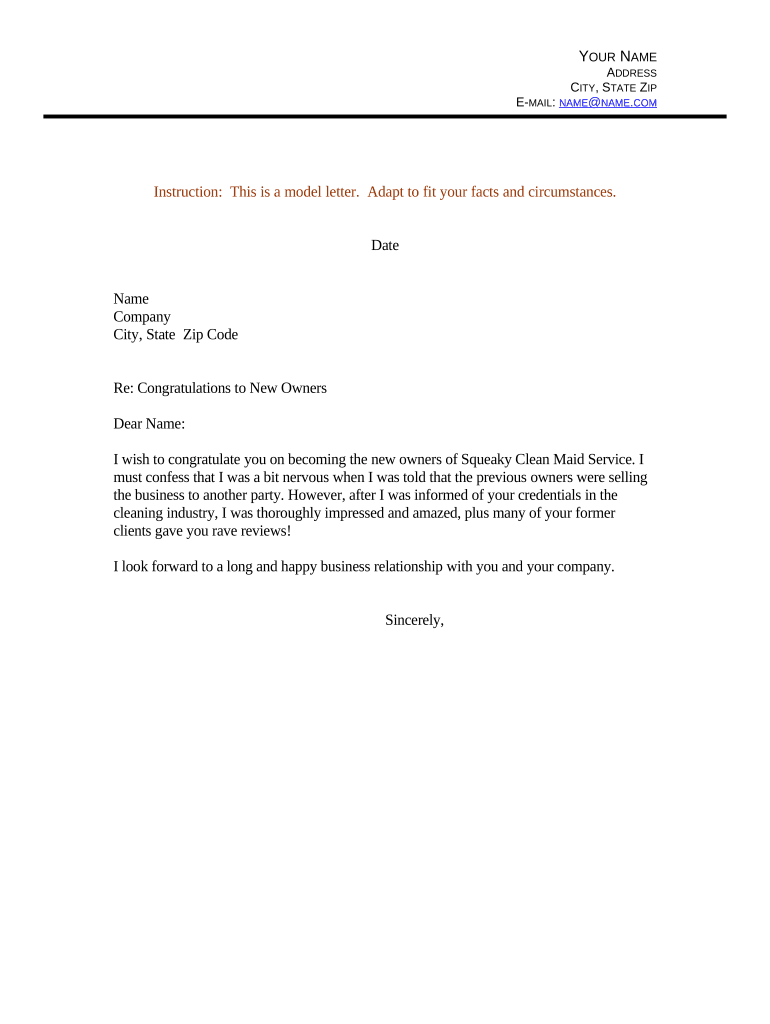
A Letter Congratulating New Business Owners is a formal, written message acknowledging the launch or ownership change of a business. It typically expresses support, recognizes achievements, and outlines any immediate next steps or offers of assistance. Use the template for suppliers, partners, lenders, chambers of commerce, or civic leaders when you want a concise, professional record of congratulations that can be emailed or printed.

Why sending a brief congratulatory letter matters

A short, well-structured letter builds goodwill, documents the relationship, and clarifies any follow-up actions. It helps establish the sender’s credibility and preserves a professional record for both parties under business communications and recordkeeping practices.

Why sending a brief congratulatory letter matters

Who commonly sends this letter and who receives it

Typical senders and recipients vary; below are the most common roles that prepare or receive this letter.

  • Business partners and vendors looking to confirm relationship terms and welcome new ownership.
  • Banks and lenders acknowledging account changes or congratulating new signatories on approved financing.
  • Local business groups, mentors, or suppliers offering introductions, support, or community resources.

Use the appropriate tone and level of detail for the sender’s role: brief and supportive for community messages, more specific for financial or contractual contexts.

Essential parts of a professional congratulatory letter

A professional congratulations letter is concise, specific, and actionable where appropriate; include identification, recognition, support offers, and clear sign-off to maintain formality and usefulness.

Opening

Start with a clear salutation and immediate statement of congratulations that names the recipient and their business to avoid ambiguity.
Acknowledgement

Note the specific event or milestone—ownership transfer, grand opening, or incorporation—so the record reflects the exact reason for the message.

Specific Achievement

Reference a concrete detail such as registration date, new trade name, or notable accomplishment to personalize the message and show attentiveness.

Offer of Support

Briefly state any available assistance—referrals, supplier terms, or introductions—and how the recipient can request that support.

Next Steps

If action is expected, summarize the next steps, timelines, or documents to follow so the recipient knows what to expect.

Closing

End with the sender’s full name, title, contact details, and date; include company letterhead or a professional signature block for formality.

Required information to include

Recipient Name: Full legal name
Business Name: Registered trade name
Event Date: MM/DD/YYYY
Contact Details: Phone, email
Specific Details: Reason for congratulations
Sender Identity: Name, title

Step-by-step: preparing and sending the letter

A simple four-step workflow covers drafting, reviewing, signing, and distributing the letter efficiently while preserving a record.

  • 01
    Choose template: Select a concise, formal template that fits your relationship to the recipient.
  • 02
    Personalize text: Fill in names, dates, and specific achievement details.
  • 03
    Sign and date: Apply a physical or electronic signature and include the date.
  • 04
    Distribute: Send via the chosen channel and archive a copy for records.

Configuring an online workflow for this letter

Use a consistent template and set fields for quick reuse; the table below lists common configuration settings for a digital workflow.

Field Configuration
Template Selection Choose a letter template with pre-defined fields
Branding Add logo, letterhead, and sender details
Signature Field Place signature and date fields where required
Delivery Method Email, signing link, or internal CRM upload

Where to send or file the completed letter

Decide the primary delivery channel and archival destination before sending so recipients and stakeholders can access the record.

  • Email the Recipient: Send a signed PDF attachment to the recipient’s business email.
  • Upload to CRM: Attach the letter to the contact or company record for future reference.
  • Share with Stakeholders: Copy partners or internal teams as appropriate for transparency.
  • Archive Securely: Store a final signed copy in the organization’s document repository.

Technical considerations for digital signing and delivery

Choose a platform that supports PDF/DOCX formats, audit trails, and the authentication level your organization requires.

  • File Formats: PDF and DOCX are widely supported
  • Authentication: Email link or SMS code as needed
  • Integrations: CRM and cloud storage connections

Confirm the platform’s export options and retention guarantees before sending; ensure recipients can open the format you send and that signed copies are preserved per your records policy.

Timing and expectations for sending and follow-up

Timing depends on the triggering event; use the standard schedule below to set expectations for recipients and internal tracking.

Send Promptly:

Dispatch within 7 days of the ownership change

Follow-up Reminder:

Send a 30-day check-in if no response received

Record Date:

Retain the letter date for filings and acknowledgements

Internal Archive:

Archive within 7 days after sending

Review Cycle:

Review template annually for legal updates

Common preparation mistakes to avoid

  • Using vague language that fails to identify the milestone precisely, which can create confusion in later record checks or introductions.
  • Leaving recipient or business names incomplete or misspelled, causing misrouting or mismatches with bank or registration records.
  • Failing to include a clear signature and date, which undermines the document’s usefulness as a formal business communication.
  • Sending the letter over an insecure channel without encryption or audit trail, risking privacy exposure and lack of proof of delivery.

Potential consequences of errors or omissions

Damaged Relationships: Loss of trust
Operational Delay: Contract or account setup delays
Record Conflicts: Mismatch with official filings
Privacy Exposure: Unsecured personal data
Noncompliance: Failure to meet internal policies
Evidence Gaps: Missing signed record

Pricing and vendor comparison for sending and e-signing letters

Compare starting prices and key feature availability for common eSignature vendors; signNow is listed first per vendor comparison conventions.

signNow DocuSign Adobe Sign PandaDoc HelloSign
Starting Price $8/user/mo $15/user/mo $14/user/mo $19/user/mo $15/user/mo
Free Trial 7-day free trial Varies by plan Varies by plan Varies by plan Varies by plan
Bulk Send Yes (Premium tier) Yes Yes Yes Limited
Audit Trail Yes Yes Yes Yes Yes
HIPAA Compliant Yes Yes Yes No No

Saving, exporting, and companion documents to attach

Finalize signed letters in common formats and include supporting documents when needed to corroborate the ownership change or milestone.

Export Formats

Save signed copies as PDF/A for long-term preservation and as DOCX for editable archives when a change may be needed.

Supporting Docs

Attach Articles of Organization, EIN confirmation, or transfer documentation to validate the milestone described in the letter.

Signature Evidence

Retain the signature certificate or audit trail showing timestamp, signer email, and IP for verification.

Archival Location

Store final signed files in a secure document repository with access controls and versioning enabled.

Frequently asked questions about this letter and e-signing

Answers to common questions about content, signatures, legal standing, corrections, and record retention for a Letter Congratulating New Business Owners.


Need help? Contact support

be ready to get more
Join over 28 million airSlate SignNow users