Establishing secure connection…Loading editor…Preparing document…

Letter Requesting Return of Borrowed Item

This template is fully customizable. Edit the text, fill out the fields, and send it for signature. Give it a try!
Letter Requesting Return of Borrowed Item

What the Letter Requesting Return of Borrowed Item Is

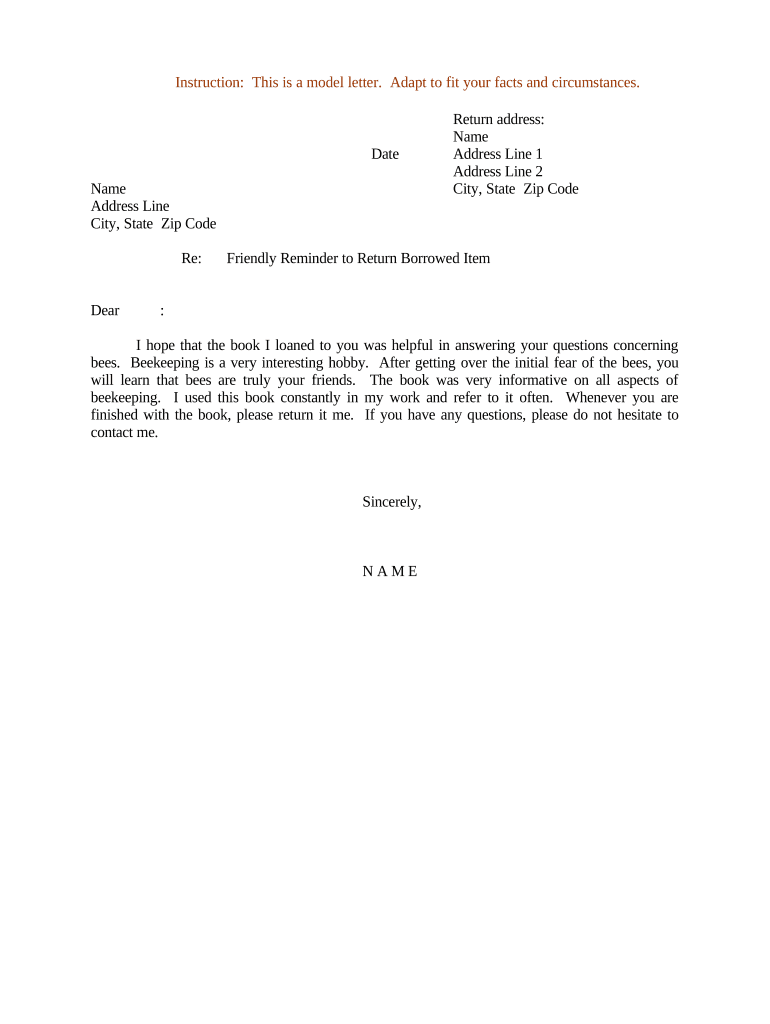
A Letter Requesting Return of Borrowed Item is a concise written notice used to ask a borrower to return tangible property loaned by the sender, such as tools, equipment, documents, or personal items. The letter documents the item description, original loan date, any agreed return date, and a clear request for return; it creates a dated record of the demand and can support follow-up steps if the borrower does not comply. This template is suitable for personal, small business, and informal commercial contexts where a formal demand or collection action is not yet necessary.

Why to Issue a Formal Return Request in Writing

A written request creates a clear record of the demand, reduces misunderstandings about what must be returned, and establishes a timeline for next steps if the item is not returned.

Why to Issue a Formal Return Request in Writing

Who Typically Sends This Letter and Why

The letter serves both as a polite reminder and as evidence of a demand should further collection or legal measures become necessary.

  • Individual lenders: people who lent household items, tools, or personal effects and want a written reminder or record.
  • Small business owners: firms that loan equipment or documents to contractors, employees, or clients and need a paper trail.
  • Property managers and landlords: to request return of keys, remotes, or temporary furnishings.

Step-by-Step: Completing the Return Request Letter

Follow these sequential steps to prepare a clear, professional return request that documents the demand and preserves supporting facts for possible next steps.

  • 01
    1. Identify Parties: Enter sender and recipient names and contact details.
  • 02
    2. Describe Item: Provide a precise description including serial numbers or distinguishing marks.
  • 03
    3. State Timeline: Record the date borrowed and specify the requested return date.
  • 04
    4. Close and Sign: Include signature, date, and preferred return instructions.

How the Return Request Fits into a Recovery Process

Use the letter as an early step in a graded approach to recovering property, progressing from polite request to formal demand if needed.

  • Initial Request: Send the courteous written request and allow the deadline to pass.
  • Follow-up Reminder: If no response, send a brief second notice referencing the first letter.
  • Final Demand: Issue a final demand indicating possible next steps within a fixed time.
  • Escalation: Consider mediation, small claims, or police report depending on item value and local law.

Digital Workflow Settings for Online Completion

Configure the workflow to capture identity, a dated audit trail, and a signed copy for your records when completing the letter online.

Field Configuration
Recipient Email Required; used to deliver and track the request
Signature Field Require signer signature and date
Authentication Email confirmation or SMS code recommended
Audit Trail Enable IP, timestamp, and event log capture

Delivery and Authentication Options for the Letter

Match the method to the item's value and your need for a verifiable audit trail; stronger authentication reduces future disputes.

  • Email Delivery: Convenient and rapid; retains timestamps and delivery receipts.
  • Certified Mail: Provides postal proof of delivery and receipt signature.
  • eSignature + Authentication: Use email link plus SMS or ID verification to strengthen attribution.

Essential Elements to Include in the Letter

A professional return request is short, factual, and documents the timeline, the item, the return instructions, and the consequences of non-return.

Sender Contact

Provide name, phone number, email, and mailing address so the recipient can arrange return or ask questions.
Recipient Contact

List the borrower's name and known contact details to tie the demand to a specific individual.

Item Details

Include make, model, serial number, condition, and any distinguishing marks to identify the property precisely.

Loan History

State when and how the item was loaned (date, circumstances) to document the agreement context.

Return Instructions

Specify location, date, time window, and acceptable methods for returning the item or arranging pickup.

Next Steps

Explain what will happen if the item is not returned by the deadline (e.g., further notices, fees, small claims).

Supporting Documents You May Attach

Attach any materials that corroborate the loan and help the recipient identify the item or the terms of the loan.

Loan Receipt

Attach any original loan agreement, receipt, or text/email exchange that documents the loan date and agreed return terms.

Photos

Include recent photos showing item condition and serial numbers to prevent disputes about identity or damage.

Proof of Ownership

Attach purchase receipts or registration that establish you as the owner if ownership may be questioned.

Previous Notices

Include copies of earlier messages or reminders to show a history of attempts to recover the item.

Typical Timelines and Reasonable Deadlines

Choose a deadline that is reasonable for the circumstances; shorter when the item is needed urgently, longer for distant recipients.

Standard Courtesy Period:

7–14 days

Reasonable Remote Return:

14–30 days

High-Value Items:

7 days with secure return instructions

Final Demand Period:

Additional 7–14 days after reminder

Escalation Trigger:

Consider small claims or police reporting after final demand period

Milestones from Request to Resolution

A staged timeline clarifies expectations and evidentiary milestones if the matter escalates.

01

Send Initial Letter

Documented written request with clear return deadline.

02

Send Reminder

If no response, send reminder referencing the prior letter.

03

Final Demand

Issue final demand setting a short, firm deadline and noting possible next steps.

04

Escalate

Pursue small claims, mediation, or police report depending on value and intent.

Common Mistakes That Weaken a Return Request

  • Vague item descriptions that allow the recipient to dispute identity or condition.
  • Unclear or unreasonable deadlines that invite noncompliance or claims of unfairness.
  • Lack of contact details, making coordination and return logistics difficult.
  • Failing to document prior communications, reducing the letter's evidentiary value.

Risks When the Letter Is Inaccurate or Incomplete

Disputed Ownership: Recipient may contest ownership if proof is not attached.
Lost Evidence: Missing dates or unsigned letters weaken claims in small claims court.
Statute Delays: Long delays can affect remedies and collection timing.
Refund or Replacement Liability: Incorrect value statements could lead to improper compensation expectations.
Returned Item Condition: No documented condition record complicates damage disputes.
Postal Proof Missing: Unrecorded delivery methods limit ability to prove notice was received.

Security and Compliance Considerations

Recordkeeping: Keep copies of letters and attachments for the full retention period.
Authentication: Use authenticated delivery for high-value items.
Privacy: Limit personal data in the letter to what is necessary.
Audit Trail: Retain timestamps and delivery receipts for evidence.
Encrypted Storage: Store digital copies using encrypted services when possible.
HIPAA Note: Avoid including protected health information unless a HIPAA-compliant workflow is used.

Real-World Examples of Use

These short case sketches show typical situations where the letter helps resolve possession issues without litigation.

Case Study 1

A homeowner lent a lawn mower to a neighbor after a weekend need

  • The borrower kept the mower beyond an agreed week
  • The homeowner sent a dated return request with photos and a 10-day deadline; the mower was returned on day nine with no further action required.

Case Study 2

A small business lent a laptop to a contractor for a month-long project

  • Contractor left town and did not return the device
  • The business issued two written requests, then a final demand; the contractor arranged return and paid for shipping after documented escalation.

Pricing and Feature Snapshot for eSignature Solutions

Basic pricing and common feature availability across selected eSignature vendors to help you choose a delivery method for the letter; signNow is listed first per vendor-comparison convention.

signNow DocuSign Adobe Sign PandaDoc HelloSign
Starting Price $8/user/mo $15/user/mo $14/user/mo $19/user/mo $15/user/mo
Free Trial 7-day free trial Varies by plan Varies by plan Varies by plan Varies by plan
Bulk Send Yes Yes Yes Yes No
Audit Trail Yes Yes Yes Yes Yes
HIPAA Compliant Yes Yes Yes No No

Frequently Asked Questions About the Letter Requesting Return of Borrowed Item

Answers to common practical questions about drafting, sending, and following up on a return request letter.


Need help? Contact support

be ready to get more
Join over 28 million airSlate SignNow users