Establishing secure connection…Loading editor…Preparing document…

Termination Letter for Theft of Company Property

This template is fully customizable. Edit the text, fill out the fields, and send it for signature. Give it a try!
Termination Letter for Theft of Company Property

What the Termination Letter for Theft of Company Property Is

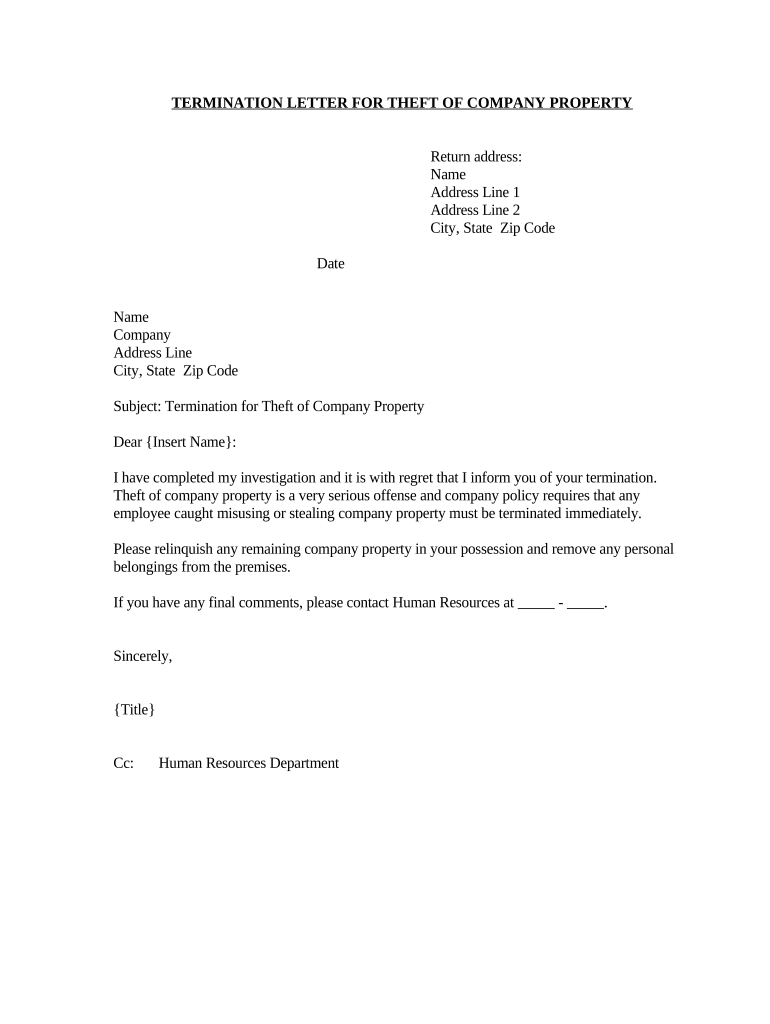
Termination Letter for Theft of Company Property is a formal employer notice documenting termination of employment when an employee is suspected or found to have stolen company assets. It records factual findings, identifies missing or misappropriated items, cites relevant policy or handbook provisions, states the effective termination date, and sets out return-of-property and post-termination obligations. The document creates an administrative record useful for payroll, benefits, unemployment claims, and potential criminal or civil proceedings, while preserving chain-of-custody details and specifying next steps for recovery or law-enforcement referral.

Why a Clear Termination Letter Matters

Use this termination letter to document the employer's decision, protect legal position, and provide clear instructions on property return, final pay, and benefits. A written record supports internal investigations, reduces ambiguity in unemployment or litigation matters, and preserves evidence for law enforcement.

Why a Clear Termination Letter Matters

Who Typically Prepares and Uses This Letter

Intended users include HR, managers, and legal counsel when addressing employee theft and documenting the outcome.

  • Human Resources — prepares the letter and maintains the personnel record.
  • Direct supervisor — documents facts, secures evidence, and recommends disciplinary action.
  • Legal counsel — reviews policy citations, unemployment risk, and potential criminal referral.

Key Roles Involved in Issuing the Letter

HR Manager

Coordinates investigation steps, drafts the termination letter, and ensures compliance with company policy and applicable employment law. Maintains records for appeals, unemployment determinations, and potential litigation, and communicates final pay and benefits details.

General Counsel

Reviews factual findings, advises on criminal referral and civil recovery options, confirms policy citations, and drafts legally defensible language. Ensures the termination letter balances evidence preservation with compliance under state and federal employment laws.

Step-by-Step: Preparing and Issuing the Termination Letter

Follow these steps to prepare and issue a termination letter that documents facts and preserves evidence.

  • 01
    Gather Facts: Collect incident reports, CCTV, and witness statements.
  • 02
    Review Policy: Cite handbook section and prior warnings.
  • 03
    Draft Letter: State findings, property list, and effective date.
  • 04
    Deliver: Provide in writing; document delivery method.

Internal Checklist Before Finalizing the Letter

Use this grid to manage approvals, documentation, and communications before finalizing the termination letter internally.

01

Investigate:

Collect evidence within 48–72 hours where possible.
02

Notify HR:

Inform HR with summary and materials attached.
03

Legal:

Request counsel review before issuance.
04

Security:

Secure assets and preserve footage.
05

Payroll:

Prepare final pay and deductions promptly.
06

Deliver:

Serve letter and obtain signed receipt.

Core Sections Your Termination Letter Should Include

Key sections of the Termination Letter for Theft of Company Property ensure factual clarity, legal defensibility, and clear post-termination instructions for returns and appeal rights.

Findings

Describe specific incidents, dates, locations, involved property, and observed conduct. Use neutral, fact-based language and avoid speculation to support internal records and potential external proceedings.
Policy Reference

Cite the exact handbook section or policy code the employee violated, include prior warnings if any, and explain how the behavior breached stated expectations in writing.

Property List

Itemize each missing or damaged company asset with description, serial numbers, estimated value, and location where last observed; attach photographic evidence and chain-of-custody notes.

Effective Date

State the exact termination date in MM/DD/YYYY format and whether the termination is immediate or effective at a later specified date for payroll and benefits purposes.

Return Instructions

Provide clear instructions for returning company property, identify contact person, set deadlines, and state consequences for noncompliance including fees, legal action, and asset hold procedures.

Signatures

Include signature blocks for company representative and terminated employee, with printed names, titles, and dates; record method of service and witness or notary if used.

Required Information and Short Field Checklist

Employee Name: Full legal name as ID.
Position Title: Job title at termination.
Effective Date: MM/DD/YYYY format; termination date.
Property Description: Detailed list of missing items.
Policy Citation: Handbook section or code.
Signatures: Employer signature and date.

Common Preparation Mistakes to Avoid

  • Failing to document chain of custody for recovered items undermines criminal referrals and can make internal investigations inadmissible.
  • Using vague language about 'misconduct' or 'policy violation' without specifics invites legal challenges and damages defense credibility.
  • Neglecting to reference the exact handbook provision or prior warnings makes it harder to prove progressive discipline.
  • Failing to provide clear return-of-property instructions and firm deadlines prolongs disputes and increases recovery costs for the employer.

Penalties and Risks of an Incorrect or Incomplete Letter

Wrongful Termination Risk: Claims of discrimination or retaliation.
Unemployment Liability: May affect benefits eligibility.
Criminal Evidence Loss: Poor documentation weakens prosecution.
Pay Calculation Errors: Final pay disputes possible.
I-9 Compliance: Retain per 8 CFR §274a.2.
Privacy Violations: Avoid disclosing health data.

Typical Routing and Approval Workflow

Typical routing for a termination letter combines internal review, approvals, and delivery while capturing signatures and audit trail details.

  • Initiate Review: Supervisor prepares summary and evidence packet.
  • Legal Review: Counsel confirms legal language and risks.
  • HR Approval: HR finalizes wording and benefit notes.
  • Delivery: Serve letter and retain signed copy in file.

Key Deadlines and Timing Considerations

Key deadlines include termination effective date, property return deadline, benefits cutoff, and required retention for investigative records.

Effective termination date in MM/DD/YYYY:

When employment ends and obligations begin.

Property return deadline and instructions:

Set a firm date and location for returns.

Final pay calculation and benefits cutoff:

Specify last paycheck date and benefit end.

I-9 and HR records retention:

Keep I-9 per 8 CFR §274a.2 rules.

Criminal reporting and law-enforcement referral timeframe:

Report promptly; evidence degrades over time.

Pricing and Feature Snapshot for eSignature Providers

Comparing common eSignature providers for executing termination letters; signNow is listed first for feature and price reference without endorsement.

signNow DocuSign Adobe Sign PandaDoc HelloSign
Starting Price $8/user/mo $15/user/mo $14/user/mo $19/user/mo $15/user/mo
Free Trial 7-day free trial Varies Varies Varies Varies
Bulk Send Yes Yes Yes Yes No
Audit Trail Yes Yes Yes Yes Yes
HIPAA Compliant Yes Yes Yes No No

Practical Tips to Make the Letter Defensible

Best practices reduce risk and ensure consistent, defensible termination letters while preserving evidence and respecting privacy obligations.

Use neutral, fact-based wording only
Avoid adjectives or conclusions about motive. Record observable facts, times, witness names, and chain-of-custody steps. Precise wording reduces exposure to wrongful termination claims and preserves credibility for internal discipline or potential criminal prosecutions.
Document delivery and receipt procedures
Record how the letter was delivered—hand, email, or certified mail—and obtain a signed receipt when possible. Store the signed copy in the employee file and preserve electronic audit trails for legal defensibility.
Coordinate with security and payroll
Notify security to secure premises and inventory; instruct payroll to calculate final wages, deductions, and benefits termination. Ensure final paycheck and required notices comply with federal and state wage laws to avoid statutory penalties.
Preserve evidence and recordings securely
Maintain original CCTV footage, device logs, and signed witness statements in a secure location with access controls. Note chain-of-custody for each item and retain a copy in personnel records to support any criminal or civil action.

FAQs — Common Questions About Termination Letters for Theft

Frequently asked questions address validity, evidence, delivery, and recordkeeping for termination letters involving theft of company property.


Need help? Contact support

be ready to get more
Join over 28 million airSlate SignNow users