Establishing secure connection…Loading editor…Preparing document…

Letter of Withdrawal as Counsel

This template is fully customizable. Edit the text, fill out the fields, and send it for signature. Give it a try!
Letter of Withdrawal as Counsel

What a Letter of Withdrawal as Counsel Is

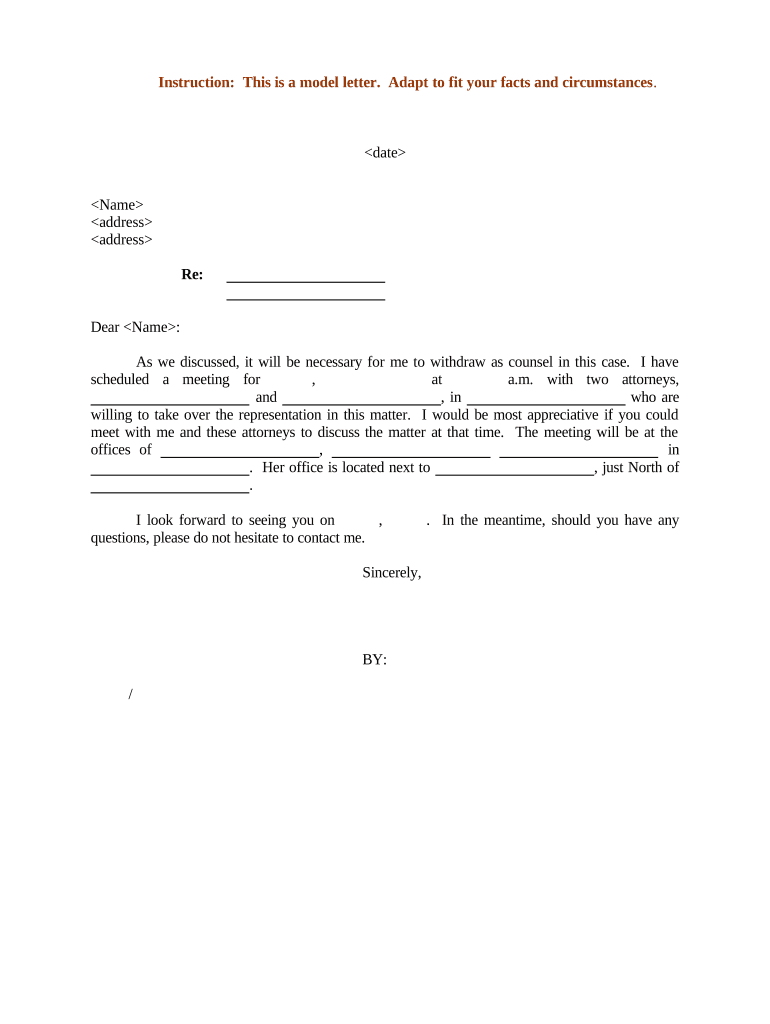
A Letter of Withdrawal as Counsel is a formal written notice from an attorney or law firm informing a client, opposing counsel, and, when required, the court that the attorney is ending representation in a particular matter. The letter typically identifies the case, states the effective date of withdrawal, explains the reason if required by local rule, confirms how the client will be served with case materials, and provides the client's contact instructions and the attorney's forwarding contact. The document preserves ethical and procedural protections while enabling substitution or self-representation by the client.

Why a Clear Withdrawal Letter Matters

A properly drafted Letter of Withdrawal as Counsel protects the attorney from professional-responsibility claims, preserves the client’s right to notice, and complies with court and local rules. It creates a dated record showing intent to end representation and documents service and contact arrangements, which reduces risk of missed deadlines, sanctions, or malpractice exposure.

Why a Clear Withdrawal Letter Matters

Who Typically Prepares and Receives This Letter

Tailor recipients to local court rules: some jurisdictions require filing a motion to withdraw and service on all parties in the case file.

  • Law firms and solo practitioners who are ending representation for conflict, nonpayment, or ethical reasons.
  • In-house counsel when internal teams transfer matters or outside counsel withdraws.
  • Clients and opposing counsel who must be informed to manage deadlines and next steps.

Typical Signatories and Contact Roles

Lead Counsel

An attorney of record who signs the withdrawal letter and certifies service. Provide full name, bar number, firm name, direct contact phone and email to enable the court and client to confirm who handled the matter and where records can be requested.

Firm Administrator

A firm or practice administrator who can receive incoming inquiries and manage client file transfer requests. Include a named administrative contact with phone, email, and physical mailing address for records and fee reconciliation.

Essential Elements to Include in the Letter

A professional Letter of Withdrawal as Counsel should be concise, include identifying case details, specify the effective date, state service and contact instructions, and comply with court and ethical rules.

Case Caption

Include the full case caption exactly as it appears on filings (party names and docket number) so the court and parties can immediately identify the matter without ambiguity.
Court and Docket

Name the court, division, and docket or case number to ensure the document can be associated with the correct file and to avoid misfiling or delayed processing.

Attorney Identity

Provide the attorney’s full legal name, bar number, firm name, mailing address, phone number, and email so the court and client can contact the withdrawing counsel if necessary.

Statement of Withdrawal

A clear statement that the attorney is withdrawing from representation in this matter and the effective date of withdrawal; mention whether the withdrawal is by consent or motion where required.

Service Confirmation

Describe how and when notice was provided to the client and opposing counsel and include a Certificate of Service line showing recipients and delivery method.

Client Instructions

Explain how the client can obtain their file, any pending deadlines they must meet, and whether substitute counsel will be filed or the client will proceed pro se.

Step-by-Step: Preparing and Sending the Letter

Follow these steps to prepare a compliant withdrawal letter and ensure proper service and court handling.

  • 01
    Assemble case details: Verify caption, docket number, and counsel of record before drafting.
  • 02
    Draft clear statement: State withdrawal intent, effective date, and any required reasons briefly.
  • 03
    Serve required parties: Deliver to client, opposing counsel, and file with court if local rules require.
  • 04
    Retain records: Keep signed copy and audit trail for retention and malpractice defense.

How to Configure an Online Workflow for This Letter

Set up a repeatable e-submission workflow so withdrawal notices are consistent, auditable, and auditable.

Field Configuration
Upload Template Use a master template with placeholders for caption and dates.
Signer Roles Assign 'Attorney' as signer and 'Firm Admin' as CC recipient.
Authentication Require email verification or SMS code for attorney signature.
Archive Settings Enable PDF/A export and store full audit trail.

Where to File and Who to Notify

Routing depends on court rules and whether the jurisdiction requires a motion. Common destinations are the client, opposing counsel, and the court clerk.

  • File with Court: E-file or deliver paper copy as local rule directs.
  • Serve Client: Provide direct delivery and confirm receipt.
  • Notify Opposing Counsel: Email or e-service to counsel of record.
  • Update Docket: Submit notice or proposed order to the clerk when required.

Digital Signing and eSubmission Considerations

Store the signed PDF and a certificate of completion that records signer identity, timestamps, IP addresses, and a tamper-evident file to support compliance and future audits.

  • Supported Formats: PDF, DOCX, and PDF/A exports
  • Integrations: Works with Microsoft 365, Google Workspace, and e-filing tools
  • Authenticator Options: Email verification, SMS code, or advanced authentication

Timing and Deadlines to Watch

Be aware of court and ethical timing obligations; some jurisdictions require immediate notice while others require a motion for leave to withdraw before the withdrawal is effective.

Immediate Notice to Client:

Provide notice promptly to avoid prejudice to client

Motion Deadlines:

File motion if local rule requires prior approval

Opposing Counsel Service:

Serve all counsel before taking action on deadlines

Docketing:

Upload or file notice per e-filing rules

Record Retention:

Retain copies per professional-retention rules

Key Milestones After Drafting the Letter

Track these milestone stages from drafting through docket update to ensure compliance and minimize risk.

01

Draft Completed

Finalize language and client contact details.

02

Serve Parties

Deliver to client and opposing counsel promptly.

03

File with Court

Submit notice or motion as required by local rules.

04

Archive

Store signed copy and audit trail for retention.

Common Preparation Mistakes to Avoid

  • Failing to match the case caption and docket number exactly, which can delay court processing and cause confusion.
  • Omitting effective date or unclear wording about when representation ends, creating disputes over who is responsible for deadlines.
  • Not confirming local rule requirements for motions or filings, resulting in an ineffective withdrawal and possible sanction.
  • Neglecting to include a Certificate of Service with recipient details and delivery method, leaving no proof of notice.

Consequences of an Improper Withdrawal

Sanctions Risk: Court may impose sanctions
Malpractice Exposure: Client may claim prejudice
Missed Deadlines: Opposing deadlines remain attorney’s duty until notice effective
Ethics Violations: Bar complaints possible
Evidentiary Loss: Lost file access risks client harm
Fee Disputes: Unresolved billing may complicate file transfer

How a Withdrawal Letter Differs from a Substitution of Counsel

These documents are related but serve different purposes: withdrawal informs parties the attorney is leaving; substitution records who is replacing counsel.

Document Withdrawal Letter Substitution Form
Purpose notify parties replace counsel
Court Filing sometimes often required
Client Consent recommended often required
Typical Use ethics/notice new counsel onboarding

eSignature Vendor Comparison for Letter Execution and Filing

Basic pricing and feature differences among common eSignature vendors; signNow is listed first per comparison guidance.

signNow DocuSign Adobe Sign PandaDoc HelloSign
Starting Price $8/user/mo $15/user/mo $14/user/mo $19/user/mo $15/user/mo
Free Trial 7-day free trial Varies by plan Varies by plan Varies by plan Varies by plan
Bulk Send Yes (Premium) Varies by plan Varies by plan Varies by plan Varies by plan
Audit Trail Yes Yes Yes Yes Yes
HIPAA Compliant Yes Varies by plan Varies by plan Varies by plan Varies by plan
Envelope Cap No cap 100 envelopes/user/year Varies by plan Varies by plan Varies by plan

Supporting Documents to Include with Your Letter

Attach or reference supporting items to create a complete record and facilitate client file transfer or court review.

Certificate of Service

Attach a signed certificate listing recipients, delivery method, and date to prove notice and satisfy court rules.

Client File Index

Provide a concise index of materials available for transfer or pickup to streamline client access and reduce disputes.

Proposed Order

If court leave is required, include a proposed order for the judge to sign granting withdrawal.

Engagement Closure

Include billing account status and instructions for outstanding fees or file hold requests.

Practical Tips for Accurate, Efficient Withdrawal Notices

Follow these best practices to reduce procedural errors, protect client interests, and document compliance.

Confirm Local Court Rules First
Check the court’s local rules or standing orders for withdrawal procedures and timing to avoid invalid filings or the need to refile.
Use a Template with Required Fields
A standardized template ensures consistent inclusion of caption, docket number, effective date, service statement, and forwarding contact.
Keep an Audit Trail
Retain signed PDFs, delivery receipts, and audit logs showing timestamps, IP addresses, and signer authentication to defend against disputes.
Communicate with the Client
Confirm the client understands their obligations after withdrawal, including upcoming deadlines and how to obtain the file or retain new counsel.

Practical Examples from Related Use Cases

These brief examples show how firms maintain compliance and speed when transferring files or ending representation using digital workflows.

Optica Ventures LLC

A small legal team standardized correspondence for timely client notices

  • The interface is simple and easy-to-use for our team; more importantly, it is just as easy for our customers.
  • Consistent templates and digital signatures reduced turnaround and improved proof of service for routine withdrawal and substitution notices.

BIS

An operations team centralized document templates to reduce errors

  • We felt most comfortable with airSlate SignNow given their SOC 2 certification and strict focus on ESIGN and UETA act compliance.
  • Centralized templates plus an auditable e-signature trail helped the firm manage multiple withdrawals across jurisdictions with better recordkeeping.

Required Information Checklist

Attorney Name: Full legal name
Bar Number: State and number
Case Caption: Exact party names
Docket Number: Court file number
Effective Date: MM/DD/YYYY format
Service Record: Recipients and method

Frequently Asked Questions About Withdrawal Letters

Answers to common procedural and e-signature questions when preparing and serving a Letter of Withdrawal as Counsel.


Need help? Contact support

be ready to get more
Join over 28 million airSlate SignNow users