Establishing secure connection…Loading editor…Preparing document…

Mississippi Letters of Administration

This template is fully customizable. Edit the text, fill out the fields, and send it for signature. Give it a try!
Mississippi Letters of Administration

What Mississippi Letters of Administration Do and when they apply

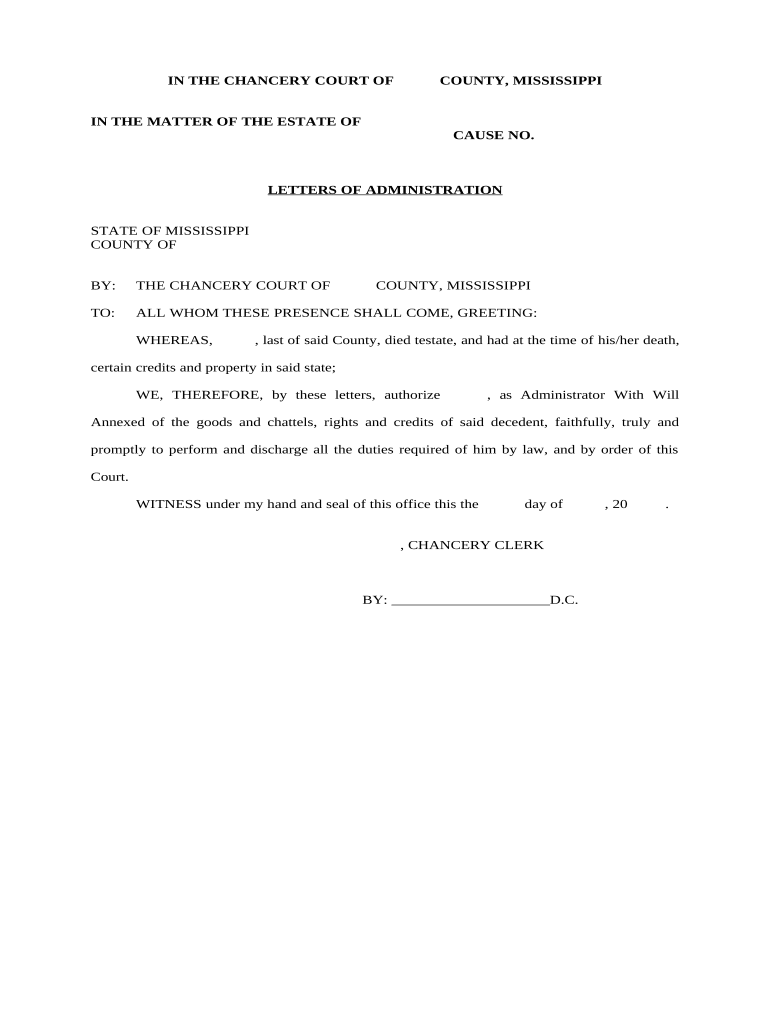
A Mississippi Letters of Administration is a court-issued document that appoints a personal representative to administer an intestate decedent's estate when no valid will exists. The chancery court grants authority to collect assets, pay valid debts and distribute property according to Mississippi law. Letters of Administration establish the representative's legal power to access bank accounts, transfer title, and manage creditor claims. The form and filing process vary by county; the appointed administrator must often post bond, notify heirs and creditors, and file inventories and accountings with the chancery court to complete probate administration.

Why Letters of Administration matter for estate continuity

Letters of Administration give a court-recognized authority to manage and close an estate when no executor is named. They enable banks, title companies, and third parties to work with an appointed administrator without repeated court intervention.

Why Letters of Administration matter for estate continuity

Who typically prepares or requests Letters of Administration

Parties should confirm county-specific chancery court requirements and consider legal counsel for contested or complex estates.

  • Next-of-kin or heir petitioners seeking formal appointment to administer an intestate estate.
  • Probate attorneys preparing petitions, inventories, and court accountings on behalf of heirs.
  • Bank or title officers requesting judicial authority to release funds or transfer property.

Typical roles involved and what they need

Heir Petitioner

A close relative (spouse, adult child, or next of kin) who petitions the chancery court for appointment. They must provide proof of relationship and death, disclose known creditors, and may need to post bond unless waived by the court; probate attorneys often assist to reduce procedural risk.

Chancery Clerk

The county chancery clerk accepts the petition, assigns a case number, and manages filings. Clerks verify required attachments, collect filing fees, and provide direction on notice and inventory deadlines but cannot give legal advice about estate distribution.

Core information fields required on the petition

Decedent Name: Full legal name
Date of Death: MM/DD/YYYY
Applicant Name: Full legal name
Heir Relationship: Relationship to decedent
Asset Summary: Estimated estate value
Bond Amount: If required by court

Step-by-step: complete and file a Mississippi Letters of Administration

Follow these core actions to prepare and file a petition for Letters of Administration in Mississippi chancery court.

  • 01
    Gather documents: Obtain death certificate, asset statements, and next-of-kin affidavits.
  • 02
    Complete petition: Fill in decedent, applicant, heirs, and asset summary fields accurately.
  • 03
    File with court: Submit petition and attachments to the county chancery clerk and pay filing fee.
  • 04
    Serve notice: Provide required notices to heirs and publish notice if the court requires it.

Where and how to submit the petition in Mississippi

Mississippi Letters of Administration are initiated at the county chancery court where the decedent resided or where major estate property is located.

  • Chancery Clerk: File original petition and attachments with the clerk's office.
  • Service to Heirs: Provide statutory notice to heirs and interested parties.
  • Court Hearing: Attend hearing if the court schedules one; bring originals and ID.
  • Record Issuance: Receive Letters of Administration and certified copies from the clerk.

How to set up a digital workflow for the petition

Configure an online workflow that collects information, signatures, notarization, and submits documents to the chancery clerk.

Field Configuration
Document Type Fillable PDF petition
Signers Applicant and any required witnesses
Authentication Email link or stronger ID verification
Delivery Download PDF for clerk filing or transmit per court rules

Digital signing and platform considerations

Verify the county chancery court accepts electronically completed petitions or whether an original wet-signed document is required before relying solely on e-submission.

  • Audit Trail: Retain timestamp, IP, and signer actions
  • Notarization: Support for RON where allowed
  • Export Formats: PDF/A export for archival

Risks and legal consequences of incorrect or incomplete petitions

Probate Delay: Court may continue or dismiss
Creditor Claims: Unnoticed claims can increase liabilities
Bond Forfeiture: Bond may be required and subject to forfeiture
Court Sanctions: Clerk or judge may require corrections
Title Rejection: Title companies may refuse transfers
Tax Exposure: Delayed filings can cause penalties

Common mistakes to avoid when preparing the petition

  • Using inconsistent names between asset records and petition entry, which can block banks or title transfers and require amended filings.
  • Failing to attach a certified death certificate and required affidavits, often causing the clerk to reject or delay the petition.
  • Not listing all known heirs or omitting known creditors, which can lead to contested proceedings and reopened accountings.
  • Assuming the chancery court accepts electronic originals without verifying county rules, resulting in rejected submissions.

Practical tips for accurate, efficient completion

Apply these practices to reduce processing time and avoid clerical rejections.

Verify identity and names
Cross-check decedent and heir names against government IDs, bank statements, and deeds. Consistent naming avoids bank holds and title issues and simplifies court review.
Prepare complete attachments
Attach a certified death certificate, asset statements, and heir affidavits to the initial filing. Complete packets reduce return-for-correction cycles and speed issuance of letters.
Confirm county rules
Contact the chancery clerk to confirm local filing fees, bond requirements, and whether electronic submission or scanned copies are acceptable for the initial petition.
Consider limited legal review
For estates with meaningful assets or potential disputes, a short attorney review can prevent costly post-appointment corrections and accelerate asset transfers.

Real-world examples of Letters of Administration workflows

Two anonymized examples illustrate typical situations and outcomes.

Administrator appointed quickly

A decedent died intestate owning a single-family home and bank accounts in one county.

  • Petition included death certificate and heir list.
  • The chancery court issued Letters of Administration within six weeks; the administrator sold the property after obtaining court approval and settled creditor claims before final distribution.

Contested heir dispute

Siblings disagreed on priority and asset valuation following an intestate death.

  • Competing petitions required a contested hearing.
  • The court appointed a temporary administrator, required a bond, and resolved distribution after an evidentiary hearing, extending administration by several months and increasing legal costs.

Comparing eSignature vendor pricing and capabilities relevant to probate workflows

A concise vendor comparison to evaluate common capabilities used for form completion, signing, and notarization support. Do NOT include any data date references.

signNow DocuSign Adobe Sign PandaDoc HelloSign
Starting Price $8/user/mo $15/user/mo $14/user/mo $19/user/mo $15/user/mo
Free Trial 7-day free trial Varies by plan Varies by plan Varies by plan Varies by plan
Bulk Send Yes (premium) Yes Yes Yes No
Audit Trail Yes Yes Yes Yes Yes
Envelope Cap No cap 100 envelopes/user/year Varies Varies Varies

Typical timing expectations and court milestones

Probate timing depends on estate complexity and local court schedules; these are common checkpoints to monitor.

Initial Filing:

File petition as soon as practicable after death; no single federal deadline

Notice to Heirs:

Provide statutory notice timelines per county rules, often within weeks

Creditor Claims:

Creditors usually have limited months to file claims; consult local statute

Inventory Filing:

Courts may require an inventory within a set number of days after appointment

Final Accounting:

Submit closing accountings when distribution is complete; timing varies by court

Frequently asked questions about Mississippi Letters of Administration

Answers to common questions about eligibility, filings, electronic signing, and next steps in Mississippi probate.


Need help? Contact support

be ready to get more
Join over 28 million airSlate SignNow users