Establishing secure connection…Loading editor…Preparing document…

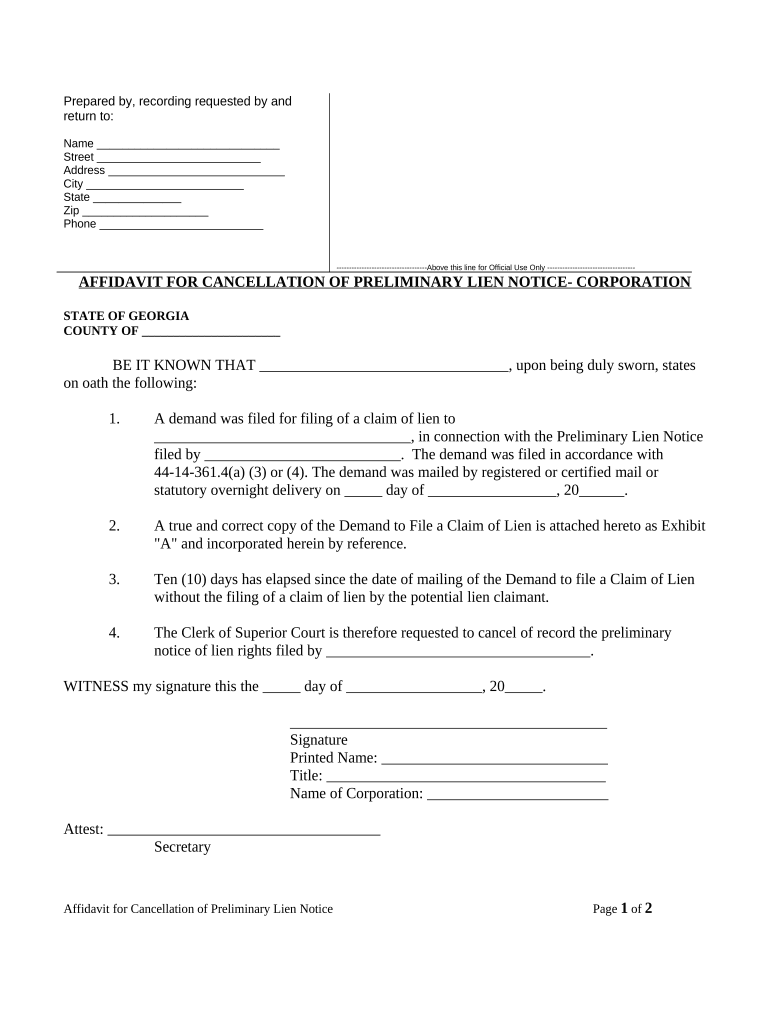
Georgia Affidavit for Cancellation of Preliminary Lien Notice

This template is fully customizable. Edit the text, fill out the fields, and send it for signature. Give it a try!
Georgia Affidavit for Cancellation of Preliminary Lien Notice

What the Georgia Affidavit for Cancellation of Preliminary Lien Notice Is

The Georgia Affidavit for Cancellation of Preliminary Lien Notice is a sworn document used to withdraw or cancel a previously filed preliminary lien notice when the underlying claim has been satisfied, withdrawn, or determined invalid. It clarifies title status for property owners and contractors, records the claimant's intent to remove the notice, and provides a notarized statement for county recording. Use this affidavit to update public records and reduce clouded title risk after disputes or billing matters are resolved.

Why a Cancellation Affidavit Matters

A properly executed affidavit removes an outstanding preliminary lien notice from public records, protecting the property owner and restoring clear title. It documents resolution, reduces risk of financing or sale delays, and creates a verifiable, recorded record of lien cancellation.

Why a Cancellation Affidavit Matters

Who Typically Prepares and Receives This Affidavit

Several parties interact with this affidavit depending on their role in the project or transaction.

  • Property owners: Request cancellation to clear title and enable sale or refinancing.
  • General contractors: File cancellation after subcontractor claims are satisfied or released.
  • Lien claimants: Execute affidavit to withdraw a preliminary lien notice when obligations are met.

Step-by-step: Completing the Georgia Cancellation Affidavit

Follow these core steps to prepare, execute, and record a valid cancellation affidavit in Georgia.

  • 01
    Locate Notice: Identify the original preliminary lien notice by filing date and recorder book/page or instrument number.
  • 02
    Complete Form: Enter claimant, property, and reason fields accurately and use MM/DD/YYYY date format.
  • 03
    Notarize: Sign before a notary or use authorized RON if accepted locally and identity proofing is met.
  • 04
    Record: File at the county recorder or clerk's office where the original notice was recorded.

How to Configure an Online Cancellation Workflow

Map roles, fields, and routing before sending the affidavit for signature to reduce back-and-forth and rework.

Field Configuration
Signer Role Assignment Assign affiant, claimant representative, and county recorder copy recipients.
Authentication Choose email link or SMS code; use stronger ID verification for high-risk cases.
Notary Step Include in-person or RON step based on local acceptance and notary availability.
Record Copy Delivery Auto-send final PDF and certificate of completion to stakeholders and filing agent.

Where the Affidavit Goes After Execution

Recording and distribution are the final steps to ensure the public record and stakeholders reflect the cancellation.

  • County Recorder: Primary filing location for public record indexing.
  • Mortgagee / Lender: Provide a recorded copy to protect financing and lien priority.
  • Property Owner: Deliver recorded affidavit to confirm title clearance.
  • Claimant Files: Retain an executed, recorded copy for the claimant's records.

Distribution and Technical Considerations for eSubmission

Choose a platform that supports the required file formats, notary workflows, and secure delivery to recording offices.

  • File Formats: PDF and DOCX accepted by most platforms and recorders.
  • Integrations: Connect with cloud storage and case management systems.
  • Notary Support: Platform should handle RON or in-person notarization options.

Essential Data Elements to Include

Affiant: Full legal name
Claimant: Entity or individual name
Property: Address and parcel ID
Original Notice: Filing/instrument number
Cancellation Reason: Clear, specific phrase
Notary Block: Date and jurat

Key Components of a Compliant Cancellation Affidavit

A complete affidavit combines factual, legal, and procedural elements so it is accepted by the recorder and clear to third parties.

Caption

Identifies document type, jurisdiction, and parties so record clerks and title examiners can index the entry correctly and instantly.
Affirmation

A sworn statement that the preliminary lien notice is withdrawn, satisfied, or invalid, setting out facts that justify cancellation.

Reference Data

Original filing date, instrument number, and property parcel information linking the affidavit to the correct recorded notice.

Notary Jurat

Notary signature, seal, and jurat language verifying affiant identity and oath; required for recording in most counties.

Signature Block

Printed name, title (if signing for an entity), date, and contact details for follow-up by recorders or interested parties.

Distribution Instructions

Notes on where a recorded copy should be returned and which parties need immediate notice after filing.

Timelines and Typical Processing Expectations

Processing times depend on county practices and whether the affidavit is paper-filed or submitted electronically; plan for local variability.

File Promptly:

Record as soon as the lien is resolved to limit title issues.

County Recording Time:

Processing often takes 3–14 business days depending on workload.

RON Sessions:

If allowed, RON completion and delivery can shorten turnaround to under 72 hours.

Mortgagee Notification:

Lenders may require a recorded copy before removing title exceptions.

Keep Audit Trail:

Retain electronic certificates and notary records for evidentiary support.

Common Preparation and Filing Mistakes to Avoid

  • Using an inconsistent claimant name that differs from the original notice leads to recording delays and potential rejections.
  • Failing to reference the original instrument number or filing date makes it difficult for recorders to match and index the cancellation.
  • Omitting notarization or using incorrect jurat language in a county that requires it results in the affidavit being returned or rejected.
  • Not delivering recorded copies to lenders or stakeholders can prolong title exceptions and delay transactions such as closings.

Consequences of Incorrect or Fraudulent Affidavits

Recording Rejection: Returned for correction
Title Issues: Continued encumbrances
Civil Liability: Damages for wrongful removal
Perjury Risk: Criminal penalties possible
Delay Costs: Closing and financing delays
Re-filing Burden: Additional legal costs

eSignature Provider Comparison for Preparing and Executing Affidavits

Common eSignature vendors vary by price, plan features, and compliance support; signNow is listed first for side-by-side comparison of typical criteria.

signNow DocuSign Adobe Sign PandaDoc HelloSign
Starting Price $8/user/mo $15/user/mo $14/user/mo $19/user/mo $15/user/mo
Free Trial Yes, 7-day trial No No Yes, limited Yes, limited
Bulk Send Yes Yes Yes Yes No
Audit Trail Yes Yes Yes Yes Yes
HIPAA Compliant Yes Yes Yes No No

Frequently Asked Questions About Cancellation Affidavits

Answers to typical questions about e-signing, notarization, recording, and post-filing steps for Georgia cancellation affidavits.


Need help? Contact support

be ready to get more
Join over 28 million airSlate SignNow users