Establishing secure connection…Loading editor…Preparing document…

Louisiana Motion Form

This template is fully customizable. Edit the text, fill out the fields, and send it for signature. Give it a try!
Louisiana Motion Form

Overview: What the Louisiana Motion Form Is

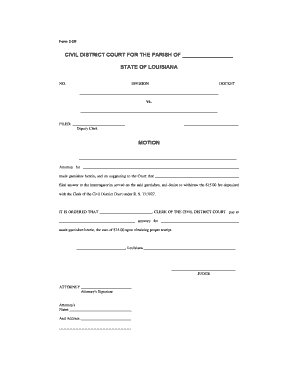
A Louisiana Motion Form is a court filing document used to request relief from a state or local court in Louisiana. It frames the moving party's request, states the factual basis and legal grounds, and specifies the remedy sought, such as continuance, dismissal, or injunctive relief. Motions must follow local rules for captions, service, and supporting affidavits or exhibits. Many motions are accompanied by memoranda of law and proposed orders. Accurate completion, proper service, and adherence to timing rules determine whether the court will consider the request.

Why a Clear, Compliant Motion Form Matters

A well-prepared Louisiana Motion Form communicates the relief requested and legal basis succinctly, reduces risk of rejection for technical defects, and helps the court resolve issues faster.

Why a Clear, Compliant Motion Form Matters

Who Typically Prepares and Files These Forms

The Louisiana Motion Form is used by attorneys, self-represented litigants, and court clerks during civil and family proceedings.

  • Private attorneys handling civil litigation and family law matters, ensuring procedural compliance and effective argument presentation.
  • Solo practitioners and small firms who prepare motions, supporting affidavits, and proposed orders for local courts.
  • Self-represented litigants filing simple motions such as continuances, name changes, or default-related requests.

Parties should confirm the applicable parish or district court rules and any local form requirements before filing.

Step-by-Step: Completing a Louisiana Motion Form

Follow these practical steps to prepare a motion that meets formatting, service, and filing expectations.

  • 01
    Caption: Enter court name, docket number, and party names exactly as on the case file.
  • 02
    Title: State the motion type clearly, e.g., Motion for Continuance or Motion to Compel.
  • 03
    Statement of Facts: Summarize relevant facts concisely, focusing on facts that support the requested relief.
  • 04
    Relief Requested: Specify precise relief, proposed order language, and any timelines or deadlines sought.

Typical Workflow for Filing a Motion in Louisiana

A motion follows a predictable sequence from drafting to court ruling; ensure compliance at each handoff to avoid delays.

  • Drafting: Prepare motion, exhibits, and proposed order tailored to local rules.
  • Service: Serve opposing parties according to state or local rule before filing as required.
  • Filing: File with the clerk electronically or in-person per the court's procedures.
  • Hearing/Decision: Attend hearing if scheduled, or await the court's written ruling or order.

Sharing and eSubmission Options

Motions can be delivered by in-person filing, secure e-filing portals, or e-mail/mail where permitted by court rules.

  • E-filing Portals: Court-specific electronic filing systems
  • Email Delivery: Allowed only if local rule permits
  • Cloud Sharing: PDF, DOCX formats supported

Confirm the receiving court's accepted formats and submission channels before sending; some courts restrict email or require e-filing accounts.

Digital Setup: Key Settings for eFiling a Motion

Configure your document and signing workflow so the filing meets court format and authentication requirements.

Field Configuration
File Format PDF/A preferred; ensure embedded fonts and readable text
Signature Type Typed or drawn e-signature with audit trail
Authentication Email or SMS code for signers where required
Attachments Combine exhibits into a single PDF, bookmarked by exhibit

Essential Components of a Professional Louisiana Motion Form

Include all structural elements below to present your request clearly and to align with court expectations and local rules.

Caption & Case ID

Complete court heading with full party names, docket number, and parish or district court designation to ensure filing associates with the correct case file.
Motion Title

A concise, conventional title (for example, Motion to Compel Discovery) that identifies the request and assists the clerk and judge.

Statement of Facts

A short, chronological factual narrative limited to material details that directly support the legal grounds for the motion.

Legal Argument

Cite controlling statutes, rules, or case law and explain how the facts satisfy each required legal element for relief.

Relief Sought

Specify the exact order requested, proposed deadlines, and any ancillary requests such as sanctions or evidentiary rulings.

Signature & Certificate

Signed signature block with contact information and a certificate of service showing how and when opposing parties were served.

Common Preparation Challenges

  • Omitting the correct caption or docket number, which can result in misfiling or rejection by the clerk.
  • Failing to attach or label exhibits properly, making it difficult for the judge to verify supporting facts.
  • Using vague or unsupported factual statements instead of specific dates, locations, and documentary evidence.
  • Ignoring local rules for service and filing method, leading to procedural objections or delayed hearings.

Consequences of Procedural Errors

Motion Rejection: Clerk may refuse filing
Delay: Hearing postponed or continuance required
Sanctions: Monetary penalties or attorney fees
Loss of Rights: Waiver of claims or defenses
Evidence Exclusion: Supporting exhibits excluded
Default Risks: Adverse default judgment possible

Typical Timing and Response Expectations

Timing for motions depends on the court and motion type; observe local rules and any scheduling orders to avoid forfeiture.

Filing Window:

Submit per local rules; some motions require advance notice or leave of court

Response Deadline:

Often 14–30 days from service, depending on court rules and motion category

Hearing Schedule:

Clerk may set hearing within weeks to months based on calendar and motion urgency

Proposed Order:

Include proposed order to expedite the court's ruling and reduce clerical revision

Emergency Motions:

Provide immediate notice and request ex parte relief when irreparable harm is alleged

Practical Examples of Motion Use

These concise scenarios illustrate typical motion filing situations and common outcomes.

Local Firm Motion

A small civil litigation firm filed a Motion for Continuance due to scheduling conflict

  • Judge granted a short continuance to preserve client testimony
  • The firm attached affidavits and a proposed order, which the court signed within two weeks.

Pro Se Motion

A self-represented litigant filed a Motion to Reschedule a hearing with clear dates and exhibits

  • Clerk required reformatting to local caption standards
  • After correction and proper service, the hearing was rescheduled and the case proceeded.

eSignature Pricing Overview for Motion Workflows

For digital signing of motions and supporting exhibits, compare vendor starting prices and basic capabilities; signNow is listed first for reference.

signNow DocuSign Adobe Sign PandaDoc HelloSign
Starting Price $8/user/mo $15/user/mo $14/user/mo $19/user/mo $15/user/mo
Free Trial Yes, 7-day trial No No No No
Bulk Send Yes Yes Yes Yes No
Audit Trail Yes Yes Yes Yes Yes
HIPAA Compliant Yes Yes Yes No No

Frequently Asked Questions About the Louisiana Motion Form

Answers to common procedural and technical questions for preparing and submitting a motion in Louisiana courts.


Need help? Contact support

be ready to get more
Join over 28 million airSlate SignNow users