Establishing secure connection…Loading editor…Preparing document…

Writ of Mandamus

This template is fully customizable. Edit the text, fill out the fields, and send it for signature. Give it a try!
Writ of Mandamus

What a Writ of Mandamus Is and When It Applies

A Writ of Mandamus is an extraordinary court order that compels a public official, government agency, or lower court to perform a nondiscretionary duty required by law. In federal practice, 28 U.S.C. §1361 authorizes mandamus to compel an officer of the United States to perform a duty. The writ is available only when the petitioner shows a clear legal right to the relief, a corresponding duty on the respondent, and an absence of other adequate remedies such as appeal or administrative review. Mandamus is remedial and exceptional, not a substitute for ordinary appeals.

When a Writ of Mandamus Provides Meaningful Relief

A Writ of Mandamus provides a targeted remedy to compel required government action or correct a lower court’s failure to act when no adequate alternative remedy exists.

When a Writ of Mandamus Provides Meaningful Relief

Who Typically Prepares or Requests a Writ of Mandamus

The Writ of Mandamus is most often used by parties seeking immediate judicial compulsion where statutory duties are being ignored or lower-court remedies are exhausted.

  • Private litigants represented by counsel who need expedited relief from administrative or judicial inaction.
  • Public-interest organizations or businesses challenging a government agency’s failure to perform a nondiscretionary duty.
  • State or federal prosecutors and agencies seeking to compel a subordinate official’s compliance with law.

Because mandamus is an extraordinary remedy, consultation with litigation counsel is common to confirm the proper target, timing, and pleading strategy.

Core Sections of a Professional Writ of Mandamus

A well-drafted writ presents facts, legal authority, and a clear request for the court to compel performance; each element supports the extraordinary relief sought.

Caption and Jurisdiction

Court name, docket number if known, and a concise jurisdictional statement explaining why the chosen court may issue mandamus relief.
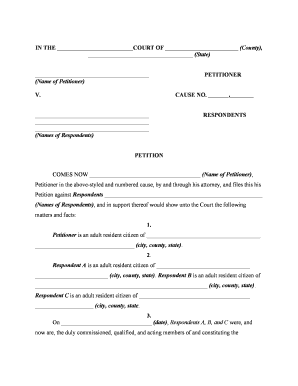
Parties

Identify petitioner(s) and respondent(s) with full legal names, official titles for public officers, and mailing addresses for service.

Statement of Facts

A chronological, specific account of events showing the respondent’s omission or refusal to perform a non‑discretionary duty.

Legal Basis

Statutes, regulations, or controlling case law establishing the petitioner’s clear right and the respondent’s corresponding duty.

Relief Requested

Clear prayer for mandamus relief, including an order directing action and any ancillary relief such as costs or injunctions.

Verification & Certificate

Signed verification or affidavit attesting to truthfulness and a certificate of service showing how respondents were served.

Essential Fields to Include in the Writ

Court Name: Full court title
Petitioner: Full legal name
Respondent: Official name/title
Relief Sought: Specific judicial order
Statement of Facts: Concise chronology
Signature Block: Counsel name and contact

Step-by-Step: Completing a Writ of Mandamus

Follow a clear sequence: gather facts, confirm duty, draft the petition, verify service, and file with supporting exhibits.

  • 01
    Gather Evidence: Collect written records, communications, and timelines demonstrating the duty and failure to act.
  • 02
    Confirm Legal Duty: Identify statutes, regulations, or binding precedents creating a nondiscretionary duty.
  • 03
    Draft Petition: Prepare caption, factual statement, legal argument, requested order, and verification.
  • 04
    Serve and File: Serve respondents per rule and file the original petition with the court clerk and required copies.

Customizing and Completing the Writ Online

When preparing the writ electronically, configure document fields, signer roles, and submission settings to meet court and service requirements.

Field Online Setting
Document Upload PDF/A preferred for court filing
Template Fields Use caption, party, date, signature fields
Signer Roles Petitioner / Counsel signers defined
Authentication Enable email/SMS code or advanced auth

Where to File and How to Deliver the Writ

Filing destination depends on the target of the writ: federal officer, agency, or state court; follow the applicable court’s local rules.

  • Federal District Court: File with the clerk; reference 28 U.S.C. §1361 where applicable
  • State Trial or Appellate Court: File according to state procedural rules or equivalent statutory provisions
  • Administrative Agency: Some agencies require exhaustion before seeking mandamus in court
  • Service on Respondent: Serve by process server or certified mail per rules

Distribution and eSubmission Options for the Writ

Courts accept filings through a combination of electronic filing systems, physical filing, and formal service methods depending on jurisdiction.

  • Court E‑Filing: Use the court’s CM/ECF or state e‑filing portal
  • Email to Counsel: Serve opposing counsel where rules allow
  • Process Server: Use for formal personal service when required

Timing, Response Windows, and Expedited Relief

Timing varies: mandamus petitions often seek expedited consideration; courts set schedules for responses and emergency temporary relief.

Filing Promptness:

File as soon as duty cannot be otherwise enforced

Response Deadline:

Varies by court; commonly 14–21 days

Expedited Motions:

Courts may shorten timelines for emergency relief

Service Timeframes:

Follow local rules for days to effect service

Appeal Windows:

Separate appeal deadlines may apply after disposition

Common Drafting and Procedural Errors to Avoid

  • Failing to allege and prove a nondiscretionary duty, which is essential for mandamus jurisdiction and often leads to dismissal.
  • Skipping administrative exhaustion when it is required, resulting in the court refusing to hear the petition as premature.
  • Submitting vague factual timelines or unsupported assertions rather than concrete documentary evidence and dates.
  • Improper service or failure to follow local filing formats, causing rejection or sanctions by the clerk.

Potential Consequences of an Incorrect or Frivolous Writ

Dismissal: Court may dismiss for lack of jurisdiction
Sanctions: Court can impose monetary sanctions for frivolous filings
Waiver: Improper procedure can waive other remedies
Delay: Misdrafted petitions can prolong relief
Costs: Litigation costs and possible fee awards
Ethics Risk: Attorney sanction for misconduct

Representative Use Cases for a Writ of Mandamus

These scenarios demonstrate typical situations where petitioners seek mandamus relief to compel action or correct judicial inaction.

Agency Delay

A business waited more than a year for statutorily mandated licensing action

  • administrative remedies exhausted
  • The petitioner sought mandamus to compel the agency to issue or deny the license and to set a deadline for action under controlling statute.

Lower Court Inaction

Litigant faced an indefinite delay in a lower court refusing to rule on a dispositive motion

  • delay threatened appeal rights
  • The writ asked an appellate court to direct the lower court to enter a ruling to preserve appellate review.

Comparing eSignature Options for Preparing and Signing a Writ

Choose an eSignature provider that supports secure signing, audit trails, and formats accepted by courts and counsel; signNow is listed first for comparison purposes.

signNow DocuSign Adobe Sign PandaDoc HelloSign
Starting Price $8/user/mo $15/user/mo $14/user/mo $19/user/mo $15/user/mo
Free Trial 7-day free trial Varies by vendor Varies by vendor Varies by vendor Varies by vendor
Audit Trail Yes Yes Yes Yes Yes
HIPAA Compliant Yes Yes Yes No No
Envelope Cap No cap 100 envelopes/user/year Varies Varies Varies

Frequently Asked Questions About Writs of Mandamus

Answers to common procedural and practical questions when preparing, filing, or serving a Writ of Mandamus.


Need help? Contact support

be ready to get more
Join over 28 million airSlate SignNow users