Establishing secure connection… Loading editor… Preparing document…
Navigation

Fill and Sign the Md Easement Form
Fill and Sign the Md Easement Form

How it works

Open the document and fill out all its fields.
Apply your legally-binding eSignature.
Save and invite other recipients to sign it.

Rate template

4.7
64 votes
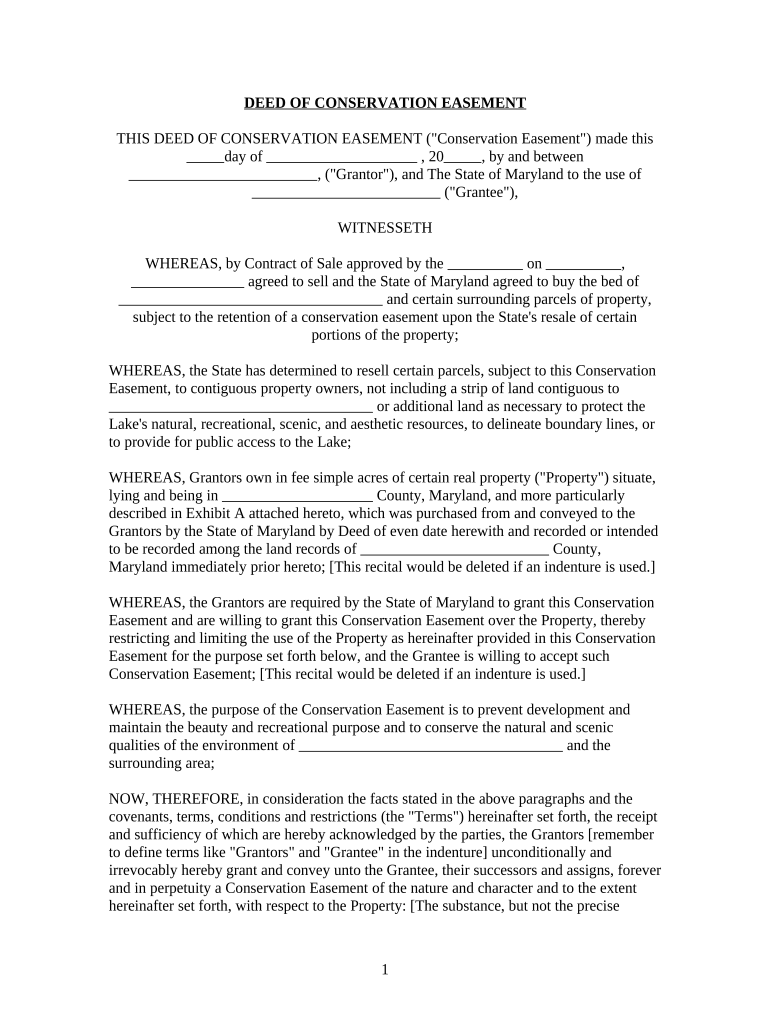
DEED OF CONSERVATION EASEMENT THIS DEED OF CONSERVATION EASEMENT ("Conservation Easement") made this       day of                         , 20       , by and between                               , ("Grantor"), and The State of Maryland to the use of                               ("Grantee"), WITNESSETH WHEREAS, by Contract of Sale approved by the             on             ,                   agreed to sell and the State of Maryland agreed to buy the bed of                                           and certain surrounding parcels of property, subject to the retention of a conservation easement upon the State's resale of certain portions of the property; WHEREAS, the State has determined to resell certain parcels, subject to this Conservation Easement, to contiguous property owners, not including a strip of land contiguous to                                           or additional land as necessary to protect the Lake's natural, recreational, scenic, and aesthetic resources, to delineate boundary lines, or to provide for public access to the Lake; WHEREAS, Grantors own in fee simple acres of certain real property ("Property") situate, lying and being in                         County, Maryland, and more particularly described in Exhibit A attached hereto, which was purchased from and conveyed to the Grantors by the State of Maryland by Deed of even date herewith and recorded or intended to be recorded among the land records of                               County, Maryland immediately prior hereto; [This recital would be deleted if an indenture is used.] WHEREAS, the Grantors are required by the State of Maryland to grant this Conservation Easement and are willing to grant this Conservation Easement over the Property, thereby restricting and limiting the use of the Property as hereinafter provided in this Conservation Easement for the purpose set forth below, and the Grantee is willing to accept such Conservation Easement; [This recital would be deleted if an indenture is used.] WHEREAS, the purpose of the Conservation Easement is to prevent development and maintain the beauty and recreational purpose and to conserve the natural and scenic qualities of the environment of                                           and the surrounding area; NOW, THEREFORE, in consideration the facts stated in the above paragraphs and the covenants, terms, conditions and restrictions (the "Terms") hereinafter set forth, the receipt and sufficiency of which are hereby acknowledged by the parties, the Grantors [remember to define terms like "Grantors" and "Grantee" in the indenture] unconditionally and irrevocably hereby grant and convey unto the Grantee, their successors and assigns, forever and in perpetuity a Conservation Easement of the nature and character and to the extent hereinafter set forth, with respect to the Property: [The substance, but not the precise 1 language, of this paragraph would be put in the indenture itself.] ARTICLE I. DURATION OF EASEMENT This Conservation Easement shall be perpetual. It is an easement in gross and runs with the land as an incorporeal interest in the Property, enforceable with respect to the Property by the Grantee against the Grantors and their personal representatives, heirs, successors and assigns. ARTICLE II. PROHIBITED AND RESTRICTED ACTIVITIES A. Industrial or Commercial Activities on the Property Industrial or commercial activities are prohibited on the Property, except, with the approval of the Grantee, for activities necessary to support and gain access to lake-related, commercial and recreational uses permitted by the State of Maryland on immediately contiguous State land or on                                           , at the time of the proposed activity. B. Construction and Improvements No building, facility, means of access, fence or other structure shall be permitted on the Property, except: (1) pedestrian pathways or stairways constructed with wood, stone, or permeable surfaces of natural materials to provide access to the lake or improvements on the Property from the contiguous property; (2) with the approval of the Grantee, utilities to serve commercial or recreational facilities on the contiguous State land; (3) structures identified on the       plat recorded among the Land records of                         County at       , folio       , or in the records of the Department of Natural Resources, provided that such structures were permitted by the Department or its predecessor in title prior to the Grantor's ownership of the Property; and (4) subject to the approval of the Grantee, temporary structures with a footprint no greater than 120 square feet. C. Transferable, Cluster and Other Development Rights The Grantors hereby grant to the Grantee all transferable, cluster or other development rights under any present or future law that are now or hereafter allocated to, implied, reserved or inherent in the Property, and the parties agree that such rights are terminated and extinguished, and may not be used or transferred to any portion of the Property, or to any other property, nor used for the purpose of calculating permissible size or lot yield of the Property or any other property. D. Trees There shall be no burning, cutting, removal or destruction of trees, shrubs and other woody vegetation (collectively "Vegetation"), except: subject to the approval of the Grantee (1) 2 Vegetation that is dead, infested or diseased; (2) Vegetation necessary to control erosion; (3) Vegetation necessary to provide reasonable access to                                           ; and (4) Vegetation cut, maintained, or removed pursuant to a forest management plan that has been approved by the Grantee and prepared by a professional forester registered in Maryland. Trimming and maintenance of Vegetation that has been planted by the Grantor or a predecessor in title to the Grantor on the Property is permitted; provided, that the Grantor or the Grantor's predecessor had provided written documentation to the Grantee of the type and location of the Vegetation prior to maintenance or trimming. E. Dumping, Placement or Storage of Materials No materials may be dumped or stored on the Property, including, but not limited to, ashes, trash, garbage, rubbish, abandoned vehicles, abandoned vessels, abandoned appliances, and abandoned machinery. F. Excavation of Materials Excavation or mining of the Property is prohibited, including, but not limited to, removal of soil or sand, except, with the approval of the Grantee, for temporary excavation: (1) to maintain access to                                           ; and (2) to repair and extend a septic system or well that has failed on a contiguous property, so long as the failure is not due to increased use, occupancy, or size of the contiguous dwelling that the septic system or well serves in violation of any health laws, ordinances, regulations or permits. [If the State is going to reserve the mineral, oil and gas underlying the Property, then that should occur in the indenture (deed).] G. Wetlands No diking, draining, filling, dredging or removal of any wetland or wetlands is permitted. "Wetland" or "wetlands" means portions of the Property defined by any State or federal laws as a wetland or wetlands at the time of the proposed activity. H. Signs and Billboards No signs, billboards, or outdoor advertising displays may be erected, displayed, placed or maintained on the Property except temporary signs not exceeding six square feet to advertise the property's sale or rental. I. Public Access This Conservation Easement does not grant the public any right to access or any right of use of the Property. 3 J. Reserved Rights Except to the extent that prior written approval of the Grantee is required by any paragraph of this Article, all rights not prohibited by this Conservation Easement are considered to be consistent with the Terms of this Conservation Easement and require no prior notification or approval. If the Grantors have any doubt with respect to whether or not any particular use of the Property is prohibited by the Terms of this Conservation Easement, the Grantors may submit a written request to the Grantee for consideration and approval of such use. ARTICLE III. ENFORCEMENT AND REMEDIES A. Remedies Upon any breach of the Terms of this Conservation Easement by the Grantors, the Grantee may exercise any or all of the following remedies: 1. institute suits to enjoin any breach or enforce any covenant by temporary and/or permanent injunction either prohibitive or mandatory; and 2. require that the Property be restored promptly to the condition required by this Conservation Easement. The Grantee' remedies shall be cumulative and shall be in addition to any other rights and remedies available to the Grantee at law or equity. If the Grantors are found to have breached any of the Terms under this Conservation Easement, the Grantors shall reimburse the Grantee for any costs or expenses incurred by the Grantee, including court costs and reasonable attorney's fees. B. Effect of Failure to Enforce No failure on the part of the Grantee to enforce any Term hereof shall discharge or invalidate such Term or any other Term hereof or affect the right of the Grantee to enforce the same in the event of a subsequent breach or default. C. Right of Inspection The State of Maryland, acting by and through the Department of Natural Resources, the Grantee, their respective employees and agents, have the right, with reasonable notice to the Grantors, to enter the Property at reasonable times for the purpose of inspecting the Property to determine whether the Grantors are complying with the Terms of this Conservation Easement. ARTICLE IV. EXHIBITS [This Article would be removed if an indenture is used.] 4 The following exhibits are hereby made a part of this Conservation Easement: A. Exhibit A: Boundary Description and Property Reference is attached hereto and made a part hereof. Exhibit A consists of pages. This exhibit reflects the existing uses and structures on the Property as of the date of this Conservation Easement. ARTICLE V. MISCELLANEOUS [This becomes Article IV if an indenture is used.] A. Future Transfers By executing this Conservation Easement, the Grantees acknowledge that this Conservation Easement is permanent and is binding on their heirs, personal representatives, successors or assigns. B. Effect of Laws Imposing Affirmative Obligations on the Grantors In the event that any applicable State or federal law imposes affirmative obligations on owners of land which if complied with by the Grantors would be a violation of a Term of this Conservation Easement, the Grantors shall: (i) if said law requires a specific act without any discretion on the part of the Grantors, comply with said law and give the Grantee written notice of the Grantors' compliance as soon as reasonably possible, but in no event more than thirty (30) days from the time the Grantors begin to comply; or (ii) if said law leaves to the Grantors discretion over how to comply with said law, use the method most protective of the purpose of this Conservation Easement set forth in the recitals herein. C. Notices to the Grantee Any notices by the Grantors to the Grantee pursuant to any Term hereof shall be sent by registered or certified mail, return receipt requested, addressed to the current address of the Secretary, Department of Natural Resources, with a copy to Manager,                                           Recreation Area. D. Approval of the Grantee In any case where the terms of this Conservation Easement require the approval of the Grantee, such approval shall be requested by written notice to the Grantee. After consultation with the                                           Policy Review Board, approval or disapproval shall be given promptly and in writing; in the event the request is disapproved, a statement of the reasons for the disapproval shall be given. E. Condemnation 5 Whenever all or part of the Property is taken in the exercise of eminent domain, so as to abrogate, in whole or in part, the restrictions imposed by this Conservation Easement, or this Conservation Easement is extinguished, in whole or in part, by other judicial proceeding, the Grantors and the Grantee shall be entitled to proceeds payable in connection with the condemnation or other judicial proceedings in an amount equal to the current fair market value of their relative real estate interests. Any costs of a judicial proceeding allocated by a court to the Grantors and the Grantee shall be allocated in the same manner as the proceeds are allocated. F. Construction This Conservation Easement shall be construed pursuant to the purpose of this Conservation Easement and the purposes of Section 2-118 of the Real Property Article of the Annotated Code of Maryland, and to the laws of the State of Maryland generally. G. Effect of Laws and Other Restrictions on the Property The Terms of this Conservation Easement shall be in addition to any local, State or federal laws imposing restrictions to the Property and any real estate interests imposing restrictions to the Property. H. Entire Agreement and Severability of the Terms This instrument sets forth the entire agreement of the parties with respect to the Conservation Easement and supersedes all prior discussions, negotiations, understandings or agreements relating to the Conservation Easement. If any Term is found to be invalid, the remainder of the Terms of this Conservation Easement, and the application of such Term to persons or circumstances other than those as to which it is found to be invalid, shall not be affected thereby. I. Successors The terms "Grantors" and "Grantee" wherever used herein, and any pronouns used in place thereof, shall include, respectively, the above-named Grantors and their personal representatives, heirs, successors, and assigns and the above-named Grantee and their successors and assigns. J. Real Property Taxes Except to the extent provided for by State or local law, nothing herein contained shall relieve the Grantors of the obligation to pay taxes in connection with the ownership of the Property. K. Captions The captions in this Conservation Easement have been inserted solely for convenience of 6 reference and are not a part of this instrument. Accordingly, the captions shall have no effect upon the construction or interpretation of the Terms of this Conservation Easement. [The remainder of this document would be altered if an indenture were used.] TO HAVE AND TO HOLD unto the State of Maryland to the use of the Department of Natural Resources, their successors and assigns, forever. The covenants agreed to and the terms, conditions and restrictions imposed as aforesaid shall be binding upon the Grantors, their survivors, agents, personal representatives, heirs, assigns and all other successors to them in interest, and shall continue as a servitude running in perpetuity with the Property. AND said Grantors hereby covenant that they have not done or suffered to be done any act, matter, or thing whatsoever, to encumber the property hereby conveyed, that they will warrant specially the Property granted and that they will execute such further assurances of the same as may be requisite. IN WITNESS WHEREOF, the Grantors have hereunto set their hands and seals in the day and year above written. WITNESS/ATTEST:                                     GRANTORS:                                     (SEAL) (SEAL) STATE OF MARYLAND, of , TO WIT: I HEREBY CERTIFY, that on this       day of                   , 20       , before me the subscriber, a Notary Public of the State aforesaid, personally appeared , known to me (or satisfactorily proven) to be a Grantor of the foregoing Deed of Conservation Easement and acknowledged that he/she executed the same for the purposes therein contained and in my presence signed and sealed the same. 7 WITNESS my hand and Notarial Seal.                         Notary Public My Commission Expires:                         [Use a separate notary for each Grantor's signature and modify the above certificate if an entity, such as a corporation, is a Grantor.] I hereby certify that this deed was prepared and reviewed for legal form and sufficiency by                               , an attorney admitted to practice before the Court of Appeals of Maryland.                                     Assistant Attorney General 8

Valuable suggestions for completing your ‘Md Easement’ online

Are you weary of the burden of dealing with paperwork? Look no further than airSlate SignNow, the leading electronic signature solution for individuals and businesses. Bid farewell to the monotonous process of printing and scanning documents. With airSlate SignNow, you can effortlessly fill out and sign documents online. Utilize the robust features embedded in this user-friendly and cost-effective platform and transform your method of document management. Whether you need to sign forms or gather eSignatures, airSlate SignNow takes care of it all seamlessly, requiring just a few clicks.

Follow this detailed guide:

  1. Log in to your account or register for a complimentary trial with our service.
  2. Click +Create to upload a document from your device, cloud, or our form repository.
  3. Open your ‘Md Easement’ in the editor.
  4. Click Me (Fill Out Now) to finalize the form on your end.
  5. Insert and allocate fillable fields for other participants (if needed).
  6. Proceed with the Send Invite settings to request eSignatures from others.
  7. Save, print your version, or convert it into a reusable template.

No need to worry if you need to collaborate with others on your Md Easement or send it for notarization—our platform provides everything you need to complete such tasks. Sign up with airSlate SignNow today and enhance your document management to a new level!

Here is a list of the most common customer questions. If you can’t find an answer to your question, please don’t hesitate to reach out to us.

Need help? Contact Support

The best way to complete and sign your md easement form

Save time on document management with airSlate SignNow and get your md easement form eSigned quickly from anywhere with our fully compliant eSignature tool.

How to Sign a PDF Online How to Sign a PDF Online

How to fill out and sign paperwork online

In the past, working with paperwork took lots of time and effort. But with airSlate SignNow, document management is quick and simple. Our robust and easy-to-use eSignature solution enables you to effortlessly complete and eSign your md easement form online from any internet-connected device.

Follow the step-by-step guidelines to eSign your md easement form template online:

  • 1.Sign up for a free trial with airSlate SignNow or log in to your account with password credentials or SSO authentication.
  • 2.Click Upload or Create and add a form for eSigning from your device, the cloud, or our form library.
  • 3.Click on the file name to open it in the editor and use the left-side toolbar to complete all the blank fields accordingly.
  • 4.Put the My Signature field where you need to approve your sample. Provide your name, draw, or import an image of your regular signature.
  • 5.Click Save and Close to finish editing your completed form.

Once your md easement form template is ready, download it to your device, save it to the cloud, or invite other individuals to electronically sign it. With airSlate SignNow, the eSigning process only requires a few clicks. Use our powerful eSignature solution wherever you are to manage your paperwork successfully!


How to Sign a PDF Using Google Chrome How to Sign a PDF Using Google Chrome

How to fill out and sign forms in Google Chrome

Completing and signing paperwork is simple with the airSlate SignNow extension for Google Chrome. Installing it to your browser is a quick and efficient way to manage your paperwork online. Sign your md easement form sample with a legally-binding electronic signature in just a few clicks without switching between programs and tabs.

Follow the step-by-step guidelines to eSign your md easement form in Google Chrome:

  • 1.Go to the Chrome Web Store, search for the airSlate SignNow extension for Chrome, and install it to your browser.
  • 2.Right-click on the link to a form you need to eSign and select Open in airSlate SignNow.
  • 3.Log in to your account with your credentials or Google/Facebook sign-in buttons. If you don’t have one, you can start a free trial.
  • 4.Use the Edit & Sign toolbar on the left to complete your template, then drag and drop the My Signature field.
  • 5.Insert an image of your handwritten signature, draw it, or simply type in your full name to eSign.
  • 6.Verify all data is correct and click Save and Close to finish editing your form.

Now, you can save your md easement form sample to your device or cloud storage, send the copy to other individuals, or invite them to eSign your document with an email request or a secure Signing Link. The airSlate SignNow extension for Google Chrome enhances your document workflows with minimum time and effort. Try airSlate SignNow today!


How to Sign a PDF in Gmail How to Sign a PDF in Gmail How to Sign a PDF in Gmail

How to complete and sign forms in Gmail

Every time you get an email containing the md easement form for approval, there’s no need to print and scan a file or download and re-upload it to another program. There’s a much better solution if you use Gmail. Try the airSlate SignNow add-on to promptly eSign any documents right from your inbox.

Follow the step-by-step guidelines to eSign your md easement form in Gmail:

  • 1.Navigate to the Google Workplace Marketplace and find a airSlate SignNow add-on for Gmail.
  • 2.Set up the tool with a corresponding button and grant the tool access to your Google account.
  • 3.Open an email with an attachment that needs approval and use the S key on the right panel to launch the add-on.
  • 4.Log in to your airSlate SignNow account. Opt for Send to Sign to forward the document to other people for approval or click Upload to open it in the editor.
  • 5.Put the My Signature option where you need to eSign: type, draw, or import your signature.

This eSigning process saves efforts and only requires a few clicks. Take advantage of the airSlate SignNow add-on for Gmail to update your md easement form with fillable fields, sign paperwork legally, and invite other people to eSign them al without leaving your inbox. Enhance your signature workflows now!


How to Sign a PDF on a Mobile Device How to Sign a PDF on a Mobile Device How to Sign a PDF on a Mobile Device

How to complete and sign paperwork in a mobile browser

Need to quickly fill out and sign your md easement form on a smartphone while working on the go? airSlate SignNow can help without needing to set up additional software applications. Open our airSlate SignNow solution from any browser on your mobile device and add legally-binding eSignatures on the go, 24/7.

Follow the step-by-step guide to eSign your md easement form in a browser:

  • 1.Open any browser on your device and follow the link www.signnow.com
  • 2.Register for an account with a free trial or log in with your password credentials or SSO option.
  • 3.Click Upload or Create and add a file that needs to be completed from a cloud, your device, or our form library with ready-made templates.
  • 4.Open the form and fill out the empty fields with tools from Edit & Sign menu on the left.
  • 5.Add the My Signature field to the form, then type in your name, draw, or upload your signature.

In a few simple clicks, your md easement form is completed from wherever you are. Once you're done with editing, you can save the document on your device, build a reusable template for it, email it to other individuals, or ask them to electronically sign it. Make your paperwork on the go speedy and productive with airSlate SignNow!


How to Sign a PDF on iPhone How to Sign a PDF on iPhone

How to complete and sign forms on iOS

In today’s corporate environment, tasks must be accomplished quickly even when you’re away from your computer. With the airSlate SignNow mobile app, you can organize your paperwork and approve your md easement form with a legally-binding eSignature right on your iPhone or iPad. Set it up on your device to conclude agreements and manage forms from just about anywhere 24/7.

Follow the step-by-step guidelines to eSign your md easement form on iOS devices:

  • 1.Open the App Store, search for the airSlate SignNow app by airSlate, and install it on your device.
  • 2.Launch the application, tap Create to import a template, and select Myself.
  • 3.Opt for Signature at the bottom toolbar and simply draw your signature with a finger or stylus to eSign the form.
  • 4.Tap Done -> Save right after signing the sample.
  • 5.Tap Save or take advantage of the Make Template option to re-use this paperwork in the future.

This method is so easy your md easement form is completed and signed in a few taps. The airSlate SignNow application works in the cloud so all the forms on your mobile device remain in your account and are available whenever you need them. Use airSlate SignNow for iOS to boost your document management and eSignature workflows!


How to Sign a PDF on Android How to Sign a PDF on Android

How to complete and sign documents on Android

With airSlate SignNow, it’s easy to sign your md easement form on the go. Set up its mobile application for Android OS on your device and start enhancing eSignature workflows right on your smartphone or tablet.

Follow the step-by-step guidelines to eSign your md easement form on Android:

  • 1.Open Google Play, find the airSlate SignNow app from airSlate, and install it on your device.
  • 2.Log in to your account or register it with a free trial, then add a file with a ➕ button on the bottom of you screen.
  • 3.Tap on the uploaded document and choose Open in Editor from the dropdown menu.
  • 4.Tap on Tools tab -> Signature, then draw or type your name to electronically sign the sample. Complete blank fields with other tools on the bottom if needed.
  • 5.Utilize the ✔ button, then tap on the Save option to finish editing.

With an easy-to-use interface and full compliance with primary eSignature requirements, the airSlate SignNow application is the perfect tool for signing your md easement form. It even operates without internet and updates all record adjustments when your internet connection is restored and the tool is synced. Fill out and eSign forms, send them for eSigning, and make multi-usable templates anytime and from anywhere with airSlate SignNow.

Sign up and try Md easement form
  • Close deals faster
  • Improve productivity
  • Delight customers
  • Increase revenue
  • Save time & money
  • Reduce payment cycles


