Establishing secure connection…Loading editor…Preparing document…

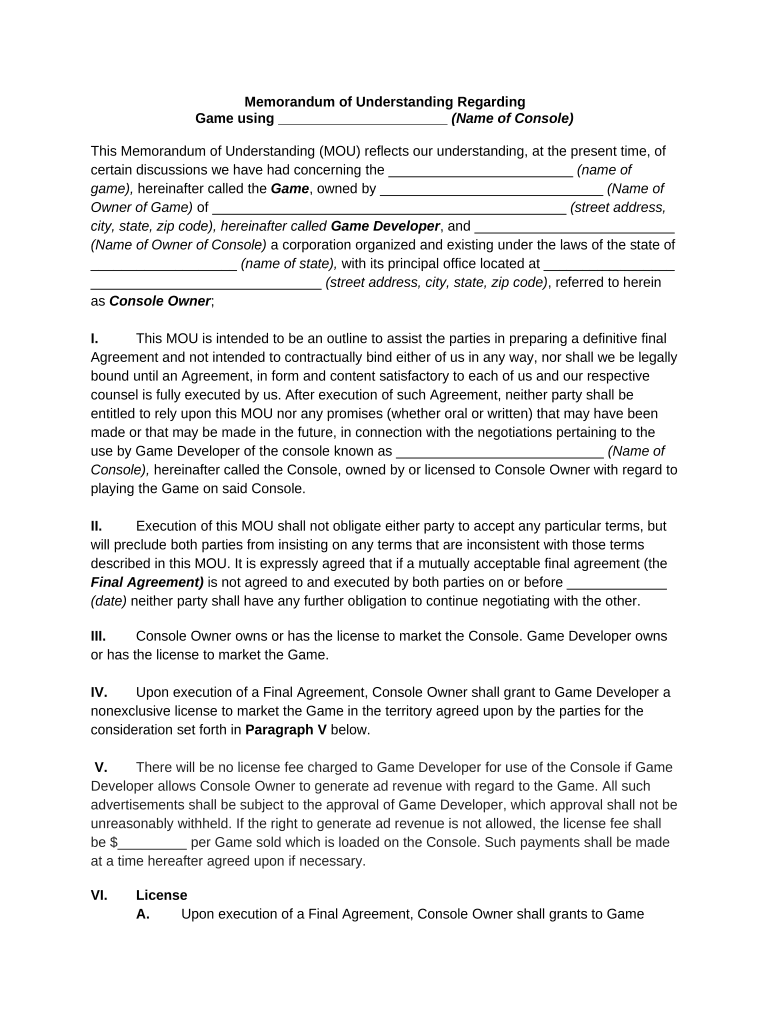
Memorandum of Understanding Regarding Game

This template is fully customizable. Edit the text, fill out the fields, and send it for signature. Give it a try!
Memorandum of Understanding Regarding Game

What a Memorandum of Understanding Regarding Game Is and When It’s Used

A Memorandum of Understanding Regarding Game is a written agreement that records the parties, project scope, and preliminary terms for collaboration on a game, event, or related intellectual property. It typically outlines roles, deliverables, timelines, financial arrangements, confidentiality, and ownership expectations. MOUs can be non-binding statements of intent or include binding provisions for specific obligations; the document helps teams align expectations before drafting a detailed contract. Parties commonly use an MOU to document milestones, licensing intentions, revenue splits, and dispute-resolution mechanics while they negotiate a final development, publishing, or distribution agreement.

Why use a Memorandum of Understanding Regarding Game

An MOU clarifies early expectations, reduces negotiation friction, and preserves negotiating leverage without immediately creating full contract obligations. It organizes essential terms—scope, IP intent, milestones, payment structure, and confidentiality—so parties can proceed to more detailed agreements or pilot development with a clear roadmap.

Why use a Memorandum of Understanding Regarding Game

Typical parties who use this MOU

Common users include small studios, independent developers, publishers, event organizers, and investors collaborating on a game or related service.

  • Independent developers and small studios that need to document roles and revenue splits before a formal publishing agreement.
  • Publishers and distributors using the MOU to confirm milestone-based payments and delivery expectations.
  • Event organizers, sponsors, and platform partners coordinating tournaments, demos, or in‑game promotions.

Who should sign and represent each party

Lead Developer

The lead developer or company officer signs to commit the development team to deliverables and timeline; include title and authority to bind the entity and note any delegated representatives for day-to-day approvals.

Publisher/Partner

An authorized corporate officer or contracting manager signs on behalf of the publisher or partner; the signatory should have authority for financial commitments and rights assignments described in the MOU.

Core elements to include in a professional MOU Regarding Game

A clear structure helps avoid later disputes. Include identifiable parties, concise scope, deliverables and milestones, IP and licensing rules, payment terms, confidentiality, and termination events to create a usable interim agreement that supports later contract drafting.

Parties

Full legal names, entity type, and mailing addresses for each party to avoid ambiguity in enforcement or service of notice.
Purpose

A succinct statement describing the project, platform targets, and the collaboration objective so scope disputes are minimized.

Deliverables

Specific milestones, acceptance criteria, and delivery dates to link payments and reduce scope creep during development.

IP & Licensing

Who owns code, art, and rights; whether licenses are exclusive or non‑exclusive; and conditions for future monetization or sublicensing.

Payment Terms

Amount, timing, invoicing, and any revenue share formulae; state whether amounts are estimates or guaranteed.

Termination & Dispute

Events that permit termination, notice requirements, and the chosen dispute-resolution method (mediation, arbitration, court jurisdiction).

Required information fields to complete the MOU

Parties' names: Full legal names
Addresses: Street, city, state, ZIP
Project summary: One-line description
Consideration: Payment or value
Effective date: MM/DD/YYYY
Signature blocks: Name, title, date

Risks and consequences of an incorrect or incomplete MOU

Breach exposure: Unclear obligations increase litigation risk
IP ambiguity: Unclear ownership can cause costly disputes
Tax implications: Mischaracterized payments may trigger withholding
Delay costs: Missing milestones may cause financial loss
Invalid signatures: Improper execution may reduce enforceability
Confidentiality loss: Weak NDA terms expose trade secrets

Common mistakes to avoid when preparing the MOU

  • Using broad, vague language for scope that later leads to disputed deliverables and unpaid work.
  • Failing to address intellectual property transfer or licensing, which can invalidate commercialization plans.
  • Omitting authorized signatory details so that signing parties lack the legal authority to bind their organizations.
  • Assuming the MOU is a full contract—leaving critical commercial terms and dispute mechanisms to chance.

Practical examples and parallel use cases

These short case arcs show how teams used an MOU‑style agreement and eSigning workflows to speed collaboration and maintain compliance.

Optica Ventures — Development Collaboration

An indie studio formalized roles with an MOU to start work while final contract continued to draft.

  • Their COO emphasized ease of use for internal and external stakeholders.
  • The MOU reduced coordination time, letting the team begin milestone work while final IP assignment language was negotiated and incorporated into a later publishing agreement.

Martin Properties — Remote Execution

A project lead used an MOU to document third‑party deliverables before in‑person meetings were possible.

  • The founder noted online execution and compliance benefits.
  • Using an eSignature flow captured intent and timestamps, shortening turnaround and preserving an audit trail while legal counsel completed formal licensing terms.

Step-by-step: how to complete the Memorandum of Understanding Regarding Game

Follow these sequential steps to prepare, review, and execute an MOU that captures key business terms and preserves enforceability for binding provisions.

  • 01
    Draft parties: Enter full legal names and addresses for each party.
  • 02
    Define scope: Write specific deliverables, platforms, and exclusions.
  • 03
    Set payments: Specify amounts, timing, and invoicing process.
  • 04
    Review and sign: Confirm signatory authority and execute with dates.

How to set up a digital MOU workflow

Configure a simple online workflow that assigns roles, places fields, and captures evidence of signing to satisfy ESIGN and UETA requirements.

Field Configuration
Signature Field Place name, signature, and date fields
Authentication Email link, SMS code, or stronger KBA
Routing Set signing order or parallel signing
Audit Trail Capture IP, timestamp, and action log

Digital signing and technical requirements

Choose a platform that supports standard document formats, secure transport, and a reliable audit trail for signature events.

  • File formats: PDF, DOCX, or HTML accepted
  • Integrations: Salesforce, NetSuite, Google Workspace
  • Security: TLS in transit; AES‑256 at rest

Comparing eSignature options for executing an MOU

Basic pricing and capability differences among common eSignature vendors. signNow is listed first per policy; verify plan specifics with each vendor for feature details.

signNow DocuSign Adobe Sign PandaDoc HelloSign
Starting Price $8/user/mo $15/user/mo $14/user/mo $19/user/mo $15/user/mo
Free Trial 7-day free trial Varies by plan Varies by plan Varies by plan Varies by plan
Bulk Send Yes (Business Premium) Yes Yes Yes No
Audit Trail Yes Yes Yes Yes Yes
HIPAA Compliant Yes Yes Yes No No

How to amend or revise an executed MOU

Use a clear amendment process: identify the provision changed, obtain written consent, and attach the amendment to the original executed MOU.

01

Identify change:

Specify clauses to modify and new language.
02

Draft amendment:

Create a short amendment referencing original effective date.
03

Obtain signatures:

All original parties sign with date and title.
04

Attach:

Append amendment to the original executed MOU.
05

Distribute:

Send final combined record to stakeholders.
06

Archive:

Store with original per retention policy.

Where to send or file the executed MOU and typical routing

Decide early whether signed originals, notarized copies, or electronic signed PDFs will serve as the official record and who will maintain them.

  • Primary Custodian: Designate one party to hold the official executed copy
  • Legal Counsel: Provide counsel with a copy for contract integration
  • Accounting: Send invoicing and payment terms to finance teams
  • External Parties: Share redacted versions with vendors or licensors

Typical timelines and deadline expectations

Establish clear dates for milestone delivery, payment, and formal contract execution to avoid ambiguity and cost overruns.

Effective Date:

Date parties agree and sign; marks when obligations start

Milestone Dates:

Enumerate delivery dates tied to payments

Payment Terms:

Specify net terms and due dates

Contract Deadline:

Target date for final contract execution

Notice Periods:

Time required for termination or cure notices

Frequently asked questions about the Memorandum of Understanding Regarding Game

Answers to common legal, execution, and eSignature questions to help parties avoid execution errors and clarify enforceability concerns.


Need help? Contact support

be ready to get more
Join over 28 million airSlate SignNow users