Establishing secure connection…Loading editor…Preparing document…

Motion to Amend Court Order

This template is fully customizable. Edit the text, fill out the fields, and send it for signature. Give it a try!
Motion to Amend Court Order

What a Motion to Amend Court Order Is and When It’s Used

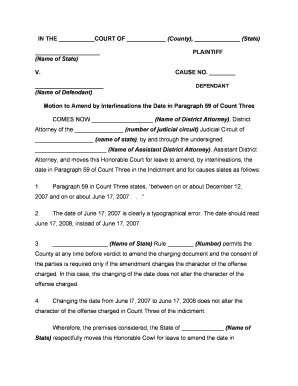
A Motion to Amend Court Order is a formal written request filed with a court asking the judge to change, correct, or clarify an existing order. It identifies the original order, explains the legal and factual grounds for modification, and proposes the specific amendments sought. The motion typically cites procedural rules and attaches supporting affidavits or exhibits. Courts assess such motions under local rules and applicable procedural standards; judges may schedule a hearing, allow written responses, or rule on the papers depending on jurisdiction and the nature of the requested change.

Why Filing a Motion to Amend Court Order Matters

Use a Motion to Amend Court Order to correct errors, address changed circumstances, or clarify ambiguous terms in an existing decree. It preserves parties’ rights, creates a formal record of requested changes, and provides the court an opportunity to reconsider relief under applicable procedural rules.

Why Filing a Motion to Amend Court Order Matters

Who Typically Prepares and Files These Motions

Common filers include litigants, attorneys, and self-represented parties seeking modifications to orders across civil, family, and administrative courts.

  • Attorneys: file motions to adjust remedies, schedules, custody, and enforcement provisions on behalf of clients.
  • Self-represented litigants: request corrections or relief when circumstances change or errors appear in orders.
  • Government agencies or administrative parties: ask clarifying amendments to compliance deadlines or regulatory conditions.

Core Components of an Effective Motion to Amend Court Order

Core elements make a Motion to Amend Court Order clear, persuasive, and procedurally compliant for judicial review and efficient resolution.

Caption

Include the court name, case number, and party names exactly as in the original order; mismatched captions can delay processing or cause clerk rejection requiring amendment or refiling.
Relief Requested

State in numbered paragraphs the exact changes sought, including redline language or explicit struck and added text, so the judge can review proposed revisions efficiently.

Grounds

Explain legal and factual grounds with citations to statutes, rules, or record items; attach affidavits or exhibits that demonstrate changed circumstances or clerical errors wherever possible.

Service

Describe how you served opposing parties and the court, including dates and methods (mail, e-filing, hand delivery); attach a certificate of service when required to confirm compliance.

Proposed Order

Submit a clean proposed order reflecting the requested amendments formatted per local rules; a track-changes version can assist the judge and opposing counsel in reviewing edits more quickly.

Authority

Cite controlling statutes, court rules, or precedent supporting relief, and explain why the motion meets the standard for amendment or relief under the applicable rule or doctrine in that jurisdiction.

Essential Information to Include on the Motion

Case Caption: Exact caption as on original order
Case Number: Full docket number including suffixes
Court Name: Complete court and division name
Movant Name: Full legal name of moving party
Relief Sought: Concise description of requested amendment
Supporting Exhibits: Numbered affidavits, exhibits, and proposed order

Step-by-Step: Prepare, Serve, and File Your Motion Correctly

Follow these steps to prepare, serve, and file a Motion to Amend Court Order correctly and efficiently.

  • 01
    Gather Documents: Collect original order, evidence, and proposed revisions.
  • 02
    Draft Motion: State amendments, legal grounds, and proposed order cleanly.
  • 03
    Serve Parties: Follow local service rules and note dates.
  • 04
    File with Court: E-file or deliver per clerk procedures; include certificate.

How to Configure an Online Workflow for the Motion

Configure an online workflow to populate fields, route for signatures, and include a proposed order attachment for judicial convenience.

Field Configuration
Auto-fill Caption Preload court and case details from template
Signature Routing Sequential routing to counsel and movant
Add Proposed Order Attach editable proposed order file for judge
Certificate Storage Save certificate of service with timestamp

Where and How to Submit a Motion to Amend Court Order

Filing methods vary by court; use the local clerk's e-filing portal or submit paper copies per court rules and certificate of service requirements.

  • E-Filing: Submit via court's electronic filing system with required attachments
  • In-Person: Deliver copies to clerk and obtain file-stamped receipt
  • Mail: Send certified or tracked mail per local rules
  • Email: Allowed only if court or opposing counsel permits

Digital Signing and eSubmission: Platform Capabilities to Confirm

Choose a platform that supports secure signatures, audit trails, and PDF attachments when preparing a Motion to Amend Court Order for e-submission.

  • File Formats: PDF and DOCX supported
  • Integrations: Works with court e-filing and cloud storage
  • Authentication: Email, SMS, or advanced verification

Common Deadlines and Timing Considerations

Motions to amend are time-sensitive; observance of local rules governs service periods, response windows, and potential hearing dates.

Motion Periods:

Follow local rule specifying days to amend after order

Response Deadlines:

Opposition typically due within 14 or 21 days per rule

Hearing Scheduling:

Court may set a hearing within weeks of filing

Emergency Motions:

Seek expedited relief when irreparable harm exists

Service Proof:

File certificate of service with filing or e-filing portal

Common Preparation Mistakes to Avoid

  • Failing to include the correct case caption or docket number leads to clerks misfiling the motion or returning it for correction, delaying resolution.
  • Submitting an unsigned or undated proposed order or failing to attach required exhibits frequently results in rejection or an order denying relief for procedural reasons.
  • Not following local service rules, including the method and timing of service, can waive rights to raise objections and may prejudice the moving party.
  • Overgeneralized or unsupported factual claims without affidavits or documentary support reduce credibility and make it harder for the court to grant amendment.

Penalties and Risks for Incorrect or Improper Motions

Clerical Rejection: Incorrect caption or missing fee
Delay in Relief: Awaiting hearing or opposition
Sanctions Risk: Sanctions for frivolous motions
Contempt Exposure: Failing to comply risks contempt
Hearing Costs: Additional court appearances and fees
Ineffective Amendment: Unsupported edits may be denied

Real-World Examples of Motions to Amend Court Orders

Sample scenarios show typical reasons parties file Motions to Amend Court Order and how courts respond in practice.

Family Law Amendment

A parent files a Motion to Amend Court Order to change custody provisions after a significant relocation makes prior arrangements impracticable.

  • Requests modified parenting time and updated visitation schedule.
  • The motion attaches affidavits, school records, and a proposed revised order; the court considers best interests factors and may schedule a hearing, including testimony and mediator reports if needed to resolve disputes.

Clerical Correction

A party discovers a mathematical error in a judgment amount and files a Motion to Amend Court Order to correct the clerical mistake promptly.

  • Seeks numeric correction without altering substantive rights.
  • The motion includes a recalculation exhibit and cites clerical error authority; courts often grant such requests on the papers absent disputed facts that require oral argument or additional evidentiary submissions from parties.

Practical Tips to Improve Acceptance and Speed of Rulings

Follow these best practices to increase the chance that a Motion to Amend Court Order is accepted and decided on substantive grounds.

Confirm local filing and service rules
Before drafting, consult the local rules and the court's e-filing instructions; confirm page limits, caption format, required certificates, and applicable filing fees to avoid clerks rejecting or returning the motion for noncompliance.
Provide clear, organized exhibits
Number and tab exhibits, attach a concise exhibit index, and highlight the specific record passages supporting the amendment; clear exhibits help the judge resolve factual issues without lengthy evidentiary hearings.
Include a judge-ready proposed order
Include a clean, judge-ready proposed order that tracks deletions and additions precisely; offering both clean and redline versions reduces time the judge spends drafting and may speed entry of the amendment.
Proofread names, dates, and citations
Double-check names, dates, citations, and cross-references; verify exhibits are attached and listed correctly; small clerical errors are a common cause of unnecessary delays and can be avoided with a final review.

Quick Pricing and Compliance Comparison for eSignature Platforms

Compare eSignature vendor pricing and core capabilities commonly relevant when preparing and routing legal motions and proposed orders.

signNow DocuSign Adobe Sign PandaDoc HelloSign
Starting Price $8/user/mo $15/user/mo $14/user/mo $19/user/mo $15/user/mo
Free Trial 7-day free trial Varies by vendor Varies by vendor Varies by vendor Varies by vendor
Bulk Send Yes (Business Premium) Available on higher tiers Available on higher tiers Available on higher tiers Available on higher tiers
Audit Trail Yes Yes Yes Yes Yes
HIPAA Compliant Yes Yes Yes No No
Envelope Cap No envelope cap 100 envelopes/user/year Varies by plan Varies by plan Varies by plan

Frequently Asked Questions About Motions to Amend Court Orders

Answers to common questions about preparing, signing, and filing a Motion to Amend Court Order in U.S. courts.


Need help? Contact support

be ready to get more
Join over 28 million airSlate SignNow users