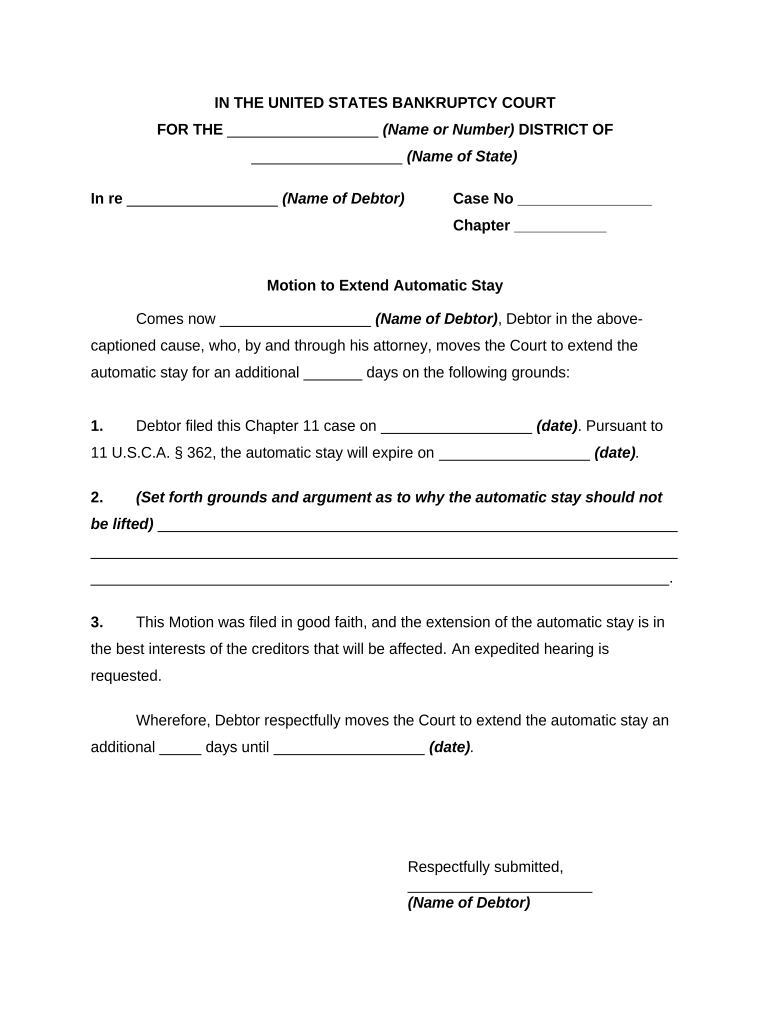
Motion to Extend Automatic Stay
What the Motion to Extend Automatic Stay Is and when it's used
Why filing this motion matters for case protection
Extending the automatic stay preserves estate assets, pauses creditor actions, and provides time to propose a plan or resolve disputes. It prevents immediate foreclosure, collection lawsuits, or repossession while the court evaluates the merits of continued protection.
Who typically prepares and files the motion
The motion is most often prepared by debtors or counsel, but other parties may seek relief depending on the case posture.
- Individual debtors or their attorneys seeking to stop creditor collection or foreclosure for a recent refiling.
- Business debtors or corporate counsel seeking breathing room to reorganize or negotiate with secured creditors.
- Trustees, creditors, or secured parties seeking clarifying orders about the scope or limits of stay protection.
Step-by-step: preparing and filing the motion
-
01Prepare Motion: Draft caption, facts, grounds for extension, and proposed order.
-
02Attach Evidence: Include declaration, prior case dockets, and exhibits proving good faith.
-
03File with Court: E-file the motion under the open case; confirm local fee rules.
-
04Serve Parties: Serve trustee, U.S. Trustee, creditors, and any affected parties per FRBP and local rules.
How to set up a digital workflow for the motion
| Field | Configuration |
|---|---|
| Case Caption Field | Auto-populate from case metadata to avoid typographical errors. |
| Declaration Upload | Require PDF upload and attach exhibit checklist. |
| Signature Block | Enable signer authentication and date stamp. |
| Proof of Service | Generate certificate and attach service list automatically. |
Where the motion goes and what happens next
-
File with Court: E-file the motion in the debtor's active bankruptcy case via the court CM/ECF system.
-
Notice Issued: Court or filer provides notice of hearing and service requirements to affected parties.
-
Responses: Creditors or trustee may file oppositions or stipulations before the hearing.
-
Hearing and Ruling: Judge hears arguments and issues an order granting, limiting, or denying extension.
Technical considerations for e-signing and e-filing
Use a platform that supports court-required formats, signer authentication, and audit trails when collecting signatures and assembling exhibits.
- File Formats: PDF, DOCX, and other court-accepted formats.
- Integrations: Works with Salesforce, NetSuite, Microsoft 365, Google Workspace.
- Security: Supports AES-256 rest and TLS 1.2/1.3 transit encryption.
Key timing rules and notice expectations
30-day statutory period:
Automatic stay may terminate after 30 days under 11 U.S.C. §362(c)(3) without court order.
Hearing scheduling:
Local rules commonly set hearing dates 14–21 days after filing notice; confirm local practice.
Service obligations:
Serve trustee, U.S. Trustee, secured creditors and affected parties per FRBP and local rules.
Opposition timing:
Oppositions or responses are subject to local deadlines; many courts require filings before the hearing.
Emergency relief:
Expedited hearings are available in emergencies; local procedures define request mechanics.
Milestone timeline from filing to court order
Prepare and File
Draft motion, attach declaration, and e-file in the active bankruptcy case.
Serve Interested Parties
Provide notice and proof of service to trustee, U.S. Trustee, and creditors.
Hearing Held
Court hears argument and any opposition; evidentiary record may be limited.
Order Issued
Judge grants, denies, or narrows stay relief; order entered on docket.
Common preparation errors to avoid
- Failing to include clear prior-case details and dismissal history, which undermines the court's ability to assess §362(c) eligibility and good faith.
- Submitting a declaration that lacks specific, contemporaneous facts about the reasons for refiling and why the extension is warranted.
- Insufficient service or incorrect service list resulting in motion being continued or partially ineffective against some creditors.
- Requesting an indefinite or overly broad extension without proposing reasonable limitations, which courts often disfavor.
Consequences of defects or incorrect motions
eSignature platform pricing and feature comparison relevant to filing and service
| signNow | DocuSign | Adobe Sign | PandaDoc | HelloSign | |
|---|---|---|---|---|---|
| Starting Price | $8/user/mo | $15/user/mo | $14/user/mo | $19/user/mo | $15/user/mo |
| Free Trial | 7-day free trial | Varies | Varies | Varies | Varies |
| Bulk Send | Yes | Yes | Yes | Yes | No |
| Audit Trail | Yes | Yes | Yes | Yes | Yes |
| HIPAA Compliant | Yes | Yes | Yes | No | No |
| Envelope Cap | No cap | 100 envelopes/user/year | Varies | Varies | Varies |
Practical examples of motions and outcomes
Chapter 7 Repeat Filer
Debtor filed a second petition within six months after dismissal for missed plan payments, seeking a 60-day extension to arrange surrender logistics.
- Court required a detailed declaration and proposed restrictions on new credit, then granted a limited 30-day extension to evaluate good faith.
- The limited order preserved estate assets while giving creditors prompt recourse if the debtor failed to meet ordered milestones.
Chapter 13 Good-Faith Refiling
Business debtor dismissed for administrative delay filed again and requested continued stay to finalize a plan.
- Creditor objected to indefinite protection without milestones; debtor submitted revised plan and cash-flow projections.
- Judge extended stay for 90 days conditioned on filing a confirmable plan and providing weekly reports.
Practical tips to improve chances of a successful motion
Frequently asked questions about filing and serving the motion
-
Who may file the motion?
The debtor or debtor's counsel typically files the motion seeking extension; in some circumstances, interested parties including trustees or creditors may file related relief asking for clarification or limitation of stay protection.
-
What facts show 'good faith'?
Courts look for specific, contemporaneous facts such as changed financial circumstances, legitimate restructuring efforts, or errors in prior filings; conclusory assertions without evidentiary support are unlikely to persuade the court.
-
Can the motion be e-signed and e-filed?
Electronic signatures and PDF filings are permitted when they meet ESIGN/UETA requirements and local court CM/ECF rules. Verify local court rules on signature formats and whether a notarized wet signature or RON is required for any supporting affidavits.
-
What if service is imperfect?
If a creditor was not served correctly, the court may continue the hearing, limit relief as to that creditor, or require re-service. Provide corrected proof of service promptly to avoid adverse impacts.
-
How soon is a hearing scheduled?
Hearing dates depend on local calendars and notice periods; many courts will set a hearing within two to three weeks, but expedited relief can be sought for emergencies subject to local procedures.
-
What happens if the motion is denied?
If denied, the automatic stay lapses as applicable and creditors may resume actions. The debtor may seek reconsideration or appeal but should plan for immediate exposure to creditor remedies.