Establishing secure connection… Loading editor… Preparing document…
Navigation

Fill and Sign the Norwest Corporation Form
Fill and Sign the Norwest Corporation Form

How it works

Open the document and fill out all its fields.
Apply your legally-binding eSignature.
Save and invite other recipients to sign it.

Rate template

4.6
56 votes
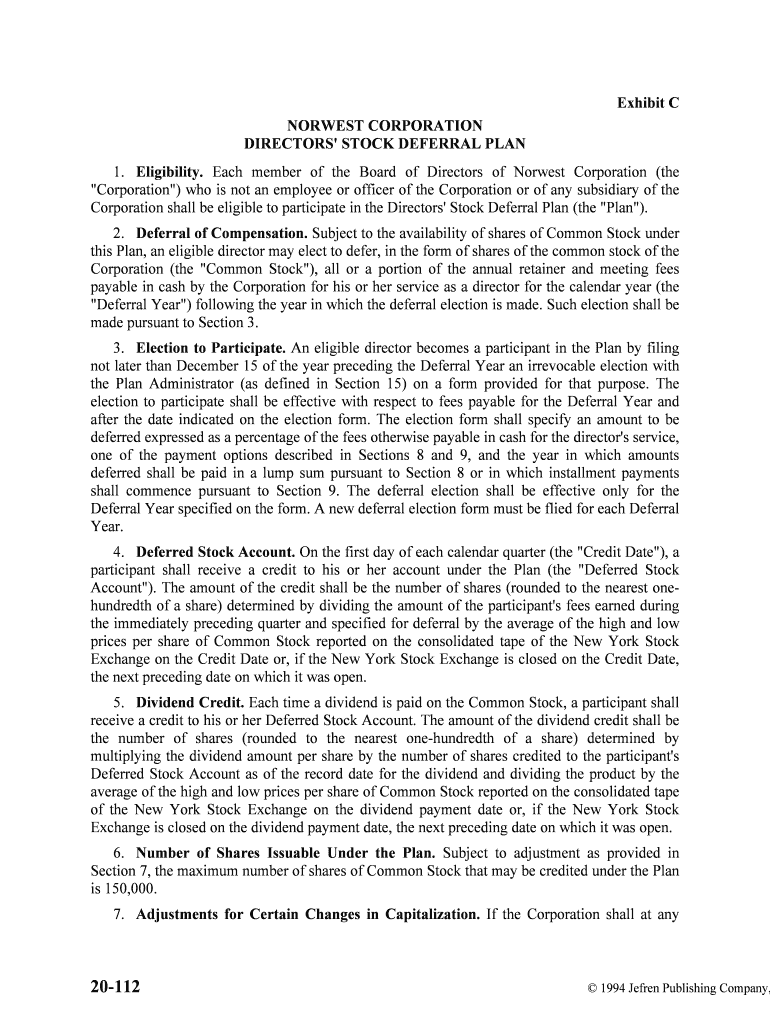
20-112© 1994 Jefren Publishing Company, Inc. Exhibit C NORWEST CORPORATION DIRECTORS' STOCK DEFERRAL PLAN 1. Eligibility. Each member of the Board of Directors of Norwest Corporation (the "Corporation") who is not an employee or officer of the Corporation or of any subsidiary of the Corporation shall be eligible to participate in the Directors' Stock Deferral Plan (the "Plan"). 2.Deferral of Compensation. Subject to the availability of shares of Common Stock under this Plan, an eligible director may elect to defer, in the form of shares of the common stock of the Corporation (the "Common Stock"), all or a portion of the annual retainer and meeting fees payable in cash by the Corporation for his or her service as a director for the calendar year (the "Deferral Year") following the year in which the deferral election is made. Such ele ction shall be made pursuant to Section 3. 3.Election to Participate. An eligible director becomes a participant in the Plan by filing not later than December 15 of the year preceding the Deferral Year an irrevocable election with the Plan Administrator (as defined in Section 15) on a form provided for that purpose. The election to participate shall be effective with respect to fees payable for the Deferral Year and after the date indicated on the election form. The election form shall speci fy an amount to be deferred expressed as a percentage of the fees otherwise payable in cash for the direct or's service, one of the payment options described in Sections 8 and 9, and the year in which amounts deferred shall be paid in a lump sum pursuant to Section 8 or in which installment payments shall commence pursuant to Section 9. The deferral election shall be effective only for the Deferral Year specified on the form. A new deferral election form must be flied for e ach Deferral Year. 4.Deferred Stock Account. On the first day of each calendar quarter (the "Credit Date"), a participant shall receive a credit to his or her account under the Plan (the "De ferred Stock Account"). The amount of the credit shall be the number of shares (rounded to the nearest one- hundredth of a share) determined by dividing the amount of the participant's fees earned during the immediately preceding quarter and specified for deferral by the average of the hi gh and low prices per share of Common Stock reported on the consolidated tape of the New York Stock Exchange on the Credit Date or, if the New York Stock Exchange is closed on the Credit Date, the next preceding date on which it was open. 5.Dividend Credit. Each time a dividend is paid on the Common Stock, a participant shall receive a credit to his or her Deferred Stock Account. The amount of the dividend credit shall be the number of shares (rounded to the nearest one-hundredth of a share) determined by multiplying the dividend amount per share by the number of shares credited to the partici pant's Deferred Stock Account as of the record date for the dividend and dividing the product by the average of the high and low prices per share of Common Stock reported on the consolidated t ape of the New York Stock Exchange on the dividend payment date or, if the New York Stock Exchange is closed on the dividend payment date, the next preceding date on which it was open. 6.Number of Shares Issuable Under the Plan. Subject to adjustment as provided in Section 7, the maximum number of shares of Common Stock that may be credited under the Plan is 150,000. 7.Adjustments for Certain Changes in Capitalization. If the Corporation shall at any time increase or decrease the number of its outstanding shares of Common Stock or change in any way the rights and privileges of such shares by means of the payment of a stock dividend or any other distribution upon such shares payable in Common Stock, or through a stock split, subdivision, consolidation, combination, reclassification, or recapitalization involving the Common Stock, then the numbers, rights, and privileges of the shares issuable under the Plan shall be increased, decreased, or changed in like manner as if such shares had been i ssued and outstanding fully paid, and nonassessable at the time of such occurrence. 8.Payment of Deferred Stock Accounts in a Lump Sum. Unless a participant elects pursuant to Section 3 to receive payment of his or her Deferred Stock Account in instal lments as described in Section 9, credits to a participant's Deferred Stock Account shall be payabl e in full in cash or in whole shares of Common Stock (together with cash in lieu of a fractiona l share), or in a combination thereof, on February 28 (or the next succeeding business day if February 28 is not a business day) of the calendar year following termination of service as a director or such other year as elected by the participant pursuant to Section 3. Amounts paid in cash, including cash in lieu of fractional shares, shall be determined based on the average of the high and low prices per share of Common Stock reported on the consolidated tape of the New York Stock Exchange on the January 31 immediately preceding the date of payment or, if the New York Stock Exchange is closed on that date, the next preceding date on which it was open. If a participant dies before receiving all payments to which he or she is entitled under the Plan, payment shall be made on February 28 (or the next succeeding business day if February 28 is not a business day) of the calendar year following the date of death in accordance with the participant's designation of a beneficiary on a form provided for that purpose and delivered t o and accepted by the Plan Administrator or, in the absence of a valid designation or if the designated beneficiary does not not survive the participant, to such participant's estate . Notwithstanding the foregoing, in the event of a Change of Control (as defined in Section 17), credits to a participant's Deferred Stock Account as of the day immediately prior to the effective date of the transaction constituting the Change of Control shall be paid in full to the participant or the participant's beneficiary or estate, as the case may be, in whole shares of Common Stock (together with cash in lieu of a fractional share) on such date. 9.Payment of Deferred Stock Accounts in Installments. A participant may elect pursuant to Section 3 to have his or her Deferred Stock Account paid in cash in annual installme nts commencing on February 28 of the calendar year following termination of service as a dire ctor or such other year as elected by the participant pursuant to Section 3. A participa nt's Deferred Stock Account shaft be converted from a share balance to a cash balance by multiplying the number of shares credited as of the Valuation Date (as defined below) immediately pri or to the first installment payment, by the average of the high and low prices per share of Common Stock reported on the consolidated tape of the New York Stock Exchange on the Valuation Date or, if the New York Stock Exchange is closed on the Valuation Date, the next preceding date on which it was open. The amount of each installment payment shall be a fraction of the va lue of the participant's Deferred Stock Account on the January 31 (the "Valuation Date") prior to the date of the installment payment, the numerator of which is one and the denominator of which is the total number of installments elected (not to exceed ten) minus the number of inst allments previously paid. Beginning on the day following the date of the first installment payment, the cash balance remaining in the Deferred Stock Account from time to time shall be ar interest at an annual rate equal to the interest equivalent of the secondary market yield for three -month United States Treasury Bills as reported for the preceding month in Federal Reserve stati stical release 20-114© 1994 Jefren Publishing Company, Inc. H.15(519). The interest rate shall be adjusted monthly, and interest shall be credited to the participant's Deferred Stock Account as of the last day of each month. If a participant dies before receiving all payments to which he or she is entitled under the Plan, payment in full shaft be made on February 28 (or the next succeeding business day if February 28 is not a business a business day) of the calendar year following the date of death in accordance with the pa rticipant's designation of a beneficiary on a form provided for that purpose and delivered to and accepted by the Plan Administrator or, in the absence of a valid designation or if the designate d beneficiary does not survive the participant, to such participant's estate. Notwithstanding the foregoing, in the event of a Change of Control (as defined in Section 17) before the first installment payment date, credits to a participant's Deferred Stock Account as of the day immediately prior to the effective date of the transaction constituting the Cha nge of Control shall be paid in full to the participant or the participant's beneficiary or estate, as the case may be, in whole shares of Common Stock (together with cash in lieu of a fractional share) on such date . In the event of a Change of Control after the first installment payment date, the remaining cash balance in such participant's Deferred Stock Account shall be paid in full to the part icipant or the participant's beneficiary or estate, as the case may be, in cash on the day imme diately prior to the effective date of the transaction constituting the Change of Control. 10. Nonassignability. No right to receive payments under the Plan nor any shares of Common Stock credited to a participant's Deferred Stock Account shall be assignable or transferable by a participant other than by will or the laws of descent and distribut ion or pursuant to a qualified domestic relations order as defined by the Internal Revenue Code of 1986, as amended ("Internal Revenue Code"), Title I of the Employee Retirement Income Sec urity Act ("ERISA"), or rules thereunder. The designation of a beneficiary by a participant pursuant to Section 8 or 9 does not constitute a transfer. 11. Funding. If the Corporation chooses to fund the credits to the Deferred Stock Accounts, the Corporation shall make contributions in cash or in shares of Common Stock to the trust described in Section 12. Any cash contributions shall be used by the trustee named in Sec tion 12 to purchase shares of Common Stock within 10 business days after such deposit. Purchase of such shares may be made by the trustee in brokerage transactions or by private purchase, including purchase from the Corporation. All shares held by the trust shall be held in the nam e of the trustee. 12.Trust Fund, Shares of Common Stock credited to Deferred Stock Accounts under the Plan may, in the sole discretion of the Corporation, be held and administered in trust (referred to as the "Trust Fund") in accordance with the terms of the Plan. The Trust Fund shall be he ld under a trust agreement between the Corporation and Marquette Bank Minneapolis, N.A. as Trustee, or any duly appointed successor trustee. All Common Stock in the Trust Fund shall be held on a commingled basis and shall be subject to the claims of general credi tors of the Corporation. 13.Voting Common Stock. If any credits made pursuant to this Plan are, in the discretion of the Corporation, funded in a trust as described in Section 12, the Common Stock held in trust shall be voted by the Trustee in its discretion; provided, however, that the participant may instruct the Trustee with respect to the voting of a number of shares determined by multi plying a fraction, the numerator of which is the number of shares credited to the participant's Deferred Stock Account and the denominator of which is the total number of shares credited to al l participants' Deferred Stock Accounts, by the total number of shares held by the Trustee for the Plan. For purposes of this section, all numbers of shares shall be determined as of the applicable record date. 14.Unsecured Obligation. Benefits payable under this Plan shall be an unsecured obligation of the Corporation. 15.Administration. The Plan shall be administered by the Corporation's senior human resources officer (the "Plan Administrator"), who shall have the authority to interpret the Plan and to adopt procedures for implementing the Plan. 16.Amendment and Termination. The Board Affairs Committee of the Corporation's Board of Directors may at any time terminate, suspend, or amend this Plan; provided, howe ver, that the provisions of Sections 1, 2, 3, 4, 5, and 6 may not be amended more than once in every six months other than to comport with changes in the Internal Revenue Code, ERISA, or the rules thereunder. No such action shall deprive any participant of any benefits to which he or she would have been entitled under the Plan if termination of the participant's service as a director had occurred on the day prior to the date such action was taken, unless agreed to by the participant. 17.Change of Control. "Change of Control" means any one of the following events: (a) the acquisition by an individual, entity, or group (within the meaning of Section 13(d)(3) or 14-(d)(2) of the Securities Exchange Act of 1934, as amended (the "Exchange Act")) (a "Person") of beneficial ownership (within the meaning of Rule 13d-3 promulgated under the Exchange Act) of 25% or more of the combined voting power of the then outstanding voting securities of the Corporation entitled to vote generally in the el ection of directors (the "Outstanding Corporation Voting Securities"); provided, however, that for purposes of this subsection (a), the following acquisitions shall not constitute a Change of Control: (i) any acquisition directly from the Corporation, (ii) any acquisition by the Corporation, (iii) any acquisition by any employee benefit plan (or related trust) sponsored or maintained by the Corporation or (iv) any acquisition by any corporation pursuant to a transaction which complies with clauses (i), (ii), and (iii) of subsection (c) below; or (b) individuals who constitute the Board of Directors of the Corporation as of April 27, 1992, (the "Incumbent Board") cease for any reason to constitute at least two-thirds thereof; provided that any person becoming a director subsequent to such date whose election, or nomination for election, by the stockholders of the Corporation was approved by a vote of at least three-fourths of the directors comprising the Incumbent Board shall, for the purposes of this clause, be considered as though such person were a member of the Incumbent Board, but excluding, for this purpose, any such individual whose initial assumption of office occurs as a result of an actual or threatened election contest with respect to the election or removal of directors or other actual or threatened solicitati on of proxies or consents by or on behalf of a Person other than the Incumbent Board; or (c) approval by the stockholders of the Corporation of a reorganization, merger, or consolidation, or sale or other disposition of all or substantially all of the assets of the Corporation (a "Business Combination"), in each case, unless following such Business Combination, (i) all or substantially all of the individuals and entities who were the beneficial owners of the Outstanding Corporation Voting Securities immediately prior to such Business Combination beneficially own, directly or indirectly, more than 60% of, respectively, the 20-116© 1994 Jefren Publishing Company, Inc. then outstanding shares of common stock and the combined voting power of the then outstanding voting securities entitled to vote generally in the election of directors, as the case may be, of the corporation resulting from such Business Combination (including, without limitation, a corporation which as a result of such transaction owns the Corporation or ail or substantially all of the Corporation's assets either directly or through one or more subsidiaries) in substantially the same proportions as their ownership, immediately prior to such Business Combination of the Outstanding Corporation Voting Securities. (ii) no Person (excluding any employee benefit plan (or related trust) of the Corporation or such corporation resulting from such Business Combination) beneficially owns, directly or indirectly, 25% or more of, respectively, the then outstanding shares of common stock of the corporation resulting from such Business Combination or the combined voting power of the then outstanding voting securities of such corporation except to the extent that such ownership existed prior to the Business Combination, and (iii) at least a majorit y of the members of the board of directors of the corporation resulting from such Business Combination were members of the Incumbent Board at the time of the execution of t he initial agreement, or of the board action, providing for such Business Combination. 18. Effective Date. The effective date of the Plan shall be the date of approval of the Plan by the holders of the Common Stock. Norwest Corporation 3/20/92

Useful suggestions for finalizing your ‘Norwest Corporation’ online

Are you fed up with the inconvenience of handling paperwork? Look no further than airSlate SignNow, the premier digital signature solution for individuals and organizations. Bid farewell to the tedious process of printing and scanning documents. With airSlate SignNow, you can effortlessly finalize and authorize paperwork online. Utilize the extensive features integrated into this user-friendly and budget-friendly platform and transform your method of document management. Whether you need to authorize forms or gather eSignatures, airSlate SignNow takes care of everything efficiently, with just a few clicks.

Adhere to this comprehensive guide:

  1. Sign in to your account or initiate a complimentary trial with our service.
  2. Select +Create to upload a file from your device, cloud, or our form collection.
  3. Open your ‘Norwest Corporation’ in the editor.
  4. Click Me (Fill Out Now) to complete the form on your end.
  5. Add and designate fillable fields for others (if needed).
  6. Proceed with the Send Invite settings to request eSignatures from others.
  7. Save, print your copy, or convert it into a reusable template.

No need to worry if you need to collaborate with your colleagues on your Norwest Corporation or send it for notarization—our platform has everything you need to achieve such tasks. Create an account with airSlate SignNow today and enhance your document management to a new level!

Here is a list of the most common customer questions. If you can’t find an answer to your question, please don’t hesitate to reach out to us.

Need help? Contact Support

The best way to complete and sign your norwest corporation form

Save time on document management with airSlate SignNow and get your norwest corporation form eSigned quickly from anywhere with our fully compliant eSignature tool.

How to Sign a PDF Online How to Sign a PDF Online

How to fill out and sign paperwork online

Previously, dealing with paperwork took pretty much time and effort. But with airSlate SignNow, document management is quick and easy. Our powerful and user-friendly eSignature solution lets you easily complete and electronically sign your norwest corporation form online from any internet-connected device.

Follow the step-by-step guide to eSign your norwest corporation form template online:

  • 1.Sign up for a free trial with airSlate SignNow or log in to your account with password credentials or SSO authorization option.
  • 2.Click Upload or Create and import a file for eSigning from your device, the cloud, or our form catalogue.
  • 3.Click on the file name to open it in the editor and utilize the left-side menu to complete all the blank fields accordingly.
  • 4.Put the My Signature field where you need to eSign your sample. Provide your name, draw, or upload a picture of your regular signature.
  • 5.Click Save and Close to accomplish modifying your completed document.

As soon as your norwest corporation form template is ready, download it to your device, save it to the cloud, or invite other people to eSign it. With airSlate SignNow, the eSigning process only requires a couple of clicks. Use our powerful eSignature solution wherever you are to manage your paperwork effectively!

How to Sign a PDF Using Google Chrome How to Sign a PDF Using Google Chrome

How to fill out and sign documents in Google Chrome

Completing and signing paperwork is simple with the airSlate SignNow extension for Google Chrome. Installing it to your browser is a fast and productive way to deal with your forms online. Sign your norwest corporation form sample with a legally-binding eSignature in just a few clicks without switching between tools and tabs.

Follow the step-by-step guide to eSign your norwest corporation form in Google Chrome:

  • 1.Go to the Chrome Web Store, locate the airSlate SignNow extension for Chrome, and add it to your browser.
  • 2.Right-click on the link to a form you need to eSign and select Open in airSlate SignNow.
  • 3.Log in to your account with your password or Google/Facebook sign-in buttons. If you don’t have one, you can start a free trial.
  • 4.Use the Edit & Sign toolbar on the left to complete your sample, then drag and drop the My Signature option.
  • 5.Upload a photo of your handwritten signature, draw it, or simply type in your full name to eSign.
  • 6.Verify all information is correct and click Save and Close to finish editing your form.

Now, you can save your norwest corporation form template to your device or cloud storage, send the copy to other individuals, or invite them to eSign your form via an email request or a secure Signing Link. The airSlate SignNow extension for Google Chrome enhances your document processes with minimum time and effort. Try airSlate SignNow today!

How to Sign a PDF in Gmail How to Sign a PDF in Gmail How to Sign a PDF in Gmail

How to fill out and sign forms in Gmail

Every time you receive an email containing the norwest corporation form for approval, there’s no need to print and scan a file or save and re-upload it to a different program. There’s a much better solution if you use Gmail. Try the airSlate SignNow add-on to quickly eSign any documents right from your inbox.

Follow the step-by-step guide to eSign your norwest corporation form in Gmail:

  • 1.Navigate to the Google Workplace Marketplace and locate a airSlate SignNow add-on for Gmail.
  • 2.Set up the program with a corresponding button and grant the tool access to your Google account.
  • 3.Open an email containing an attached file that needs signing and utilize the S symbol on the right sidebar to launch the add-on.
  • 4.Log in to your airSlate SignNow account. Opt for Send to Sign to forward the file to other parties for approval or click Upload to open it in the editor.
  • 5.Place the My Signature option where you need to eSign: type, draw, or upload your signature.

This eSigning process saves time and only takes a couple of clicks. Utilize the airSlate SignNow add-on for Gmail to update your norwest corporation form with fillable fields, sign documents legally, and invite other parties to eSign them al without leaving your mailbox. Enhance your signature workflows now!

How to Sign a PDF on a Mobile Device How to Sign a PDF on a Mobile Device How to Sign a PDF on a Mobile Device

How to complete and sign paperwork in a mobile browser

Need to quickly complete and sign your norwest corporation form on a mobile phone while working on the go? airSlate SignNow can help without needing to set up additional software applications. Open our airSlate SignNow tool from any browser on your mobile device and add legally-binding eSignatures on the go, 24/7.

Follow the step-by-step guidelines to eSign your norwest corporation form in a browser:

  • 1.Open any browser on your device and go to the www.signnow.com
  • 2.Register for an account with a free trial or log in with your password credentials or SSO option.
  • 3.Click Upload or Create and add a file that needs to be completed from a cloud, your device, or our form library with ready-to go templates.
  • 4.Open the form and fill out the blank fields with tools from Edit & Sign menu on the left.
  • 5.Place the My Signature field to the form, then enter your name, draw, or upload your signature.

In a few simple clicks, your norwest corporation form is completed from wherever you are. As soon as you're finished editing, you can save the document on your device, generate a reusable template for it, email it to other individuals, or invite them electronically sign it. Make your documents on the go speedy and productive with airSlate SignNow!


How to Sign a PDF on iPhone How to Sign a PDF on iPhone

How to fill out and sign paperwork on iOS

In today’s business world, tasks must be done rapidly even when you’re away from your computer. With the airSlate SignNow application, you can organize your paperwork and sign your norwest corporation form with a legally-binding eSignature right on your iPhone or iPad. Set it up on your device to conclude agreements and manage forms from anyplace 24/7.

Follow the step-by-step guidelines to eSign your norwest corporation form on iOS devices:

  • 1.Go to the App Store, find the airSlate SignNow app by airSlate, and set it up on your device.
  • 2.Launch the application, tap Create to import a template, and select Myself.
  • 3.Select Signature at the bottom toolbar and simply draw your signature with a finger or stylus to eSign the form.
  • 4.Tap Done -> Save right after signing the sample.
  • 5.Tap Save or utilize the Make Template option to re-use this document in the future.

This process is so easy your norwest corporation form is completed and signed within a couple of taps. The airSlate SignNow app works in the cloud so all the forms on your mobile device are kept in your account and are available whenever you need them. Use airSlate SignNow for iOS to boost your document management and eSignature workflows!


How to Sign a PDF on Android How to Sign a PDF on Android

How to fill out and sign paperwork on Android

With airSlate SignNow, it’s simple to sign your norwest corporation form on the go. Set up its mobile app for Android OS on your device and start enhancing eSignature workflows right on your smartphone or tablet.

Follow the step-by-step guide to eSign your norwest corporation form on Android:

  • 1.Open Google Play, find the airSlate SignNow application from airSlate, and install it on your device.
  • 2.Log in to your account or register it with a free trial, then upload a file with a ➕ button on the bottom of you screen.
  • 3.Tap on the imported file and select Open in Editor from the dropdown menu.
  • 4.Tap on Tools tab -> Signature, then draw or type your name to electronically sign the template. Complete empty fields with other tools on the bottom if required.
  • 5.Use the ✔ button, then tap on the Save option to finish editing.

With an intuitive interface and full compliance with major eSignature standards, the airSlate SignNow app is the perfect tool for signing your norwest corporation form. It even operates without internet and updates all form adjustments once your internet connection is restored and the tool is synced. Complete and eSign documents, send them for eSigning, and make multi-usable templates anytime and from anywhere with airSlate SignNow.

Sign up and try Norwest corporation form
  • Close deals faster
  • Improve productivity
  • Delight customers
  • Increase revenue
  • Save time & money
  • Reduce payment cycles







