Establishing secure connection…Loading editor…Preparing document…

Notice of Claim Form

This template is fully customizable. Edit the text, fill out the fields, and send it for signature. Give it a try!
Notice of Claim Form

What the Notice of Claim Form Is and when it’s used

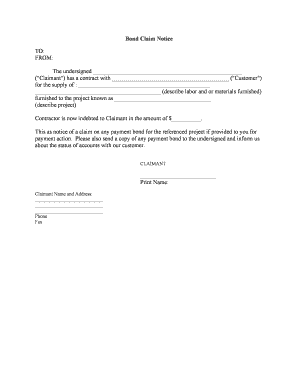
A Notice of Claim Form is a formal written notice submitted to a public entity, contractor, or insurer to report a grievance, alleged loss, or intent to pursue a claim. It typically describes the incident, identifies the claimant, states the basis for the claim, and requests a remedy or damages. Many municipalities, state agencies, and private contracts require a notice of claim before a lawsuit may be filed or before administrative remedies are available. Properly completed notices preserve legal rights and trigger agency responses under applicable statutes and contract terms.

Why a clear Notice of Claim Form matters

Filing a timely, accurate notice protects legal rights, starts official review processes, and often is a prerequisite to litigation or administrative relief under state statutes and contract provisions.

Why a clear Notice of Claim Form matters

Who files a Notice of Claim and who reviews it

The Notice of Claim Form is used by individuals, businesses, contractors, and their attorneys to notify a public body, insurer, or contracting party of a claimed loss or injury.

  • Individual claimants who suffered personal injury, property damage, or financial loss and must preserve the right to seek compensation later.
  • Business or organizational claimants seeking contract remedies, payment disputes, or property damage recovery.
  • Attorneys or authorized representatives filing on behalf of a client per local filing rules and power of attorney authorization.

Recipients typically include city or county claims units, agency legal offices, insurers, and contract administrators; follow the issuer’s submission rules exactly.

Step-by-step: Completing and submitting the form

Follow these steps in order to complete the Notice of Claim and reduce processing delays.

  • 01
    Gather evidence: Collect photos, invoices, and witness details before drafting.
  • 02
    Complete form fields: Fill claimant, incident, and relief sections fully and accurately.
  • 03
    Attach supporting documents: Scan and attach receipts, police reports, or estimates.
  • 04
    Submit by required method: File via mail, certified mail, hand-delivery, or eSubmission per instructions.

Typical online workflow settings for a Notice of Claim

If you digitize the form, configure these settings to match recipient requirements and audit expectations.

Field Configuration
Required fields Make claimant, date, location required
File attachments Allow PDF, JPG; limit 25 MB
Authentication Email link or SMS code
Audit trail Enable IP, timestamp, and signer details

How digital submission typically flows

This sequence shows a common eSubmission lifecycle for notices sent to public entities or insurers.

  • Prepare: Complete form and attach evidence
  • Authenticate: Confirm identity by email or code
  • Submit: Send via portal, secure email, or certified mail
  • Acknowledge: Recipient issues receipt or tracking number

Core elements every professional Notice of Claim should include

Include these components to create a clear, defensible notice that complies with common statute and contract expectations.

Identification

Full claimant name, business name if applicable, and accurate contact details for service and correspondence.
Incident specifics

Exact date, time, and precise location of the event causing the claim to help recipient investigate quickly.

Factual narrative

A concise, objective account of events, avoiding speculation and legal argument in the notice itself.

Damages estimate

A reasonable stated amount or description of the relief sought, with supporting calculations or bids attached.

Supporting evidence

Attach photos, invoices, repair estimates, police reports, or witness contact information for corroboration.

Signature block

Signer name, title, date, and signature; if signed by an agent, include proof of authorization or power of attorney.

Security and compliance basics for handling notice data

Encryption in transit: TLS 1.2/1.3
Encryption at rest: AES-256
Audit trail: IP, timestamp, events
HIPAA option: BAA available
Identity checks: Email, SMS, KBA
Retention controls: Configurable retention

Common pitfalls when preparing a Notice of Claim

  • Submitting incomplete claimant information causes processing delays and may be treated as noncompliant by some agencies.
  • Missing or vague incident dates and locations can lead to investigatory rejection or requests for clarification.
  • Failing to attach key supporting documents like repair estimates or police reports weakens the claim and slows resolution.
  • Using informal language or unverified damage amounts increases the chance the notice will be challenged or ignored.

Potential legal risks of an incorrect or late notice

Statute bars claim: Loss of right to sue
Administrative denial: Claim rejected
Financial exposure: Increased costs
Evidence gap: Weakened position
Late penalties: Fines or sanctions
Incorrect parties: Misrouted or invalid notice

Typical deadlines and timing considerations

Deadlines for filing a Notice of Claim vary by jurisdiction and contract; some public-entity claims must be filed within a short window after the incident.

Short filing windows:

Many municipalities require 30–180 days to file

Contract notice clauses:

Often require notice 'within X days' of discovery

Statute of limitations:

Filing a notice may be a prerequisite to suit

Acknowledgment timeframe:

Agencies often issue receipts within 14–60 days

Document preservation:

Retain originals until matter resolves

Key milestones from incident to resolution

Sequence the main stages so you can track time-sensitive actions and maintain compliance with filing windows.

01

Incident Occurs

Document event details and collect evidence promptly

02

Notice Prepared

Complete form and gather supporting documents

03

Notice Submitted

File by required method; obtain proof of delivery

04

Agency Response

Investigative review or acknowledgment is issued

Typical vendor pricing and feature contrasts for eSignature support

Compare starting price and common feature availability across vendors; signNow is listed first per platform comparison conventions.

signNow DocuSign Adobe Sign PandaDoc HelloSign
Starting Price $8/user/mo $15/user/mo $14/user/mo $19/user/mo $15/user/mo
Free Trial 7-day free trial Varies by plan Varies by plan Varies by plan Varies by plan
Bulk Send Yes (Business Premium) Yes (plan dependent) Yes (plan dependent) Yes (plan dependent) Limited
Audit Trail Yes Yes Yes Yes Yes
HIPAA Compliant Yes (BAA) Yes (BAA) Yes (BAA) No No
Envelope Cap No cap 100 envelopes/user/year Varies by plan Varies by plan Varies by plan

Technical considerations for electronic submission and signing

Match your submission method to recipient requirements and your security needs before sending.

  • Supported formats: PDF, DOCX, image files
  • Authentication options: Email, SMS, KBA
  • Integrations: CRMs, cloud storage

Frequently asked questions about Notice of Claim Forms

Answers to common questions about timing, signatures, attachments, and digital submission for Notice of Claim forms.


Need help? Contact support

be ready to get more
Join over 28 million airSlate SignNow users