Establishing secure connection…Loading editor…Preparing document…

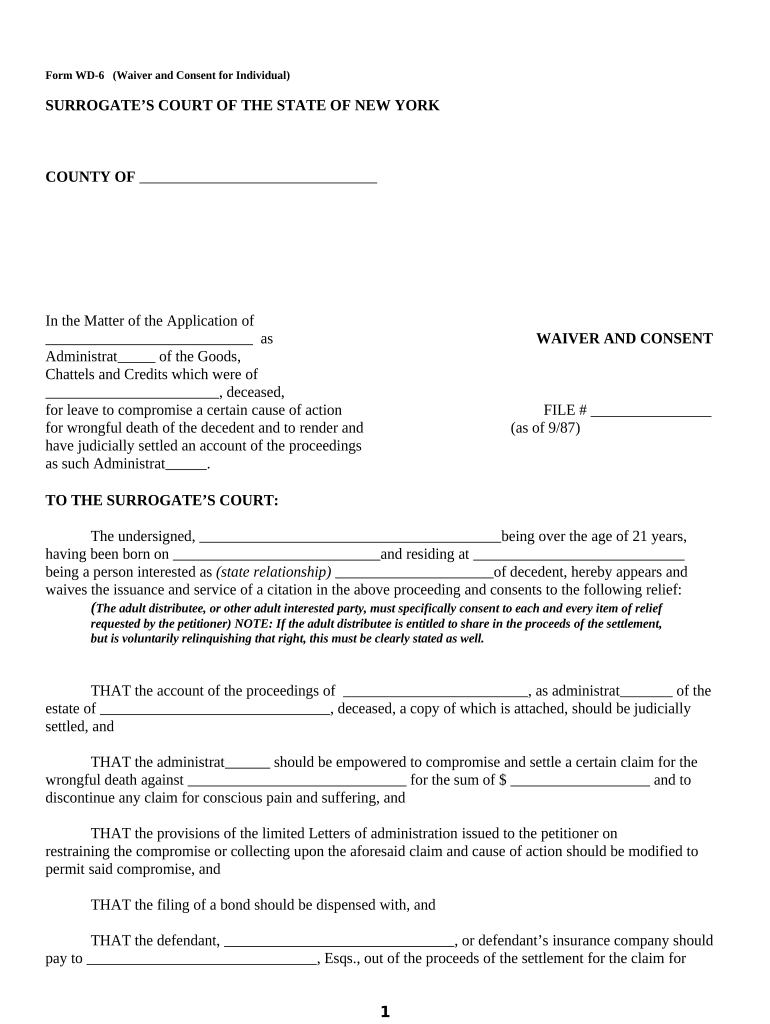
New York Waiver Consent

This template is fully customizable. Edit the text, fill out the fields, and send it for signature. Give it a try!
New York Waiver Consent

What the New York Waiver Consent Is and when it applies

A New York Waiver Consent is a document used to record a party's voluntary relinquishment of a statutory right, claim, or procedural notice under New York law, or to document affirmative consent for a specified action. Common examples include waivers of subrogation, liability releases at events, or consent to limited data uses. The form typically identifies parties, the scope of the waiver or consent, effective dates, any conditions, and signature blocks. In New York the form should be drafted with awareness of state-specific witness, notarization, and consumer disclosure rules.

Why a properly drafted waiver consent matters

A clear New York Waiver Consent reduces ambiguity about rights and obligations, creates an auditable record of informed consent, and helps manage downstream liability exposure. Properly executed waivers are easier to enforce and are valuable when combined with robust signature evidence and retention practices.

Why a properly drafted waiver consent matters

Who commonly prepares and signs these waivers

Each scenario has different form details and authentication needs; confirm state witness or notarization rules and recordkeeping requirements before finalizing the document.

  • Real estate brokers and landlords handling move-in releases or tenant consent forms in New York.
  • Healthcare providers collecting patient consent for specific procedures or data disclosures.
  • Construction contractors and subcontractors documenting conditional lien waivers tied to payments.

Primary signers and approvers

Alex Morgan, GC

General counsel or in-house attorney who reviews waiver language, confirms enforceability under New York law, and ensures the document allocates risk appropriately before execution.

Jamie Rivera, PM

Project manager or operations lead who executes routine consents on behalf of an organization, verifies signer identity, and confirms that any required exhibits or payment conditions are attached.

Stepwise process to prepare and finalize the waiver

Follow these steps to draft, verify, sign, and store the New York Waiver Consent without missing critical elements.

  • 01
    Draft: Define parties, scope, consideration, and effective date clearly.
  • 02
    Review: Have counsel or compliance check enforceability and statutory exceptions.
  • 03
    Authenticate: Choose an appropriate signer authentication method.
  • 04
    Archive: Store the executed document with retention metadata and audit trail.

Typical e-signing workflow for online completion

This outlines a standard digital workflow from upload to completed record with audit evidence.

  • Upload Document: Upload the waiver template in PDF or DOCX format.
  • Place Fields: Add signature, date, and optional initial fields for parties.
  • Send to Signers: Send by email link or bulk send depending on volume.
  • Capture Audit Trail: Record IP, timestamp, and authentication details on completion.

Key configuration settings for online waiver workflows

Configure these settings to match your compliance and authentication needs when using an eSignature platform.

Field Configuration
Signer Authentication Email link, SMS code, or advanced ID verification
Signature Order Sequential or parallel signer routing
Audit Trail Enable detailed logs and certificate of completion
Retention Tagging Apply metadata for storage and legal holds

Technical considerations for digital signing platforms

Ensure the vendor supports the authentication, audit, and retention policies you need; test the end-to-end flow before production use.

  • Formats: PDF and DOCX support for editable templates.
  • Security: TLS in transit; AES-256 at rest.
  • Integrations: CRM, document storage, and HR system connectors.

Essential elements to include in a professional waiver consent

A complete New York Waiver Consent should include concise, unambiguous clauses that make obligations and rights clear for all parties involved.

Parties

Identify each party with legal name, entity type, and contact information to avoid ambiguity about who is bound by the waiver.
Definitions

Define key terms (e.g., 'Claim', 'Event', 'Effective Date') to limit interpretive disputes later.

Scope and Limitations

Describe precisely which claims or rights are waived, include temporal and territorial limits, and carve-outs for gross negligence if intended.

Consideration

State the value or reason for the waiver; this supports enforceability as a bargained-for exchange.

Signatures and Dates

Include signature blocks for all parties, printed names, titles for entities, and the date of signature to fix the effective moment.

Notary/Witness Block

If notarization or witness testimony is required by New York practice or contract, include a dedicated block for acknowledgement.

Core security and compliance data to capture

Encryption: TLS 1.2/1.3; AES-256 at rest
Audit Trail: IP address, timestamp, signer email
Authentication: Email, SMS, KBA, or advanced ID
HIPAA BAA: Breach & PHI handling
Retention Tag: Preservation metadata
Access Controls: Role-based permissions

Consequences of incomplete or incorrect waivers

Enforceability Risk: Waiver may be invalid
Statutory Exception: Certain rights cannot be waived
Evidence Gap: Missing audit trail weakens proof
Regulatory Penalty: Sector fines possible
Contract Dispute: Litigation costs increase
Reputational Harm: Negative public exposure

Common preparation and execution mistakes to avoid

  • Using vague waiver language that fails to specify which claims are waived, leading to interpretive disputes in court and undermining reliance.
  • Mismatching signer names or failing to verify identity, which can void the document or require additional witness testimony at enforcement.
  • Skipping required consumer disclosures for regulated contexts, such as financial or healthcare consents, which can nullify electronic consent under federal rules.
  • Failing to attach required exhibits or consideration statements, leaving the waiver unsupported and subject to rescission or challenge.

Selected eSignature vendor pricing and feature comparison

This comparison focuses on starting price and a few core capabilities relevant to executing New York waiver consents online.

signNow DocuSign Adobe Sign PandaDoc HelloSign
Starting Price $8/user/mo $15/user/mo $14/user/mo $19/user/mo $15/user/mo
Free Trial Yes, 7-day trial Varies Varies Varies Varies
Bulk Send Yes Yes Yes Yes No
Audit Trail Yes Yes Yes Yes Yes
HIPAA Compliant Yes Yes Yes No No
Envelope Cap No cap 100 envelopes/user/year Varies Varies Varies

Timing and processing expectations for waiver workflows

Use these timing guidelines to set SLAs and internal deadlines for executing and storing waiver consents.

Execution Window:

Execute before the event or action the waiver covers; otherwise the waiver may not apply

Delivery:

Provide the signed copy to all parties immediately after execution

Retention Start:

Retention begins on the execution date, which affects recordkeeping obligations

Notarization Timing:

Notarize at or after signing as required by state law or contract

Review Deadlines:

Allow counsel sufficient time — typically 48–72 hours for review on non-emergency matters

Practical examples of New York waiver consent usage

The following scenarios illustrate how a waiver consent may be used and documented in practice.

Event Release

A venue requires attendees to sign a liability waiver before a high-risk activity

  • Waiver limits claims from covered activities during the event
  • The signed waiver is stored with event records and timestamps to demonstrate informed consent.

Construction Payment Waiver

A subcontractor signs a conditional waiver upon receipt of payment

  • The waiver references the specific invoice and payment date
  • The document is retained with payment records and used to clear lien queries.

Practical tips for accurate and defensible waivers

Apply these practices to reduce disputes and strengthen the evidentiary weight of executed waivers.

Use Plain, Precise Language
Draft clear, narrowly tailored waiver clauses that state what is being waived, why, and for what period to avoid ambiguity in enforcement.
Confirm Signer Identity
Use appropriate authentication (email + SMS or advanced ID verification) and record identification method to support attribution and admissibility.
Record the Audit Trail
Preserve timestamps, IP addresses, and any consent disclosures to create a complete record for later review or dispute.
Attach Consideration Evidence
Include proof of payment or service as an exhibit when consideration is central to enforceability and future challenges.

Frequently asked questions about New York Waiver Consent

Answers to common execution, enforceability, and digital signing questions for waiver consents in New York.


Need help? Contact support

be ready to get more
Join over 28 million airSlate SignNow users