Establishing secure connection…Loading editor…Preparing document…

Ohio Workers Form

This template is fully customizable. Edit the text, fill out the fields, and send it for signature. Give it a try!
Ohio Workers Form

What the Ohio Workers Form Is and when it applies

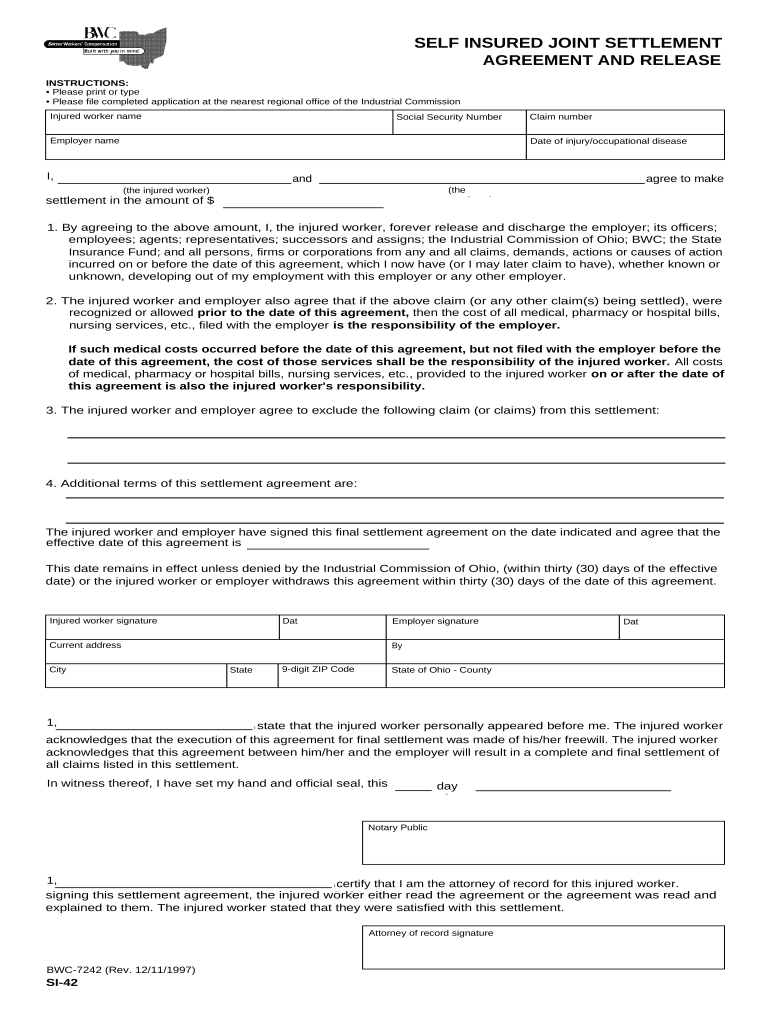
The term Ohio Workers Form commonly refers to employer–employee documents used in Ohio to record hiring, payroll, workplace incidents, workers' compensation claims, and benefit enrollments. Individual forms may include onboarding records, injury or incident reports for claims, wage-payroll returns, and employer notices. Legal requirements — which fields are mandatory, whether notarization or witnesses are required, and where to file — depend on the exact form and applicable federal and Ohio law. This guide covers typical fields, filing and e-signature options, retention rules, and common preparation pitfalls.

Why accurate completion of an Ohio Workers Form matters

Accurate, compliant forms protect employee rights, ensure timely payroll and benefit processing, and reduce exposure to penalties or claim disputes. Properly completed forms also establish a clear administrative record for audits, workers' compensation claims, and tax reporting under federal and state rules.

Why accurate completion of an Ohio Workers Form matters

Who prepares and relies on Ohio Workers Forms

Employers, HR teams, payroll administrators, and injured employees commonly complete these forms; claims adjusters and regulators use them for adjudication.

  • Employers and HR departments: Prepare onboarding, payroll, incident reports, and maintain records for compliance and audits.
  • Employees and claimants: Report injuries, provide attendance and wage information, and complete consent or benefits enrollment sections.
  • Third-party administrators and counsel: Review submissions, manage workers' compensation claims, and represent parties during appeals.

Keep completed forms accessible to authorized personnel and store per retention rules to support audits, tax reporting, and claims.

Step-by-step: completing and submitting an Ohio Workers Form

Follow this sequence to collect accurate information, validate it, obtain signatures, and route the form to the correct recipient or agency.

  • 01
    Collect data: Gather IDs, dates, and wage details before you start.
  • 02
    Validate entries: Confirm names, SSN/EIN, and pay figures for accuracy.
  • 03
    Sign and date: Obtain required signatures and record dates.
  • 04
    Route and retain: Send to payroll/claims and store per retention rules.

Essential sections to include on a professional Ohio Workers Form

A well-structured form reduces processing time and supports legal compliance. Include clear sections for identity, incident details, payroll data, approvals, and attachments.

Employee Details

Full legal name, date of birth, contact information, SSN or partial SSN, job title, hire date, and employee ID to uniquely identify the worker.
Employer Details

Company name, mailing address, EIN, contact person, and department responsible for payroll or claims management for traceability.

Incident Description

Clear summary of what happened, location, witnesses, and immediate actions taken; for injury reports include body part and injury mechanism.

Payroll and Wage Data

Recent gross wages, pay period dates, overtime details, and pay rate to support benefit calculations and tax reporting.

Signature Block

Lines for employee and employer signatures, printed names, titles, and dates; note whether e-signature or notarization is required.

Supporting Evidence

Attach medical records, photographs, timecards, or supervisor notes as PDFs or scans to substantiate claims or payroll entries.

Security and compliance features to protect form data

Encryption in transit: TLS 1.2/1.3
Encryption at rest: AES-256
Audit trail: Detailed signature metadata
HIPAA readiness: BAA available
Federal e-sign laws: ESIGN and UETA compliance
Certifications: SOC 2 Type II, ISO 27001

Consequences and legal risks from incorrect forms

1099 filing penalties: $60–$330 per form; IRC §6721
I-9 documentation fines: $281–$2,789 per violation
Workers' comp delays: Delayed benefits and disputed claims
Tax withholding errors: Backup withholding at 24%
Notarization failure: Potential invalidation of executed form
Data breach exposure: Regulatory fines and remediation costs

Where to send the completed Ohio Workers Form

Routing depends on the form type — payroll returns, injury reports, or claims each have distinct recipients and processing queues.

  • Internal routing: Send to HR or payroll for recordkeeping.
  • Claims submission: Forward injury reports to carrier or BWC.
  • Tax reporting: Provide wage forms to payroll tax provider.
  • Regulatory filing: Submit required copies to state or federal agency.

Configuring a digital workflow for Ohio Workers Forms

Set validation, signer roles, and retention rules to streamline processing and reduce manual review.

Field Configuration
Employee Name Required, exact-match validation
SSN/TIN Masked input, numeric-only
Incident Date MM/DD/YYYY, required
Attachments PDF/JPEG allowed, max 25MB

Digital submission and platform considerations

Choose a platform that supports secure upload, audit trails, and required authentication for signers.

  • File formats: PDF and DOCX supported
  • Integrations: Payroll and HR systems compatible
  • Authentication: Email, SMS, or multi-factor

Ensure the provider supports applicable compliance standards (ESIGN, UETA, HIPAA where relevant) and preserves an auditable certificate with each signed document.

Time-sensitive deadlines to keep in mind

Different pieces of worker-related reporting follow federal or state deadlines; missing them may trigger penalties or payment delays.

W-2 to employee:

Jan 31 annually

1099-NEC reporting:

Jan 31 to recipients and IRS

Form 1040 filing:

April 15 (extension to Oct 15)

I-9 retention:

3 years after hire or 1 year after termination

Incident reporting:

Follow carrier or state BWC deadlines

Practical tips for accurate, efficient form completion

Apply these steps to reduce rework, ensure legal compliance, and speed processing across payroll and claims workflows.

Use validated templates
Standardize fields and add input validation (date format, numeric masks) to reduce typographical errors and speed downstream processing during audits or claims.
Capture intent and consent
When using e-signatures, include a clear consent statement and retain an audit trail with timestamp, signer identity, and IP address to satisfy ESIGN and UETA requirements.
Keep supporting documents attached
Attach timecards, photos, or medical notes as part of the record so reviewers and insurers have context; store attachments with the signed form to preserve chain of custody.
Train staff on common errors
Provide short checklists for HR and supervisors to verify SSNs, EINs, dates, and required signatures before routing to payroll or claims teams.

Real-world examples of how organizations use workers forms

These short examples show practical outcomes when forms and digital signatures are implemented correctly.

Optica Ventures (Finance)

Optica streamlined claim intake with a single form and clear fields for payroll evidence

  • Reduced processing time for initial claim review
  • The result was faster alignment between payroll and claims teams and fewer data requests during audits.

Martin Properties (Real Estate)

Martin Properties centralized incident reports and tenant staff records into a digital repository

  • Allowed mobile completion on site
  • They reported improved compliance tracking and quicker responses to workplace incidents without in-person signings.

Comparison: eSignature vendor pricing and capabilities relevant to Ohio Workers Forms

Costs and feature availability vary; signNow is listed first for comparison. Verify plan details with each vendor before purchasing.

signNow DocuSign Adobe Sign PandaDoc HelloSign
Starting Price $8/user/mo $15/user/mo $14/user/mo $19/user/mo $15/user/mo
Free Trial 7-day free trial Varies Varies Varies Varies
Bulk Send Yes Yes Yes Yes No
Audit Trail Yes Yes Yes Yes Yes
HIPAA Compliant Yes Yes Yes No No

Frequently asked questions about Ohio Workers Forms

Answers to common concerns about e-signing, notarization, corrections, retention, and signature authority.


Need help? Contact support

be ready to get more
Join over 28 million airSlate SignNow users